timetraveler
Members
-
Joined
-
Last visited
-
hab die Dokumentation von vorne bis hinten durch gelesen, aber klappt leider trotzdem nicht. Es gibt anscheinen irgendein Ordner Permission Problem, welches in der Doku gar nicht vorkommt - vielleicht eine Unraid Eigenheit gegenüber einer Standard Docker installation? Jedenfalls hat der Author des Templates das anscheinend auf dem Schirm gehabt, aber der Lösungsvorschlag ist für mich zu knapp beschrieben um es selbst verstehen/umsetzen zu können. Der Hinweis mit dem Herstellersupport ist berechtigt, allerdings hab ich das Produkt noch nicht gekauft. Da das Template (zumindest für Google) als "offical" markiert ist hatte ich gehofft, dass es "out of the Box" funktioniert.
-
hab mir leider auch an der Google Variante die Zähne ausgebissen und wäre dankbar zu erfahren was genau nötig ist, um die App zum Laufen zu bekommen bzw. was genau gemeint ist mit "NOTE: You must set permissions on the appdata folders and create your own config.toml file in the cfg directory as well."
-
I am facing the same issues following the standard process and also trying out different things from google and ChatGPT without success. Did anybody get this App to run without errors?
-
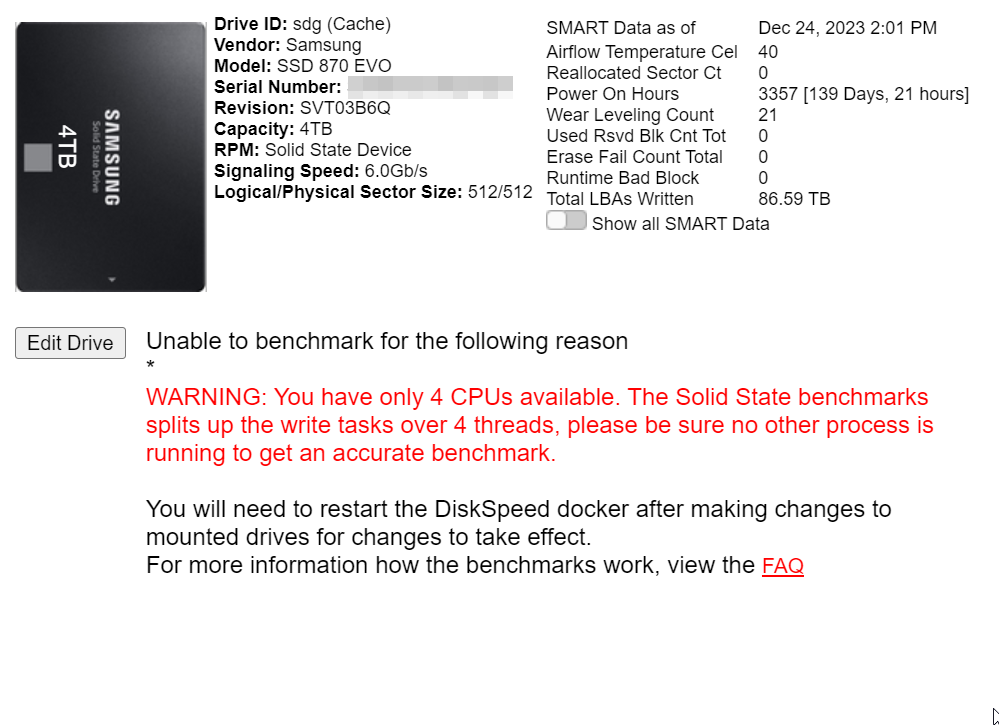
I decided to try the SSD Benachmark. I put the docker mount in place, but I can still not Benchmark my SSD Is it because the SSD is part of a Cache pool? Is that not supported?
-
Thank you I was actually wondering about the same thing when I discovered your app. Perhaps adding this little explanation to the app could really take away some of the confusion others might have EDIT: I see it's actually there when I just checked. I remember when I first checked it wasn't clear for me so I got really worried. Perhaps you can just add "no existing files/data will be overwritten" or something similar....
-
Thank you @thomast_88 for this excellent container, it does exactly what I need. Unfortunately the Rclone version (and perhaps other components in the image) is quite outdated, so I tried to exchange the executable for the newest Version manually After updating the Rclone executable inside the docker container, I've been facing challenges with mounting Symptoms: After the update, when attempting to mount using Rclone, I receive errors indicating that the data directory is already mounted (directory already mounted error) or issues related to FUSE (fusermount: exec: "fusermount3": executable file not found in $PATH). Configuration: I'm using the following mount command: rclone mount --config=/config/.rclone.conf --allow-other --vfs-cache-mode full -v --bwlimit 10M --vfs-cache-poll-interval 10m --vfs-cache-max-age 6h --vfs-cache-max-size 250G --dir-cache-time 24h --vfs-write-back 30s --cache-dir=/var/rclonecache M-Z: /data. Attempts to Resolve: I've tried unmounting and remounting, checking for processes using the mount, restart docker, reboot etc. The directory /data appears to be empty, yet the issues persist. In the meantime I have learned you are not supposed to simply modify a running docker image like that. I need to use the newer rclone feature because "--vfs-write-back" seems not to work with the older version as well as general improvements in the newer version. So in summary I think an update of the container would be due, however this is far beyond my capabilities unfortunately so I would rely on your help or any other skilled docker developers. my wishlist for the new version would be: updated rclone version in the docker template: cache / VFS-cache Path design it with running multiple containers in mind. I would assume the best practice is to run multiple dockers (one for each mount). In this case the mounting path should have some kind of sub folder e.g. /mnt/disks/rclone_volumes/Mount1 instead of /mnt/disks/rclone_volume alternatively it should have a way of autostarting multiple mounts in the one container I would greatly appreciate any help and any insights or suggestions you might have. If additional information is required, I am happy to provide it. Thank you for your continued development and support of Rclone – it’s an invaluable tool for many of us. Best regards, timetraveler
-
One minor bug: if the cache is more then 24h old it just shows the time but no date. I'd suggest to show: 0-24h old: the timestamp (current behavior) 24-48h old: xy hours ago > 48h old: x days ago (alternatively just the date)
-
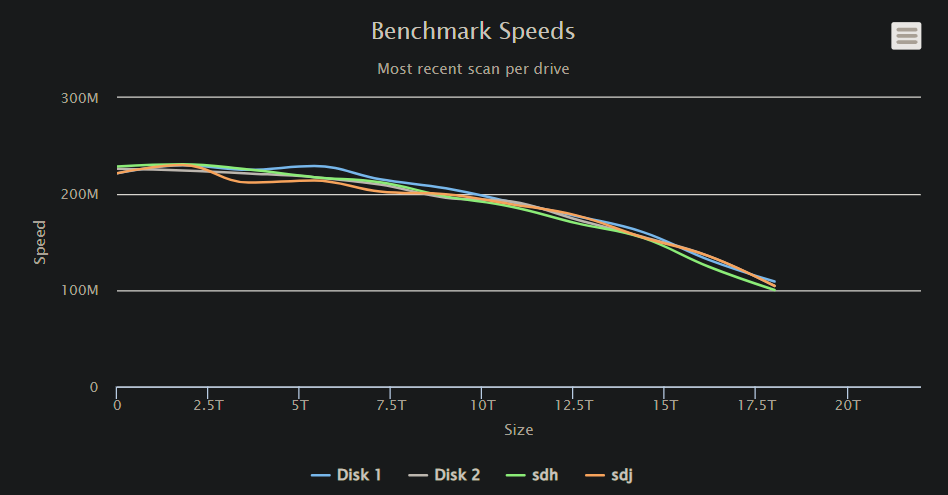
after starting the container again I checked the file and it is indeed present. Upon start I also see the graph. After a refresh the graph is gone, but the file stays in place. After that I performed a Full benchmark and the file did go away during the benchmark (drivebenchmarks.json stays) it stays absent, until I click continue, when it reappears and also shows the graph on the main page. Again after a refresh the graph is gone, but the file remains
-
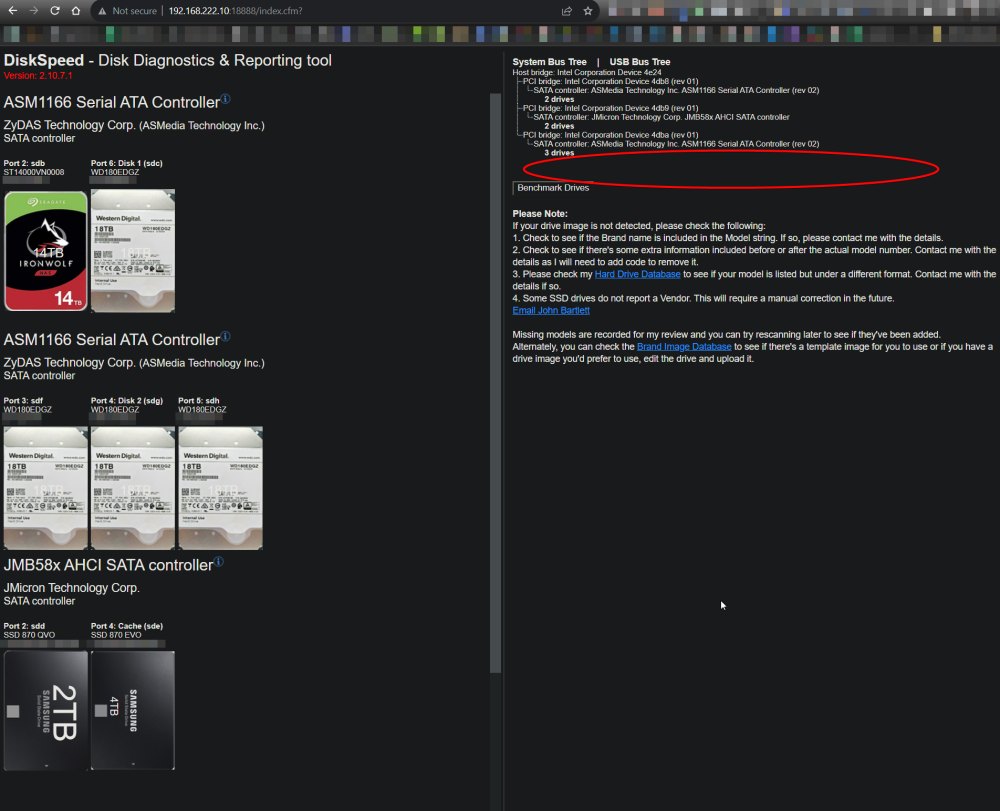
Maybe, this is a silly question: but how to get the graph that shows all drives in comparison? I can see it after doing a benchmark of a drive and it also shows up after scanning the controllers, but if I just go to the homepage that spot is empty
-
Hi, I've been using Unraid with a single parity drive and really appreciate the ability to update the parity without waking up all other drives by simply flipping the bits on the parity drive. This feature significantly contributes to the longevity and efficiency of the setup. Recently, I have been considering upgrading to a dual parity setup to enhance data protection. However, I am curious to know whether the smart parity updating mechanism (i.e., without waking up other drives) is retained in dual parity scenarios as well. Does Unraid’s dual parity setup have a mechanism to update the parity drives when writing to the array, without waking up the other drives? Or does it require access to all drives to update the parity information like in typical RAID 6 setups? When I try to think about it I believe it would be logically impossible, but perhaps unraid has thought of some clever way I couldn't come up with. Your insights and experiences with dual parity in Unraid, particularly regarding the parity update mechanism, would be highly valuable. Thank you in advance for sharing your knowledge! Best regards, Time
-
works like a charm, thanks for your continued support! Cheers 🍻 for all your great work! (I used this link, i hope that was correct: https://www.paypal.com/paypalme/ikersaint)
-
Yes please 😍 I am certain that's what everybody would be very happy about!!! 🙂 The problem is not so much about people that leave the main page open for many hours but mostly the people are are afraid to visit it at all, not to wake up any sleeping disks 😅 (I'll admit I even uninstalled the plugin for a time period because of this) If you want to please everyone you could create two settings: only manual once per page load (current behavior "no refresh") 5 min 10 min .... but if you want to have only one, then the "only manual" is definitely the thing people wish for the most. besides that I wanted to say: amazing work on the latest version, especially lazy load!! Thanks!
-
Thank you that worked. This is what i used to move the data: take a snapshot of all datasets zfs list -H -o name -r poolname | while read dataset; do zfs snapshot "${dataset}@snapshot_name"; done transfer zfs send -R -v cache@snapshot_transfer | zfs receive -F disk2 also make sure there are no regular folders on the root level!
-
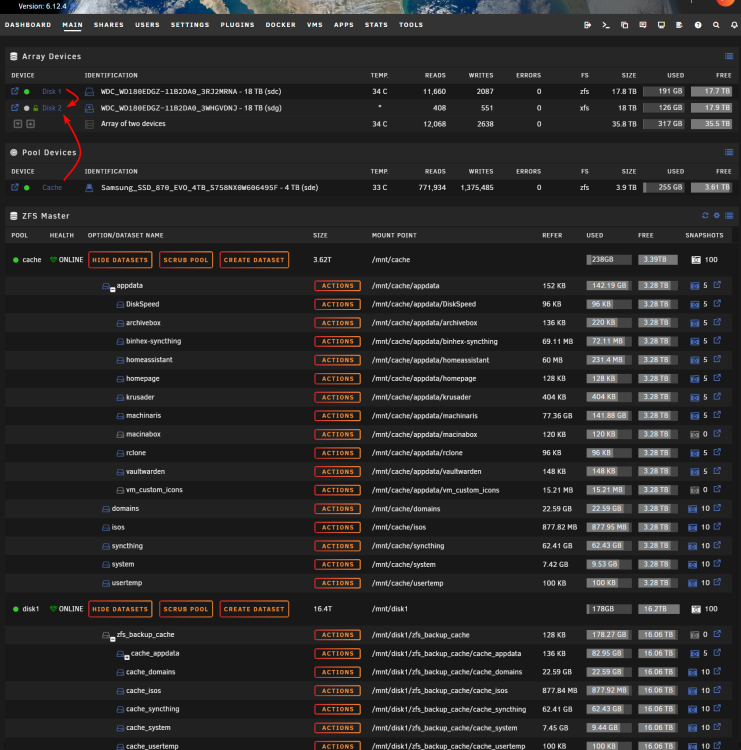
TL;DR: Need guidance on transferring ZFS datasets and snapshots from an unencrypted drive to an encrypted one. Context: I've successfully converted a cache SSD and HDD into ZFS following this guide and then setting up nightly snapshots of the cache SSD, replicated to the HDD according to this guide from @SpaceInvaderOne now I aim to encrypt my unraid server. As a test, I've already encrypted one empty drive. works great! Issue: I'm looking to move data from the unencrypted drives to encrypted ones, and then reformat the unencrypted ones and then move the data back (at least for the SSD) Although I plan to follow this encryption guide , my concern is about the ZFS datasets and snapshots present on the existing drives. I'm unsure how the mover tool in the guide would work with these ZFS features as the tutorial didn't feature any of those Request: Should I consider using native ZFS features, like 'zfs send', for this transfer? If so, how? should I perhaps use spaceinvaders replication script to move/copy the data? or syncoid directly? I'd appreciate any advice or tips on this process. note: please ignore the Disk2 in the example screenshot is encrypted-xfs. I am planning to reformat it to encrypted-ZFS