




-
Pretty sure this is a config issue in unraid vpn settings.
-
Yes, I meant the dns in the unraid settings. It has been a while since I set it up, but it did take a bit to get it right. I see you're not the only one who has had this issue. Have you seen this? Wireguard DNS leaks with ProtonVPN - General Support - Unraid
-
What Dns are you using in the settings? I use surfshark and have to use their dns servers
-
So, I fixed it. I also had to change it in the Tunarr gui to renderD129 and it works again. Still unsure how my GPU's flipped and I wish they didn't but its all working agian!
-
Thanks for the suggestion. I don't use plex but that did make me dig deeper. I found that it the iGPU is identifying as card1. So, it should use --device=/dev/dri/renderD129 but it still doesn't work. In the Tunarr errors it still shows renderD128. I'm not sure how to fix this
-
Ever since I updated to 7.3.1 I have been having issues with my iGPU and docker. I was not working with Frigate, Jellyfin and Tunarr. I have no clue how I got Frigate working again but it is. Jellyfin I was using vaapi and switched it to quicksync and it started working agian. Now for Tunarr, I cannot get it to work with the iGPU no matter what I do. --device=/dev/dri in extra parameters /dev/dri in add device even tried adding /dev/dri/renderD128 and /dev/dri/renderD129 (also have an nvidia) In Tunarr it doesn't matter if I use vaapi or quicksync it does work with software transcode and direct play though ERROR from Tunarr [AVHWDeviceContext @ 0x555be1fa8380] Failed to initialise VAAPI connection: -1 (unknown libva error). Device creation failed: -5. Failed to set value '/dev/dri/renderD128' for option 'vaapi_device': Input/output error Error parsing global options: Input/output error Original command: -nostdin -hide_banner -nostats -loglevel warning -fflags +genpts+discardcorrupt+igndts -vaapi_device /dev/dri/renderD128 -headers 'X-Emby-Token: REDACTED' -ss 14972ms -reconnect 1 -reconnect_on_network_error 1 -reconnect_streamed 1 -multiple_requests 1 -c:v hevc -readrate 1 -readrate_initial_burst 60 -i http:/192.168.21.4:8096/Videos/bc8c878b7430a4426efadaf04ad83424/stream?static=true -filter_complex [0:0]scale=iw*sar:ih,setsar=1,scale=1920:1080:flags=bicubic:force_original_aspect_ratio=decrease,format=nv12|p010le|vaapi,hwupload,pad_vaapi=w=1920:h=1080:x=-1:y=-1:color=black[v];[0:1]aresample=async=1,apad[a];[v]hwdownload,format=nv12[vpf] -map [vpf] -map [a] -muxdelay 0 -muxpreload 0 -flags cgop -movflags +faststart -t 605038.667ms -video_track_timescale 90000 -b:v 2000k -maxrate:v 2000k -bufsize:v 4000k -c:v libx264 -sc_threshold 1000000000 -c:a aac -b:a 192k -maxrate:a 192k -bufsize:a 384k -ar 48k -g 96 -keyint_min 96 -force_key_frames expr:gte(t,n_forced*4) -f hls -hls_time 4 -hls_list_size 0 -segment_list_flags +live -hls_segment_type mpegts -hls_segment_filename /config/tunarr/streams/stream_aded6889-3c26-40df-af18-624cb77e9350/data%06d.ts -hls_base_url /stream/channels/aded6889-3c26-40df-af18-624cb77e9350/hls/ -master_pl_name playlist.m3u8 -hls_flags program_date_time+append_list+independent_segments+omit_endlist+discont_start -mpegts_flags +initial_discontinuity /config/tunarr/streams/stream_aded6889-3c26-40df-af18-624cb77e9350/stream.m3u8
-
Does the power profiles change the unraid power modes. i.e. in autotweak power profile if I pick balanced does it change the unraid power mode from powersave to performance based on cpu load and demand?
-
So is this like file bot?
-
Same issue for me
-
No issues on two servers and 7.2 seems to be running more efficient. Great update!
-
This has finallly solved my problems, anyone running Surfshark needs to do this! @xieve you are a saint
-
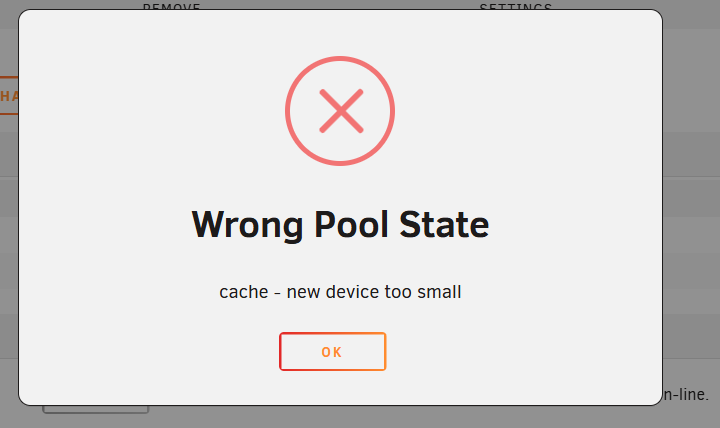
Turns out the drive was 2.05tb instead of the normal 2tb. I know this isn’t unraids fault but I wish there was an option to shrink a drive since this created issues. I ended up using my NVR 2tb nvme in the cache pool and using the 2.05tb as my NVR storage. That was painful, thanks Micron for the 50gb of extra storage.
-
I have a 2tb and a 1tb mirrored zfs cache drive pool. Went to replace the 1tb with a 2tb nvme and get the following. "Cache drive too small". Running 7.1.4
-
https://www.newegg.com/p/0D9-0022-000S3?Item=9SIAJZYKBU8813&tpk=1
-
Thank you, that worked! I actually had a folder that I was not syncing at the moment and it was paused and it did not have a destination folder on the other end. This was my problem, deleted the folder and all is good. Funny thing is I have had the folder there for a good while through many updates and it was never an issue. Anyway thanks again

View in the app
A better way to browse. Learn more.
