





Timski
Members
-
Joined
-
Last visited
Everything posted by Timski
-
Bump!
-
Hi, I have run out of log space., with Fix Common Problems reporting that /var/log is getting full (currently 100 % used). Diagnostics attached. Server is at version 7.0.0, uptime around 25 days. Please help! whitey-diagnostics-20250205-0558.zip
-
haha, I'm happy to add your findings to my open ticket with Nord. For the next 6 months, that is, until I jump over to Proton Again, love your work @Squid .. hope it didn't wreck your weekend.
-
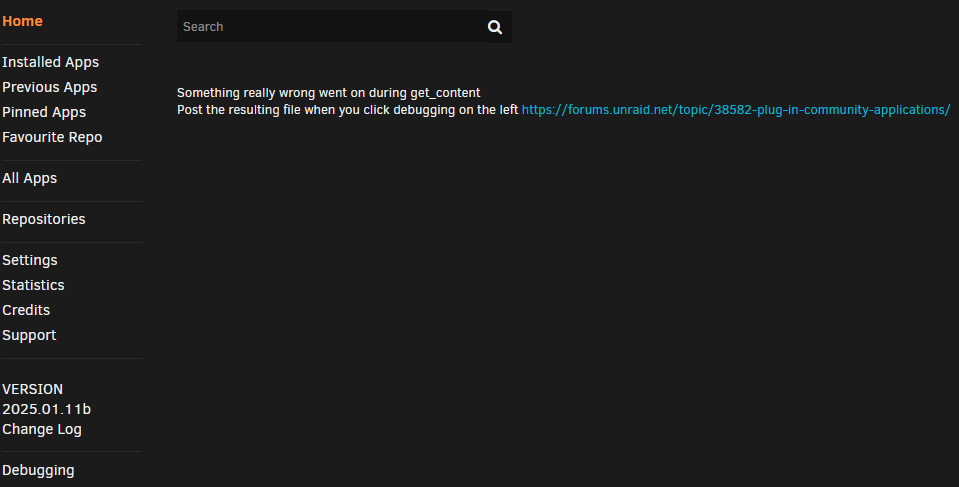
Can confirm that 2025.01.11b still fails if NordVPN Threat Protection is enabled, as per below screenshot. Disabling NVPN TP makes the problem go away. I have raised a ticket with Nord, clearly their latest TP upgrade has done something new that makes things break. Interestingly, the latest Nord upgrade also "breaks" perfectly legitimate websites (like https://bodyblade.com). Thanks @Squid for all your efforts, love your work mate.
-
Sent you a pm mate
-
Have removed the NordVPN extensions from both Firefox and Edge. Have turned off the NordVPN in Windows. Still getting the same "Something really wrong went on during get_content" error on both browsers despite having rebooted. CA-Logging-20250111-0303.zipGotta say, @thequailman (owner of the candiddev/homechart repo) is awesome .. solved my issue straight up, a hole-in-1 on a par 4 with a blowing gale The answer is ... the SMTP variables should be in camelCase format e.g. HOMECHART_smtp_fromAddress and NOT HOMECHART_SMTP_fromAddress or HOMECHART_SMTP_FROMADDRESS, as per the help. Oh and only use gmail port 587 (TLS) ... port 465 (SSL) does not work (in my experience) for Homechart notifications. You're a legend Mike, thank you
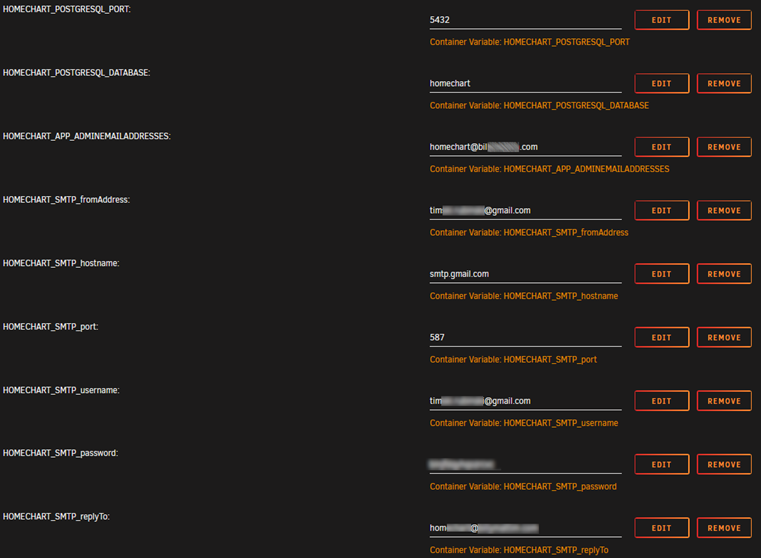
 Having some major trouble with Homechart self-hosted and cannot find support anywhere. My biggest issue atm is I cannot get my instance to send outbound emails .. thus I cannot invite anyone into the household. There’s no way to manually setup their account, and no verification emails are being sent. My Unraid docker settings have the SMTP variables added to them, as follows: I have also tried setting port to SSL & TLS (465 and 587), neither works. The containers log screen shows no SMTP errors whatsoever, as follows: Forgot to mention .. yes, I did set an app password on my gmail account for Homechart .. and have copied that password to my HOMECHART_SMTP_password docker container variable. Anyone have any ideas?
Brother, you are a genius .. many thanks .. I was having this same issue (docker stopped and fully unmounted). Any attempt to umount the offending mount point resulted in "invalid parameters" error response. Finally I realised I had a MobaXTerm window open and SSH'd into Unraid. Killed that and array stopped beautifully. Thanks for all your inputs to this and other threads .. what an amazing community 🙏Ordered some new USB drives. While waiting, I did the following: 1. Backed up the USB drive 2. Removed USB from server, re-formatted it on Windoze 10 3. Manually copied backup zip contents to USB 4. Ran makeboot.bat as administrator 5. Returned USB to server, restarted --> ran into an exceptionally long mcelog daemon operation (probably was still running but I rebooted after about 20mins in frustration) 6. Unraid booted perfectly, USB disk showing up as 32GB Not sure if the USB drive is suspect .. I may just swap it out when my new ones arrive (assuming Unraid USB Flash Creator will actually see any of the new USB's) but for now, Unraid is up and I can get busy migrating my 47TB Xigmanas server over to Unraid 😅 Thanks @JorgeB for your advice .. I will still be following your advice just to be safe 🙏
Having some major trouble with Homechart self-hosted and cannot find support anywhere. My biggest issue atm is I cannot get my instance to send outbound emails .. thus I cannot invite anyone into the household. There’s no way to manually setup their account, and no verification emails are being sent. My Unraid docker settings have the SMTP variables added to them, as follows: I have also tried setting port to SSL & TLS (465 and 587), neither works. The containers log screen shows no SMTP errors whatsoever, as follows: Forgot to mention .. yes, I did set an app password on my gmail account for Homechart .. and have copied that password to my HOMECHART_SMTP_password docker container variable. Anyone have any ideas?
Brother, you are a genius .. many thanks .. I was having this same issue (docker stopped and fully unmounted). Any attempt to umount the offending mount point resulted in "invalid parameters" error response. Finally I realised I had a MobaXTerm window open and SSH'd into Unraid. Killed that and array stopped beautifully. Thanks for all your inputs to this and other threads .. what an amazing community 🙏Ordered some new USB drives. While waiting, I did the following: 1. Backed up the USB drive 2. Removed USB from server, re-formatted it on Windoze 10 3. Manually copied backup zip contents to USB 4. Ran makeboot.bat as administrator 5. Returned USB to server, restarted --> ran into an exceptionally long mcelog daemon operation (probably was still running but I rebooted after about 20mins in frustration) 6. Unraid booted perfectly, USB disk showing up as 32GB Not sure if the USB drive is suspect .. I may just swap it out when my new ones arrive (assuming Unraid USB Flash Creator will actually see any of the new USB's) but for now, Unraid is up and I can get busy migrating my 47TB Xigmanas server over to Unraid 😅 Thanks @JorgeB for your advice .. I will still be following your advice just to be safe 🙏 Brand new, bought yesterday .. and the 3 others I bought yesterday all report as incompatible by the Unraid USB Flash Creator 😢Just to confirm .. 32GB USB showing as 8GB
 Hi all .. first post, day 3 into my first Unraid server (Version: 6.12.3) so please go easy on me I'm having a small (but atm catastrophic) hiccup with my USB drive. Having run on Trial license for 3 days (on an 8TB flash drive), I've upgraded my license to Pro and moved the license to a 32GB flash. All was fine until this morning when my USB reports as being (a) read-only and (b) only 8GB in size. Everything else is running perfectly (dockers seem fine, array seems fine, etc). Following instructions at https://forums.unraid.net/topic/3118-how-to-fsck-my-usb-flash-drive/ but getting stuck with the USB still reporting the drive as busy, as follows: root@Beast:~# mount rootfs on / type rootfs (rw,size=32950744k,nr_inodes=8237686,inode64) proc on /proc type proc (rw,relatime) sysfs on /sys type sysfs (rw,relatime) tmpfs on /run type tmpfs (rw,nosuid,nodev,noexec,relatime,size=32768k,mode=755,inode64) /dev/sda1 on /boot type vfat (rw,noatime,nodiratime,fmask=0177,dmask=0077,codepage=437,iocharset=iso8859-1,shortname=mixed,flush,errors=remount-ro) /boot/bzmodules on /lib type squashfs (ro,relatime,errors=continue) overlay on /lib type overlay (rw,relatime,lowerdir=/lib,upperdir=/var/local/overlay/lib,workdir=/var/local/overlay-work/lib) /boot/bzfirmware on /usr type squashfs (ro,relatime,errors=continue) overlay on /usr type overlay (rw,relatime,lowerdir=/usr,upperdir=/var/local/overlay/usr,workdir=/var/local/overlay-work/usr) devtmpfs on /dev type devtmpfs (rw,relatime,size=8192k,nr_inodes=8237689,mode=755,inode64) devpts on /dev/pts type devpts (rw,relatime,gid=5,mode=620,ptmxmode=000) tmpfs on /dev/shm type tmpfs (rw,relatime,inode64) fusectl on /sys/fs/fuse/connections type fusectl (rw,relatime) hugetlbfs on /hugetlbfs type hugetlbfs (rw,relatime,pagesize=2M) cgroup_root on /sys/fs/cgroup type tmpfs (rw,relatime,size=8192k,mode=755,inode64) none on /sys/fs/cgroup type cgroup2 (rw,relatime) tmpfs on /var/log type tmpfs (rw,relatime,size=131072k,mode=755,inode64) efivarfs on /sys/firmware/efi/efivars type efivarfs (rw,nosuid,nodev,noexec,relatime) rootfs on /mnt type rootfs (rw,size=32950744k,nr_inodes=8237686,inode64) root@Beast:~# umount /dev/sda1 umount: /boot: target is busy. root@Beast:~# Clearly I need to umount something else first, just no idea what. Any thoughts would be gratefully received 🙏





