






Reid-O
Members
-
Joined
-
Last visited
-
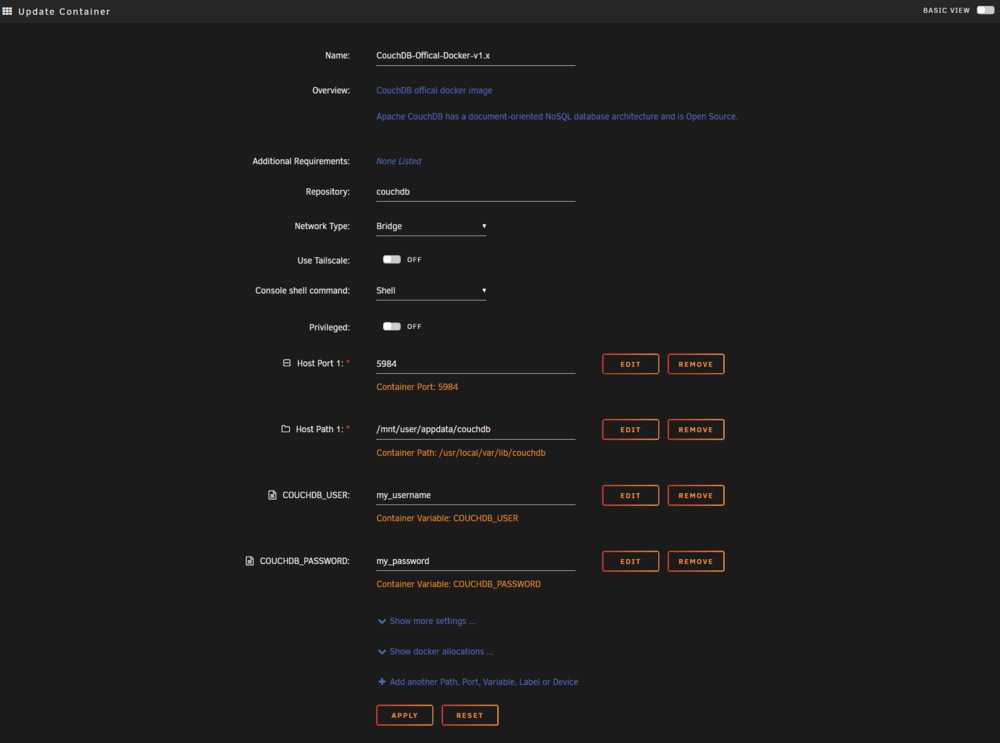
1. Click on the container and click 'Edit' 2. In the Update Container window, go to the bottom and click '+ Add another Path, Port, Variable...' 3. In the Add Configuration window that pops up, change Config Type to variable, set the name and key to 'COUCHDB_USER' and the value to your username. Click Add. 4. Repeat step 3 for COUCHDB_PASSWORD. 5. Click Apply
-
This worked to get beyond the following: "error: unsupported configuration: internal snapshot for disk hdc unsupported for storage type raw" But once I ran through the above fix, I was met with another: "error: Operation not supported: internal snapshots of a VM with pflash based firmware are not supported" Apparently UEFI and virsh don't play well together. After a little more Googling, I settled on the following workaround: - Shut down the VM - Edit the VM's XML config: change 'os loader type' from 'pflash' to 'rom' - Run "virsh snapshot-create-as <VM name> --name <snapshot name>" - Verify the snapshot was created in "/var/lib/libvirt/qemu/snapshot/<machine name>/" - Revert the VM's XML edit: change 'os loader type' from 'rom' back to 'pflash' - Restart the VM

