lightsout
Members
-
Joined
-
Last visited
Everything posted by lightsout
-
Ok I got the log running. Left it going until it started acting up. I was able to eventually get a clean shutdown. Here is the log from the flash drive. There is also a smaller "previous" file. I have added that as well. The help here is much appreciated. syslog syslog-previous
-
Great thanks I'll do that when I get home.
-
Yes, it might have been after a reboot. I'll try to get one again while it's doing it. But at that point it is hit and miss if the UI is accessible.
-
Ok I'll try that. But it's more than flickering. The shares drop off and are unavailable at times. My over night backups from a proxmox server are failing. So when it's doing it, the data may or may not be available. I'm not sure how to begin to troubleshoot that because even the nvme drive and the flash drive at one point were showing up in unassigned drives. Also I can't really access the webui at all once it starts acting up. I just get a white screen.
-
So I did this a couple hours ago. Also restored the shares. Sadly it is doing the same thing again. Not sure how to proceed.
-
Ok thank you for the help.
-
Thanks that was all I was trying to clarify. I'm on 6.12.8 and the only options are 6.12.9 and 6.12.10 Do you think it will be a problem to upgrade in the process as well?
-
Do I wipe the whole thing first? Won't that make it unbootable?
-
I know I am being super dense here but I don't understand this part. How do I go about redoing it and restoring the bare minimum? I used the USB creator tool, but I got no option on what I wanted to restore it just copied the whole thing. Are you talk about starting from a clean usb and then copy pasting files into it. Not sure I can do this since the creator tool doesn't have the OS version I am on. So it would also be an update in the process.
-
Do you have a link to the documentation on how to do this properly?
-
I'm a little nervous about this as I have never done it. A couple questions. 1. Are you talking about using the same flash drive or a different one. 2. Will this potentially mess up my array somehow?
-
Just woke up to the flashing again. Cleared cookies, made sure ublock was not running. When I refreshed I could get passed the login screen. Tried on chrome (second browser) and same thing. I also noticed that two backups that run overnight failed because they couldn't access my backup share on Unraid. I don't have any fancy firewall running. Pihole is up but everything is green that is connected to unraid. Sigh
-
I booted the machine in safe mode. Was good for half a day or so then started doing the same thing. Drives disappearing. I thought maybe it was my HBA card going in and out but it is not just drives that are on that card, sometimes cards on the sata controller drop as well. Also the last time the NVME cache drive was also disappearing. Video Anyone have any ideas I am at a loss. Concerned about my data.
-
Just to clarify there are no further diagnostic options at that point. You are recommending to boot into safe mode and see if the problem persists? And if it does not start looking at plugins and apps? It's weird because when I reboot in the morning all is well. And at least yesterday things seemed fine all day. So I guess I can do that over night tonight and see how we look in the morning. ###EDIT Already started having the issue again, rebooted into safe mode. We'll see how it goes.
-
I am having some very erratic behavior with my server all of a sudden. I haven't changed anything. I am on 6.12.8. I thought about updating but it was so unstable I was nervous it might crash during the process. For two days now I have woken up to a white screen when I try to access the webui. Refreshing the page sometimes brings up the webui. But then all the drives started disappearing, but oddly, the scrren would flash, no drives, half the drives, all drives. Here is a video. https://imgur.com/Gk9MnY8 During this time it seems like my docker stuff is online. My kids were watching TV through Emby. I also had a hard time getting the diagnostics page to load because the webui kept crashing. Totally at a loss right now. Both days this has happened I was able to SSH into the machine and reboot and it calmed down. This machine is 6 months old and has been very stable. unraid-diagnostics-20240614-0849.zip
-
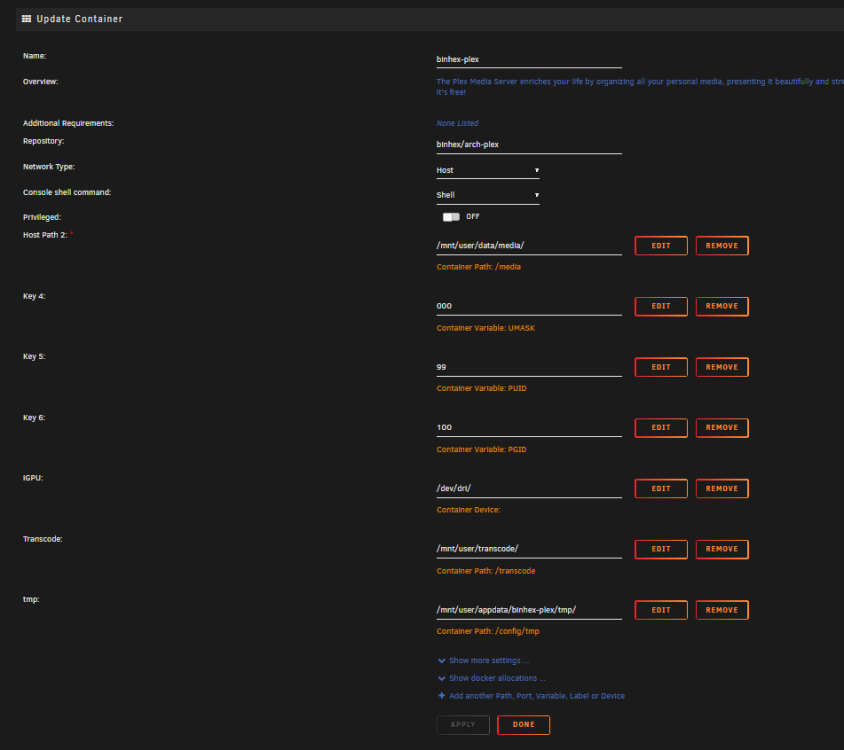
I got rid of the extra tmp path. Plex is back up and running, but seems like sonic analysis has started over with my 10,000 albums. And is stuck at 0%, as much as I love this feature it has been a real pain.
-
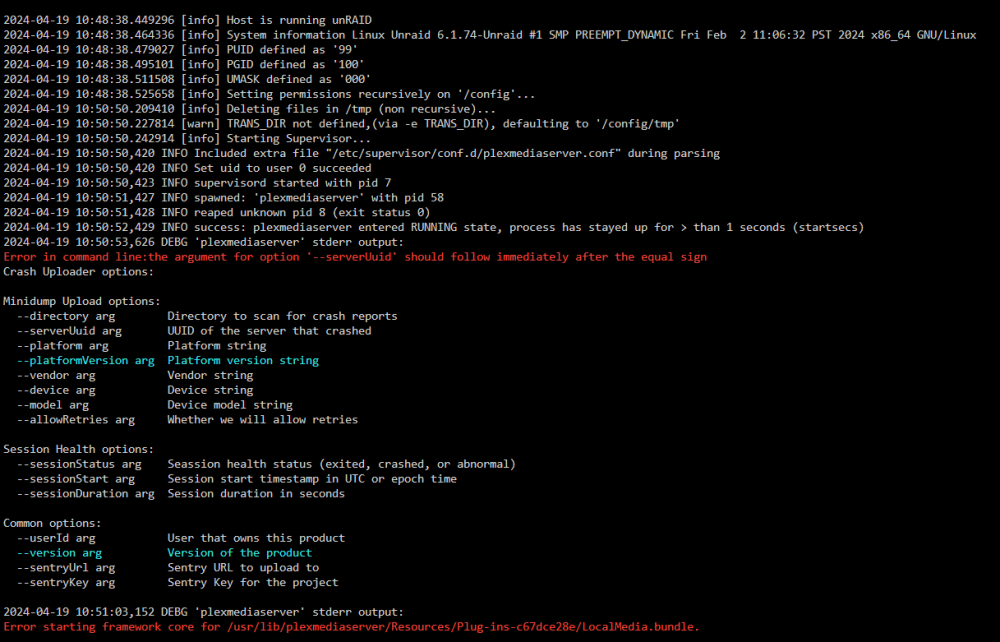
I am having some issues with Plex. Music analysis is filling up the temp folder and it never empties, after a while plex will crash and not start. I created the "tmp" directory because in the plex log it was hung on sonic analysis with an error that it couldn't create the /tmp folder, after I added it sonic analysis got moving, but the container takes a while to start now and throws some complaints in the log. Any got any ideas how to do this correct? I wanted to get transcoding moved to ram to stop the transcode folder from filling, but when I did that sonic analysis was hanging and having issues.
-
Thanks just came here to post this, music analysis fills up the tmp folder and never clears. It was 1.7tb on my 2tb nvme. Need to figure out how to avoid this. Not sure why this is posted in this thread, I was certain I was in the binhex/plex thread.
-
I keep finding plex closed, this is the last output of the log. 2024-04-19 07:57:05,372 CRIT uncaptured python exception, closing channel <POutputDispatcher at 22566202968144 for <Subprocess at 22566203126160 with name plexmediaserver in state RUNNING> (stderr)> (<class 'OSError'>:[Errno 28] No space left on device: '/config/supervisord.log' [/usr/lib/python3.11/site-packages/supervisor/supervisord.py|runforever|218] [/usr/lib/python3.11/site-packages/supervisor/dispatchers.py|handle_read_event|276] [/usr/lib/python3.11/site-packages/supervisor/dispatchers.py|record_output|210] [/usr/lib/python3.11/site-packages/supervisor/dispatchers.py|_log|189] [/usr/lib/python3.11/site-packages/supervisor/loggers.py|log|345] [/usr/lib/python3.11/site-packages/supervisor/loggers.py|emit|227] [/usr/lib/python3.11/site-packages/supervisor/loggers.py|doRollover|276]) I tried to add this to extra parameters but the container fails. --restart-unless-stopped EDIT: Weird now it won't even start 2024-04-19 10:05:34.759878 [info] Host is running unRAID 2024-04-19 10:05:34.771724 [info] System information Linux Unraid 6.1.74-Unraid #1 SMP PREEMPT_DYNAMIC Fri Feb 2 11:06:32 PST 2024 x86_64 GNU/Linux 2024-04-19 10:05:34.785155 [info] PUID defined as '99' 2024-04-19 10:05:34.800228 [info] PGID defined as '100' 2024-04-19 10:05:34.816307 [info] UMASK defined as '000' 2024-04-19 10:05:34.829559 [info] Permissions already set for '/config' 2024-04-19 10:05:34.845927 [info] Deleting files in /tmp (non recursive)... 2024-04-19 10:05:34.862603 [warn] TRANS_DIR not defined,(via -e TRANS_DIR), defaulting to '/config/tmp' chmod: cannot access '/config/supervisord.log': No such file or directory Any ideas? Thanks folks.
-
EDIT## Got it sorted.
-
Thanks, I came across that page but wanted to ask before I went and started messing with stuff.
-
Thanks for this plugin. I am still learning how it all works. I have installed it on my unraid server and on my phone. My goal is to login to docker services on my phone with the local home addresses of 192.168.1.192:xxxx This is because I have some apps that are already setup to connect to these services locally. Is this a possibility? Sorry if this is obvious there is a lot of jargon that I don't quite get.
-
I am trying to use this python app on windows to add Quality profiles and "cf"'s. It works fine on the hotio radarr instance I have running, but not on binhex radarr or sonarr. Curious if there is something specific to these dockers that is blocking it. I get an error when I try to add them. https://dictionarry.pages.dev/Wiki/Importing Profiles %26 Custom Formats/#importing
-
docker run -d --name='binhex-radarr2k' --net='bridge' -e TZ="America/Los_Angeles" -e HOST_OS="Unraid" -e HOST_HOSTNAME="Unraid" -e HOST_CONTAINERNAME="binhex-radarr2k" -e 'UMASK'='000' -e 'PUID'='99' -e 'PGID'='100' -l net.unraid.docker.managed=dockerman -l net.unraid.docker.webui='http://[IP]:[PORT:7878]/' -l net.unraid.docker.icon='https://raw.githubusercontent.com/binhex/docker-templates/master/binhex/images/radarr-icon.png' -p '7878:7878/tcp' -v '/mnt/user/data':'/data':'rw' -v '/mnt/user/appdata/binhex-radarr':'/config':'rw' 'binhex/arch-radarr' EDIT## Very strange but when I ran the command by changing the port and changing it back, it caused it to update. Now I am on 5.xxx, strange but I think I'm good.
-
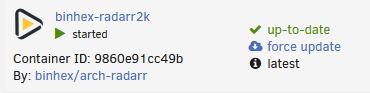
Yeah it still says it is up to date. In the template Repository: binhex/arch-radarr Registry: https://registry.hub.docker.com/r/binhex/arch-radarr/