Lean_
Members
-
Joined
-
Last visited
-
Seems to be behaving as expected so far! No flashing drives at the moment, I will let you know if I see the issue come up again. Thank you for all your work!
-
once unraid picks up the update I"ll let you know. I can see it on the 'apps' tab but not in plugins yet.
-
SEAGATE_ST8000NM0075_ZA10KZLK.json Luckily, this one is still flashing.
-
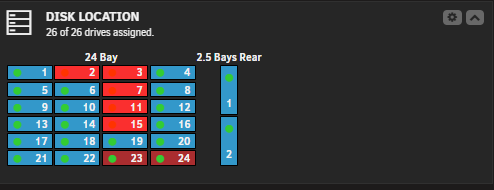
Bay 6 was flashing. I ran the command "smartctl -n standby /dev/sdy | grep -i Device" and got: "Device is in STANDBY BY COMMAND mode, exit(2)" after running force smart+db I got a lot more flashing but bay 6 stopped: Afterwards, running "smartctl -n standby /dev/sdy | grep -i Device" I got: "Device is in ACTIVE mode SCSI device successfully opened" The other drives complaining also show ACTIVE mode
-
Yes, the HDD's are purposely being spun-down to save power after no activity for 45min to save on power. (24 drives power adds up) 24bay backplane -> 9300 8i HBA. I have deep system sleep states (package/system c10) disabled in bios. The "Failed" drives are ALWAYS in standby (spun-down) when this happens, hence why I assume it just happens to be that smart polling happens right as a disk is spinning down The next time smart is polled on the disk, the critical flashing disappears and returns to normal. I don't currently have any flashing to run that command on , but from experience as long as the drives are active in unraid they will clear on their own. I have a feeling that if there was somehow a way to: on poll, if smart fail -> check if spun down after returning data -> if yes (ignore) -> else (flash critical fail). This would probably alleviate the false "failures" and critical flashing.
-
Hello! I've been busy lately so forgive me for getting back to you so late. I just wanted to let you know I am still seeing this issue after manually setting the controller type in unraid. Additionally I am getting them on both SAS and SATA disks so we can rule that out. I'm not sure if one of the earlier debug files above this quoted message would still have what you need, or if u need a new one from me because of the recent updates. I can try and catch one next time I see the flashing disks on failed smart if that's the case.
-
Gotcha, I will try that and let you know if I see the issue come up again! Thank you for everything!
-
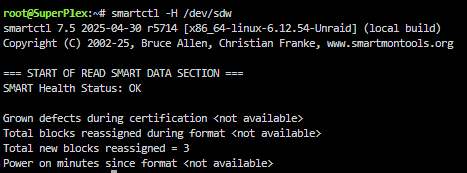
This does work. also "smartctl -x /dev/sdw -d scsi" provides ALL of the HDD info. I just checked in unraid my SMART controller type was set to "use default". I should change all of the SAS drives to use "SCSI" or "Automatic" you think?
-
Sorry I am just seeing this. They don't return anything, presumably because they are SAS drives? I'm also using an LSI HBA 9300 8i to a supermicro backplane. sdx is a SATA drive that passes as expected.


-
Just happened again with two other drives, here is an updated debug file. Hope this helps. disklocation-2026-06-05 (1).log
-
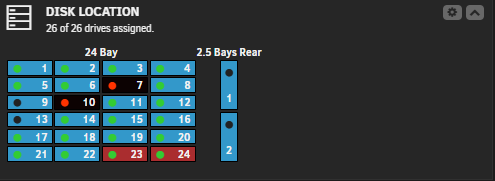
disklocation-2026-06-05.log Understood, Here you go. Disk8 is currently flashing but will actually pass SMART.

-
I have been dealing with this issue for a while now. I believe this happens at least in my case because I have drives set to spin down after x minutes. Presumably, if SMART check happens right when the disk is about to spin down it flags as failed which is 'technically' true. But, much like you mentioned, running the test manually will spin up the drive and pass normally
-
Luckily, they are both mountable and being emulated correctly. Rebuild ETA is 12hrs for these 4tb drives not bad
-
Will do, thank you guys for all your time and help, much appreciated!
-
checking the filesystem status of the disks in maintenance mode returns: Phase 1 - find and verify superblock... Phase 2 - using internal log - zero log... - scan filesystem freespace and inode maps... - found root inode chunk Phase 3 - for each AG... - scan (but don't clear) agi unlinked lists... - process known inodes and perform inode discovery... - agno = 0 - agno = 1 - agno = 2 - agno = 3 - process newly discovered inodes... Phase 4 - check for duplicate blocks... - setting up duplicate extent list... - check for inodes claiming duplicate blocks... - agno = 0 - agno = 1 - agno = 3 - agno = 2 No modify flag set, skipping phase 5 Phase 6 - check inode connectivity... - traversing filesystem ... - traversal finished ... - moving disconnected inodes to lost+found ... Phase 7 - verify link counts... No modify flag set, skipping filesystem flush and exiting. Am I going to need to rebuild again? ;( superplex-diagnostics-20250417-0745.zip