




Skip to content
View in the app

A better way to browse. Learn more.

Unraid

A full-screen app on your home screen with push notifications, badges and more.

To install this app on iOS and iPadOS
  1. Tap the Share icon in Safari
  2. Scroll the menu and tap Add to Home Screen.
  3. Tap Add in the top-right corner.
To install this app on Android
  1. Tap the 3-dot menu (⋮) in the top-right corner of the browser.
  2. Tap Add to Home screen or Install app.
  3. Confirm by tapping Install.

imagined-binder1936

Members
  • Joined

  • Last visited

Everything posted by imagined-binder1936

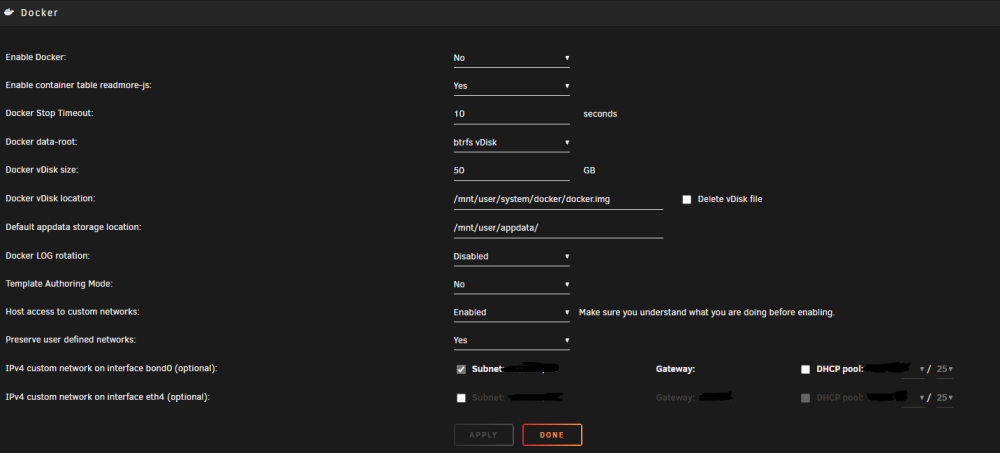
  1. I was working through the change to eth0, I have already upgraded to 6.12.4, when my internet as a whole went out. Now when I go to make the change to ipvlan from macvlan, I do not see the option at all (yes, I am looking at Docker settings using the advanced view). I dod not use ipv6, is it possible that the option only shows up if both are selected? I'm experiencing server crashes every 10-12 hours. I initially started using the on-board nic as well as my quad nic card as I thought the issue might be my nic card going out. I started working on the proposed solutions when I saw the macvlan errors and hit this forum. But as noted above, I now have no way to try to move from macvlan to ipvlan
Account

Navigation

Search

Search

Configure browser push notifications

Chrome (Android)
  1. Tap the lock icon next to the address bar.
  2. Tap Permissions → Notifications.
  3. Adjust your preference.
Chrome (Desktop)
  1. Click the padlock icon in the address bar.
  2. Select Site settings.
  3. Find Notifications and adjust your preference.