Florris
Members
-
Joined
-
Last visited
-
Ok I figured it out, what a dumb issue to have. Apparently ProtonVPN has a feature called Moderate-NAT when you create a wireguard config (for my download dockers) and for some reason, don't ask me why, it causes this issue. So if you are having a similar issue, uncheck this box when creating a config and you should be good.
-
Sadly it didn't work for me ()

-
Hello, this issue is bugging me for a while and I have exactly zero clues where I can look for a fix. Here is whats happening: I have a gigabit cable internet connection, I can easily saturate that connection with my main PC, when I download a steam game for example (110-120ish MB's), no problems occur here. If I now try to download something on my Unraid Server at over 30-40-50ish MB's my entire network gets knocked out, I cant access the unraid UI or any other docker UI for that matter and I can't reach any websites. The network is knocked out for a few seconds(20-30) and then comes back online, just for it to shortly after get knocked out again. This is quiet the issue as I would like to have download that are fast and dont knock out my entire network. Here are a few things I observed / important notes: - Dockers I tested it with were (both binhex, both protonvpn) qbittorrentvpn,sabnzbdvpn - I use wireguard to connect to the server, tho my PC is in the network and uses ipv4 and no wireguard config - There is nothing in the logs (log tab in the unraid web UI) - The network dies for the server too (in case one can think it just saturates the server) - I have a fritzbox 6690 cable router - Server is a HPE ML350 Gen9 Again, I can saturate my connection as much as I want with other devices, so my guess is, that its either with unraid and my configuration, or the dockers I use. I'm really clueless to what could cause this issue, hence why I tried to provide anything that I can think off, if anyone has any idea please let me know. bocchi-diagnostics-20240817-0504.zip
-
Hi, I'm having a problem where qbittorrent will completely shutdown my internet, freeze the unraid GUI and qbittorrent for that matter if I don't rate limit to around 30 MB/s (I have a gigabit connection). I have no idea why this happens and even scheduling torrents to only go one by one makes this happen. bocchi-diagnostics-20240405-0923.zip
-
Hi everyone, I used my nvidia gpu for a while now together with my jellyfin docker, but from one day to another it stopped working. I made an issue on the jellyfin docker's gh but apparently its an nvidia issue, here is how I start the docker together with the issue. docker run -d --name='jellyfin' --net='bridge' -e TZ="Europe/Berlin" -e HOST_OS="Unraid" -e HOST_HOSTNAME="Bocchi" -e HOST_CONTAINERNAME="jellyfin" -e 'JELLYFIN_PublishedServerUrl'='192.168.0.5' -e 'PUID'='99' -e 'PGID'='100' -e 'UMASK'='022' -l net.unraid.docker.managed=dockerman -l net.unraid.docker.webui='http://[IP]:[PORT:8096]' -l net.unraid.docker.icon='https://raw.githubusercontent.com/linuxserver/docker-templates/master/linuxserver.io/img/jellyfin-logo.png' -p '8096:8096/tcp' -p '8920:8920/tcp' -p '7359:7359/udp' -p '1900:1900/udp' -v '/mnt/user/Jellyfin':'/data/tvshows':'rw' -v '/mnt/user/Jellyfin':'/data/movies':'rw' -v '/mnt/user/jellyfin_data/':'/config':'rw' -e NVIDIA_DRIVER_CAPABILITIES=all -e NVIDIA_VISIBLE_DEVICES=all --runtime=nvidia --gpus all 'lscr.io/linuxserver/jellyfin' 0025478b06b8336843ca753b9d4126ff63a73feb1187fe44d44b95b27a50a348 docker: Error response from daemon: failed to create task for container: failed to create shim task: OCI runtime create failed: runc create failed: unable to start container process: error during container init: error running hook #0: error running hook: exit status 1, stdout: , stderr: Auto-detected mode as 'legacy' nvidia-container-cli: initialization error: open failed: /proc/sys/kernel/overflowuid: permission denied: unknown. (there are no logs since it won't even start) Also I'm not sure which parameters are needed, but no matter which I try it fails to start. bocchi-diagnostics-20240318-1055.zip
-
Protonvpn works on my PC or my Phone no problem, using the openvpn credentials the other guy talked about didn't work either for me.
-
docker run -d --name='binhex-qbittorrentvpn' --net='bridge' --privileged=true -e TZ="Europe/Berlin" -e HOST_OS="Unraid" -e HOST_HOSTNAME="Bocchi" -e HOST_CONTAINERNAME="binhex-qbittorrentvpn" -e 'VPN_ENABLED'='yes' -e 'VPN_USER'='myprotonvpnusername' -e 'VPN_PASS'='myprotonvpnpassword' -e 'VPN_PROV'='protonvpn' -e 'VPN_CLIENT'='wireguard' -e 'VPN_OPTIONS'='' -e 'STRICT_PORT_FORWARD'='no' -e 'ENABLE_PRIVOXY'='no' -e 'ENABLE_STARTUP_SCRIPTS'='no' -e 'WEBUI_PORT'='8080' -e 'LAN_NETWORK'='192.168.0.0/22' -e 'NAME_SERVERS'='84.200.69.80,37.235.1.174,1.1.1.1,37.235.1.177,84.200.70.40,1.0.0.1' -e 'VPN_INPUT_PORTS'='' -e 'VPN_OUTPUT_PORTS'='' -e 'DEBUG'='false' -e 'UMASK'='000' -e 'PUID'='99' -e 'PGID'='100' -l net.unraid.docker.managed=dockerman -l net.unraid.docker.webui='http://[IP]:[PORT:8080]/' -l net.unraid.docker.icon='https://raw.githubusercontent.com/binhex/docker-templates/master/binhex/images/qbittorrent-icon.png' -p '6881:6881/tcp' -p '6881:6881/udp' -p '8080:8080/tcp' -p '8118:8118/tcp' -v '/mnt/user/appdata/data':'/data':'rw' -v '/mnt/user/appdata/binhex-qbittorrentvpn':'/config':'rw' --sysctl="net.ipv4.conf.all.src_valid_mark=1" 'binhex/arch-qbittorrentvpn' 16c1cfa57cf6df1691c2499a609b6ddaeffdc508f643006e9456e722430f368c The logs are stuck at this point for a while, then it tries again until it finally starts the UI without any internet connection supervisord.log
-
Hi, I'm using this docker with protonvpn and it stopped working without me changing anything. I rechecked the username and password, created a new wireguard config but I can't get it to work again. I not fully removed the docker and all its files but I still can't get it to work. It works when I select no vpn, but I can't think of any reason why it wouldn't work with protonvpn. I also tried the +pmp thing, port forwarding etc pretty much all combinations without any luck so far
-
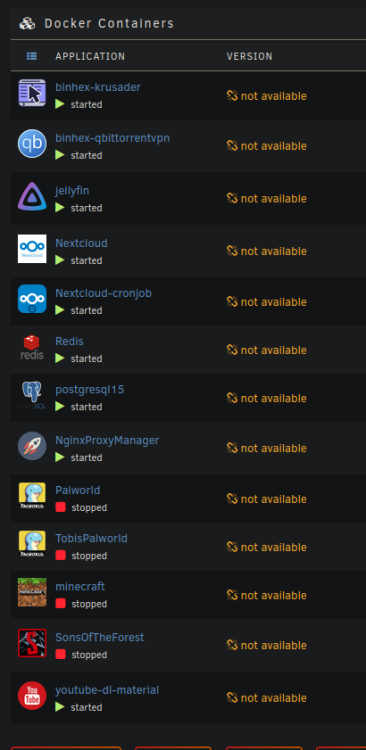
Hello, I've seen this issue a few times here, but none of the posts had a fix that worked for me, I don't think I have to explain much but here is a screenshot and the diagnostics, could anyone take a look or know what could cause this problem? Thanks bocchi-diagnostics-20240311-1809.zip
-
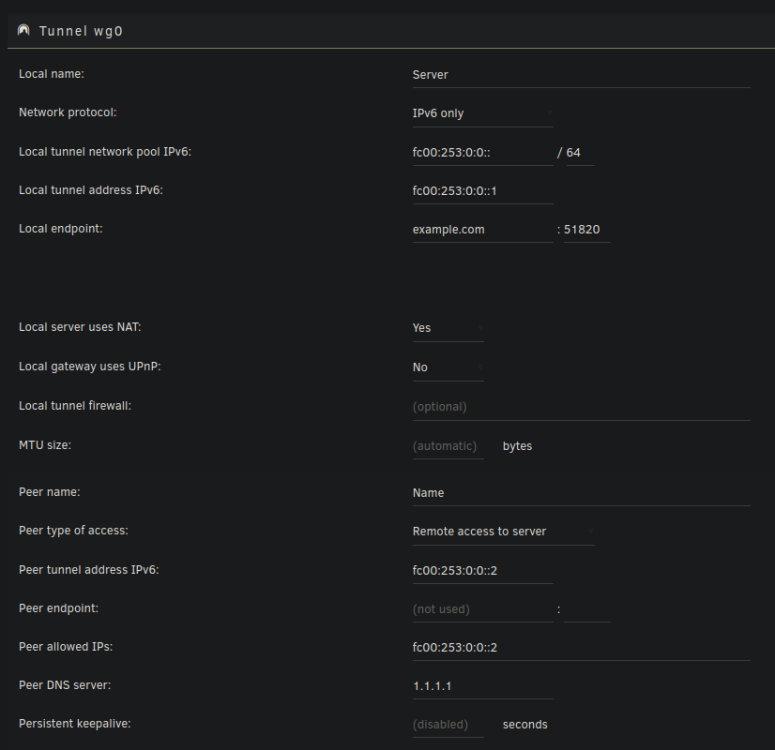
Hello, I'm trying to set up WireGuard with IPv6 only since I don't have an IPv4. I've had it setup in the past with IPv4 without any problems, but I can't get it to work with IPv6. I have an AAAA entry that points to the IPv6 of my Unraid server, and it works for my Jellyfin server, but since game servers don't support IPv4 I wanted to set up WireGuard to access the server that way and tunnel IPv4 through it. I opened the UDP/51820 port in my Router too, btw. Every time I try to activate the tunnel it sets it to inactive again without any error and I can't figure out why, I haven't changed anything except the name and my domain, the rest is filled in my Unraid I attached a screenshot on how it's configured, with the domain obviously changed