




.jpg.0b616e550346049ebd693502012366dc.jpg)
James Miller
Members
-
Joined
-
Last visited
-
I did it carefully over the past week. I first upgraded a test environment to 7.3. It was a Mac Mini. It upgraded okay (modified boot loader in place), and I then switched to internal boot, which is using a newer / different boot loader. It all worked. I then upgraded my main Mac Mini (with all the Thunderbolt enclosures attached). Switched across to internal boot, and it’s been working for about a week using internal boot. Seems to be working in 7.3.
-
I'm making the assumption and hoping the next major update will include an updated boot loader which may address this. This is very much a workaround, and in a future update the bootx64.efi will likely get overwritten.
-
Hi, Yep, I used the boot loader and config provided above. It worked first time, so I’ve not tweaked or adjusted anything yet as it worked first try. J
-
I’ve been testing this tonight and appears to work. Able to boot the Mac Mini 2012, in EFI mode with the Thunderbolt 2 enclosures attached.
-
Hi, I've just started testing, but I've downloaded 7.2.4 to a USB, added the limine binary to the /EFI/boot and added the config files. So far the Mac mini 2012 has booted with the external Thunderbolt 2 enclosures connected. Just running through some testing now. J
-
Hi, I think I forgot to report back after the previous testing. The Mac Minis I'm using all have the most recent firmware they can, and non have had OCLP on them. I did try using legacy boot, and UnRAID itself would boot but if I had the external Thunderbolt enclosures attached the Mac Mini would hang on LEGACY boot with the newer OS. So, I've stuck with 7.1.4, using EFI boot as that's the combo that works. I'm hoping the next major release will fix the fault and allow me to upgrade. J
-
There are a couple of ways. On the Mac Mini if you hold down the OPTION key on boot it will list the various boot options. You should see an EFI and a legacy boot option. You can then select the non EFI option to legacy boot. Also from within UnRAID -> MAIN -> flash (boot device) then down the bottom there is a "Permit UEFI boot mode". If you turn that off it forces legacy boot.
-
That's a fair question to ask. I'm using UEFI boot (not legacy), and these Macs have never had OCLP on them. I hadn't thought to try legacy boot as I've not needed to do that before. I'll get it a try on the test Mac and see if I get different results.
-
Okay, just did a quick test by downloading 7.2.1 onto a test USB stick and trying it in a Mac mini 2012. Still getting the kernel panic.
-
I've not had a chance to test yet, but looking at the release notes I don't see anything about this bug, and the kernel doesn't look to be changed so I'm assuming this update won't fix this.
-
Thank you for providing some hope. I’ll try again with the next release.
-
I guess I’ll wait for the next update and see if it’s resolved. I’ve been running this happily for years, and it’s worked really well.
-
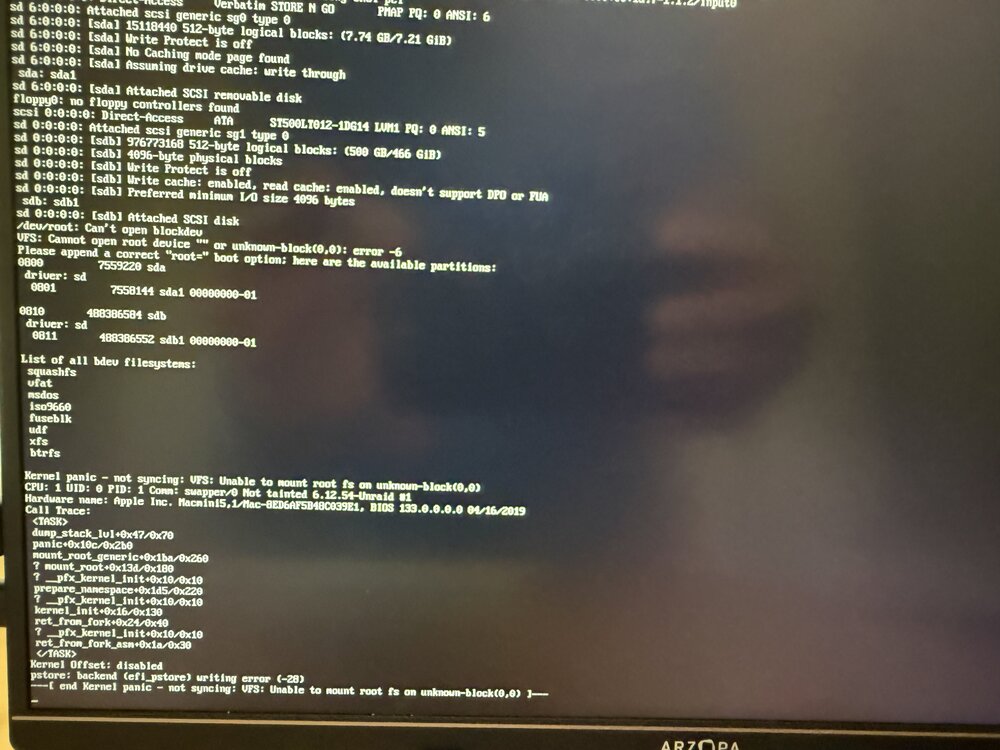
Thank you for that suggestion and I tried a variation of that. I grabbed a new/clean flash drive and used the USB created tool to make a new/vanilla one. Exact same error (that’s where the screen shot is from).
-
Hi All, I've checked the forums before posting, and I'm not seeing others report this symptom yet. I have UnRAID running on a Mac mini and it's been working really well for the past few years. It's currently running 7.14 and using an Kingston USB (one of the 'known working' / recommended ones). I attempted to upgrade to 7.2 last night and after it wouldn't boot with a kernel panic and warmings about /dev/root / can't open block device. From various reading this is usually an issue with the USB stick, or damaged file system. I copied the previous bz files back to the root of the USB and it's booting correctly now (back to 7.14). As a troubleshooting step, I grabbed a seperate (and admittedly older) Mac Mini and a different USB stick (Verbatim) and did a fresh/vanilla install of 7.2. The attached error is the same on the PROD UnRaid Mac Mini (noting PROD is a Macmini6,2 with a Kingston USB), but apart from that difference the kernel panic and error is the same. Any suggestions welcome, and/or is there some difference with 7.2 which is preventing it from working on the Mac Minis now?
-
Well, I have no idea what I’ve done differently, but the NVMe is now consistently working. I’ve shutdown and rebooted several times. Still appearing and working. Thanks for the help.
.thumb.jpg.00a666f8fa0a19b1bb304dcdd1e7cc7e.jpg)

