





Esteban4u
Members
-
Joined
-
Last visited
-
Hi Squidly271, Following up on PR #2 from back in May — I applied the spec-compliance fix you requested directly to main (<Author> → <PluginAuthor>, added <Plugin>True</Plugin>) and closed the PR as superseded, since it had been open a while without being merged. It's now been about a month since that fix went in, and ReBalance still doesn't appear in the CA feed (checked directly against applicationFeed.json — no matches for the plugin name or repo). Is there something else blocking indexing beyond the XML spec issue, or does the feed just need a manual refresh/re-check on your end? Happy to make any further changes needed — just let me know what's missing. Repo: https://github.com/Esteban4u/ReBalance Template: ReBalance.xml in the repo root Forum thread: https://forums.unraid.net/topic/198334-rebalance-array-disk-usage-balancer/ Thanks for maintaining CA — appreciate you taking a look.
-
Yes, I filled out the form
-
Hi Squid, I'd like to submit my ReBalance plugin to Community Applications. Plugin: ReBalance — Array Disk Usage Balancer GitHub: https://github.com/Esteban4u/ReBalance Install URL: https://raw.githubusercontent.com/Esteban4u/ReBalance/main/rebalance.plg Support thread: https://forums.unraid.net/topic/198334-rebalance-array-disk-usage-balancer/ Balances disk usage percentage across mixed-capacity Unraid array drives. Thanks!
-
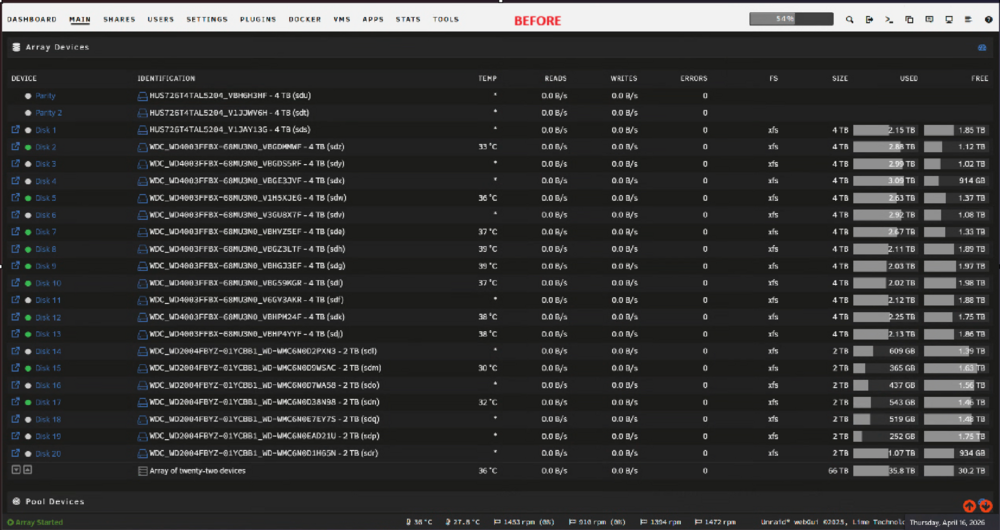
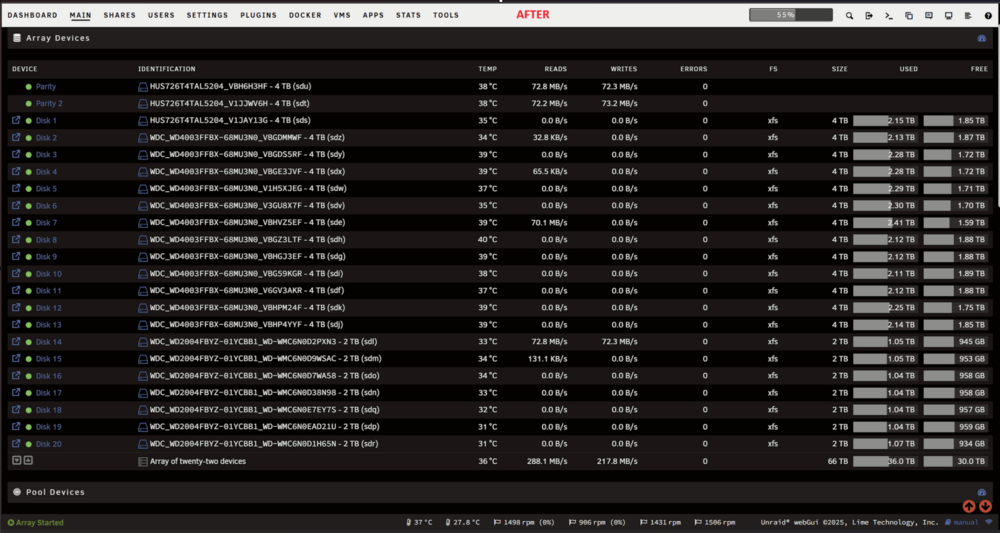
A note to the moderator of these forums: Can you please move this post to the Plugin Support forum once I have enough standing. What is ReBalance? ReBalance is a plugin for Unraid arrays with mixed-capacity drives. If you have a mix of, say, 4 TB and 2 TB disks, Unraid's default "fill" strategies leave your drives at very different usage percentages — one disk at 80% while another sits at 30%. ReBalance fixes this by moving files between disks until every drive lands at roughly the same fill percentage, regardless of its size. Why does this matter? - Disks near 100% have no room for new files in their shares - Uneven fill means Unraid's mover and cache behaviour becomes unpredictable - A balanced array is easier to expand — you always know which disk has headroom Features - Equalises usage % across all array disks, weighted by capacity - Analysis mode — builds a full move plan and shows you exactly what would be moved before touching a single file - Minimum file size filter — skip small files (subtitles, NFOs, thumbnails) and focus moves on content files only - Optional SSD cache staging — pipelines source reads with destination writes for ~1.5× throughput - Live progress bar with transfer rate, elapsed time, and ETA - Planning progress shows which source disk is being scanned (Disk X of Y) - Configurable tolerance (default ±2%) — disks within ±N% of target are left alone - Stop button — safely interrupts a run at any point - Dark mode UI Installation 1. In the Unraid web UI go to Plugins → Install Plugin 2. Paste the following URL and click Install: https://raw.githubusercontent.com/Esteban4u/ReBalance/main/rebalance.plg 3. The plugin appears under Tools → ReBalance How to use it 1. Open Settings → User Utilities → ReBalance 2. Set your Tolerance (default 2% is fine for most arrays) 3. Optionally set a Minimum file size to skip small files (e.g. 50 MB) 4. Click Start Analysis to preview what would be moved — no files are touched 5. Review the plan in the drive table above, then click Start Rebalance to execute For large arrays the first run can take several hours. Running overnight with Use SSD Cache as staging buffer checked is recommended for faster throughput. Notes - Unraid parity is updated normally during moves — this is safe to run on a live array - The plugin does not touch parity disks, cache pools, or the flash drive - Runtime state is stored in /tmp/ and is cleared on reboot — a rebalance in progress will not resume after a reboot - Source code and issue tracker: https://github.com/Esteban4u/ReBalance Feedback and bug reports Please reply to this thread or open an issue on GitHub. Include your Unraid version, array disk sizes, and a description of what happened.
-
I discovered the issue had to do with a bad USB port on my motherboard. Once I moved the flash drive to a different USB port, the unformatting issues stopped.
-
This made me wonder if parity is kept for the flash drive just as it is for the main array.
-
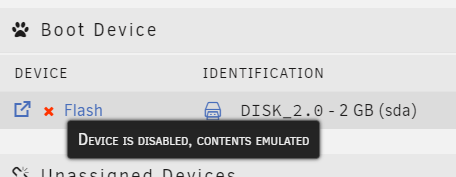
Hello All, I'm running Unraid 6.12.4 and for some unknown reason the Flash device I use to boot up Unraid became unformatted. I was able to still recover the \config folder from it but I didn't trust the drive anymore so I created another Flash boot device with a new flash drive. I used an older backup of the original Flash device to create the new Flash device and I copied the recovered \config folder from the old Flash device. After replacing the key file everything is working again but on the Main tab of Unraid, the new Flash has a red X next to it indicating that it's being emulated: . Does anyone know how this can be fixed ?
-
Is it possible to have a Docker container access pwsh.exe ?, I've installed the plugin but I can't find the directory in the file system where pwsh.exe is
-
With just one vdev consisting of 6x 4TB HDDs, when I want to expand the ZFS pool in the future, I would have to add 6 more drives of the same size, right ?
-
So if you were me (with 6x 4TB HDDs), would you configure a ZFS pool as 2 vdevs in raidz1 each ?
-
Just wanted to add another related question for anyone who can answer: In the case of a ZFS pool with multiple vdevs of drives in raidz1, can each vdev survive 1 drive failure or the entire ZFS pool can only survive 1 drive failure ?
-
Hello All, I'm fairly new to UnRaid OS and new to ZFS file system as well. I currently have 6 4TB hard drives and planning on getting more. What i'm trying to decide is how do I get the most performance, storage space, and fault tolerance from my current drives in a ZFS pool but also make future expandability of the pool easy? For the ZFS pool should I do 1 vdev in raidz2 with all 6 drives, 2 vdevs of 3 drives each in raidz1 or 3 vdevs of 2 drives each mirrored ? Overall, I would like the ZFS pool to be able to recover from 2 drive failures. Hoping the great minds here can help me figure this out.
-
I do know about adding additional paths, which I've already done to have certain downloads go to a different output path. I would just ask if we could have a choice to change the main output path within the container (/output), as how some of the other setting fields have and "Edit" and "Remove" buttons to edit the path\port\etc... on the container side of things, to also avoid needlessly creating an "output" folder in the file system (call me a file system neat-freak) please.
-
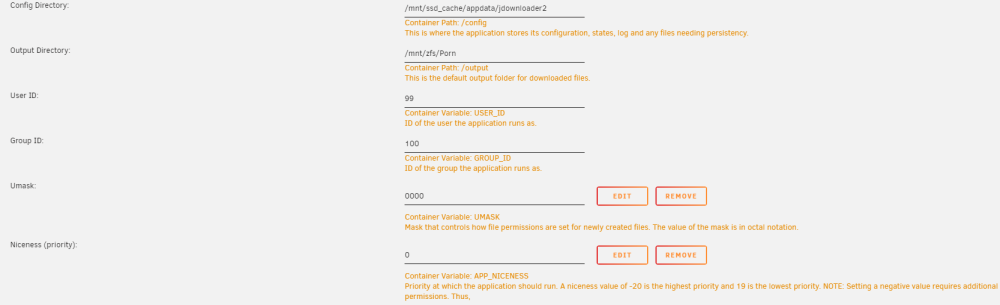
There isn't a way, through the UI at least, to change how the output folder is defined for the container: It's defined as "/output" but there is no "Edit" button like some of the other defined container values have. I would like to change it to another share I have on the server already.
-
Hello, How can I change the container's defined Output Directory from "/output" to something else ?


