





S7ewie
Members
-
Joined
-
Last visited
-
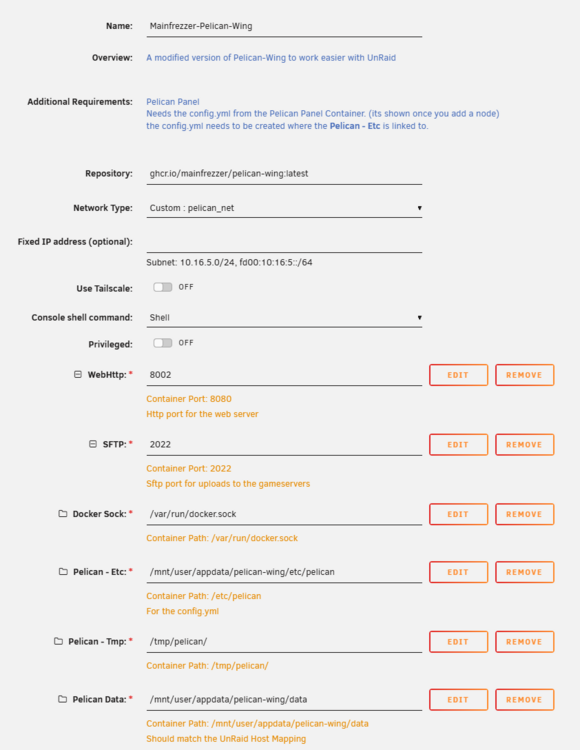
UPDATE: I got it working. I needed to point my NGINX container to the pelican_net network and NGINX to the container instead of the ip. Now it's connected and the console is working :)
-
I get a 502 if I try to access wings.s7ewieslab.net directly 🤔 Unraid template:
-
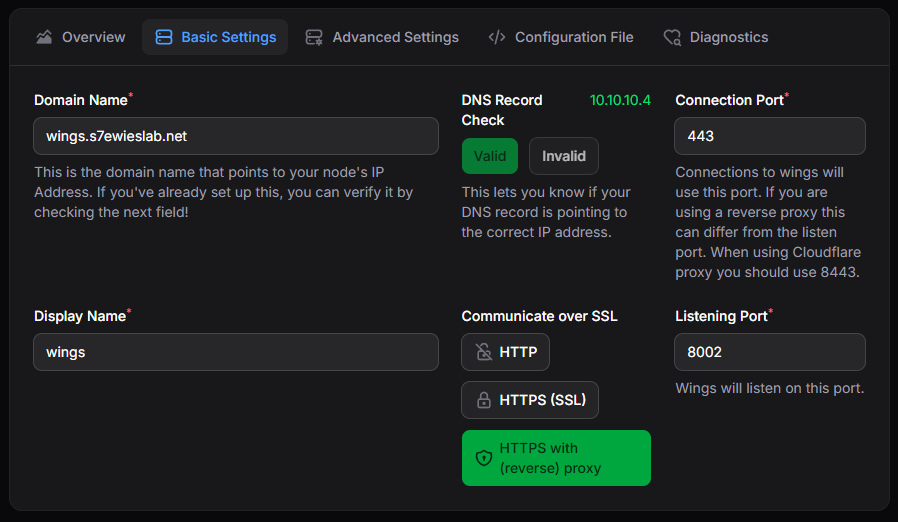
I'm trying to migrate over from Pterodactyl and I'm having an issue connecting to my wing. I did have this working by using the container and HTTP mode. I had a minecraft server up and running but the console didn't work and neither didn't any of the Start/Stop actions. A search on the discord suggested that this was because I wasn't using SSL? I did have Pterodactyl working with SSL so i assumed it would be a pretty similar setup but I'm at this stage and I'm not getting a connection: For context: The panel is running on 8001, the wing is running on 8002. 10.10.10.2 is my Unraid server 10.10.10.4 is NGINX NGINX has a proxy host for http://wings.s7ewieslab.net that points to 10.10.10.2:8002 with websocket support and uses an SSL certificate generated with cloudflare. The browser console gives me this error but I think it's a bit of a red herring as I've checked the tokens in the config and the configuration file and they match: https://wings.s7ewieslab.net/api/system does not match node token_id ! I'm not really sure how to diagnose this from here. Any suggestions?
-
Hey all, I've had an unraid server running for a year now and it's been brilliant! I mostly use it as a media server now (which is funny as that wasn't one of my original goals) but also for the odd game server, password manager and other really useful things. Until now, I ran everything in containers all within a single shared custom network and used a domain managed by cloudflare to point to my router, which port forwarded to NGINX so I had pretty much everything accessible with a simple subdomain. Lately I've decided that's probably not the most secure way of doings things so I'm trying to tidy things up a bit. Cloudflare Tunnel I use this for a couple of containers that I want to expose to the web without the requirement of a VPN to connect. This works really nicely outside of my network though for some reason it doesn't work from within my local network? Is this normal? Or have I missed something during configuration? Tailscale I upgraded to Unraid 7 and set up tailscale. This on its own works great! I can connect to my server via my tailscale ip from anywhere and use port numbers to navigate my various containers. The biggest issue with this for me though is that I can't remember the IPs and Ports of everything I want to connect to.. NGINX Proxy Manager I was using this previously to re-route subdomains to services and it worked brilliantly. I'd like to continue using it but only within the enclosed safety of my local network / VPN. I'm struggling to work out how to set this up without port forwarding since it uses 80 and 443 by default but so does the Unraid GUI. My Unraid is on 10.10.10.2 and my original plan was to put NPM on 10.10.10.3 and somehow point traffic to that.. however, Unraid still complains about the ports already being in use. How do others have this set up? What sort of docker network should NPM be on? I think I can potentially install tailscale into NPM (once I get NPM working) and then point traffic directly to the tailscale NPM IP from cloudflare DNS, however.. I also ideally want subdomains to work within my own local network when not connected via VPN. I might be wrong, but I feel like I shouldn't "need" to own a domain to be able to make this work. I presumably need to point my router to NPM? But I can't give it a port.. so I need to find a way to get 80 and 443 working? Which is where I thought if I could set it up on 10.10.10.3 then I could just router DNS to NPM then it should work? but it's not. Overall I think I know what I want to do. But I'm not at export on networks so I'm having a bit of trouble getting it set up. I don't really understand the difference between the types of docker network either. From what I understand, if you want containers to talk to each other then they should be on the same network. So i have a single customer network that pretty much everything is sharing. But I don't really know if i should be using host, bridge of br0 instead? Any help would be appreciated! Thanks! Stuart
-
Ahh thanks for the explanation. I was planning to set it up on its own custom network but I'd still need to change the ports? Or does that mean I've set up the network wrong?
-
Is Unraid supposed to have nginx running? I feel dumb asking but why are we running nginx via a container if it's already built in?
-
I'm struggling to get this container successfully running. I previously used an Unraid version (not the official one) which used ports 1880 and 18443. Now that I'm trying to set up the official one, I'm getting the following error: docker run -d --name='Nginx-Proxy-Manager-Official' --net='nginx' --pids-limit 2048 -e TZ="Europe/London" -e HOST_OS="Unraid" -e HOST_HOSTNAME="S7ewiesLab" -e HOST_CONTAINERNAME="Nginx-Proxy-Manager-Official" -e 'DB_SQLITE_FILE'='/data/database.sqlite' -l net.unraid.docker.managed=dockerman -l net.unraid.docker.webui='http://[IP]:[PORT:81]' -l net.unraid.docker.icon='https://nginxproxymanager.com/icon.png' -p '81:81/tcp' -p '80:80/tcp' -p '443:443/tcp' -p '3000:3000/tcp' -v '/mnt/user/appdata/Nginx-Proxy-Manager-Official/data':'/data':'rw' -v '/mnt/user/appdata/Nginx-Proxy-Manager-Official/letsencrypt':'/etc/letsencrypt':'rw' -v '/tmp/Nginx-Proxy-Manager-Official/var/log':'/var/log':'rw' --memory=1G --no-healthcheck 'jc21/nginx-proxy-manager' WARNING: Your kernel does not support swap limit capabilities or the cgroup is not mounted. Memory limited without swap. d796083263545a6851be67d392158814b00a67303b31a33ca2044c8991507695 docker: Error response from daemon: driver failed programming external connectivity on endpoint Nginx-Proxy-Manager-Official (90a1a29cea71199abb5e387e40c71049e705ccc95e7f414113481c14c2c02709): failed to bind port 0.0.0.0:80/tcp: Error starting userland proxy: listen tcp4 0.0.0.0:80: bind: address already in use. From what I can gather, it's implying that port 80 is already in use? But I have no containers using this port and if I run something like "netstat -tulnp | grep :80" I get: tcp 0 0 127.0.0.1:80 0.0.0.0:* LISTEN 620903/nginx: maste tcp 0 0 100.88.223.16:80 0.0.0.0:* LISTEN 620903/nginx: maste tcp 0 0 0.0.0.0:8001 0.0.0.0:* LISTEN 12772/docker-proxy tcp 0 0 0.0.0.0:8002 0.0.0.0:* LISTEN 679462/docker-proxy tcp 0 0 0.0.0.0:8096 0.0.0.0:* LISTEN 12050/docker-proxy tcp 0 0 10.10.10.2:80 0.0.0.0:* LISTEN 620903/nginx: maste tcp6 0 0 fd7a:115c:a1e0::6101:80 :::* LISTEN 620903/nginx: maste tcp6 0 0 :::8001 :::* LISTEN 12780/docker-proxy tcp6 0 0 :::8002 :::* LISTEN 679468/docker-proxy tcp6 0 0 :::8096 :::* LISTEN 12058/docker-proxy tcp6 0 0 ::1:80 :::* LISTEN 620903/nginx: maste Which implies that the only thing using port 80 is nginx? which isn't running? Is this just left over stuff from a previous install? My knowledge around this subject is limited.
-
Until recently, I've had a domain set up to forward traffic to NGINX Proxy Manager which then redirects to the various services I'm running. Mainly for Jellyfin and Starr apps but various other things too. This has worked great! But lately I've started to wonder if exposing everything to the internet, even if it is generally behind a login screen, is really a good idea. So over the weekend I set up Tailscale VPN using the plugin and this is working great! The problem is that I no longer have the convenience of using subdomains to find my services and now have to remember the ports for each service which is a pain. So I set up a DNS record on my router to point traffic to my server in the hopes that NPM would take over and redirect, but instead, I kept getting my UnRaid login page. It took me a while to figure it out but I think it's because my local traffic doesn't hit my port forwarding rules for 1880 and 18443, so the traffic never gets to NPM. How do I get around this? Or is there a better way to achieve what I'm trying to do? Presumably UnRaid needs ports 80 and 443 so I can't just tell NPM to use those? Maybe I could keep the setup as normal point my cloudflare DNS to the Tailscale IP instead? But I feel like I should be able to do this locally without needing a public domain.
-
Thanks! That looks like it could be ideal!
-
Thanks! Lots to process I’m trying to work out if ZFS is really worth it for my use case, I’m leaning towards not. I like the idea of drives powering down when they’re not in use as they will be the majority of the time. For cache I was planning on just the one 1 TB NVME but I could get a second and mirror if that would be better? NVMEs are fairly cheap at the moment. Was planning to start with 64GB DDR4 to begin with (I’m expecting I might need a fair amount for game servers), and I decided against going down the ECC rabbit hole.
-
I’m looking for a mATX case. Unfortunately I’m limited by the depth of my utility cupboard so it can’t be any more than 300mm wide. Ideally I’d like something capacity for 8 hot swap bays (though it isn’t vital that they’re hotswap). Looking at something like this In-Win IW-MS08. I’ll be limited by PSU, not sure how big of an issue that is? Any recommendations? Just needs to be mATX, space for 8 drives and compact.
-
Hi All, I’m in the process of designing my new (first) homelab and have some questions on storage. To begin with, I’m planning on 4 HDDs approx 6-8TB each, plus a 1TB NVME. From what I understand, I can setup one of those HDDs as the parity drive and use the 1TB NVME as the cache? Is this a good setup to get started? I plan to eventually expand to 8 drives where I’ll likely the have 2 parity drives. I gather Unraid is quite flexible in the size of the drives you can add as long as the parity drives remain the largest? I’m planning to host some game servers, how should I set Unraid up? Ideally I want to utilise the speed of an SSD, so can I add one and tell Unraid to use that specifically for this task? Or will the cache drive handle the speedy bits? Do a need another SSD for this? I also need to decide if I want to go ZFS or XFS, I need to do more research here. Power efficiency is important and I think Unraid will power down drives that aren’t in use? I also need to decide on SAS or SATA, does it make much difference? Can I use the two together? Finally I’ll need a controller when I go past 4 drives. Is there any benefit to using a controller from the start or will a motherboard handle it fine until you run out of slots? Any other advice here would be appreciated. I’ve only ever used RAID1 before. Thanks
-
Hi everyone! I'm new to Unraid and well.. new to home servers in general actually. I've been building my own gaming PCs for the past 20 years and I have a small synology NAS but recently I've decided I want to build a homelab and one of my friends suggested I take a look at Unraid. I'm currently still in the planning phase so expect to see a few posts from me. My goals are: NAS 4-8 bays (replace and expand my synology NAS) 2-3 game servers for up to 10 players (Minecraft, Rust, Valheim, DayZ, 7 Days to Die etc.) Most likely scenario is that it’ll be 1 server at a time with 3-4 players but I don’t want to set the bar too low. Music streaming (for myself and partner) Video streaming (for myself and partner at our home) Very rare, I literally just have a couple of videos we occasionally watch. It’ll never be more than 1 stream Home automation (home assistant) MUST be efficient. The only real taxing thing I think is going to be the gaming servers so I've been looking at an intel i5-12400 CPU for the 6 cores and 12 threads which should hopefully be plenty for my needs? It also has Quicksync which I'm told is really good for video. As for motherboard, potentially looking at an ASUS TUF B760M-PLUS Micro ATX. I'm less decided on this but it needs to be a Micro ATX and this one seems fairly decent for the price. I think I should be able to do just about everything I want through Unraid with containers? I'd like to focus on consumer parts and power efficiency is a absolute MUST. Just looking for some general advice on CPU and Mobo at this stage. Is this a good option? What's the next step up or down? Anything I should look out for? Thanks everyone! 😁


