





NADEAVELi
Members
-
Joined
-
Last visited
-
Why would it go in to maintenance mode and now throw any disk errors or have I just lost my entire configuration? I don't think I can remember what disks went where and in what order. This would absolutely suck to start from scratch.
-
That's great detective work but I've since built a completely different server.
-
I do not.
-
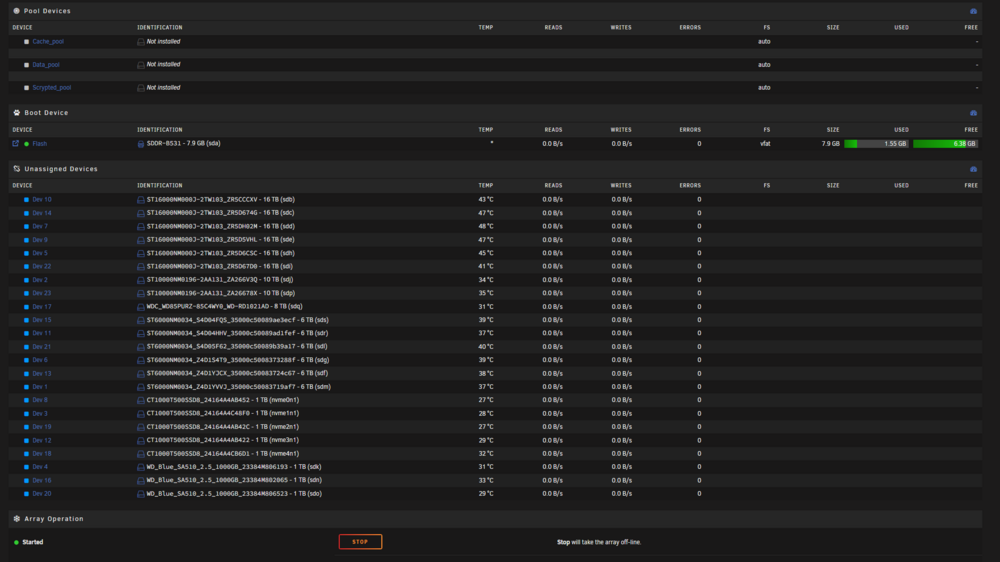
Hi all, I'm seeking some support regarding an issue after installing a P1000 GPU into my Unraid system. Here’s the sequence of events: I powered down my system to install a new P1000 GPU. Due to space constraints, I moved my SAS PCIe card to a different slot. Upon rebooting, I encountered several issues: The array starts only in maintenance mode. All previously assigned disks appeared as unassigned. My MAC address changed unexpectedly. SSL configurations were missing. Since then, I've adjusted my network settings to disable bonding and bridging, connecting directly through my 10G NIC. Currently, all drives are visible but remain unassigned, and the pool configurations have disappeared. Any advice or guidance to help restore my previous setup would be greatly appreciated. Thanks in advance! nkhalil-zcp-diagnostics-20250319-1455.zip
-
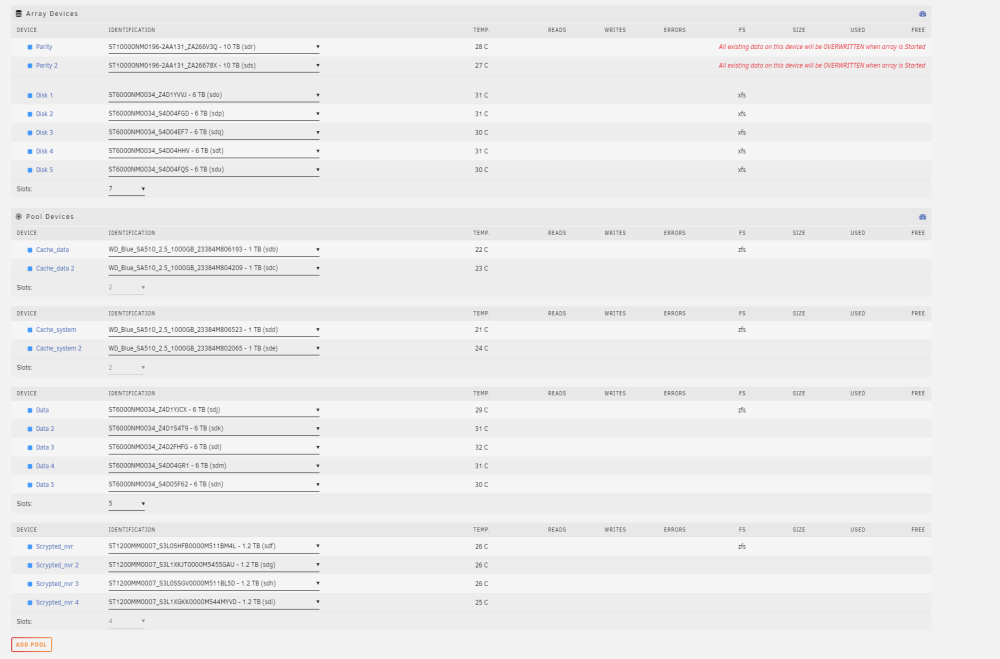
Hi all, I've reading/watching a lot of Unraid material as well as tinkering with Unraid for a few months now. I think I have a semi grasp on what I need to do for optimal performance. Looking to get suggestions of my array, pool, and cache structure and appropriate filesystems. Parity 1: 10 TB SATA 7.2k Parity 2: 10 TB SATA 7.2k Array: 5x6 TB SAS 7.2k in XFS Cache_data: 2x1 TB SSD in ZFS raid0, for downloads/transcoding/tmp files Cache_system: 2x1 TB SSD in ZFS mirror, for appdata, system, vms, and isos Data Pool: 5x6 TB SAS 7.2k in ZFS raid0, for long term media file access via Plex without having to trigger parity Scrypted_nvr: 4x1.2TB SAS 10k in ZFS raid0, long term cam recording via Scrypted NVR without having to trigger parity Any suggestions would be much appreciated. Happy to provide more info. Thank you to everyone that contributes to help us noobs get started! NOTE: I was also thinking of removing Parity 2 and adding that space to Data Pool
-
I found this video helpful: https://youtu.be/GazzD_z6VEw?si=T-p7j_r7-ITpjGNW

