JP
Members
-
Joined
-
Last visited
Everything posted by JP
-
It was one battery. I could have gotten a cheaper battery than Cyberpower, but at $45, I thought that was still cheap and I felt better staying with Cyberpower. Your battery looks cooler than my car. Those terminals look beastly. Nice work!
-
I really can't say enough good things about Cyberpower. I bought this UPS literally a decade ago. It has worked flawlessly until now and the culprit was simply the battery, a $45 replacement no less. I'm sort of in disbelief I got 10 years out of the original battery. Anyway, replaced the battery and charged it for 8 hours as the directions said. I then spun up all the drives and pulled the power cable from the UPS. The battery and UPS held and ramped down power slowly as it should. It got to 75% left on the battery and Unraid cleanly shutdown as it should. It is so nice when things just work. Historically, I've preferred having the Unraid server just go completely shutdown and stay there after a power failure because I like to know it happened, but I'm starting to feel a little more comfortable automating it and might set it up so that Unraid boots back up and starts the array on its own once power is restored. I think I have to do something in the BIOS and in the UNRAID settings to accomplish this, but not sure. I'll be looking into it more. Thanks again for the help here.
-
Yea, spot on from both of you. Thank you. I took the UPS out and started to test with a lamp and nothing seemed wrong at first. I thought the load might not be enough so I tried to think of what energy consuming devices I might have around. Then I thought of this candle warmer my wife has always had that I hate. It puts out a ridiculous amount of heat (usually when the A/C is on 😡) so I thought I might add that. Sure enough the battery went from full, down to about 10% in one minute. Definitely seems to be the battery. I've purchased a replacement battery and it will be here tomorrow. I'm optimistic this will take care of it, but I'll report back once I know for sure.
-
Thanks for this. It would really be helpful. I'll look into it more once I get the UPS figured out and have the server up and running again.
-
Yea, I've got some testing to do. Another 8 hours until the parity check is done. So, there is nothing in the diagnostics that can help tell us what might have happened here? Just a guess right now, but I don't think it is the battery. This server doesn't pull a big load at all. It is doing a parity check with all drives spinning right now and the load isn't even breaking 100 W. The runtime left on the batter is 43 minutes at this load, which seems like plenty. Here is how I have my settings configured: I'm assuming the first two line items are leveraged when whichever one comes first. Also, another reason I don't think it is the battery, is the UPS still had 50% battery left when I checked it during the power outage. BUT it was not ON. I had to power cycle it to see it was at 50% and as you can see from my settings, it is not supposed to shutdown the UPS after SHUTDOWN. Sort of further leading me to believe that when the power outage hit, it shut down everything, the UPS and the UNRAID server all at once, not what the UPS should be doing. Again, just a guess for now, but I'll provide more information later.

-
I've had two recent power outages and both have seemingly resulted in unclean shutdowns from unraid. I know there are a few things I could test like: 1) Will it shutdown properly at all? I'm going to test this once my parity check is complete. 2) Connect something like only a light to one of the protected outlets on the UPS and trip the fuse. This is only a guess right now, but I'm wondering if the UPS ability to catch the power outage in time is failing and this might help me answer that. If the light shuts off with a power outage then it seems like that would be the culprit. However, in the meantime and while I'm waiting for the parity check, I thought I would ask whether there would be anything in the diagnostics that might tell me what the root cause is here? I'm not great looking at this information, but I tried myself and it seems like the diagnostics only pick up at reboot, everything before that is lost. Is that accurate? Thanks for any help. tower-diagnostics-20240802-1207.zip
-
Thank you. I think I follow now. "Think" being the operative word. So, the tunnel back to Unraid masks all the data to it, but from there it is pretty much no different than if I was connected to my home network, in my home, because anything I call on from there is essentially unmasked out to the internet. If that does seem accurate, I guess I'm still curious about my original question. That is, is there any downside to simply using Unraid's Wireguard VPN all the time? Do some people do this? And if some do not, is there any reason why?
-
Sorry, but this response only furthers my confusion. I thought at first you were saying that the Wireguard VPN simply provides a tunnel back to your local network resources, like the Unraid page, but I noticed that it seems to provide more than that. For example, my work blocks GMAIL on mobile devices (while on their network) and on their computers. However, with Wireguard enabled on my mobile device I can access GMAIL just fine. I know I must be missing something because this feels like it is accomplishing the same thing an external VPN provider would.
-
I truly love what Unraid did with VPN some time ago by embedding Wireguard into it. It has made getting back to Unraid and other local home network items so much easier. However, I've only ever used it when I need to get back to those local items. I've switched it off otherwise. I know for most VPN products they say you should stay logged into it all the time. I guess it basically protects the network traffic from "prying eyes." But it seems to me Wireguard with Unraid is a little different since it is sitting on our server. So, what makes the most sense here? Do most people stay logged in to Wireguard? Is there any downside for doing so? In my specific case I have a personal mobile device the I use for work and work has put all kinds of policies on it. Not that I would ever give them a reason to do so, but they could wipe the device clean remotely if they wanted to.
-
Thanks. I only have 3 4TB drives that are RFS so I'm probably good there. My swap drive will be 4TB, which is essentially my backup drive that I always have sitting off to the side in the event a drive fails. One question though, once I complete this full process, I'll then have one extra formatted (blank) 4TB drive sitting in the array. I could follow the steps to remove it from the array and then take it out of the server. This would essentially put me in the same exact spot I was before I started this process. However, and what might be better (and I suspect others probably do), is keep the drive in the server, but remove it from the array and have it "at the ready" in the event a drive does fail. This would just save me the time from having to install the drive again, should a drive fail in the future. My question is, what is the best way to accomplish this and where is the best place to put the extra backup drive? I would not want it drawing power from the power supply and I do have UNASSIGNED DEVICES installed. Would it be best to remove it from the array, somehow move it to UNASSIGNED DEVICES, and then spin it down so it doesn't draw any power? Thanks again.
-
Geesh...thanks for this. I was way off when it came to how I thought this process was supposed to work. I see now that you copy data from the RFS Data Drive to your XFS Swap Drive and then after the copy sort of "trick" the OS into thinking the XFS Swap Drive (now having identical data) is now the Data Drive and the RFS Data Drive is now your swap drive. Great advice on writing all this out first. I don't have a ton of drives, but I can see how it could get very confusing. Thanks again.
-
Thanks. Some of this is a little over my head, which tells me I just need to learn some more. Reading through this topic in a number of posts, they refer to some documentation in the WIKI, however, the links always lead to the home page of the WIKI. I can only assume that topic has been moved or something like that and that is why it defaults to the home page. BUT when I look in the WIKI, it does have instructions around how to complete the file conversion, but they are really high-level. Things like rsync aren't even mentioned. Is there possibly a more detailed WIKI entry I'm missing somewhere?
-
I'm trying to digest everything that needs to take place here. It seems best (or maybe required) to disable all DOCKERS while going through this process as well as any VMs. But I don't see any mention of MOVER. Do you need to disable MOVER as well for some reason before starting a process like this?
-
Thanks for this. I guess I need to bite the bullet and find a way to get away from REISERFS. These instructions should help me. Thanks again.
-
Thank you! Yes, High-Water is selected for all my shares.
-
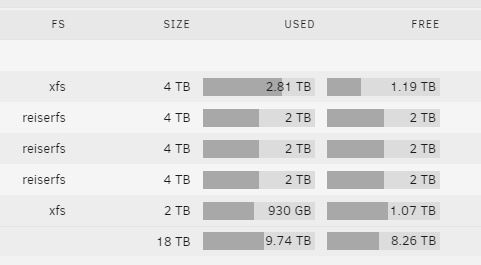
So if I'm reading this correctly, my Disk 2 has 2 TB of free space. Half that is 1 TB. Once Disk 1 reaches 1 TB of free space it will start to fall over to Disk 2. Is that accurate? If that is accurate, then I guess this is all normal, which is awesome news.
-
I just received a utilization warning for Drive 1 from Unraid. I don't think I've ever had one before. I took a look and as you can see below, something doesn't feel right. All data seems to be loading up on Drive 1 and I can't figure out why. I've had Unraid I think running for over a decade and I'm sort of stickler for leaving everything at default. Basically, I'm not going into Unraid and asking it to put specific data on a specific drive or anything like that. I've always let Unraid decide that for me. Is this normal, and if not, is there something I should do to resolve it? tower-diagnostics-20230106-1206.zip
-
My 11-year old unraid server recently died (MB, CPU, or RAM failure) so it seemed like a good time to upgrade. Put together a new system with an I5-12400 CPU, 32 GBs of RAM, and an Asrock Steel Legend Z690 MB. Works great and happy with it for my basic needs (i.e. media / general storage, transcoding, etc.). As meager as this server might seem to many people here, it is actually the most powerful PC we now have in the house. Most of the tasks on my computers aren't demanding and I'm not a gamer, but there is one thing I do where I could use the extra processing power, that is, 4K video editing with Davinci Resolve. Most of the time this is for family videos. Having only basic knowledge of VMs, I have a few questions before attempting to pursue this: Would this even be worth the trouble? I could buy a GPU to help with 4K playback and scrubbing the timeline and I know by doing the VM, I'm probably going to take a 5-10% hit on processing power by doing it through a VM, but again, it is still the most powerful PC we have in the house so I'm trying to take advantage of it, if I can. I thought about testing this first without purchasing a GPU to see how it works, but I see some other posts referring with issues leveraging the IGP. Is that possibly a non-issue or am I likely to run into major issues attempting to get the IGP to work with a VM and I might just better off getting the GPU and starting from there? Now for a big newbie question. I see others using a VM for gaming. I'm worried about lag when attempting to edit a 4K video via a VM. Is that a legitimate concern? Are gamers connecting monitors and peripherals directly to the server or are they accessing the VM from another PC and playing games from a distance? I would think the lag issue might really be prevalent when attempting to access the VM over the network, rather than directly connected to the server, but I just don't know how this is being leveraged by most. Any insight would help. Thanks again for any help, recommendations, and/or guidance.
-
Wow @hellasus0001. Amazing information and thanks for all the detail. I'll admit, some of what you are speaking to is over my head, but I get a lot of it. Ultimately, for me, I took @peterg23 advice and got an I5-12400. I paired it with the Asrock Steel Legend Z690, 32 GBs of G.Skill Ram, and put it in a Silverstone CS380 case. I haven't built a PC in ages so my troubleshooting was a little rusty. Bad RAM and a bad HDMI cable (how?) had me scratching my head for a bit, but eventually figured it out. The only other hiccup was high temps for the hard drives, but I expected that after so many people had complained about the same thing with the CS380. Replaced the stock fans with 3 cheap Arctic P12 PSM fans and completed a full parity check without any hdd getting too hot. It all works great and just blows my mind how stable the Unraid software is. Move to entirely new components and it just works. Amazes me. Anyway, I have meager needs right now and the I5-12400 seems to crush it. Holding media and some transcoding here and there, it seems to handle it just fine. The only thing I haven't dipped my toe in yet is VMs. I'm not a gamer, but I would like something that I could do some 4K video editing (family videos) with using Davinci Resolve. Render times aren't a big deal to me since I just leave it alone when I'm rendering. But having enough "horsepower" for scrubbing the timeline efficiently with 4K videos is something else. As I understand it you need a pretty decent video card for that. Maybe an AMD RX 6600 XT coupled with the I5-12400 is enough? Not sure, but I'm trying to understand more to maybe give it a try. Anyway, all the best and thanks for the info.
-
I thought I would just jump in to provide my own experience with this case. I almost didn't purchase it because I saw so many negative reviews about heat issues. It does leave you scratching your head when you look at it. The vent from the outside of the case covers up 1/2 of the fans against the hard drive cage. Then those fans are blowing against almost all metal with only small slits available for the air to get through. Regardless, I still bought the case because I didn't want to pay a much more expensive price for a server case, but really wanted the added luxury of being able to get directly to my drives without opening the case. So, I took the risk. First, I tried the case as it comes. I have 7 of the 8 drive bays filled. Started a parity-check and it didn't take long. After about an hour I was getting notifications that one of the drives was exceeding 45 degrees. Not good. So, I read through this post and saw all the mods people were doing. Additional fan on the bottom of the case, duct tape at some locations, expensive replacement Noctua fans, etc.. I decided to start pretty simple and see where that got me. I bought 3 relatively cheap ($9 each) Arctic P-12 PSM fans to replace all 3 120 mm fans in the case. Fired it up again and voila. 10 hour parity check made it through just fine. The "hot" disk got up to 41 degrees, but that was it. All the other disks were below 40 degrees the entire time and a couple of these disks are really old and tend to run hot. So I'm really happy with it. I just thought I would mention it in case it helped others.
-
No, I just noticed in some of the instructions for unraid somewhere that the process you should go through when upgrading your motherboard is ensure that the drives are allocated as they were before (i.e. parity and data). I had a pretty strong feeling that unraid was correct once I booted up the server, but since the instructions said to be sure, I thought I should probably do so for good measure. Ultimately, I didn't have definitive information, but enough that I felt confident unraid was correct so I just started the array and everything went fine.
-
Thanks. So if the "flushing RAM" had more space, I would probably have more time and data that gets passed before it bottoms out...correct? I have 32 GBs of RAM now. I'm thinking if I double that, it might be money well spent. I do leverage a cache drive, but that is only for data that isn't terribly important for me.
-
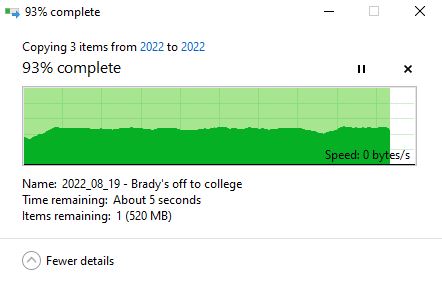
I just built a new unraid server and everything appears to be working fine, but there is one issue I had with my previous 11 year old unraid server that has made its way to this new server. That is, when transferring data across the LAN my Unraid server will accept data at very fast speeds (to me at least), around 140 - 300 MB/sec depending on the source. However, almost always, at some point, if I'm transferring a significant amount of data, the transfer will bottom out and stall. After 15 - 30 seconds maybe, it will pick things back up. This is not due to waiting on a drive to spin up since I've also tested this from a cache drive to a single drive that is connected by USB. They were both spun up. What is the culprit here? I've done these transfers and watched my CPU and RAM. Both are practically untouched with the CPU not even getting into double digits and the RAM having tons of space remaining. What am I missing? This screenshot is a good example. It transferred at amazingly fast speeds and then bottomed out to 0 bytes / sec. In case it helps, the new server I built has: CPU: Intel i5 - 12400 Motherboard - Asrock Steel Legend Z690 RAM: 32 GB (dual channel) G.Skill
-
Thanks everyone. In hindsight this was a little reckless of me, but fortunately, it all worked out. I found a label document I used to label all my drives inside my previous case so I could quickly determine what was what in the event of a HDD failure and just to keep things organized. The last entry was the Seagate Drive with its respective serial number that matched what UNRAID currently thought was the parity drive. That made so much sense that I started the array and everything looks good. Now, if I would have had a brain in my head, I would have simply pulled all the drives (easy to do in this new Silverstone CS380 case) and using those labels it would have been obvious there was only one parity drive and which one it was. Feeling pretty stupid that I didn't think of that, but oh well, moving on. Thanks again for all the help. I do appreciate it.
-
That's a relief. I'm sorry to get so granular here, but I don't want to mess something up, especially when I think I could just probably start the array as-is and it would be correct. I guess what I don't understand about NEW CONFIG is wouldn't starting the array now without going through NEW CONFIG essentially accomplish the same thing? Basically, we only want to know where the parity drive is, right? So if I start the array now, and all the disks are assigned to somewhere, the only thing that would happen is if the parity was assigned to a data drive slot, then it would ask me if I wanted to FORMAT it...right? That would be the tell-tale sign. If nothing asks to be formatted then I think you can assume everything is in its place just as it was before my recent crash. Does that make sense?