




-
What is the issue with port multipliers? The product listing says 6Gbps. Do we know the source of the incompatibility? I am trying to avoid using an expensive/hot LSI card, are there any other options?
-
Hello, Attached are my diagnostics. I am having two issues. One is with a new SATA PCIe card and a disk rebuild. I installed a new PCIe card: https://www.startech.com/en-eu/cards-adapters/10p6g-pcie-sata-card I moved my array sata cord to the StarTech card, and I had one disk come up as failed. I ran SMART tests on it, and came back with no errors. I ended up starting to do a rebuild on the same disk, but it is going incredibly slow, 30-40 MB/s (occasional spikes to 60 or 70). I don't think this is normal, does anyone have any insight? Also, I know that the drive definitely was the thing with the error, as I rotated positions on the sata cables on my array drives and the same HDD came back with errors. Also, when I try to update or edit containers, I get an error saying "Configuration not found. Was this container created using this plugin?" I found the DockerMan config in the flash drive, but it seems that the templates (for whatever reason) got corrupted: Should I just restore this from a recent backup of my flash drive? The "unifi-network-application" template there does work. I had to delete and redownload the container, as it would not start when I rebooted the server for whatever reason. This template does allow me to edit and pull updates. TL;DR 1. Slow disk rebuild - normal, or issue? 2. Seem to have lost docker container templates - something wrong, or should I just restore flash from backup? Thanks in advance! -ingeniero tower-diagnostics-20240305-0650.zip
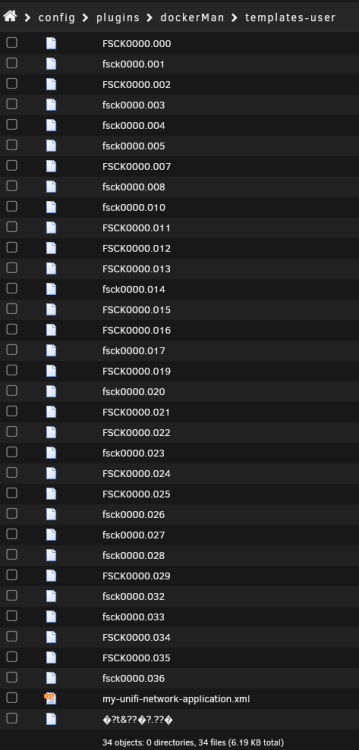
-
Actually, changing the container to neko and then back to vnc seems to have fixed it. It is now working for me.
-
I am having the same issue as well. I upgraded from 6.12.4 to 6.12.6, and how this container no longer works, which is a shame. I really like it. 2024-01-06 01:39:28,109 INFO Included extra file "/etc/supervisor.d/dbus.ini" during parsing 2024-01-06 01:39:28,109 INFO Included extra file "/etc/supervisor.d/desktop.ini" during parsing 2024-01-06 01:39:28,110 INFO Included extra file "/etc/supervisor.d/neko.ini" during parsing 2024-01-06 01:39:28,110 INFO Included extra file "/etc/supervisor.d/pulseaudio.ini" during parsing 2024-01-06 01:39:28,110 INFO Included extra file "/etc/supervisor.d/steam.ini" during parsing 2024-01-06 01:39:28,110 INFO Included extra file "/etc/supervisor.d/sunshine.ini" during parsing 2024-01-06 01:39:28,110 INFO Included extra file "/etc/supervisor.d/udev.ini" during parsing 2024-01-06 01:39:28,110 INFO Included extra file "/etc/supervisor.d/vnc-audio.ini" during parsing 2024-01-06 01:39:28,110 INFO Included extra file "/etc/supervisor.d/vnc.ini" during parsing 2024-01-06 01:39:28,110 INFO Included extra file "/etc/supervisor.d/wol-power-manager.ini" during parsing 2024-01-06 01:39:28,110 INFO Included extra file "/etc/supervisor.d/xorg.ini" during parsing 2024-01-06 01:39:28,110 INFO Included extra file "/etc/supervisor.d/xvfb.ini" during parsing 2024-01-06 01:39:28,110 INFO Set uid to user 0 succeeded 2024-01-06 01:39:28,112 INFO RPC interface 'supervisor' initialized 2024-01-06 01:39:28,112 CRIT Server 'unix_http_server' running without any HTTP authentication checking 2024-01-06 01:39:28,112 INFO supervisord started with pid 1 2024-01-06 01:39:29,114 INFO spawned: 'dbus' with pid 1026 2024-01-06 01:39:29,115 INFO spawned: 'udev' with pid 1027 2024-01-06 01:39:29,116 INFO spawned: 'xorg' with pid 1028 2024-01-06 01:39:29,116 INFO spawned: 'frontend' with pid 1029 2024-01-06 01:39:29,117 INFO spawned: 'pulseaudio' with pid 1030 2024-01-06 01:39:29,118 INFO spawned: 'x11vnc' with pid 1032 2024-01-06 01:39:29,119 INFO spawned: 'desktop' with pid 1035 2024-01-06 01:39:29,120 INFO spawned: 'sunshine' with pid 1039 PULSEAUDIO: Starting pulseaudio service 2024-01-06 01:39:29,128 INFO reaped unknown pid 1058 (exit status 0) 2024-01-06 01:39:30,124 INFO success: dbus entered RUNNING state, process has stayed up for > than 1 seconds (startsecs) 2024-01-06 01:39:30,124 INFO success: udev entered RUNNING state, process has stayed up for > than 1 seconds (startsecs) 2024-01-06 01:39:30,124 INFO success: xorg entered RUNNING state, process has stayed up for > than 1 seconds (startsecs) 2024-01-06 01:39:30,124 INFO success: frontend entered RUNNING state, process has stayed up for > than 1 seconds (startsecs) 2024-01-06 01:39:30,124 INFO success: pulseaudio entered RUNNING state, process has stayed up for > than 1 seconds (startsecs) 2024-01-06 01:39:30,124 INFO success: x11vnc entered RUNNING state, process has stayed up for > than 1 seconds (startsecs) 2024-01-06 01:39:30,124 INFO success: desktop entered RUNNING state, process has stayed up for > than 1 seconds (startsecs) 2024-01-06 01:39:30,124 INFO success: sunshine entered RUNNING state, process has stayed up for > than 1 seconds (startsecs) 2024-01-06 01:39:30,168 WARN exited: xorg (exit status 134; not expected) 2024-01-06 01:39:30,203 INFO spawned: 'xorg' with pid 1096 2024-01-06 01:39:30,231 WARN exited: xorg (exit status 134; not expected) 2024-01-06 01:39:32,144 INFO spawned: 'xorg' with pid 1124 2024-01-06 01:39:32,172 WARN exited: xorg (exit status 134; not expected) 2024-01-06 01:39:35,144 INFO spawned: 'xorg' with pid 1166 2024-01-06 01:39:35,171 WARN exited: xorg (exit status 134; not expected) 2024-01-06 01:39:38,174 INFO spawned: 'xorg' with pid 1208 2024-01-06 01:39:38,202 WARN exited: xorg (exit status 134; not expected) 2024-01-06 01:39:39,203 INFO gave up: xorg entered FATAL state, too many start retries too quickly It seems like the issue is related to PULSEAUDIO? Or perhaps xorg? I do not have an NVidia card installed, and use my iGPU, but I passthrough --device==/dev/dri and the container confirms it can see it. I only connect over VNC, and use this container purely as a lancache for steam.
-
Just started my first server with a trial license, and my array disks are clearing as I write this. i am trying to login to Unraid connect and get this error: Error: {"message":"Request failed with status code 403","data":"Oh noes! something doesn't seem right here"} I saw in this thread that a forum post had potentially solved the issue. Here goes nothing. Advice is welcome as well. Update: posting here did NOT solve the issue, I am still unable to log in.

View in the app
A better way to browse. Learn more.
