





nmkaufman
Members
-
Joined
-
Last visited
-
Immediately I'm seeing some weird deviations from my exclude list on my Podcast and TV shares. They're only excluding a few filetypes. Neither of those shares have an override set. I did use this plugin, once, a while back, and ended up reverting to the old version; Is it possible there's some leftover config files that need cleared out? Debug_Mover_tuning_2025-06-09T130503.log
-
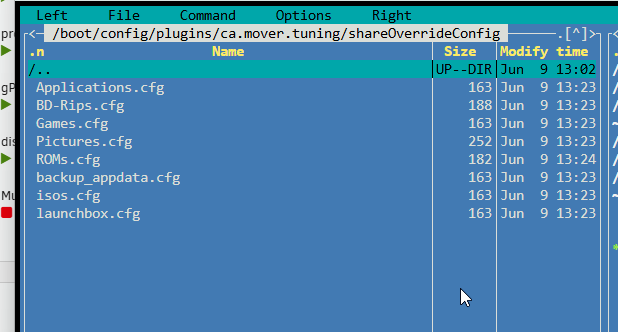
I didn't think of that, but I have a log cooking now. I'll post it when it's done. I did find out it has something to do with per-share overrides, or perhaps just a problem with one of my per-share overrides.
-
Are the filetype filters ignored, while in test mode? I really don't want to turn test mode off until I know it's not going to move all my metadata to the array. I would post logs, but I'm still waiting for the run to complete from 6AM this morning! 82,000 files to go. I'm not too excited to start another pass just to collect logs, unless there's something different I can try, at the same time.
-
I migrated from the old plugin, and my "Comma separated list of file types:" ignore list isn't working. What is the correct format for the list? I copied and pasted my list from the old plugin: .jpg,.JPG,.nfo,NFO (etc) I tried reformatting with spaces: .jpg, .JPG, .nfo, .NFO (etc) The log appears to be respecting the list: Skip filetypes: ass ASS gif GIF idx IDX jfif JFIF jpeg JPEG jpg JPG nfo NFO png PNG srt SRT ssa SSA sub SUB svg SVG txt TXT vtt VTT ffs_db ffs_lock But then it's spewing 239,120 entries of attempted moves, ignoring my list; It takes several hours, each attempt. Moving "/mnt/cache/./Podcasts/Radiolab/folder.jpg" to /mnt/user0/ TEST MODE: Would Move using rsync utility 227824 files remaining from caches to array 11GiB I am calling "mover start" from a backup script, in case that makes any difference.
-
It is moving. It does not seem to be respecting the threshold %. I removed the plugin, and set back up from scratch, same behavior.
-
You're not misunderstanding; That's exactly how mine used to work until a few days ago. There's now a per-share threshold %, and the behavior seems to have completely changed. It may just be a bug that the per-share threshold % is not being respected.
-
The lookup may not be waking mine, either, but it's waking disks because it keeps moving stuff that doesn't need moved. Mover tuner is configured to move >30 day files, with a threshold of 80%. I have multiple share overrides configured to move >0 days (but also with a threshold of 80%) I don't want anything to happen unless my cache is 80% full. At that point some shares are completely emptied, and others retain any files newer than 30 days. The new plugin keeps emptying these 0-day shares, every night, which I do not want.
-
Are there plans to create an option to disable all the new cache juggling? Or should I just keep using the old plugin? I'd made the assumption it would be deprecated at some point, since it hasn't been updated for 7.0.0. I run my mover every night after a backup script, and I really don't expect/want it to do anything until my cache is 80% full. It seems that having overrides set on any of my shares causes the contents of those shares to be scanned, each night, even if my cache filled % is below the threshold. I respect all the hard work, it's just not for me is all. I'd prefer my disks just keep sleeping unless the cache is full.
-
I will play around with it, this weekend. I believe the problem is that it's creating files, owned by ROOT, while other containers use NOBODY, by default. It's not setting permissions that allow other users to access the files. The easiest solution would be to set the UMASK, but I tried passing a UMASK environmental variable to the container, and it didn't seem to work. I did see a reddit thread where someone claimed this worked, though, so I'm going to further experiment.
-
Did you have any luck getting permissions working? I tried adding --user 99:100 as a post argument, and it's still not working. I have to reset permissions on my downloads folder before other containers can interract with the files. It makes sharing/contributing next to impossible, as well.
-
Dang; This is so much faster than trying to manage ROMs via SMB. Thank you for the hard work! Now I have to decide if it's worth re-hashing my entire library to take advantage of it. I may see if I can trick RV into using my existing RomVault3_2.Cache file, but I don't have much hope. After some experimentation, I have some good and bad news. Good news; this container is much faster than SMB/virtiofs when crawling shares, and scanning ROMs that have already been hashed. Bad news; the performance of hashing / repairing new ROMs is significantly slower than a Windows VM. Especially CHD files. It appears that while newer versions of CHDman are multi-threaded, the mono interpreter is less-so. Good news; an existing .cache file can be successfully dropped into the appdata/ROMVault folder, and Launchbox will use it. You can use a VM or more powerful machine to hash/build your library, initially, and drop the .cache file into the container for routine maintenance.
-
Have the 'Recently Added/Spotlight/Trending' sections on the homepage always been there? Didn't see it on the changelog, but I've never noticed them before. I never noticed the 'Why we picked it' blurbs on the spotlight apps, either. All great stuff.
-
If anyone finds this thread in the future, Unraid does occasionally touch ctime. It's not useful as an incremental backup trigger. I instead switched to using -mtime, and configured my software to touch the modified time when extracting archives.
-
My computer will only boot 1/5 (sometimes less) attempts from a USB 3.0 port. I've never had a problem with any other operating sytem or boot image, but the XHCI hand-off in Unraid is very particular. It doesn't sound like you're even getting that far, but just to rule it out try using a USB 2.0 port.
-
I'm new to Unraid, but this plugin has immediately become one I can never live without. Thank you! My disks stay parked while browsing, searching, and even scanning with emby/*arr or freefilesync. I tried countless solutions to achieve this in Windows over the years, with minimal success. That said, the cpu spikes are wild. It's a low cpu utilization % per thread (<10%), but since it runs 1 thread per disk, it means my cpu basically never parks cores, and is always in some state of turbo-boost. My computer idles ~5 degrees (C) hotter with the plugin on, vs off (2x ancient E5-2600 v3). I've tried turning off 'run scan of each disk in a seperate thread' but this results in my disks spinning up. I've also tried increasing the minimum interval between folder scans, but this also results in more spin-ups. Does the 'hack' that this plugin exploits only keep folders in memory if there's a constant folder-scan happening? Like I said, it's not that the cpu utilization % is so high, but it's just high and persistent enough to defeat all the power-saving features of my computer.

