xazac
Members
-
Joined
-
Last visited
Everything posted by xazac
-
Hello, Are these settings still valid for Unraid 7.1.4 and upcoming 7.2? Is there any update about SMB parameters that has not been updated in this thread? Thanks.
-
Hello, I'm here again because I'm still facing the buffering issue. It's really, really frustrating and I don't know how to fix it. I tried to: • Swap HDD with a new one; • Change Plex Media Server Container from LinuxServer.io to Official PMS one; • Disable NIC Flow Control through Tips & Tweaks Plugin; • Increase XFS "read_ahead_kb" parameter from 128 (this was the default value assigned by Unraid) to 16384; • Install Unraid 7.2.0 (BETA 2). None of the above solved this unexpected behaviour. Is there any log I can collect and post while having the buffering issue in order to get help? Thanks for your patience.
-
Hello, Preclear is going to finish in about 13 hours, then I will format the disk with XFS format and I'll start to copy my files from the old disk. As I don't want to waste disk space, is this setting still worth it? I would also know if default block size (4KB) is fine for my contents (.mkv files between ~2GB and ~120GB). Is there any other tip or trick to avoid Plex buffering problem due to initial read speed? My disk should have a 512MB cache but I can't find any command line to check it. Last question: is defrag process something I need to consider with such a large files? Really thanks @JorgeB @alturismo
-
Hello @JorgeB Thank you for your reply. Yes, I will add it as a new disk then I'll copy all content from the previous disk.
-
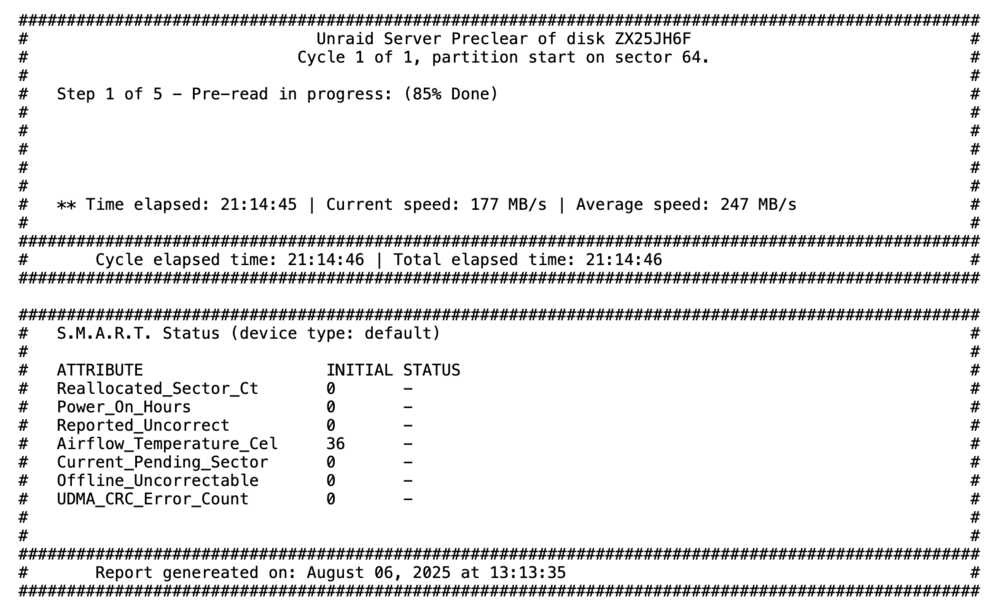
Hello @alturismo Thanks for your reply! I get a brand new replacement disk yesterday and it's running preclear since 21 hours (it's at 85% right now): I don't remember there were 5 steps, I remember 3 (read, write, read). So which are these 5 steps? I also don't remember if the Preclear plugin will format the disk at the end of its job. Is it better to let Unraid OS to format the disk? Thanks again
-
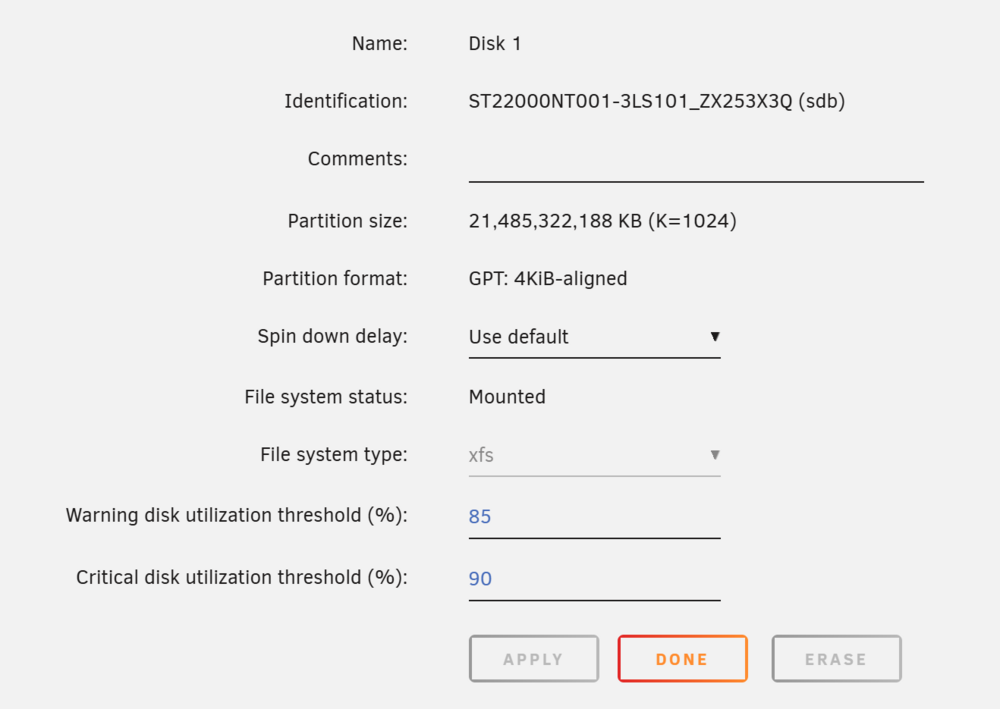
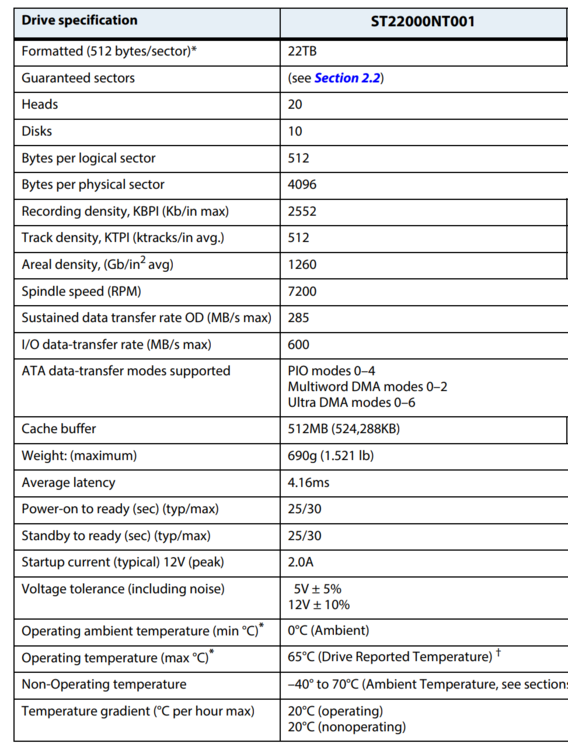
Hello @alturismo and really thanks for your support! I tried to create a new script as you told me, this is the content: 1 #!/bin/bash 2 bash -c "echo 16384 > /sys/block/sdb/queue/read_ahead_kb"Is it correct? I'm a bit confused about the values I get when I use different commands to check the "read_ahead" parameter before to make any change: When I type cat /sys/block/sdb/queue/read_ahead_kb I get 128 When I type blockdev --getra /dev/sdb I get 256 Same after I run the script: With cat /sys/block/sdb/queue/read_ahead_kb command I get 16384 With blockdev --getra /dev/sdb I get 32768 Maybe because they use different measuring units? Anyway, I'm getting a HDD replacement with a brand new unit (not refurbished) and I'll start over. I will do a Preclear before to create a new XFS Volume in order to check disk integrity. Is there any parameter I need to consider when I will create the XFS Volume on the new HDD? I am specifically referring to the bytes/sector formatting parameter. This is the actual configuration of the current disk that I will replace: These are the official disk specs from Seagate: Full document here. Sorry for my noob questions, any help and suggestion are appreciated. Thanks
-
Hello @alturismo Really thanks for your help! When I was using BTRFS file system I never experienced buffering issue. Do you suggest me to reformat the drive from XFS to BTRFS? Thanks
-
I never did this before. Can you @JorgeB please help me? Thanks
-
Hello @JorgeB It seems to be working, but everytime I reboot I loose this setting. How can make it permanent? Thanks
-
Hello @JorgeB Thank you for your reply! Yes, I noticed that during streaming reads value are in that range (5-10/12Mb/s). Well, I tried the suggestion I posted early and then I started watching a Movie: I never experienced any buffering, even post rewind or fastforward. Anyway I used /dev/sdb instead of /dev/md1p1. What's the difference? I assumed that I had to select the whole disk and not a "partition" (what kind of partition is that, anyway? I'm at my first XFS Disk experience). Really thanks, hope to read from you soon.
-
Hello @JorgeB Thank you for your reply. Here's the Reads value while performing Read-Check: I also found this suggestion: Is it worth it? Thanks!

-
Hi there, I'm writing you because I have an issue with Plex: Since I swapped my HDD Array because of failure and I switched from BTRFS to XFS on the new HDD, I'm getting buffering issue for the first 10-15 minutes of play of large media files. I don't remember I ever had this issue with my previous HDD formatted with BTRFS. I tried both Plex-Media-Server Official and Linuxserver containers: same results. I also adjusted file paths to bypass Unraid FUSE layer. This is the long story short. If you need more details, here's the Full story Is there anyone who can help me to fix this issue? Really thanks for reading!
-
I was just wondering the same since I can't find it anymore 🤔
-
Thank you for your suggestion. Anyway, I read that many 20TB WD Red Pro drives have longevity issues, according to Reddit. I also see that it's out of stock on the official WD Europe store and even on Amazon.it. Which similar or better alternatives are there? I found a deal on the Seagate Ironwolf Pro 20TB. Is this model suitable for my needs? Or WD Gold will be better since I can't get the WD Red Pro? Thanks
-
Thank you all for your suggestions! Here's an overview of my setup: I have a UGreen NASync DXP6800 Pro with 32GB of RAM (2x16GB Crucial DDR5-4800) and a 2TB WD Black SN850X NVMe drive (which I had in my old gaming PC). I use the NVMe as a cache pool for 4-5 Docker containers, with JDownloader and Plex being the most important. JDownloader operates entirely on the NVMe, including downloads and extractions, after which I move the content to the HDD. Plex also runs on the NVMe but reads the multimedia files from the HDD. My NAS operates 24/7 and is protected by an APC UPS. I have an end-to-end 10Gbps LAN connection between the NAS and the streaming device, and my multimedia files are quite large (4K HDR/DV, around 60-80GB each). So, which ~20TB HDD would you recommend as a replacement for my Toshiba HDD? I've looked at 20TB models like the WD Red Pro, WD Gold, and Ultrastar DC, but I can't really tell the difference between them for my needs. They all seem similar to me. I've used WD Red Pro drives in the past with a Synology NAS. Then I switched to Synology HDDs (I had a HAT5310-8T manufactured by Toshiba) and I remember it being very quiet. Therefore, I'm looking for a good option to replace my Toshiba HDD: it should be at least 20TB, 7200rpm, and as quiet as possible. I'm not considering Seagate as an option since all the HDDs I've owned from that brand have given me a terrible experience. Any suggestions would be greatly appreciated. I hope you can help me, really thanks!
-
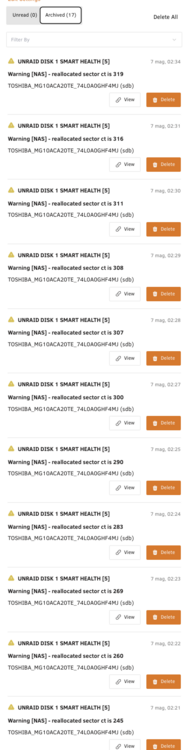
Hello again, The situation is getting worse quickly, I've received 17 more "reallocated sector" notifications: This is the actual disk status: I don't have a parity disk so I assume it would be better to get a replacement disk. What do you think? Do you have any suggestion about a different brand/model SATA 20TB disk? I can get a full refund for this disk, so I could buy something better. Really thanks

-
Okay man, really thanks!
-
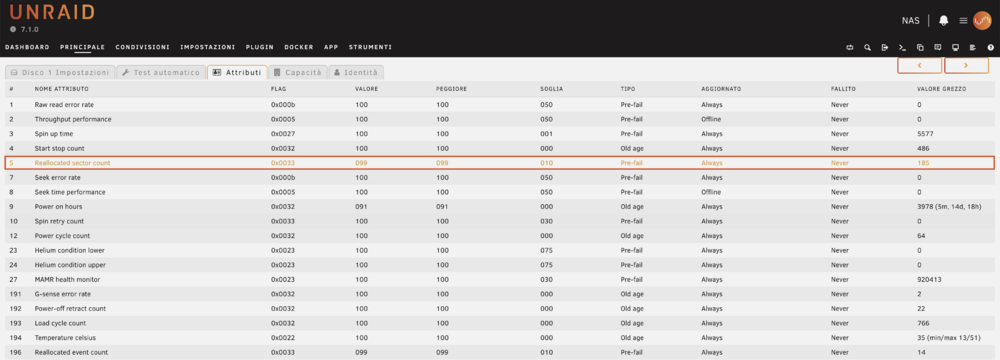
Hello there, I'm asking for your support about "Reallocated sector count" warning message on my Toshiba MG10ACA20TE 20TB (using Btrfs) disk: I performed one Short S.M.A.R.T. test and one Deep S.M.A.R.T. test after this warning, but it doesn't report any error: I also run a Read-check but no issue has been found: Do I have to worry about this situation? Am I missing any other disk test? Any suggestion? You'll find S.M.A.R.T. logs attached. Really thanks for your time! nas-smart-20250506-1341.zip


-
Hi man, It still doesn’t work. nas-syslog-20241208-2150.zip
-
Hello, the plugin stopped working again. You can find logs attached. nut-debug-20241207191435.zip Thanks!
-
Okay, I'll keep you updated! Really thanks
-
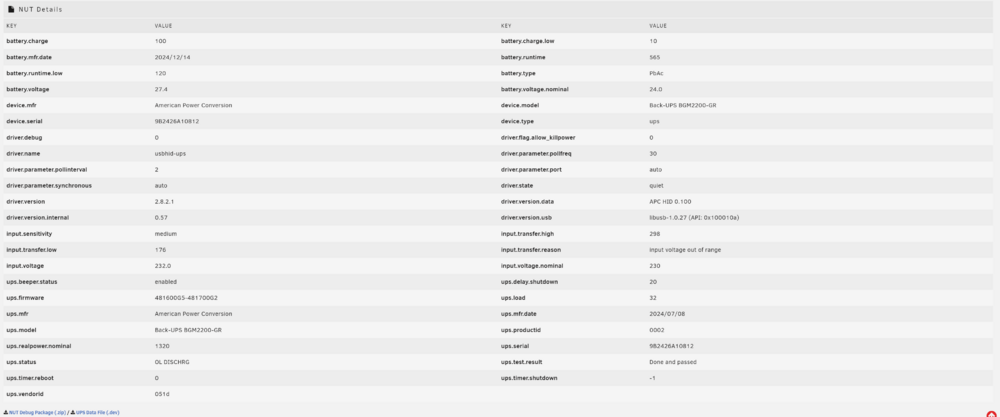
Hello, Thank you for your reply! I tried to change USB port and I also switched to "preview (latest build)" then I rebooted my NAS. As always I still have my UPS status this way: And this is how it get recognized:

-
Hello, I installed your plugin since my brand new APC BGM2200-GR isn't natively recognized by Unraid. Your plugin works for some time, then it stops to work and I get all these warnings: Dec 5 20:23:23 NAS usbhid-ups[90825]: #012Reconnecting. If you saw "nut_libusb_get_interrupt: Input/Output Error" or similar message in the log above, try setting "pollonly" flag in "ups.conf" options section for this driver! Dec 5 20:23:23 NAS usbhid-ups[90825]: device->Product is NULL so it is not possible to determine whether to activate max_report_size workaround Dec 5 20:23:23 NAS usbhid-ups[90825]: libusb1: Could not open any HID devices: insufficient permissions on everything Dec 5 20:23:25 NAS usbhid-ups[90825]: #012Reconnecting. If you saw "nut_libusb_get_interrupt: Input/Output Error" or similar message in the log above, try setting "pollonly" flag in "ups.conf" options section for this driver! Dec 5 20:23:25 NAS usbhid-ups[90825]: device->Product is NULL so it is not possible to determine whether to activate max_report_size workaround Dec 5 20:23:25 NAS usbhid-ups[90825]: libusb1: Could not open any HID devices: insufficient permissions on everything Dec 5 20:23:26 NAS upsmon[90853]: Poll UPS [[email protected]] failed - Data stale Dec 5 20:23:27 NAS usbhid-ups[90825]: #012Reconnecting. If you saw "nut_libusb_get_interrupt: Input/Output Error" or similar message in the log above, try setting "pollonly" flag in "ups.conf" options section for this driver! Dec 5 20:23:27 NAS usbhid-ups[90825]: device->Product is NULL so it is not possible to determine whether to activate max_report_size workaround Dec 5 20:23:27 NAS usbhid-ups[90825]: libusb1: Could not open any HID devices: insufficient permissions on everything Dec 5 20:23:29 NAS usbhid-ups[90825]: #012Reconnecting. If you saw "nut_libusb_get_interrupt: Input/Output Error" or similar message in the log above, try setting "pollonly" flag in "ups.conf" options section for this driver! Dec 5 20:23:29 NAS usbhid-ups[90825]: device->Product is NULL so it is not possible to determine whether to activate max_report_size workaround Dec 5 20:23:29 NAS usbhid-ups[90825]: libusb1: Could not open any HID devices: insufficient permissions on everything Dec 5 20:23:31 NAS usbhid-ups[90825]: #012Reconnecting. If you saw "nut_libusb_get_interrupt: Input/Output Error" or similar message in the log above, try setting "pollonly" flag in "ups.conf" options section for this driver! Dec 5 20:23:31 NAS usbhid-ups[90825]: device->Product is NULL so it is not possible to determine whether to activate max_report_size workaround Dec 5 20:23:31 NAS usbhid-ups[90825]: libusb1: Could not open any HID devices: insufficient permissions on everything Dec 5 20:23:31 NAS upsmon[90853]: Poll UPS [[email protected]] failed - Data stale Dec 5 20:23:33 NAS usbhid-ups[90825]: #012Reconnecting. If you saw "nut_libusb_get_interrupt: Input/Output Error" or similar message in the log above, try setting "pollonly" flag in "ups.conf" options section for this driver! Dec 5 20:23:33 NAS usbhid-ups[90825]: device->Product is NULL so it is not possible to determine whether to activate max_report_size workaround Dec 5 20:23:33 NAS usbhid-ups[90825]: libusb1: Could not open any HID devices: insufficient permissions on everything Dec 5 20:23:35 NAS usbhid-ups[90825]: #012Reconnecting. If you saw "nut_libusb_get_interrupt: Input/Output Error" or similar message in the log above, try setting "pollonly" flag in "ups.conf" options section for this driver! Dec 5 20:23:35 NAS usbhid-ups[90825]: device->Product is NULL so it is not possible to determine whether to activate max_report_size workaround Dec 5 20:23:35 NAS usbhid-ups[90825]: libusb1: Could not open any HID devices: insufficient permissions on everything Dec 5 20:23:36 NAS upsmon[90853]: Poll UPS [[email protected]] failed - Data stale Dec 5 20:23:37 NAS usbhid-ups[90825]: #012Reconnecting. If you saw "nut_libusb_get_interrupt: Input/Output Error" or similar message in the log above, try setting "pollonly" flag in "ups.conf" options section for this driver! Dec 5 20:23:37 NAS usbhid-ups[90825]: device->Product is NULL so it is not possible to determine whether to activate max_report_size workaround Dec 5 20:23:37 NAS usbhid-ups[90825]: libusb1: Could not open any HID devices: insufficient permissions on everything Dec 5 20:23:39 NAS usbhid-ups[90825]: #012Reconnecting. If you saw "nut_libusb_get_interrupt: Input/Output Error" or similar message in the log above, try setting "pollonly" flag in "ups.conf" options section for this driver! Dec 5 20:23:39 NAS usbhid-ups[90825]: device->Product is NULL so it is not possible to determine whether to activate max_report_size workaround Dec 5 20:23:39 NAS usbhid-ups[90825]: libusb1: Could not open any HID devices: insufficient permissions on everything Dec 5 20:23:41 NAS usbhid-ups[90825]: #012Reconnecting. If you saw "nut_libusb_get_interrupt: Input/Output Error" or similar message in the log above, try setting "pollonly" flag in "ups.conf" options section for this driver! Dec 5 20:23:41 NAS usbhid-ups[90825]: device->Product is NULL so it is not possible to determine whether to activate max_report_size workaround Dec 5 20:23:41 NAS usbhid-ups[90825]: libusb1: Could not open any HID devices: insufficient permissions on everything Dec 5 20:23:41 NAS upsmon[90853]: Poll UPS [[email protected]] failed - Data stale Dec 5 20:23:43 NAS usbhid-ups[90825]: #012Reconnecting. If you saw "nut_libusb_get_interrupt: Input/Output Error" or similar message in the log above, try setting "pollonly" flag in "ups.conf" options section for this driver! Dec 5 20:23:43 NAS usbhid-ups[90825]: device->Product is NULL so it is not possible to determine whether to activate max_report_size workaround Dec 5 20:23:43 NAS usbhid-ups[90825]: libusb1: Could not open any HID devices: insufficient permissions on everything Dec 5 20:23:45 NAS usbhid-ups[90825]: #012Reconnecting. If you saw "nut_libusb_get_interrupt: Input/Output Error" or similar message in the log above, try setting "pollonly" flag in "ups.conf" options section for this driver! Dec 5 20:23:45 NAS usbhid-ups[90825]: device->Product is NULL so it is not possible to determine whether to activate max_report_size workaround Dec 5 20:23:45 NAS usbhid-ups[90825]: libusb1: Could not open any HID devices: insufficient permissions on everything Dec 5 20:23:46 NAS upsmon[90853]: Poll UPS [[email protected]] failed - Data stale Dec 5 20:23:47 NAS usbhid-ups[90825]: #012Reconnecting. If you saw "nut_libusb_get_interrupt: Input/Output Error" or similar message in the log above, try setting "pollonly" flag in "ups.conf" options section for this driver! Dec 5 20:23:47 NAS usbhid-ups[90825]: device->Product is NULL so it is not possible to determine whether to activate max_report_size workaround Dec 5 20:23:47 NAS usbhid-ups[90825]: libusb1: Could not open any HID devices: insufficient permissions on everything Dec 5 20:23:49 NAS usbhid-ups[90825]: #012Reconnecting. If you saw "nut_libusb_get_interrupt: Input/Output Error" or similar message in the log above, try setting "pollonly" flag in "ups.conf" options section for this driver! Dec 5 20:23:49 NAS usbhid-ups[90825]: device->Product is NULL so it is not possible to determine whether to activate max_report_size workaround Dec 5 20:23:49 NAS usbhid-ups[90825]: libusb1: Could not open any HID devices: insufficient permissions on everything Dec 5 20:23:51 NAS usbhid-ups[90825]: #012Reconnecting. If you saw "nut_libusb_get_interrupt: Input/Output Error" or similar message in the log above, try setting "pollonly" flag in "ups.conf" options section for this driver! Dec 5 20:23:51 NAS usbhid-ups[90825]: device->Product is NULL so it is not possible to determine whether to activate max_report_size workaround Dec 5 20:23:51 NAS usbhid-ups[90825]: libusb1: Could not open any HID devices: insufficient permissions on everything Dec 5 20:23:51 NAS upsmon[90853]: Poll UPS [[email protected]] failed - Data stale Dec 5 20:23:53 NAS usbhid-ups[90825]: #012Reconnecting. If you saw "nut_libusb_get_interrupt: Input/Output Error" or similar message in the log above, try setting "pollonly" flag in "ups.conf" options section for this driver! Dec 5 20:23:53 NAS usbhid-ups[90825]: device->Product is NULL so it is not possible to determine whether to activate max_report_size workaround Dec 5 20:23:53 NAS usbhid-ups[90825]: libusb1: Could not open any HID devices: insufficient permissions on everything Dec 5 20:23:55 NAS usbhid-ups[90825]: #012Reconnecting. If you saw "nut_libusb_get_interrupt: Input/Output Error" or similar message in the log above, try setting "pollonly" flag in "ups.conf" options section for this driver! Dec 5 20:23:55 NAS usbhid-ups[90825]: device->Product is NULL so it is not possible to determine whether to activate max_report_size workaround Dec 5 20:23:55 NAS usbhid-ups[90825]: libusb1: Could not open any HID devices: insufficient permissions on everything Dec 5 20:23:56 NAS upsmon[90853]: Poll UPS [[email protected]] failed - Data stale Dec 5 20:23:57 NAS usbhid-ups[90825]: #012Reconnecting. If you saw "nut_libusb_get_interrupt: Input/Output Error" or similar message in the log above, try setting "pollonly" flag in "ups.conf" options section for this driver! Dec 5 20:23:57 NAS usbhid-ups[90825]: device->Product is NULL so it is not possible to determine whether to activate max_report_size workaround Dec 5 20:23:57 NAS usbhid-ups[90825]: libusb1: Could not open any HID devices: insufficient permissions on everything Dec 5 20:23:59 NAS usbhid-ups[90825]: #012Reconnecting. If you saw "nut_libusb_get_interrupt: Input/Output Error" or similar message in the log above, try setting "pollonly" flag in "ups.conf" options section for this driver! Dec 5 20:23:59 NAS usbhid-ups[90825]: device->Product is NULL so it is not possible to determine whether to activate max_report_size workaround Dec 5 20:23:59 NAS usbhid-ups[90825]: libusb1: Could not open any HID devices: insufficient permissions on everything Dec 5 20:24:01 NAS usbhid-ups[90825]: #012Reconnecting. If you saw "nut_libusb_get_interrupt: Input/Output Error" or similar message in the log above, try setting "pollonly" flag in "ups.conf" options section for this driver! Dec 5 20:24:01 NAS usbhid-ups[90825]: device->Product is NULL so it is not possible to determine whether to activate max_report_size workaround Dec 5 20:24:01 NAS usbhid-ups[90825]: libusb1: Could not open any HID devices: insufficient permissions on everything Dec 5 20:24:01 NAS upsmon[90853]: Poll UPS [[email protected]] failed - Data stale Dec 5 20:24:03 NAS usbhid-ups[90825]: #012Reconnecting. If you saw "nut_libusb_get_interrupt: Input/Output Error" or similar message in the log above, try setting "pollonly" flag in "ups.conf" options section for this driver! Dec 5 20:24:03 NAS usbhid-ups[90825]: device->Product is NULL so it is not possible to determine whether to activate max_report_size workaround Dec 5 20:24:03 NAS usbhid-ups[90825]: libusb1: Could not open any HID devices: insufficient permissions on everything Dec 5 20:24:05 NAS usbhid-ups[90825]: #012Reconnecting. If you saw "nut_libusb_get_interrupt: Input/Output Error" or similar message in the log above, try setting "pollonly" flag in "ups.conf" options section for this driver! Dec 5 20:24:05 NAS usbhid-ups[90825]: device->Product is NULL so it is not possible to determine whether to activate max_report_size workaround Dec 5 20:24:05 NAS usbhid-ups[90825]: libusb1: Could not open any HID devices: insufficient permissions on everything Dec 5 20:24:06 NAS upsmon[90853]: Poll UPS [[email protected]] failed - Data stale Dec 5 20:24:07 NAS usbhid-ups[90825]: #012Reconnecting. If you saw "nut_libusb_get_interrupt: Input/Output Error" or similar message in the log above, try setting "pollonly" flag in "ups.conf" options section for this driver! Dec 5 20:24:07 NAS usbhid-ups[90825]: device->Product is NULL so it is not possible to determine whether to activate max_report_size workaround Dec 5 20:24:07 NAS usbhid-ups[90825]: libusb1: Could not open any HID devices: insufficient permissions on everything Dec 5 20:24:09 NAS usbhid-ups[90825]: #012Reconnecting. If you saw "nut_libusb_get_interrupt: Input/Output Error" or similar message in the log above, try setting "pollonly" flag in "ups.conf" options section for this driver! Dec 5 20:24:09 NAS usbhid-ups[90825]: device->Product is NULL so it is not possible to determine whether to activate max_report_size workaround Dec 5 20:24:09 NAS usbhid-ups[90825]: libusb1: Could not open any HID devices: insufficient permissions on everything Dec 5 20:24:11 NAS usbhid-ups[90825]: #012Reconnecting. If you saw "nut_libusb_get_interrupt: Input/Output Error" or similar message in the log above, try setting "pollonly" flag in "ups.conf" options section for this driver! Dec 5 20:24:11 NAS usbhid-ups[90825]: device->Product is NULL so it is not possible to determine whether to activate max_report_size workaround Dec 5 20:24:11 NAS usbhid-ups[90825]: libusb1: Could not open any HID devices: insufficient permissions on everything Dec 5 20:24:11 NAS upsmon[90853]: Poll UPS [[email protected]] failed - Data stale Dec 5 20:24:13 NAS usbhid-ups[90825]: #012Reconnecting. If you saw "nut_libusb_get_interrupt: Input/Output Error" or similar message in the log above, try setting "pollonly" flag in "ups.conf" options section for this driver! Dec 5 20:24:13 NAS usbhid-ups[90825]: device->Product is NULL so it is not possible to determine whether to activate max_report_size workaround Dec 5 20:24:13 NAS usbhid-ups[90825]: libusb1: Could not open any HID devices: insufficient permissions on everything Dec 5 20:24:15 NAS usbhid-ups[90825]: #012Reconnecting. If you saw "nut_libusb_get_interrupt: Input/Output Error" or similar message in the log above, try setting "pollonly" flag in "ups.conf" options section for this driver! Dec 5 20:24:15 NAS usbhid-ups[90825]: device->Product is NULL so it is not possible to determine whether to activate max_report_size workaround Dec 5 20:24:15 NAS usbhid-ups[90825]: libusb1: Could not open any HID devices: insufficient permissions on everything Dec 5 20:24:16 NAS upsmon[90853]: Poll UPS [[email protected]] failed - Data stale Dec 5 20:24:17 NAS usbhid-ups[90825]: #012Reconnecting. If you saw "nut_libusb_get_interrupt: Input/Output Error" or similar message in the log above, try setting "pollonly" flag in "ups.conf" options section for this driver! Dec 5 20:24:17 NAS usbhid-ups[90825]: device->Product is NULL so it is not possible to determine whether to activate max_report_size workaround Dec 5 20:24:17 NAS usbhid-ups[90825]: libusb1: Could not open any HID devices: insufficient permissions on everything Dec 5 20:24:19 NAS usbhid-ups[90825]: #012Reconnecting. If you saw "nut_libusb_get_interrupt: Input/Output Error" or similar message in the log above, try setting "pollonly" flag in "ups.conf" options section for this driver! Dec 5 20:24:19 NAS usbhid-ups[90825]: device->Product is NULL so it is not possible to determine whether to activate max_report_size workaround Dec 5 20:24:19 NAS usbhid-ups[90825]: libusb1: Could not open any HID devices: insufficient permissions on everything Dec 5 20:24:21 NAS usbhid-ups[90825]: #012Reconnecting. If you saw "nut_libusb_get_interrupt: Input/Output Error" or similar message in the log above, try setting "pollonly" flag in "ups.conf" options section for this driver! Dec 5 20:24:21 NAS usbhid-ups[90825]: device->Product is NULL so it is not possible to determine whether to activate max_report_size workaround Dec 5 20:24:21 NAS usbhid-ups[90825]: libusb1: Could not open any HID devices: insufficient permissions on everything Dec 5 20:24:21 NAS upsmon[90853]: Poll UPS [[email protected]] failed - Data stale Dec 5 20:24:23 NAS usbhid-ups[90825]: #012Reconnecting. If you saw "nut_libusb_get_interrupt: Input/Output Error" or similar message in the log above, try setting "pollonly" flag in "ups.conf" options section for this driver! Dec 5 20:24:23 NAS usbhid-ups[90825]: device->Product is NULL so it is not possible to determine whether to activate max_report_size workaround Dec 5 20:24:23 NAS usbhid-ups[90825]: libusb1: Could not open any HID devices: insufficient permissions on everything Dec 5 20:24:25 NAS usbhid-ups[90825]: #012Reconnecting. If you saw "nut_libusb_get_interrupt: Input/Output Error" or similar message in the log above, try setting "pollonly" flag in "ups.conf" options section for this driver! Dec 5 20:24:25 NAS usbhid-ups[90825]: device->Product is NULL so it is not possible to determine whether to activate max_report_size workaround Dec 5 20:24:25 NAS usbhid-ups[90825]: libusb1: Could not open any HID devices: insufficient permissions on everything Dec 5 20:24:26 NAS upsmon[90853]: Poll UPS [[email protected]] failed - Data stale Dec 5 20:24:27 NAS usbhid-ups[90825]: #012Reconnecting. If you saw "nut_libusb_get_interrupt: Input/Output Error" or similar message in the log above, try setting "pollonly" flag in "ups.conf" options section for this driver! Dec 5 20:24:27 NAS usbhid-ups[90825]: device->Product is NULL so it is not possible to determine whether to activate max_report_size workaround Dec 5 20:24:27 NAS usbhid-ups[90825]: libusb1: Could not open any HID devices: insufficient permissions on everything Dec 5 20:24:29 NAS usbhid-ups[90825]: #012Reconnecting. If you saw "nut_libusb_get_interrupt: Input/Output Error" or similar message in the log above, try setting "pollonly" flag in "ups.conf" options section for this driver! Dec 5 20:24:29 NAS usbhid-ups[90825]: device->Product is NULL so it is not possible to determine whether to activate max_report_size workaround Dec 5 20:24:29 NAS usbhid-ups[90825]: libusb1: Could not open any HID devices: insufficient permissions on everything Dec 5 20:24:31 NAS usbhid-ups[90825]: #012Reconnecting. If you saw "nut_libusb_get_interrupt: Input/Output Error" or similar message in the log above, try setting "pollonly" flag in "ups.conf" options section for this driver! Dec 5 20:24:31 NAS usbhid-ups[90825]: device->Product is NULL so it is not possible to determine whether to activate max_report_size workaround Dec 5 20:24:31 NAS usbhid-ups[90825]: libusb1: Could not open any HID devices: insufficient permissions on everything Dec 5 20:24:31 NAS upsmon[90853]: Poll UPS [[email protected]] failed - Data stale Dec 5 20:24:31 NAS upsmon[90853]: UPS [email protected] is unavailable Dec 5 20:24:33 NAS usbhid-ups[90825]: #012Reconnecting. If you saw "nut_libusb_get_interrupt: Input/Output Error" or similar message in the log above, try setting "pollonly" flag in "ups.conf" options section for this driver! Dec 5 20:24:33 NAS usbhid-ups[90825]: device->Product is NULL so it is not possible to determine whether to activate max_report_size workaround Dec 5 20:24:34 NAS usbhid-ups[90825]: libusb1: Could not open any HID devices: insufficient permissions on everything Dec 5 20:24:35 NAS usbhid-ups[90825]: #012Reconnecting. If you saw "nut_libusb_get_interrupt: Input/Output Error" or similar message in the log above, try setting "pollonly" flag in "ups.conf" options section for this driver! Dec 5 20:24:35 NAS usbhid-ups[90825]: device->Product is NULL so it is not possible to determine whether to activate max_report_size workaround Dec 5 20:24:36 NAS ool www[1149035]: /usr/local/emhttp/plugins/nut-dw/scripts/restart Dec 5 20:24:36 NAS rc.nut: Stopping the NUT services... Dec 5 20:24:36 NAS usbhid-ups[90825]: libusb1: Could not open any HID devices: insufficient permissions on everything Dec 5 20:24:36 NAS rc.nut: Network UPS Tools upsmon 2.8.2 Dec 5 20:24:36 NAS upsmon[90853]: Signal 15: exiting Dec 5 20:24:36 NAS upsd[90850]: User [email protected] logged out from UPS [ups] Dec 5 20:24:36 NAS upsd[90850]: mainloop: Interrupted system call Dec 5 20:24:36 NAS upsd[90850]: Signal 15: exiting Dec 5 20:24:36 NAS rc.nut: Network UPS Tools upsd 2.8.2 Dec 5 20:24:37 NAS usbhid-ups[90825]: WARNING: send_to_all: write 34 bytes to socket 9 failed (ret=-1), disconnecting: Broken pipe Dec 5 20:24:37 NAS usbhid-ups[90825]: #012Reconnecting. If you saw "nut_libusb_get_interrupt: Input/Output Error" or similar message in the log above, try setting "pollonly" flag in "ups.conf" options section for this driver! Dec 5 20:24:37 NAS usbhid-ups[90825]: device->Product is NULL so it is not possible to determine whether to activate max_report_size workaround Dec 5 20:24:37 NAS usbhid-ups[90825]: libusb1: Could not open any HID devices: insufficient permissions on everything Dec 5 20:24:38 NAS usbhid-ups[90825]: Signal 15: exiting Dec 5 20:24:39 NAS rc.nut: fopen /var/run/nut/usbhid-ups-ups.pid: No such file or directory Dec 5 20:24:39 NAS rc.nut: Network UPS Tools - UPS driver controller 2.8.2 Dec 5 20:24:43 NAS rc.nut: Writing NUT configuration... Dec 5 20:24:46 NAS rc.nut: Updating permissions for NUT... Dec 5 20:24:46 NAS rc.nut: Checking if the NUT Runtime Statistics Module should be enabled... Dec 5 20:24:46 NAS rc.nut: Enabling the NUT Runtime Statistics Module... Dec 5 20:24:47 NAS rc.nut: device->Product is NULL so it is not possible to determine whether to activate max_report_size workaround Dec 5 20:24:47 NAS rc.nut: Network UPS Tools - Generic HID driver 0.53 (2.8.2) Dec 5 20:24:47 NAS rc.nut: USB communication driver (libusb 1.0) 0.47 Dec 5 20:24:47 NAS rc.nut: libusb1: Could not open any HID devices: insufficient permissions on everything Dec 5 20:24:47 NAS rc.nut: No matching HID UPS found Dec 5 20:24:47 NAS rc.nut: Driver failed to start (exit status=1) Dec 5 20:24:47 NAS rc.nut: Network UPS Tools - UPS driver controller 2.8.2 The only way to get it to work again is to uninstall and reinstall the plugin itself. Can you please help me? Thanks nut-debug-20241205203725.zip nut-debug-20241205203725.zip
-
The plugin isn't working anymore. This is the second time that it happens, the only way to get it to work again is to uninstall and reinstall the plugin itself. I really don't know how to get my UPS to work flawlessly. Dec 5 20:23:53 NAS usbhid-ups[90825]: #012Reconnecting. If you saw "nut_libusb_get_interrupt: Input/Output Error" or similar message in the log above, try setting "pollonly" flag in "ups.conf" options section for this driver! Dec 5 20:23:53 NAS usbhid-ups[90825]: device->Product is NULL so it is not possible to determine whether to activate max_report_size workaround Dec 5 20:23:53 NAS usbhid-ups[90825]: libusb1: Could not open any HID devices: insufficient permissions on everything Dec 5 20:23:55 NAS usbhid-ups[90825]: #012Reconnecting. If you saw "nut_libusb_get_interrupt: Input/Output Error" or similar message in the log above, try setting "pollonly" flag in "ups.conf" options section for this driver! Dec 5 20:23:55 NAS usbhid-ups[90825]: device->Product is NULL so it is not possible to determine whether to activate max_report_size workaround Dec 5 20:23:55 NAS usbhid-ups[90825]: libusb1: Could not open any HID devices: insufficient permissions on everything Dec 5 20:23:56 NAS upsmon[90853]: Poll UPS [[email protected]] failed - Data stale Dec 5 20:23:57 NAS usbhid-ups[90825]: #012Reconnecting. If you saw "nut_libusb_get_interrupt: Input/Output Error" or similar message in the log above, try setting "pollonly" flag in "ups.conf" options section for this driver! Dec 5 20:23:57 NAS usbhid-ups[90825]: device->Product is NULL so it is not possible to determine whether to activate max_report_size workaround Dec 5 20:23:57 NAS usbhid-ups[90825]: libusb1: Could not open any HID devices: insufficient permissions on everything Dec 5 20:23:59 NAS usbhid-ups[90825]: #012Reconnecting. If you saw "nut_libusb_get_interrupt: Input/Output Error" or similar message in the log above, try setting "pollonly" flag in "ups.conf" options section for this driver! Dec 5 20:23:59 NAS usbhid-ups[90825]: device->Product is NULL so it is not possible to determine whether to activate max_report_size workaround Dec 5 20:23:59 NAS usbhid-ups[90825]: libusb1: Could not open any HID devices: insufficient permissions on everything Dec 5 20:24:01 NAS usbhid-ups[90825]: #012Reconnecting. If you saw "nut_libusb_get_interrupt: Input/Output Error" or similar message in the log above, try setting "pollonly" flag in "ups.conf" options section for this driver! Dec 5 20:24:01 NAS usbhid-ups[90825]: device->Product is NULL so it is not possible to determine whether to activate max_report_size workaround Dec 5 20:24:01 NAS usbhid-ups[90825]: libusb1: Could not open any HID devices: insufficient permissions on everything Dec 5 20:24:01 NAS upsmon[90853]: Poll UPS [[email protected]] failed - Data stale Dec 5 20:24:03 NAS usbhid-ups[90825]: #012Reconnecting. If you saw "nut_libusb_get_interrupt: Input/Output Error" or similar message in the log above, try setting "pollonly" flag in "ups.conf" options section for this driver! Dec 5 20:24:03 NAS usbhid-ups[90825]: device->Product is NULL so it is not possible to determine whether to activate max_report_size workaround Dec 5 20:24:03 NAS usbhid-ups[90825]: libusb1: Could not open any HID devices: insufficient permissions on everything Dec 5 20:24:05 NAS usbhid-ups[90825]: #012Reconnecting. If you saw "nut_libusb_get_interrupt: Input/Output Error" or similar message in the log above, try setting "pollonly" flag in "ups.conf" options section for this driver! Dec 5 20:24:05 NAS usbhid-ups[90825]: device->Product is NULL so it is not possible to determine whether to activate max_report_size workaround Dec 5 20:24:05 NAS usbhid-ups[90825]: libusb1: Could not open any HID devices: insufficient permissions on everything Dec 5 20:24:06 NAS upsmon[90853]: Poll UPS [[email protected]] failed - Data stale Dec 5 20:24:07 NAS usbhid-ups[90825]: #012Reconnecting. If you saw "nut_libusb_get_interrupt: Input/Output Error" or similar message in the log above, try setting "pollonly" flag in "ups.conf" options section for this driver! Dec 5 20:24:07 NAS usbhid-ups[90825]: device->Product is NULL so it is not possible to determine whether to activate max_report_size workaround Dec 5 20:24:07 NAS usbhid-ups[90825]: libusb1: Could not open any HID devices: insufficient permissions on everything Dec 5 20:24:09 NAS usbhid-ups[90825]: #012Reconnecting. If you saw "nut_libusb_get_interrupt: Input/Output Error" or similar message in the log above, try setting "pollonly" flag in "ups.conf" options section for this driver! Dec 5 20:24:09 NAS usbhid-ups[90825]: device->Product is NULL so it is not possible to determine whether to activate max_report_size workaround Dec 5 20:24:09 NAS usbhid-ups[90825]: libusb1: Could not open any HID devices: insufficient permissions on everything Dec 5 20:24:11 NAS usbhid-ups[90825]: #012Reconnecting. If you saw "nut_libusb_get_interrupt: Input/Output Error" or similar message in the log above, try setting "pollonly" flag in "ups.conf" options section for this driver! Dec 5 20:24:11 NAS usbhid-ups[90825]: device->Product is NULL so it is not possible to determine whether to activate max_report_size workaround Dec 5 20:24:11 NAS usbhid-ups[90825]: libusb1: Could not open any HID devices: insufficient permissions on everything Dec 5 20:24:11 NAS upsmon[90853]: Poll UPS [[email protected]] failed - Data stale Dec 5 20:24:13 NAS usbhid-ups[90825]: #012Reconnecting. If you saw "nut_libusb_get_interrupt: Input/Output Error" or similar message in the log above, try setting "pollonly" flag in "ups.conf" options section for this driver! Dec 5 20:24:13 NAS usbhid-ups[90825]: device->Product is NULL so it is not possible to determine whether to activate max_report_size workaround Dec 5 20:24:13 NAS usbhid-ups[90825]: libusb1: Could not open any HID devices: insufficient permissions on everything Dec 5 20:24:15 NAS usbhid-ups[90825]: #012Reconnecting. If you saw "nut_libusb_get_interrupt: Input/Output Error" or similar message in the log above, try setting "pollonly" flag in "ups.conf" options section for this driver! Dec 5 20:24:15 NAS usbhid-ups[90825]: device->Product is NULL so it is not possible to determine whether to activate max_report_size workaround Dec 5 20:24:15 NAS usbhid-ups[90825]: libusb1: Could not open any HID devices: insufficient permissions on everything Dec 5 20:24:16 NAS upsmon[90853]: Poll UPS [[email protected]] failed - Data stale Dec 5 20:24:17 NAS usbhid-ups[90825]: #012Reconnecting. If you saw "nut_libusb_get_interrupt: Input/Output Error" or similar message in the log above, try setting "pollonly" flag in "ups.conf" options section for this driver! Dec 5 20:24:17 NAS usbhid-ups[90825]: device->Product is NULL so it is not possible to determine whether to activate max_report_size workaround Dec 5 20:24:17 NAS usbhid-ups[90825]: libusb1: Could not open any HID devices: insufficient permissions on everything Dec 5 20:24:19 NAS usbhid-ups[90825]: #012Reconnecting. If you saw "nut_libusb_get_interrupt: Input/Output Error" or similar message in the log above, try setting "pollonly" flag in "ups.conf" options section for this driver! Dec 5 20:24:19 NAS usbhid-ups[90825]: device->Product is NULL so it is not possible to determine whether to activate max_report_size workaround Dec 5 20:24:19 NAS usbhid-ups[90825]: libusb1: Could not open any HID devices: insufficient permissions on everything Dec 5 20:24:21 NAS usbhid-ups[90825]: #012Reconnecting. If you saw "nut_libusb_get_interrupt: Input/Output Error" or similar message in the log above, try setting "pollonly" flag in "ups.conf" options section for this driver! Dec 5 20:24:21 NAS usbhid-ups[90825]: device->Product is NULL so it is not possible to determine whether to activate max_report_size workaround Dec 5 20:24:21 NAS usbhid-ups[90825]: libusb1: Could not open any HID devices: insufficient permissions on everything Dec 5 20:24:21 NAS upsmon[90853]: Poll UPS [[email protected]] failed - Data stale Dec 5 20:24:23 NAS usbhid-ups[90825]: #012Reconnecting. If you saw "nut_libusb_get_interrupt: Input/Output Error" or similar message in the log above, try setting "pollonly" flag in "ups.conf" options section for this driver! Dec 5 20:24:23 NAS usbhid-ups[90825]: device->Product is NULL so it is not possible to determine whether to activate max_report_size workaround Dec 5 20:24:23 NAS usbhid-ups[90825]: libusb1: Could not open any HID devices: insufficient permissions on everything Dec 5 20:24:25 NAS usbhid-ups[90825]: #012Reconnecting. If you saw "nut_libusb_get_interrupt: Input/Output Error" or similar message in the log above, try setting "pollonly" flag in "ups.conf" options section for this driver! Dec 5 20:24:25 NAS usbhid-ups[90825]: device->Product is NULL so it is not possible to determine whether to activate max_report_size workaround Dec 5 20:24:25 NAS usbhid-ups[90825]: libusb1: Could not open any HID devices: insufficient permissions on everything Dec 5 20:24:26 NAS upsmon[90853]: Poll UPS [[email protected]] failed - Data stale Dec 5 20:24:27 NAS usbhid-ups[90825]: #012Reconnecting. If you saw "nut_libusb_get_interrupt: Input/Output Error" or similar message in the log above, try setting "pollonly" flag in "ups.conf" options section for this driver! Dec 5 20:24:27 NAS usbhid-ups[90825]: device->Product is NULL so it is not possible to determine whether to activate max_report_size workaround Dec 5 20:24:27 NAS usbhid-ups[90825]: libusb1: Could not open any HID devices: insufficient permissions on everything Dec 5 20:24:29 NAS usbhid-ups[90825]: #012Reconnecting. If you saw "nut_libusb_get_interrupt: Input/Output Error" or similar message in the log above, try setting "pollonly" flag in "ups.conf" options section for this driver! Dec 5 20:24:29 NAS usbhid-ups[90825]: device->Product is NULL so it is not possible to determine whether to activate max_report_size workaround Dec 5 20:24:29 NAS usbhid-ups[90825]: libusb1: Could not open any HID devices: insufficient permissions on everything Dec 5 20:24:31 NAS usbhid-ups[90825]: #012Reconnecting. If you saw "nut_libusb_get_interrupt: Input/Output Error" or similar message in the log above, try setting "pollonly" flag in "ups.conf" options section for this driver! Dec 5 20:24:31 NAS usbhid-ups[90825]: device->Product is NULL so it is not possible to determine whether to activate max_report_size workaround Dec 5 20:24:31 NAS usbhid-ups[90825]: libusb1: Could not open any HID devices: insufficient permissions on everything Dec 5 20:24:31 NAS upsmon[90853]: Poll UPS [[email protected]] failed - Data stale Dec 5 20:24:31 NAS upsmon[90853]: UPS [email protected] is unavailable Dec 5 20:24:33 NAS usbhid-ups[90825]: #012Reconnecting. If you saw "nut_libusb_get_interrupt: Input/Output Error" or similar message in the log above, try setting "pollonly" flag in "ups.conf" options section for this driver! Dec 5 20:24:33 NAS usbhid-ups[90825]: device->Product is NULL so it is not possible to determine whether to activate max_report_size workaround Dec 5 20:24:34 NAS usbhid-ups[90825]: libusb1: Could not open any HID devices: insufficient permissions on everything Dec 5 20:24:35 NAS usbhid-ups[90825]: #012Reconnecting. If you saw "nut_libusb_get_interrupt: Input/Output Error" or similar message in the log above, try setting "pollonly" flag in "ups.conf" options section for this driver! Dec 5 20:24:35 NAS usbhid-ups[90825]: device->Product is NULL so it is not possible to determine whether to activate max_report_size workaround Dec 5 20:24:36 NAS ool www[1149035]: /usr/local/emhttp/plugins/nut-dw/scripts/restart Dec 5 20:24:36 NAS rc.nut: Stopping the NUT services... Dec 5 20:24:36 NAS usbhid-ups[90825]: libusb1: Could not open any HID devices: insufficient permissions on everything Dec 5 20:24:36 NAS rc.nut: Network UPS Tools upsmon 2.8.2 Dec 5 20:24:36 NAS upsmon[90853]: Signal 15: exiting Dec 5 20:24:36 NAS upsd[90850]: User [email protected] logged out from UPS [ups] Dec 5 20:24:36 NAS upsd[90850]: mainloop: Interrupted system call Dec 5 20:24:36 NAS upsd[90850]: Signal 15: exiting Dec 5 20:24:36 NAS rc.nut: Network UPS Tools upsd 2.8.2 Dec 5 20:24:37 NAS usbhid-ups[90825]: WARNING: send_to_all: write 34 bytes to socket 9 failed (ret=-1), disconnecting: Broken pipe Dec 5 20:24:37 NAS usbhid-ups[90825]: #012Reconnecting. If you saw "nut_libusb_get_interrupt: Input/Output Error" or similar message in the log above, try setting "pollonly" flag in "ups.conf" options section for this driver! Dec 5 20:24:37 NAS usbhid-ups[90825]: device->Product is NULL so it is not possible to determine whether to activate max_report_size workaround Dec 5 20:24:37 NAS usbhid-ups[90825]: libusb1: Could not open any HID devices: insufficient permissions on everything Dec 5 20:24:38 NAS usbhid-ups[90825]: Signal 15: exiting Dec 5 20:24:39 NAS rc.nut: fopen /var/run/nut/usbhid-ups-ups.pid: No such file or directory Dec 5 20:24:39 NAS rc.nut: Network UPS Tools - UPS driver controller 2.8.2 Dec 5 20:24:43 NAS rc.nut: Writing NUT configuration... Dec 5 20:24:46 NAS rc.nut: Updating permissions for NUT... Dec 5 20:24:46 NAS rc.nut: Checking if the NUT Runtime Statistics Module should be enabled... Dec 5 20:24:46 NAS rc.nut: Enabling the NUT Runtime Statistics Module... Dec 5 20:24:47 NAS rc.nut: device->Product is NULL so it is not possible to determine whether to activate max_report_size workaround Dec 5 20:24:47 NAS rc.nut: Network UPS Tools - Generic HID driver 0.53 (2.8.2) Dec 5 20:24:47 NAS rc.nut: USB communication driver (libusb 1.0) 0.47 Dec 5 20:24:47 NAS rc.nut: libusb1: Could not open any HID devices: insufficient permissions on everything Dec 5 20:24:47 NAS rc.nut: No matching HID UPS found Dec 5 20:24:47 NAS rc.nut: Driver failed to start (exit status=1) Dec 5 20:24:47 NAS rc.nut: Network UPS Tools - UPS driver controller 2.8.2
-
Hello, I installed the NUT plugin but it works like a charm: I don't know why it works with a 3rd party plugin but not natively since it's an APC UPS.