





Plexi09
Members
-
Joined
-
Last visited
-
Output of free -h user@jacaranda-vm:~$ free -h total used free shared buff/cache available Mem: 89Gi 33Gi 21Gi 33Mi 34Gi 55Gi Swap: 8,0Gi 0B 8,0Gi
-
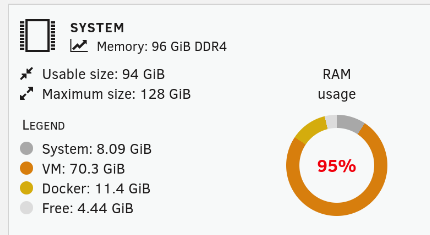
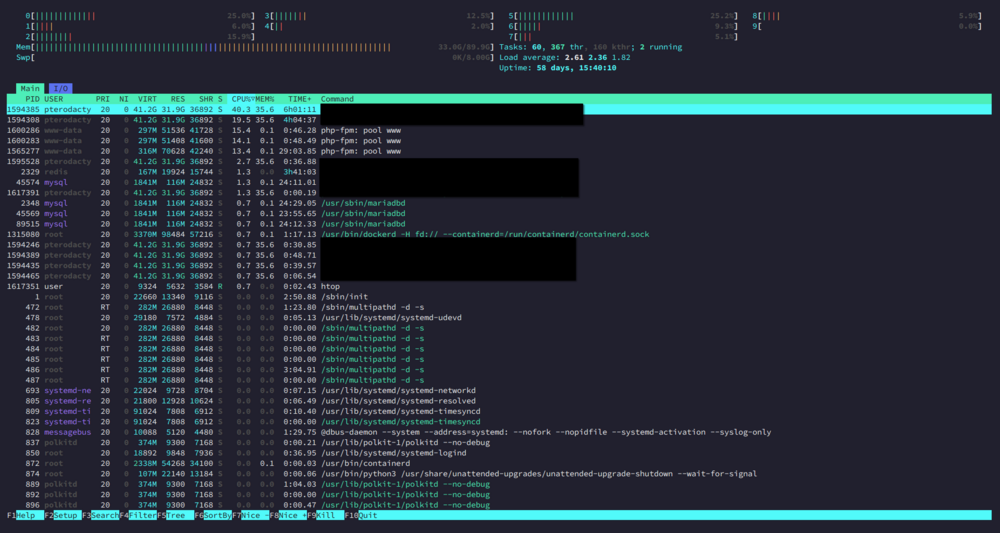
The situation is a bit confusing: htop inside the VM shows ~32 GB RAM usage, but Unraid reports almost 70 GB. Why is there such a big difference? The VM does have a large RAM allocation, but reducing it isn’t really an option. Does anyone know what could be causing the VM to appear to consume so much memory on the host side? This is the only VM running on the server.
-
Hello, Today, Fix Common Problems sent me a warning: So far, my server hasn’t shown any hardware-related issues. I’ve attached the system diagnostic report for reference. Any guidance or assistance would be greatly appreciated! lnx1-diagnostics-20250827-1323.zip

-
The flashdrive won't boot, but it is readable on a windows machine.
-
So it turns out the USB drive was indeed, dead. What's the procedure to follow ? I have a flash backup.
-
My unraid was working perfectly fine until it told me that my flashdrive is corrupted. All my containers and VMs are offline. I'm a bit scared. Here is my system diagnosis. Any help is welcome lnx1-diagnostics-20250720-2206.zip
-
Whenever I create a virtual machine (regardless of the operating system), it works fine for the first few minutes. However, shortly after, the display freezes unexpectedly, and I can no longer interact with the VM. I’ve tried both VNC and SPICE, but the issue persists with either viewer — the screen freezes in the same way. The only way to recover is to forcefully stop the VM and restart it. Unraid 7.1.2 Tested with Debian, Ubuntu, and Windows 11 Any help or suggestions would be greatly appreciated! debian.xml
-
Understood! Thank you for your explanation.
-
I've been using Unraid for a few months now, and I think it's safe to say I'm officially addicted. But there's still one question that's been nagging at me. Could someone explain to me like I'm five the difference between the cache and a pool (I'm not talking about the cache)? From what I understand: the Array is only for hard drives and it's slow, whereas the cache and a pool can be made up of SSDs (because speed). But if all the data goes to the Array (or the cache), then what exactly is the point of using a Pool? Is it just a spa for SSDs or is it actually useful? When and how should I use a pool instead of the array or the cache, and how do you get parity on a Pool (if that's even useful)?
-
I use FileZilla and when i transfer a file, i get this: `Response : 550 Create directory operation failed.` and then `Error: File transfer failed` Of course, FTP is enable on the server
-
This happens when i go the the web UI. I Know it's a database error because of the logs I followed exactly this tutorial (in french): www.youtube.com/watch?v=cmSqDYVUQUE&t nextcloud.log

-
Ok now i get that fatal error -- couldn't map inode 281491201, err = 117 full log : https://paste.gloriouseggroll.tv/?b5e751f69c2fb1a2#8G2DogpgYnHHBm8aJK7qkr97j6bZrCArBJs5sDfb6YZv
-
ERROR: The filesystem has valuable metadata changes in a log which needs to be replayed. Mount the filesystem to replay the log, and unmount it before re-running xfs_repair. If you are unable to mount the filesystem, then use the -L option to destroy the log and attempt a repair. Note that destroying the log may cause corruption -- please attempt a mount of the filesystem before doing this. Should i do it ?
-
Hello, sorry for the late reply. I did the ckeck, but i'm not sure what to do next. Here is the result of the check https://paste.gloriouseggroll.tv/?1d4ec01307ff370b#CgUEo1mCfk9EhAegutDiEqNBbHazWc46NS3B71fyXfFF The disk is in XFS. I'm curently reading this : https://docs.unraid.net/legacy/FAQ/check-disk-filesystems/#xfs_repair
-
Hi, there, When I install or modify a docker container (any container), it tells me something like this docker: Error response from daemon: error while creating mount source path '/mnt/user': mkdir /mnt/user: file exists. Because of this, when I launch a container, it tells me Execution error Server error I can't get anything to work, please help me. tower-diagnostics-20231205-1737.zip tower-syslog-20231205-1550.zip


