Ke3gan
Members
-
Joined
-
I have found the only solution I could find: I set all my variables and configuration as extra parameters, allowing UNRAID to actually add my variables to the docker run command. Also be sure to put your password in ' ' or else issues can arise.
-
I tried that but no change I'm afraid, same log output:log2.txt
-
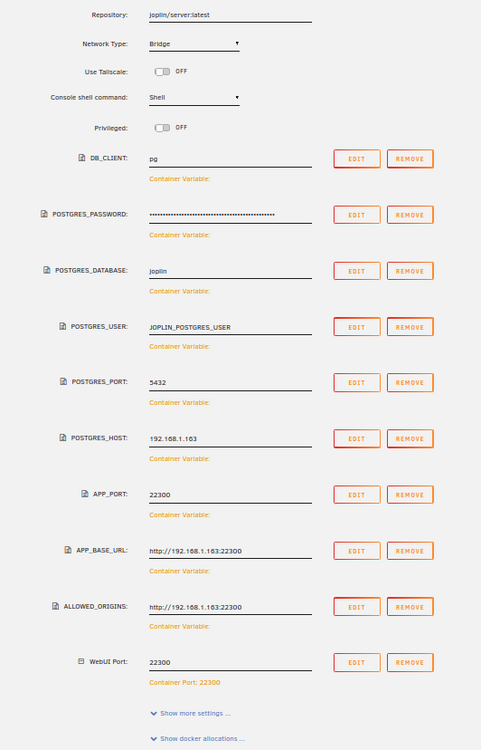
I'm trying to setup joplin/server:latest, using the following variables (through the GUI): -p 22300:22300 -e DB_CLIENT=pg -e POSTGRES_PASSWORD=your_db_password -e POSTGRES_DATABASE=joplin -e POSTGRES_USER=JOPLIN_POSTGRES_USER -e POSTGRES_PORT=5432 -e POSTGRES_HOST=192.168.1.163:5432 -e APP_PORT=22300 \ -e APP_BASE_URL=http://192.168.1.163:22300 \ -e ALLOWED_ORIGINS=http://192.168.1.163:22300 \ When I run it, my given variables are ignored. I cannot go to the WebUI due to the origin not being allowed, and it decides it is using sqlite rather than postgreSQL. JoplinLogs.txt
-
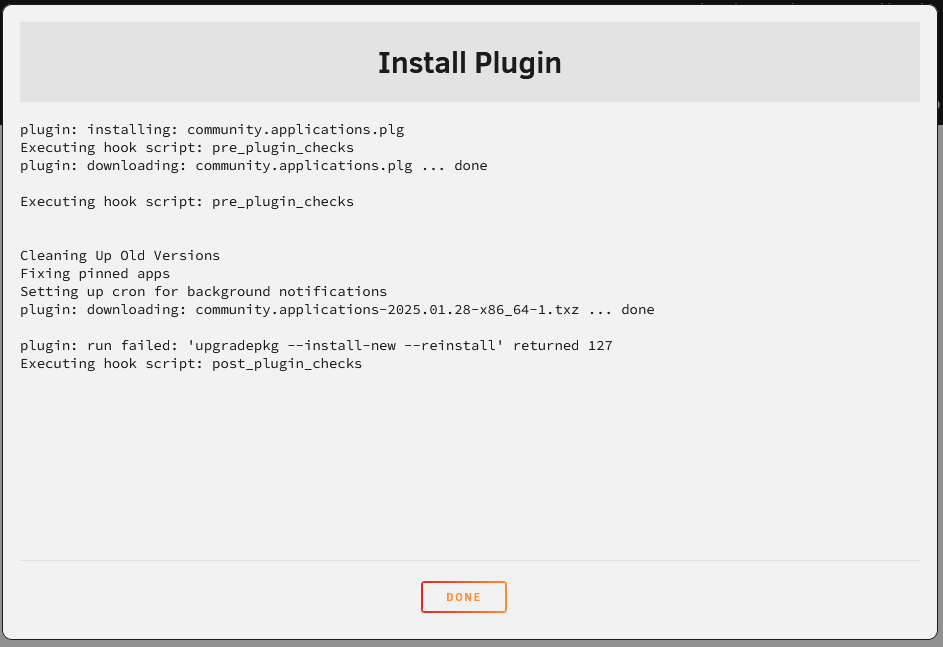
I tried updating and when that didn't work I attempted to uninstall the plugin and reinstall it but I got the same error. I also tried to manually install the plugin but it had the same output. If anybody can help I'd appreciate it, thanks.