





MightyRufo
Members
-
Joined
-
Last visited
Everything posted by MightyRufo
-
ohhhhh, and suddenly it makes complete sense. Damn people out here rocking storinators.
-
64gb, eventually 128gb as I have a ton of stuff running. I am certainly fully utilizing Unraid 😎
-
How would we configure our start order/delay while using the FolderView plugin?
-
What's the point of multiple arrays if you can just restrict shares to specific disks? I feel like then, you'd have to allocate more drives for parity.
-
It's so interesting to see people swear left and right by Seagate or WD because of their experiences. It goes to show you that you can't always trust your personal experiences when it comes to what others will think.
-
What's the benefit of having the symbol green? or are we all just chasing a color here?
-
There seems to be some other projects that might be working? Has there been any word from the devs or are they ghosts at this point?
-
Only way I was able to fix the login issue you're having is by clearing your cookies. It seems once you do this, you're good. I also think this bug might've been fixed in the latest release of RomM but I'm not 100% sure.
-
Well. after weeks (and maybe months?) I've finally gotten a stable system! I also managed to get everything set up.. with one issue.. I had Dynamix auto fan control working and then suddenly it.. stopped.. XD and for the past week or so it has only worked once by a random chance one night when I came home and logged into the server. I do have a manual curve set in the bios. no matter what, dynamix will NOT control the fan speeds even though it shows it is (percent next to rpm on the bottom of the webui) I even went as far as modifying the script myself with chatgpt and having chatgpt create me a custom script I can use in user scripts to basically do the same thing. No go. Even running 'echo 100 > /sys/class/hwmon/hwmon2/pwm1' yields zero control. It's almost as if the MB is not allowing control. All fans are connected to a hub, but even the fans that aren't won't work. My next step is messing with bios settings related to fan control and seeing if there's something that's causing it. I know the fans will still ramp up if the cpu needs it (which is what I want) but I don't run the AC when I'm not home and it can get up to about 78f in the room the sever is in.
-
I did some further testing and whatnot and yeah.. completely normal. My intel desktop idles at like 31. Trying to do research on the different motherboard sensors. I suppose the one I should monitor is the hottest one which I assume is power delivery to the cpu.
-
I'd like to see this too tbh.
-
The weird thing is it doesn't seem accurate. It reads slightly higher than what it actually seems to be. My 7950x really idles at 41c? lol
-
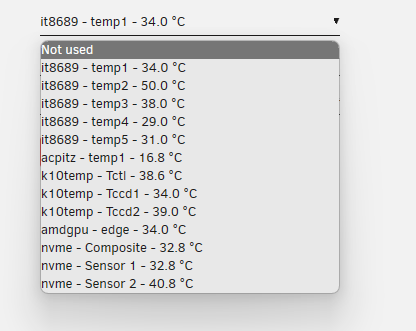
2 days ago I turned everything back on. figured I could just start with dockers if it crashed since I felt like 15 days was enough to convince it me it was stable as just a NAS. So far so good! No issues!! also, I managed to get temps and fan readings without using the thor kernel by adding the drivers manually to the driver file in the plugin folder like your post mentions and installing the it87 plugin (for it8689 sensor) from ich777. I believe I figured out which one was the cpu temp by just running a trancode in plex and waiting for that temp to go up what I know to be normal for my cpu. As far as the motherboard temp though, I am lost. This is the last piece of the puzzle lol. EDIT: nevermind.. the readings are all wrong. CPU temp doesn't match what I see in corefreq and what I see in corefreq makes a lot more sense.
-
Guess what? I think I -might- have figured out what the issue was.. My case has 4 USBs on top.. One of them didn't work from the beginning and I just assumed it was dead. Well I thought about it a coupled days ago and I was like "I wonder if reseating all of my cables fixed that too?" And sure enough, it did! So interesting enough, I am going on 14 days of uptime. The system has been running as just a nas for that duration. No vms or containers for. No issues whatsoever. No usb issues or ethernet issues.. I will eventually turn vms and docker on but I wanted to kill two birds with one stone. It seems very strange to me but I wonder if the usb font panel connector (usb 3.0) was somehow the root cause. It'a just funny how my uptime is much better and that's fixed too.. Before I reseated all of my cables, I had the system in the bios as I was changing some things inside the case and noticed it rebooted. That's what made me think to reseat my cables. I wonder if somehow the cable was seated in a way that caused it to mess with the motherboard. I really have no idea.
-
I have not tried safe mode. Though that is a good idea. Does safe mode just disable plugins? or does it disable VMs and Docker as well? I was doing some research and came to conclusion that it could also be bad memory as well. Especially since the issues are so wide spread. Obviously the last part I want to replace is the motherboard. so I will do everything I can to avoid it lol. Let's hope a reseat of the cables wsa enough to fix it. Server's been up for 1 day and 23 hours. Currently running without Docker and VMs. *fingers crossed*. You gave me some good troubleshooting tips and for that, I thank you. This is my first server set up so I'm learning.
-
Wouldn't running the system with expo enabled effectively enable the overlclock on the ram? Also never considered the pbo thing, I will try this if it crashes again.. Yesterday I went through and reseated all of my cables for everything. I did check for bios updates. I'm running the latest one as of checking today. I will say the system seems "more" stable with c-states disabled and typical current idle enabled. But my crashing is so random that it's hard to know for sure. Yeah it's weird that I don't get any readings. I do get "more" readings on the thor kernel. I'm guessing asus uses a more popular method of the OS interaction with temps. All disks are okay, all disks were used in a previous setup. No slow downs or errors in disk logs. I know what you're talking about though -- I've had issues where an ssd would cause the system to completely hang on my desktop. I will say, I am going 11 hours of up time now on stock unraid kernel. Let's see what happens. Sometimes it can take a while. 6 to 8 hours of uptime was more of a recent estimate. The most I've gotten was 13 days so.. it's a waiting game now. Thanks for replying!
-
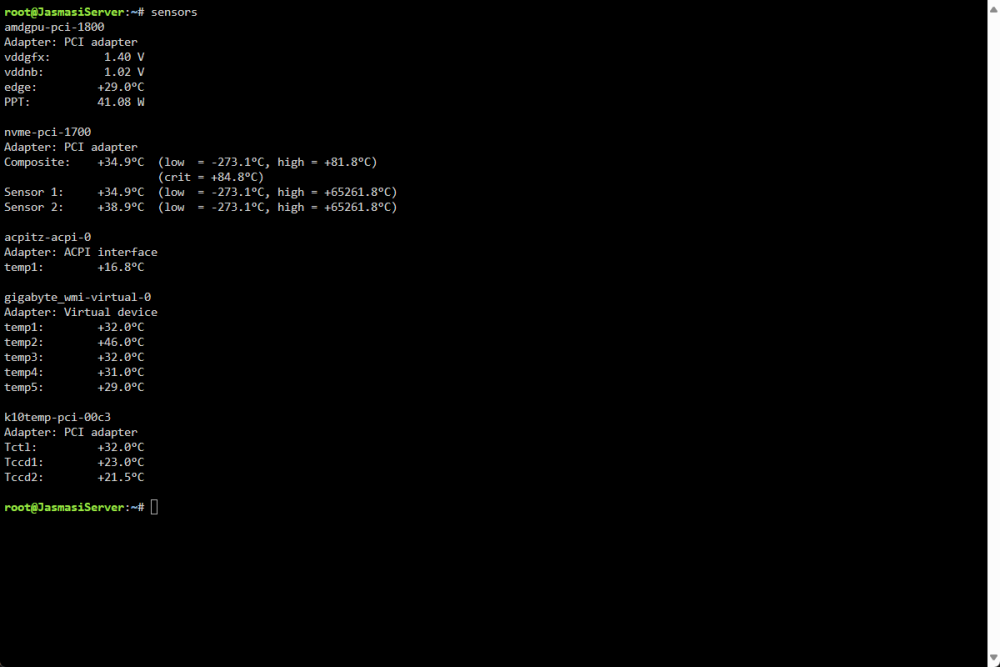
I certainly came to that conclusion myself as well. I'm trying to exhaust every option before I'm forced to start switching out hardware as I will have to eat the cost or wait for a warranty replacement. My motherboard is the gigabyte x670 aorus elite ax.. But I see a fair amount of peopling running the asus tuf x670e (such as yourself) without issues. I'm considering getting that board. I say this because the system seems 100% stable on windows and I wonder if it's just a major stability issue with this board. I have checked temps and whatnot. I am running a 420 AIO as well. All checks out. Ram is indeed expo but I am not running it at its advertised speed. I am running it at the stock 48000. I haven't messed with c-states or typical idle control. Bios is at stock. also. interesting enough, I copied the files for this kernel onto my flash drive and booted up unraid, opened terminal and typed sensors and I don't see any info about my cpu and whatnot. I attached a photo of what I see. I feel like that's odd given this is a x670 board.
-
I'm currently suffering from major stability issues with my x670 7950x build. Call traces (not related macvlan), usbs dropping, cpu cores not responding, dropping network connection (but sometimes the server can still access the internet).. I'm wondering if this kernel would help. On unraid, I can't get 6 to 8 hours of uptime.. On windows server? I'm going on 1 day and 2 hours. Are there any disadvantages to running this kernel? I don't nor will I use ZFS and I don't plan on getting an nvidia gpu for ages. Especially if I can utilize the igpu on my cpu. (using the radeonTop plugin with plex causes crashes).
-
I'm waiting as well.. but not for the same reason's ya'll are waiting.
-
This issue arised from day 1 of building this server. The previous one was fine.. it has to be the motherboard. That really sucks. I noticed the server was offline again.. this time it would NOT respond to me pressing the power button. I am having call traces. Apr 6 02:20:34 JasmasiServer kernel: invalid opcode: 0000 [#1] PREEMPT SMP NOPTI Apr 6 02:20:34 JasmasiServer kernel: CPU: 19 PID: 16015 Comm: tdarr-ffmpeg Tainted: P O 6.1.79-Unraid #1 Apr 6 02:20:34 JasmasiServer kernel: Hardware name: Gigabyte Technology Co., Ltd. X670 AORUS ELITE AX/X670 AORUS ELITE AX, BIOS F22b 02/06/2024 Apr 6 02:20:34 JasmasiServer kernel: RIP: 0010:plist_add+0x9c/0x9e Apr 6 02:20:34 J asmasiServer kernel: Code: 42 10 48 83 c2 08 48 89 50 08 48 89 48 10 4c 89 01 4c 89 ca 48 8b 4a 08 48 89 7a 08 48 89 50 18 48 89 48 20 48 89 39 e9 ca 08 <3b> 00 48 8b 47 08 48 8d 57 08 48 39 c2 74 41 48 8b 47 18 48 39 c6 Apr 6 02:20:34 JasmasiServer kernel: RSP: 0018:ffffc9002f72fd88 EFLAGS: 00010246 Apr 6 02:20:34 JasmasiServer kernel: RAX: ffffc9002f72fe20 RBX: ffffc9002f72fe20 RCX: ffff8881013ba908 Apr 6 02:20:34 JasmasiServer kernel: RDX: ffff8881013ba908 RSI: ffff8881013ba908 RDI: ffffc9002f72fe38 Apr 6 02:20:34 JasmasiServer kernel: RBP: ffff888763dcac80 R08: ffffc9002f72fe28 R09: ffff8881013ba908 Apr 6 02:20:34 JasmasiServer kernel: R10: 0000000000000000 R11: 0000000000000000 R12: 0000000000000000 Apr 6 02:20:34 JasmasiServer kernel: R13: 0000000000000000 R14: ffff888763dcac80 R15: 000056254857e964 Apr 6 02:20:34 JasmasiServer kernel: FS: 0000150ee61f0700(0000) GS:ffff888ffe2c0000(0000) knlGS:0000000000000000 Apr 6 02:20:34 JasmasiServer kernel: CS: 0010 DS: 0000 ES: 0000 CR0: 0000000080050033 Apr 6 02:20:34 JasmasiServer kernel: CR2: 0000152bdedb2d20 CR3: 00000002dcb2c000 CR4: 0000000000750ee0 Apr 6 02:20:34 JasmasiServer kernel: PKRU: 55555554 Apr 6 02:20:34 JasmasiServer kernel: Call Trace: And it continues. I'm gonna run windows server and see if I encounter the same issues.
-
I just encountered another error. I lost network connectivity with the server.. However the server still had a connection to the internet (I received notifications from a container via pushover having trouble connecting to another). The log shows as follows Apr 5 19:29:21 JasmasiServer kernel: r8169 0000:10:00.0 eth0: Link is Up - 10Mbps/Full - flow control off Apr 5 19:29:21 JasmasiServer kernel: bond0: (slave eth0): link status definitely up, 10 Mbps full duplex Apr 5 19:29:21 JasmasiServer kernel: bond0: (slave eth0): making interface the new active one Apr 5 19:29:21 JasmasiServer kernel: device eth0 entered promiscuous mode Apr 5 19:29:21 JasmasiServer kernel: bond0: active interface up! Apr 5 19:29:21 JasmasiServer kernel: br0: port 1(bond0) entered blocking state Apr 5 19:29:21 JasmasiServer kernel: br0: port 1(bond0) entered forwarding state Apr 5 19:29:22 JasmasiServer kernel: r8169 0000:10:00.0 eth0: Link is Down Apr 5 19:29:22 JasmasiServer kernel: bond0: (slave eth0): link status definitely down, disabling slave Apr 5 19:29:22 JasmasiServer kernel: device eth0 left promiscuous mode Apr 5 19:29:22 JasmasiServer kernel: bond0: now running without any active interface! Apr 5 19:29:22 JasmasiServer kernel: br0: port 1(bond0) entered disabled state Apr 5 19:29:25 JasmasiServer kernel: r8169 0000:10:00.0 eth0: Link is Up - 1Gbps/Full - flow control off Apr 5 19:29:25 JasmasiServer kernel: bond0: (slave eth0): link status definitely up, 1000 Mbps full duplex Apr 5 19:29:25 JasmasiServer kernel: bond0: (slave eth0): making interface the new active one Apr 5 19:29:25 JasmasiServer kernel: device eth0 entered promiscuous mode Apr 5 19:29:25 JasmasiServer kernel: bond0: active interface up! This continues to repeat. the log is just before the server lost network connectivity. I think the log shows repeated fluctuations in the link status of my ethernet adaptor, until it gives up, I assume. Restarting the server restores it to normal working order. This was after almost 5 days of uptime. Even though I was able to press the power button on the server and it did shut down, I still got an unclean shutdown notification from unraid. No "shutdown information" was found in the log either. I think this also seems like a hardware issue? I'm not sure.. I wasn't able to connect to the webui or else I would of done a diagnostics. Let me know if there's any further information I can provide.
-
I was afraid you'd say that. The interesting part is that the last time it happened. There was two USB ports on my motherboard that simply wouldn't respond to anything (not even power I believe) I also couldn't find any reports with x670. If I do try the beta, can I downgrade if it causes other issues? Obviously I will make a backup of my flash.
-
Interesting. Unraid 7? That's gotta be ages away.. We are next in line for 6.13 lol. I'm also waiting of course but my issues are a little more widespread in that I'm also having USBs randomly disconnecting. I get these issues in my logs.. Followed by devices disconnecting and not coming back up. usb 9-1-port1: disabled by hub (EMI?), re-enabling... and xhci_hcd 0000:18:00.3: xHCI host controller not responding, assume dead xhci_hcd 0000:18:00.3: HC died; cleaning up My post about the issue
-
I'm experiencing a similar issue with my Gigabyte X670 AORUS ELITE AX paired with an AMD Ryzen 9 7950X, particularly the lack of temperature and fan control on unRAID. It's quite concerning to operate without these essential monitoring tools. I'm also cautious about attempting kernel modifications due to the potential risk to my data. Have you or anyone else found a solution or workaround since your post? Any guidance would be greatly appreciated.
-
Hi everyone, I'm experiencing intermittent disconnections with the USB 3.0 ports on my Gigabyte X670 AORUS ELITE AX, running alongside an AMD Ryzen 7950X on Unraid 6.12.8. The issue persists despite isolating devices and updating the BIOS to version F22. I've noticed others here have had various issues with x670 boards and the 7950X; I'm wondering if there might be a common thread or solution. I've attached my Unraid diagnostics in hopes that someone might have insights or suggestions on how to address this. Thank you for any help you can provide! jasmasiserver-diagnostics-20240329-0022.zip


