





IggyWhite
Members
-
Joined
-
Last visited
-
Pity it's gone. I like my own theme much better.
-
Nothing of above worked for me until I added another variable: CHANGE_DETECTION_TOKEN and set value to 123456 (probably arbitrary) Now it finally works again.
-
Congrats, Ed.
-
Sure, here it is. It's nothing fancy or smart, but if it can help you, I'm glad. Of course, your IP addresses/ports and/or usernames/passwords may vary. bookmarks.yaml: - Server management: - Server1 (OMV): - abbr: AN href: http://192.168.1.26:800 - Server2 (OMV): - abbr: AU href: http://192.168.1.29 - Server3 (UNRAID): - abbr: HY href: http://192.168.1.27 - Server4 (ESXi): - abbr: OR href: http://192.168.1.23 - Server5 (UNRAID): - abbr: CY href: http://192.168.1.30 - Server1 (CasaOS): - abbr: ANC href: http://192.168.1.26:81 - Server2 (CasaOS): - abbr: AUC href: http://192.168.1.29:81 - Remote access controllers: - Server1: - abbr: AN href: http://192.168.1.17 - Server2: - abbr: AU href: http://192.168.1.18 - Server3: - abbr: HY href: http://192.168.1.13 - Server4: - abbr: OR href: http://192.168.1.14 - Server5: - abbr: CY href: http://192.168.1.19 - Chassis1: - abbr: FX href: http://192.168.1.10 - Server6: - abbr: ER href: http://192.168.1.11 - Server7: - abbr: FO href: http://192.168.1.12 - LANSwitch1: - abbr: UM href: http://192.168.1.5 settings.yaml title: Homepage Home headerStyle: boxedWidgets color: slate providers: openweathermap: openweathermapapikey weatherapi: weatherapiapikey layout: Server1: useEqualHeights: true style: row columns: 5 disableCollape: true Server2: useEqualHeights: true style: row columns: 5 disableCollapse: true Server3: useEqualHeights: true style: row columns: 4 disableCollapse: true Server4: style: row columns: 5 disableCollapse: true Server5: style: row columns: 5 disableCollapse: true Server management: useEqualHeights: true style: row columns: 5 Remote access controllers: useEqualHeights: true style: row columns: 5 widgets.yaml - resources: label: System expanded: true cpu: true memory: true cputemp: true uptime: true - resources: label: Storage expanded: true disk: - / # - /disk1 # - /mnt/disk2 # - /mnt/disk3 # - /mnt/mcache # - /mnt/vcache - search: provider: duckduckgo target: _blank services.yaml - Server3: - Dell R730xd: icon: unraid widget: type: glances url: http://192.168.1.27:61208 metric: info - CPU: icon: thunderhub-light widget: type: glances url: http://192.168.1.27:61208 metric: cpu - Memory: widget: type: glances url: http://192.168.1.27:61208 metric: memory - Network: widget: type: glances url: http://192.168.1.27:61208 metric: network:eth0 - Processes: widget: type: glances url: http://192.168.1.27:61208 metric: process - CPU 1 temperature: widget: type: glances url: http://192.168.1.27:61208 metric: sensor:Package id 0 - CPU 2 temperature: widget: type: glances url: http://192.168.1.27:61208 metric: sensor:Package id 1 - Disk 1: widget: display: list type: customapi url: http://192.168.1.27:24940 method: GET mappings: - field: array: 0: total label: total format: number suffix: "GB" - field: array: 0: used label: used format: number suffix: "GB" additionalField: field: array: 0: used_percent format: percent prefix: "(" suffix: ")" - field: array: 0: free label: free format: number suffix: "GB" additionalField: field: array: 0: free_percent format: percent prefix: "(" suffix: ")" - Disk 2: widget: display: list type: customapi url: http://192.168.1.27:24940 method: GET mappings: - field: array: 1: total label: total format: number suffix: "GB" - field: array: 1: used label: used format: number suffix: "GB" additionalField: field: array: 1: used_percent format: percent prefix: "(" suffix: ")" - field: array: 1: free label: free format: number suffix: "GB" additionalField: field: array: 1: free_percent format: percent prefix: "(" suffix: ")" - Disk 3: widget: display: list type: customapi url: http://192.168.1.27:24940 method: GET mappings: - field: array: 2: total label: total format: number suffix: "GB" - field: array: 2: used label: used format: number suffix: "GB" additionalField: field: array: 2: used_percent format: percent prefix: "(" suffix: ")" - field: array: 2: free label: free format: number suffix: "GB" additionalField: field: array: 2: free_percent format: percent prefix: "(" suffix: ")" - MCache: widget: display: list type: customapi url: http://192.168.1.27:24940 method: GET mappings: - field: cache: 0: total label: total format: number suffix: "GB" - field: cache: 0: used label: used format: number suffix: "GB" additionalField: field: cache: 0: used_percent format: percent prefix: "(" suffix: ")" - field: cache: 0: free label: free format: number suffix: "GB" additionalField: field: cache: 0: free_percent format: percent prefix: "(" suffix: ")" - VCache: widget: display: list type: customapi url: http://192.168.1.27:24940 method: GET mappings: - field: cache: 1: total label: total format: number suffix: "GB" - field: cache: 1: used label: used format: number suffix: "GB" additionalField: field: cache: 1: used_percent format: percent prefix: "(" suffix: ")" - field: cache: 1: free label: free format: number suffix: "GB" additionalField: field: cache: 1: free_percent format: percent prefix: "(" suffix: ")" #- Server1: # - Dell R630: # icon: openmediavault # widget: # type: glances # url: http://192.168.1.26:61208 # metric: info # - CPU: # widget: # type: glances # url: http://192.168.1.26:61208 # metric: cpu # - Memory: # widget: # type: glances # url: http://192.168.1.26:61208 # metric: memory # - Network: # widget: # type: glances # url: http://192.168.1.26:61208 # metric: network:eth0 # - Processes: # widget: # type: glances # url: http://192.168.1.26:61208 # metric: process # - CPU temperature: # widget: # type: glances # url: http://192.168.1.26:61208 # metric: sensor:Package id 0 # - S.M.A.R.T.: # widget: # type: openmediavault # url: http://192.168.1.26:800 # username: xxxxxx # password: xxxxxx # method: smart.getListBg - Server2: - Dell R630: icon: openmediavault widget: type: glances url: http://192.168.1.29:61208 metric: info - CPU: widget: type: glances url: http://192.168.1.29:61208 metric: cpu - Memory: widget: type: glances url: http://192.168.1.29:61208 metric: memory - Network: widget: type: glances url: http://192.168.1.29:61208 metric: network:eth0 - Processes: widget: type: glances url: http://192.168.1.29:61208 metric: process - CPU temperature: widget: type: glances url: http://192.168.1.29:61208 metric: sensor:Package id 0 - S.M.A.R.T.: widget: type: openmediavault url: http://192.168.1.29 username: xxxxxx password: xxxxxx method: smart.getListBg
-
User manual will tell you which slot it is: https://download.asrock.com/Manual/E3C246D4U.pdf, page 7. And you are right, it's 2nd from the top. Just buy a new stick, DD4 is very cheap these days.
-
Can we assume that support for this container is officially dead? 🤔
-
Hi. Dumb question. Is it possible to have two (or more) output paths in different pools for different Tixati folders? Something like Finished folder that resides in a pool1 that will be moved to the array by the Mover Ongoing/incomplete folder that resides in a pool2 and is not moved to the array Is simply adding another output path in the config feasible for this scenario? Another dumb question. I see the incomplete-pieces folder residing in /mnt/user/appdata/Tixati/xdg/config/tixati/ (i.e. Config) folder. Isn't it supposed to be placed into the /mnt/user/tixati/ (i.e. Output) folder?
-
IggyWhite changed their profile photo
-
No problem. Glad I could help! 👍
-
So, six hours later, not a single error! 🙂
-
Pulled latest QA version, testing at the moment. So far, no errors. Will inform in about an hour or so if anything changes.
-
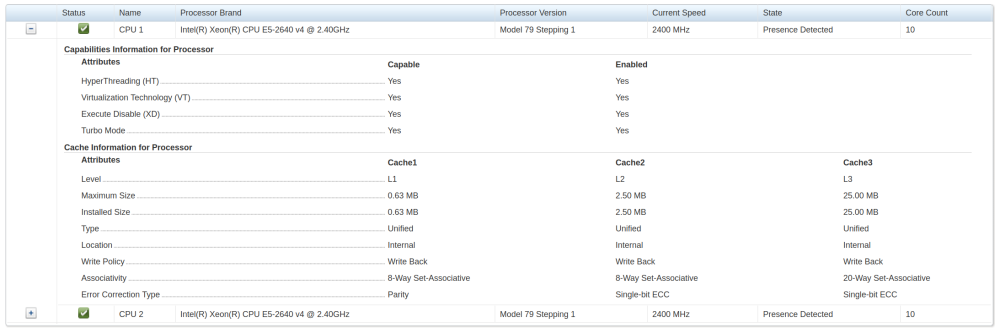
It's the CPU, it seems: 2024/04/02 15:22:28 ERROR Error trying to respond to API call error="json: unsupported value: NaN" "attempting to marshal"="{Array:[{Path:/mnt/disk1 Total:3725 Used:2162 Free:1563 UsedPercent:58.04 FreePercent:41.96} {Path:/mnt/disk2 Total:3724 Used:1862 Free:1862 UsedPercent:50 FreePercent:50} {Path:/mnt/disk3 Total:3724 Used:486 Free:3238 UsedPercent:13.05 FreePercent:86.95}] Cache:[{Path:/mnt/mcache Total:953 Used:2 Free:951 UsedPercent:0.21 FreePercent:99.79} {Path:/mnt/vcache Total:953 Used:86 Free:867 UsedPercent:9.02 FreePercent:90.98}] Network:[{Iname:bond0 RxMiBs:0 TxMiBs:0 RxMbps:0 TxMbps:0}] ArrayTotal:{Path:total Total:11173 Used:4510 Free:6663 UsedPercent:40.37 FreePercent:59.63} CacheTotal:{Path:total Total:1906 Used:88 Free:1818 UsedPercent:4.62 FreePercent:95.38} NetworkTotal:{Iname:total RxMiBs:0 TxMiBs:0 RxMbps:0 TxMbps:0} Cpu:{LoadPercent:NaN} Memory:{Total:128826 Used:4411 Free:124415 UsedPercent:3.42 FreePercent:96.58}}\n" There are two Intel Xeons E5-2640 v4 with 10 cores, 20 threads each.
-
I will do this later today, if time permits, and let you know how it went/post logs here.
-
But ERROR Error trying to respond to API call error="json: unsupported value: NaN" still persists, though.
-
I'm such a dumbass... You were right, I misspelled bond0 to bound0 in conf.yaml. 🥺
-
I might appear ignorant, but shouldn't it be bond0, not bound0?

