





mattesl
Members
-
Joined
-
Last visited
-
Hi, i want to run a gaming VM with Win10 on Unraid, to which i pass through my gpu. Ive been using this guide: https://forums.serverbuilds.net/t/guide-remote-gaming-on-unraid/4248/9 However that means that the GPU cannot be used for anything else. I am aware that using a GPU with Docker containers and VM simultaneously is impossible, but can i set it up in a way that the GPU is available for my Jellyfin docker container for transcoding whilst the vm is shut down, and then, when the vm turns on, it switches from the containers to the VM? Thx
-
sure will do p.s. i couldnt download it via the webui, it got stuck at the "downloading" screen, had to do it with scp tower-diagnostics-20231210-1408.zip
-
Hi, im currently on my trial period of unraid, and have set up my shares and docker containers as well as a windows vm. However, after rebooting the server in the process of making it accesible from outside my lan via a vps proxy, the entire array is missing. As you can see in the bottom, i get a start error when trying to start the array. However sshing into the server (the webconsole in unraid doesnt work, just gives me a blank screen) all drives are visible with "lsblk". What did i mess up to cause this? tower-diagnostics-20231210-1408.zip
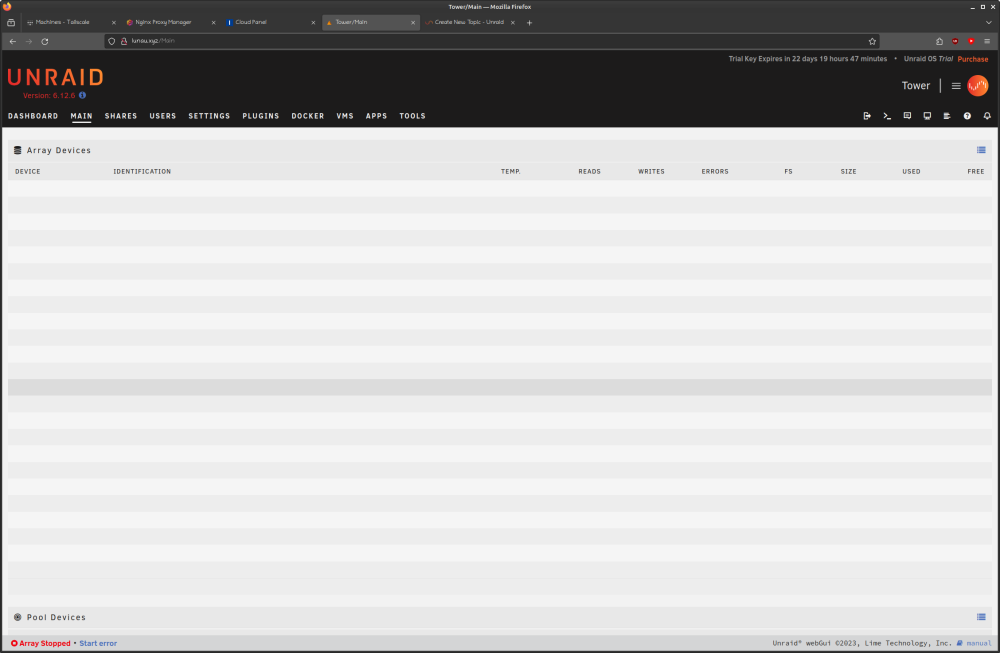
-
Hi everyone, i have just installed Unraid, and i have to say it works really well. I even prefer the docker UI to portainer. That is why i am migrating my docker stack to Unraid right now. In doing so, i am setting up a Wireguard VPN, and binding various containers to it. Something i cannot find however is the option to set specific ports. A default gluetun docker-compose.yml looks something like this: version: "3" services: gluetun: image: qmcgaw/gluetun # container_name: gluetun # line above must be uncommented to allow external containers to connect. # See https://github.com/qdm12/gluetun-wiki/blob/main/setup/connect-a-container-to-gluetun.md#external-container-to-gluetun cap_add: - NET_ADMIN devices: - /dev/net/tun:/dev/net/tun ports: - 8888:8888/tcp # HTTP proxy - 8388:8388/tcp # Shadowsocks - 8388:8388/udp # Shadowsocks volumes: - /yourpath:/gluetun environment: # See https://github.com/qdm12/gluetun-wiki/tree/main/setup#setup - VPN_SERVICE_PROVIDER=ivpn - VPN_TYPE=openvpn # OpenVPN: - OPENVPN_USER= - OPENVPN_PASSWORD= # Wireguard: # - WIREGUARD_PRIVATE_KEY=wOEI9rqqbDwnN8/Bpp22sVz48T71vJ4fYmFWujulwUU= # - WIREGUARD_ADDRESSES=10.64.222.21/32 # Timezone for accurate log times - TZ= # Server list updater # See https://github.com/qdm12/gluetun-wiki/blob/main/setup/servers.md#update-the-vpn-servers-list - UPDATER_PERIOD= Specifically the "ports:" option is something i cannot find in the docker setting in Unraid. The closest thing i have found in the WEBUI is the "FIREWALL_VPN_INPUT_PORTS:" option, but that is for exposing ports I have also added the port at the bottom, which is 8080, but the qbittorent container webui is still unreacheable I thought about posting this to a gluetun forum, but this is a problem specific to Unraid, so i figured this is a better place to ask. Thanks in advance
