



Skip to content
View in the app

A better way to browse. Learn more.

Unraid

A full-screen app on your home screen with push notifications, badges and more.

To install this app on iOS and iPadOS
  1. Tap the Share icon in Safari
  2. Scroll the menu and tap Add to Home Screen.
  3. Tap Add in the top-right corner.
To install this app on Android
  1. Tap the 3-dot menu (⋮) in the top-right corner of the browser.
  2. Tap Add to Home screen or Install app.
  3. Confirm by tapping Install.

blackwaves

Members
  • Joined

  • Last visited

  1. That fixed it, thanks a bunch!
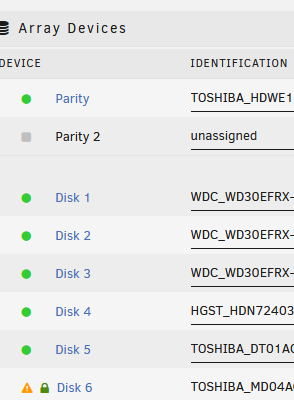
  2. bunker-diagnostics-20231204-1103.zip I have an encrypted server and I went to swap a drive. I shutdown, pulled the drive, added the new drive, booted, assigned new drive to old drives spot. I've done this with no problem for years on my other two unraid servers that are not encrypted. Now there is no field to enter the encryption passphrase For some reason there's only a lock on Disk 6 now, the one I'm replacing, there's no where to enter the key and I can't start it without the key. I've tried... * flushing cache * starting in safe mode * removing all plugins * different browsers and different computers/phones * upgrading from 6.12.2 to 6.12.6 Is there a way I can run a command line to start the array with a key? Any help would be great.

Account

Navigation

Search

Search

Configure browser push notifications

Chrome (Android)
  1. Tap the lock icon next to the address bar.
  2. Tap Permissions → Notifications.
  3. Adjust your preference.
Chrome (Desktop)
  1. Click the padlock icon in the address bar.
  2. Select Site settings.
  3. Find Notifications and adjust your preference.
