





HDodd
Members
-
Joined
-
Last visited
Everything posted by HDodd
-
Thank you all for your help! I really appreciate it. It seems like everything is up and running now
-
Okay after another restart the new tunnel seems to be running. I'm going to test a few other things before marking this as solved, but I think we're there
-
The tunnel says that it's active and shows a very tiny amount of data being received and sent. So I added a brand new tunnel (wg1) and tried using that with my containers, but I'm not able to access the webui of these containers at all. Both wg0 and wg1 are active, but only wg0 gives webui access... any idea what could be causing this?
-
I'm going to get some rest before working on this in the morning, I'm planning on adding another tunnel with a different config in the morning to see if that does anything, but I'm not sure what's causing this separation from other containers... Is there anything else I should try, or anything obvious I might be missing?
-
So I deleted my VPN and re-added it via a new imported wireguard config, and the network has returned. But now none of those containers can access anything else (Not the internet or other docker containers)
-
So I completed the above and br0 is now back, but my VPN connection no longer shows up when adding/updating docker containers... It still shows up in the VPN manager, and is able to handshake/ping, but I can't connect any of my containers to the VPN now
-
And even more strange is this: "Error response from daemon: network b3c2cf3baf6e not found" Even though the log specifically calls out that network above, it also claims it is not found... What do I need to do to recreate my docker image? Just delete the docker.img file and reinstall previous apps from CA?
-
Interestingly enough the network id is unchanged after restarting docker "Feb 28 17:32:39 mHDPC root: Error response from daemon: network di-b3c2cf3baf6e is already using parent interface br0"
-
Not sure if this is helpful, but here:
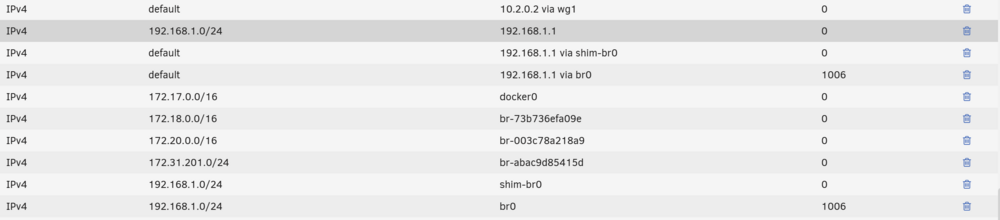
-
Would giving br0 a new subnet help? (192.168.3.0/24 instead of 192.168.1.0/24) I'd like to avoid that if I can, but I'm open to any options and really appreciate the help you all have given so far
-
I've checked all of the netowrks shown in the list and none of them show a parent of br0... here is the text from my console. I searched for br0 after inspecting every network and found nothing dockerNetworkInspectLog.txt
-
Okay, what do I need to do to identify which custom network is causing the issue? I've used 'docker network ls' to list them, but none of the IDs match with the above id you found. Are these re-generated every launch?
-
When I enter that into the console I get : "Error response from daemon: network br0 not found"
-
I just tried that and unfortunately nothing changed... Would checking the DHCP Pool checkbox help at all?
-
and I apologize for the title, I must've copied that by mistakeHere's the screenshot you requested
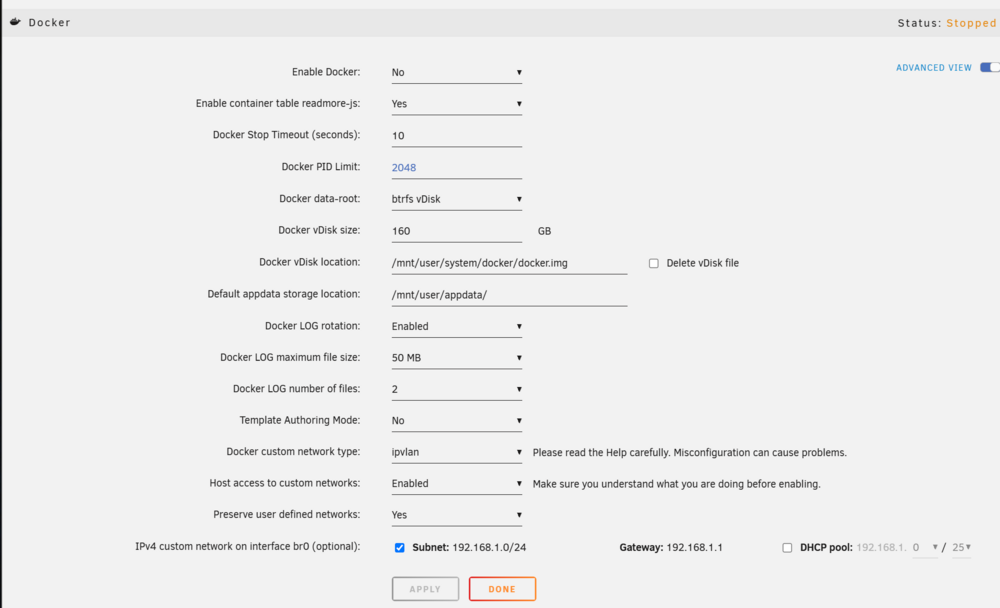 It is not, I'm still unable to set any of my dockers to br0... here are my interface details. This is the only place I'm able to see br0 referenced
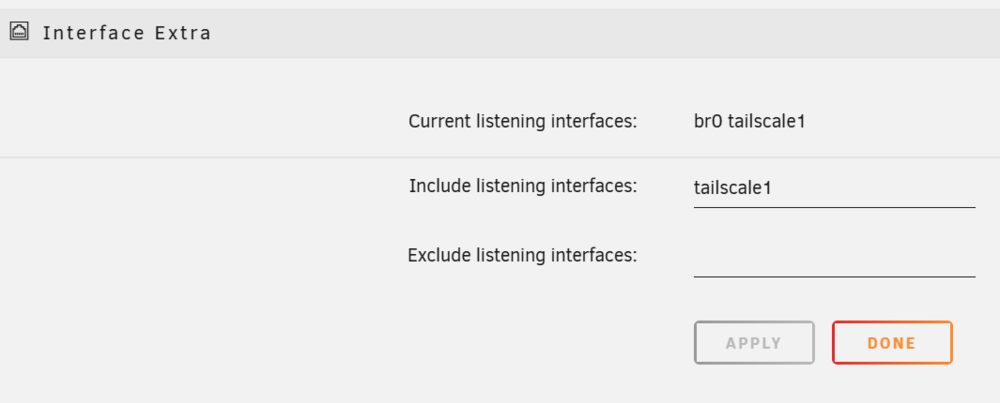 Sorry about that, I appreciate you letting me know I forgot to add that! Here is my diagnostics file. mhdpc-diagnostics-20250227-1744.zipAfter updating to 7.0.1 from 7.0.0 recently, my dockers connected to my br0 network stopped being accessible, both through ngnix and the local network. I'd had a similar issue before, which I solved by deleting the network.cfg file and allowing unRaid to rebuild it. I tried this again, but am having an entirely new problem Now br0 won't show up at all under 'Network Type' when I try to update my containers, and instead I have 'None' show up in the dockers which used to have br0 assigned. I've tried deleting the network.cfg and changing my network settings around, but have had no luck. Currently I am using: Docker settings: - Docker custom network type: ipvlan - Host access to custom networks: Enabled - Preserve user defined networks: Yes - IPv4 custom network on interface br0: Subnet: 192.168.1.0/24 Gateway: 192.168.1.1 DHCP pool: not set Network Settings: - Enable bonding: No - Enable bridging: Tes Can someone please help me figure this out?So I've recently been struggling to figure out what went wrong with my VPN in unRaid. Following a power loss and Ubiquiti router update (both happened in a span of half a day), my wireguard tunnels are now unable to access the internet. Containers using the tunnel's custom network can ping other containers on my machine, but cannot access the outside world. When I ping my tunnel it replies, but the "Data received:" and "Data sent:" entries at the bottom left show essentially no traffic (1.80 kb and 35.0 kb) I hadn't updated or changed any settings in my setup prior to this happening, so I'm at a bit of a loss. Things I've tried/double-checked: - Quadrouple checking my port forwarding - Changing my server's IP from static to automatic and back from unraid, and changing the IP it's assigned via the router to a new one and back - Deleting my tunnel and setting them up again (even downloaded a new config from ProtonVPN) - Deleting my network.cfg and wg0.conf/wg1.conf - Setting up a static route (which the server previously did not need) - Setting my persistent keepalive to 25 seconds (was not set/needed previously) I also tried making these suggested tweaks (I was previously using ipvlan): Settings > Network Settings > eth0 > Enable Bonding = Yes or No, either work with this solution Settings > Network Settings > eth0 > Enable Bridging = No (this will automatically enable macvlan) Settings > Docker > Host access to custom networks = Enabled And these did not help. I followed the "Complex Network Setup" portion of this guide and currently have these settings. My current settings are as follows: Use NAT = No Settings > Network Settings > eth0 > Enable Bonding = Yes Settings > Network Settings > eth0 > Enable Bridging = Yes Settings > Docker > Host access to custom networks = Enabled I've been trying to figure this out for a few weeks now, and I normally don't like asking but can someone please help me troubleshoot this?How is your "cv-store" domain still able to serve your resume files? Or rather, how do you access them if the first proxy is disabled? If I try to use the url given by Reactive Resume (given in "cv.mydomain...") but enter it as "cs-store.mydomain...", I'm given an "access denied" error. I have the first proxy disabled and the second enabled, is there anything else I need to do? I have this fully set up and working otherwise



