





Yock
Members
-
Joined
-
Last visited
Everything posted by Yock
-
Hello. When running Emby in a docker container it sometimes shoots up in memory usage, i've seen it take over 10GB+ memory at some point. Looking into it, with the help of the Emby developers, Emby it self only seems to use around 1.5GB in total while Unraid reports much more. Looking up difference monitoring programs i get different kinds of results. Some report what Emby does, others what Unraid does. My question: Does Unraid include cache, disk cache and so on in the memory usage for docker containers? That would explain pretty much everything if it does.
-
Seeing as it's only when you transfer files.. Can it be the cables? I've seen stranger things happen because of bad cables.
-
Just updated to lastest version. Container now stalls on "[info] NAME_SERVERS defined as....." Disabling VPN makes it so it can start again.
-
In Unraid Beta 7 you can set the CPU governor to performance, that gains me about 200MB/s. You can also do it with the "tips and tweaks" plugin.
-
Turbo write would also speed thing up somewhat though it's no magic bullet.
-
Just saw the update and tried it. Emby shows up now, many thanks! Keep up the great work.
-
That sadly didn't do anything.
-
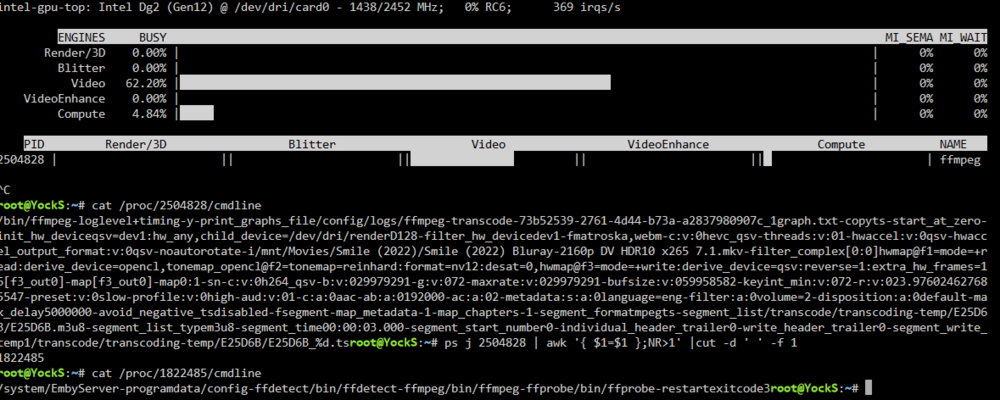
Forgot to add. Things like Fileflows, Tdarr and other things show, just Emby that doesn't. I don't get any activity with 3D render either but i guess that's a problem with GPU top.
-
Here ya go.
-
Nothing i do can get it to show any activity, even encoding in Fileflows or Tdarr. I don't mind it much though as long as it works as it should then an indicator doesn't matter that much.
-
Using Emby with 2024.10.22a does not show Emby in active apps. Also reading through this thread, is 3D render supposed to be used when transcoding? Always at 0% for me with an Intel Arc card.
-
A good quality NVME can write petabytes before near any where you have to worry about it dying. Look up your SSD/NVME on google like fx. "Samsung 990 Pro endurance" and it should be easy to find how much it can handle before getting in range of it max endurance. On main page of the Unraid server webpage you can click on the SSD/NVME device and under "attributes" you should be able to see it there to plus remaining endurance if the NVME vendor gives that info.
-
What precisely do you mean by this?
-
ARC cards are only supported in Unraid Beta 7 or with a custom kernel.
-
Just out of curiosity i've been doing some testing my self. Running 3 NVME's in a raidz1 configuration. My server seems to be unable to get any higher than 1.3GB/s in combined transfer speeds, what i mean with that is if i move a file read and write speed combined will never exceed 1.3GB/s, looking at CPU usage no thread is even close to maxed out. Ran a "dd if=/dev/zero of=/mnt/cache/temp/test.img bs=16G count=20 oflag=dsync" a couple of times and got results ranging from 1.2 - 1.8GB/s. Looking at the speed of the disks while test ran they individually hit 1.2GB/s until settling at the before mentioned speeds (probably because of the SSDs internal cache getting full) Copying a file from my PC to the server to a fuse layer folder 600MB/s, moving to an exclusive share i max out my 10Gpbs nic. Copying a file internally on the server from fuse layer to fuse layer i get 300MB/s, from exclusive to exclusive i get 600MB/s. Rounded the numbers a little. My server is on a Ryzen 3900x. Before it became my server i used it as my work/gaming computer and the speeds were way higher than that so should not be a saturated PCIe problem. Makes me think that Unraid has some serious overhead somewhere even on exclusive shares. @bryce2113 Run the "dd if=/dev/zero of=/mnt/cache/temp/test.img bs=16G count=20 oflag=dsync status=progress" (change the destination in the command to fit your server) and see what the internal results are. Might point to if it's internal or network problem. Btw. as you can see i'm far from an expert but the result of this should at least be interesting. Edit: Changed some numbers i f.ed up.
-
Seems low for disks that are rated for much more than that. Well.. I trust you and will be happy with the speed i get!
-
Yes. Copying from same pool, while not optimal I used to get a fair bit higher than that plus should be able to get better speeds than that with drives rated for much higher.
-
Sorry, forgot about that. yocks-diagnostics-20240905-1103.zip
-
Just noticed the internal copy speeds on my server are very slow. On NVME only copying from one directory to another over the fuse layer i get arund 350MB/s and from exclusive share to exclusive share i get around 600MB/s. Using the internal file manager gives the same results. Network speeds seems unaffected as i can saturate 10Gbps uploading to the server. My NVME pool consists of 3 x 2TB NVME in a raidz1 configuration. Unraid version is 7.2 Beta but my thinking is this might not be a beta problem, if it is then i'm sorry and will move it to the beta threads.
-
I was referring to the speeds being slow for a NVME in general but if only SABnzbd is performing below what you expect then try and upping the "Article Cache Limit" under general settings in SABnzbd. Maybe try Nzbget instead and see if it makes a difference.
-
80MB/ writes and 35MB/s writes in SabNZB most likely with direct unpack enabled makes it seem like you are writing to a mechanical hard drive in the array without recontruct write turned on and not a SSD. Just an observation.
-
To be 100% honest i don't think a fresh install will work but it's ofc. worth a try. I'm very curious as to if it will work so if you go that route please write an update.
-
I rarely get over 550MB/s on my server on a fuse share. SMB and fuse transfers takes a lot of resources and are single thread, maybe your CPU doesn't boost for some reason doing transfers or just doesn't have the single threaded needed for higher transfers over the fuse layer. The fact you can get 900MB/s+ on a disk share kinda suggest that, though the oscillating speed is kinda weird and why i suggested trying changing MTU in case you had some equipment causing problems, though it could be something as simple as SSD cache filling up. Kernel 6.10 has fuse pass-through and should help a lot when/if we get that.
-
My stuff is to old to be running Unifi. So i'm afraid i'm of little help setting wise. I pretty much just had the router find my ISP, set up the ports as dumb as possible as that's it. My home network is small so no vlans or anythin,. i try and keep things as simple as possible or my OCD runs away with me.
-
Using Ubiquity router and switch my self, granted it's not the newest of gear so might be why. Well if 9000 works and 1500 for some reason don't then you might as well keep using it. Using anything other than 1500 in a home network is just not normally recommended.




