MOEman365
Members
-
Joined
-
Last visited
-
Any idea how to use GPU acceleration for local whisper with this? I've tried the usual runtime='nvidia' and adding the nvidia driver and GPU ID variables, but it never seems to acknowledge it.
-
Wow, just limiting VRAM cache seems to have done it! Thank you so much! If I can impose a bit more... Can you explain what exactly what the max_cache_vram limit is doing? I clearly don't understand it, as I would expect you want that number to be high, but less than the GPU memory, ie 20GB for my 24GB card. Setting it to 100MB feels very counterintuitive. So if I want to utilize more of my VRAM, can I increase that number? It seems to be working well, and <7GB in VRAM, so now I'm looking to speed up if I can.
-
I'm seeing consistent OOM errors when trying to do image-to-image workflows. As an example, I have a photo that I am trying to re-stylize into more of a cartoony caricature. The photo is resized to ~1800x1000, and when using the Flux image-to-image it OOM errors almost immediately. This is regardless of using the quantized or full version of Flux-dev. Card is a Tesla P40, so I have 24GB of VRAM, which I'd expect to be plenty as long as I utilize the low-vram settings in the config yaml (which I do). torch.OutOfMemoryError: CUDA out of memory. Tried to allocate 3.38 GiB. GPU 0 has a total capacity of 23.87 GiB of which 975.62 MiB is free. Process 28644 has 22.92 GiB memory in use. Of the allocated memory 19.50 GiB is allocated by PyTorch, and 3.24 GiB is reserved by PyTorch but unallocated. If reserved but unallocated memory is large try setting PYTORCH_CUDA_ALLOC_CONF=expandable_segments:True to avoid fragmentation. See documentation for Memory Management (https://pytorch.org/docs/stable/notes/cuda.html#environment-variables) [2025-02-04 09:10:38,173]::[InvokeAI]::INFO --> Graph stats: 267ffbbe-02de-42ab-a12d-7d2859f9fbad Node Calls Seconds VRAM Used flux_model_loader 1 0.003s 18.094G flux_vae_encode 1 0.855s 22.497G TOTAL GRAPH EXECUTION TIME: 0.858s TOTAL GRAPH WALL TIME: 0.863s RAM used by InvokeAI process: 30.17G (+0.000G) RAM used to load models: 0.16G VRAM in use: 17.988G RAM cache statistics: Model cache hits: 1 Model cache misses: 0 Models cached: 14 Models cleared from cache: 0 Cache high water mark: 26.71/0.00G I'm at a loss of why it doesn't seem to be offloading to system RAM. I expect the slowdown, but I have manually assigned 128GB of my 256GB total, which should be WAY more than enough... I can successfully generate text images, but even those at 1024x1024 can be slightly iffy using Flux. Any help is appreciated. I'm very new to this...
-
That does seem to have fixed it! It loaded and I can currently get to the Web-UI. No models loaded yet or anything, and I won't have time to play with it for a while, but thank you so much for the help!
-
Unfortunately it shows 12.3 flat. And when I try to install the older container for 12.3.2 I get a different error: Unable to find image 'mmartial/comfyui-nvidia-docker:ubuntu22_cuda12.3.2' locally docker: Error response from daemon: manifest for mmartial/comfyui-nvidia-docker:ubuntu22_cuda12.3.2 not found: manifest unknown: manifest unknown. See 'docker run --help'
-
Does this container require a certain generation of graphics card? I have a Tesla P40 in my system with the latest Nvidia driver installed (545.29.06), which has me using Cuda 12.3 according to Nvidia-smi. However, when I try to install this container using the latest, it throws the error docker: Error response from daemon: failed to create shim task: OCI runtime create failed: runc create failed: unable to start container process: error during container init: error running hook #0: error running hook: exit status 1, stdout: , stderr: Auto-detected mode as 'legacy' nvidia-container-cli: requirement error: unsatisfied condition: cuda>=12.5, please update your driver to a newer version, or use an earlier cuda container: unknown. Is there some way to force a earlier cuda version to match my installation? Apologies if this is a simple question, I am just starting to dabble in AI and have been having fun with Invoke, but it sounds like Comfy is the superior software.
-
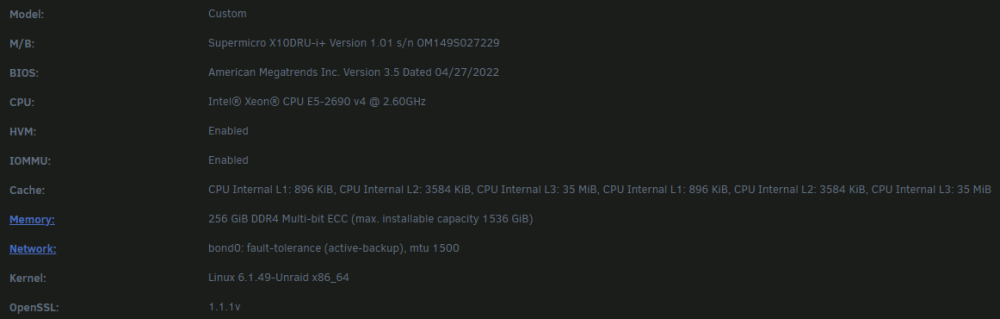
I have installed this on a server and, once a game is running, see exceptional performance. But getting a game to launch can take significant time. I've tried installing the game library both to my main array and to my SSD cache disk (SATA though, not NvME)... I've tried various flavors of Proton... I've tried Moonlight, Remote Play, and NoVNC... All take forever for a game to launch. Pinning CPU cores to the container also did not seem to have any affect. The computer is an ex-server, primarily used for media storage, so it's not exactly gaming hardware, but it should be solid enough. The container also has sole access to a RTX 3080, besides the hardware in the attached image. Any help is appreciated!