





loosenut76
Members
-
Joined
-
Recently I added 3 new drives to my system and redid all of the power and SAS/SATA cabling in my system. After that, I had a couple of drives have read errors and get disconnected after running for several hours. I checked power and data connections for the drive, and ran extended smart test, no errors. So, I removed and re-added the drive and allowed it to be rebuilt. After happening 3 times, I did some digging and came across verifying I have sufficient power and sometimes drives do not wake up properly after being spun down. Then I moved 1 drive from the SATA power cable that drive was on and disabled spin down of drives. After that, I went 5 days with no issues. Yesterday I enabled disk spin down (after 30 min) and within 4 hours, a disk was disabled again. I have not confirmed if this drive is connected to the expander first, or is directly connected to the HBA, but assuming it is on the expander, has anyone heard or delt with issues of disks failing to spin back up if they are connected to an expander? HBA LSI 9300-8i Expander Adaptec AEC-82885t Drive HGST HUS724040ALA640
-
I have had the same thing happen recently; it happened after I made hardware changes. I added extra drives and a SAS expander. The problem happened on drives that had been present already, but I had removed all cables and did clean up when doing the work. To try and resolve the issue, I removed a SATA power extension cable, and disabled disk spin down and the problem went away for me. Yesterday I turned disk spin down back on, and within 8 hours I had a disk get disabled again. Have you made any changes to hard drive layout?
-
I could not find the download for this set of icons. Is it still available?
-
I have enabled the setting to allow installing a second instance of a docker image, and in the past have successfully installed a second instance. I don't know that I have tried it since moving to 7.1.2. I have tried turning the setting off and back on. I have rebooted my Unraid server, no change. When even I go into Installed Apps and find a previously installed Docker container, I do not get the option to install a second instance.
-
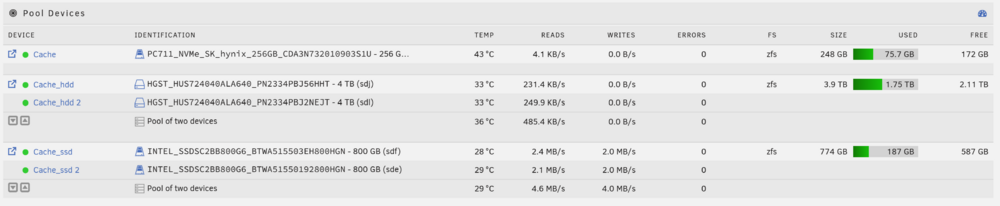
The combined pool temp for my pool cache_hdd is incorrectly being reported. Both drives are the same temp (33C) but the combined device temp is reported as 36C. I did notice that if you take the top pool device that is in a different pool, and average it in, then you would get 36C. So maybe it is incorrectly considering that drive even though it is not a member of this pool?
-
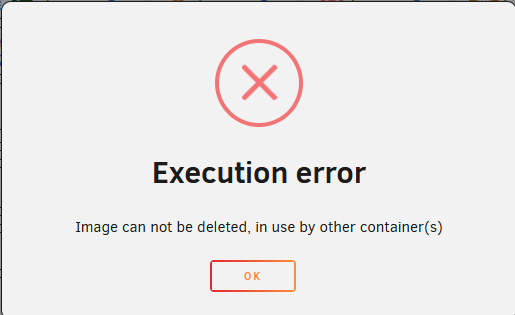
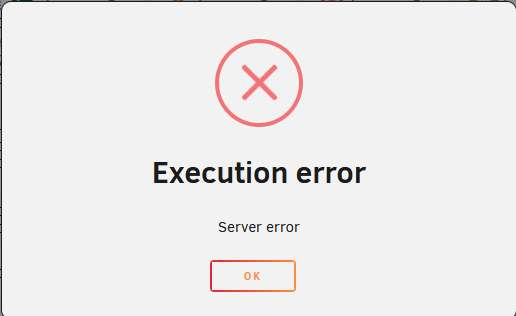
I just re-read your message, and I don't think I answered it clearly. I get different errors depending on what I try to do. My first post had images of the errors. I get a different error trying to start, Delete, or save a configuration change (link move to a different network). Deleting orphaned images from Docker didn't change anything. Rebooting UnRaid did not change anything.
-
It stopped working without me doing anything. I thought it was working after upgrading to 7.0.0, but I don't know for sure. I just happened to notice it wasn't running when I couldn't get into Photo Prism. All editing and deletion attempts were after the issue was found on an attempt to fix it.
-
Yes I still have the error. I rebooted my Unraid box, and still got the same error. One item I noticed, is that turning on advanced view listed a Container ID fofor each container. The container listed in the error message starts with the Container ID from the advanced view. "Container ID: a36ecc17e0f2"
-
I did this and found 8 orphaned images. I removed all of them. MariaDB still will not start.
-
I am having issues with my MariaDB docker. I am not sure how long it has been happening. Right now, I cannot start, remove, or configure the docker container. I did not try to rename the container. I do have auto update for docker containers enabled, if it was possibly an update that caused the issue. I also have appdata backups that I can try to restore from if it is unrecoverable. Before attempting to configure or delete the container, I made a copy of the MariaDB-Official folder under appdata. UnRaid 7.0.0 From the log: "Error response from daemon: can not get logs from container which is dead or marked for removal" When starting: When I try to delete: If I try to reconfigure: docker create --name='MariaDB-Official' --net='bridge' --pids-limit 2048 -e TZ="America/Chicago" -e HOST_OS="Unraid" -e HOST_HOSTNAME="Tower" -e HOST_CONTAINERNAME="MariaDB-Official" -e 'MARIADB_RANDOM_ROOT_PASSWORD'='Yes' -e 'MARIADB_DATABASE'='photoprism' -e 'MARIADB_USER'='photoprism' -e 'MARIADB_PASSWORD'='*****' -e 'MARIADB_ROOT_PASSWORD'='*****' -l net.unraid.docker.managed=dockerman -l net.unraid.docker.icon='https://github.com/mgutt/unraid-docker-templates/raw/main/mgutt/images/mariadb.png' -l 'Container'='PhotoPrism' -p '3306:3306/tcp' -v '/mnt/cache/appdata/mariadb-official/data':'/var/lib/mysql':'rw' -v '/mnt/cache/appdata/mariadb-official/config':'/etc/mysql/conf.d':'rw' --user=99:100 --memory=2G 'mariadb' Error response from daemon: Conflict. The container name "/MariaDB-Official" is already in use by container "a36ecc17e0f22dbb129841b053be336e40b191694e58d36bddd64d3bdb274325". You have to remove (or rename) that container to be able to reuse that name. The command failed.
-
I looked in the folder, and it was logging data. Same sets of files created after every run. I disabled logging for the plugin, and ran "find . -maxdepth 1 -type f -ctime .3 -delete" from /tmp/ca.mover.tuning to get rid of all the old files except for the past few hours. Got the folder down to 351 MB. This took care of the warning in Fix Common Problems.
-
plugin: installing: memorystorage.plg Executing hook script: pre_plugin_checks plugin: downloading: memorystorage.plg ... done Executing hook script: pre_plugin_checks This script may take a few minutes to run, especially if you are manually mounting a remote share outside of /mnt/disks or /mnt/remotes /usr/bin/du --exclude=/mnt/user --exclude=/mnt/user0 --exclude=/mnt/disks --exclude=/proc --exclude=/sys --exclude=/var/lib/docker --exclude=/boot --exclude=/mnt -h -d2 / 2>/dev/null | grep -v 0$' ' 4.0K /root/.config 128K /root/.pm2 148K /root 5.0M /var/lib 3.0M /var/log 4.0K /var/lock 8.0K /var/spool 8.0K /var/tmp 16K /var/named 4.1M /var/cache 12K /var/state 4.0K /var/kerberos 731M /var/local 743M /var 12M /bin 116K /etc/X11 60K /etc/profile.d 8.0K /etc/acpi 80K /etc/default 188K /etc/bash_completion.d 4.0K /etc/sasl2 8.0K /etc/dbus-1 4.0K /etc/cron.weekly 4.0K /etc/cron.d 12K /etc/cron.daily 4.0K /etc/cron.hourly 4.0K /etc/cron.monthly 12K /etc/elogind 112K /etc/pam.d 24K /etc/modprobe.d 9.3M /etc/udev 4.0K /etc/sensors.d 56K /etc/logrotate.d 92K /etc/mc 48K /etc/mcelog 4.0K /etc/nvme 568K /etc/ssh 260K /etc/ssl 44K /etc/security 4.0K /etc/sysctl.d 12K /etc/sysstat 44K /etc/apcupsd 24K /etc/avahi 2.7M /etc/file 40K /etc/nginx 24K /etc/php-fpm.d 8.0K /etc/php.d 20K /etc/samba 8.0K /etc/ssmtp 8.0K /etc/libnl 152K /etc/lvm 4.0K /etc/pkcs11 8.0K /etc/OpenCL 48K /etc/zfs 12K /etc/gtk-3.0 8.0K /etc/fonts 340K /etc/libvirt- 356K /etc/libvirt 4.0K /etc/rsyslog.d 17M /etc 25K /lib/dhcpcd 146M /lib/firmware 18K /lib/modprobe.d 27M /lib/modules 512 /lib/systemd 8.5M /lib/udev 186M /lib 4.4M /lib64/security 1.8M /lib64/elogind 12K /lib64/pkgconfig 47M /lib64 8.0K /run/blkid 644K /run/udev 4.0K /run/dbus 4.0K /run/elogind 4.0K /run/avahi-daemon 1.4M /run/docker 60K /run/libvirt 2.2M /run 24M /sbin 601M /usr/bin 29M /usr/lib 1018M /usr/lib64 90M /usr/libexec 509M /usr/local 50M /usr/sbin 279M /usr/share 7.2M /usr/src 17M /usr/doc 800K /usr/info 1.1M /usr/man 2.1M /usr/include 2.6G /usr 20K /tmp/emhttp 852K /tmp/plugins 1.2M /tmp/notifications 4.0K /tmp/unraid.patch 140K /tmp/appdata.backup 8.0K /tmp/ca.turbo 14M /tmp/community.applications 16K /tmp/unassigned.devices 4.0K /tmp/user.scripts 12G /tmp/ca.mover.tuning 18M /tmp/fix.common.problems 56K /tmp/gui.search 656K /tmp/CA_logs 4.0K /tmp/ca_notices 20K /tmp/tailscale 12G /tmp 16G / 0 /mnt/addons 0 /mnt/rootshare 0 /mnt Finished. NOTE: If there is any subdirectory from /mnt appearing in this list, then that means that you have (most likely) a docker app which is directly referencing a non-existant disk or cache pool script: memorystorage.plg executed Executing hook script: post_plugin_checks
-
Getting this alert in Fix Common Problems. Output from Script under post "Where can I see what folders are taking up my RAM?" plugin: installing: memorystorage.plg Executing hook script: pre_plugin_checks plugin: downloading: memorystorage.plg ... done Executing hook script: pre_plugin_checks This script may take a few minutes to run, especially if you are manually mounting a remote share outside of /mnt/disks or /mnt/remotes /usr/bin/du --exclude=/mnt/user --exclude=/mnt/user0 --exclude=/mnt/disks --exclude=/proc --exclude=/sys --exclude=/var/lib/docker --exclude=/boot --exclude=/mnt -h -d2 / 2>/dev/null | grep -v 0$' ' 4.0K /root/.config 128K /root/.pm2 148K /root 5.0M /var/lib 2.9M /var/log 4.0K /var/lock 8.0K /var/spool 8.0K /var/tmp 16K /var/named 4.1M /var/cache 12K /var/state 4.0K /var/kerberos 731M /var/local 743M /var 12M /bin 116K /etc/X11 60K /etc/profile.d 8.0K /etc/acpi 80K /etc/default 188K /etc/bash_completion.d 4.0K /etc/sasl2 8.0K /etc/dbus-1 4.0K /etc/cron.weekly 4.0K /etc/cron.d 12K /etc/cron.daily 4.0K /etc/cron.hourly 4.0K /etc/cron.monthly 12K /etc/elogind 112K /etc/pam.d 24K /etc/modprobe.d 9.3M /etc/udev 4.0K /etc/sensors.d 56K /etc/logrotate.d 92K /etc/mc 48K /etc/mcelog 4.0K /etc/nvme 568K /etc/ssh 260K /etc/ssl 44K /etc/security 4.0K /etc/sysctl.d 12K /etc/sysstat 44K /etc/apcupsd 24K /etc/avahi 2.7M /etc/file 40K /etc/nginx 24K /etc/php-fpm.d 8.0K /etc/php.d 20K /etc/samba 8.0K /etc/ssmtp 8.0K /etc/libnl 152K /etc/lvm 4.0K /etc/pkcs11 8.0K /etc/OpenCL 48K /etc/zfs 12K /etc/gtk-3.0 8.0K /etc/fonts 340K /etc/libvirt- 356K /etc/libvirt 4.0K /etc/rsyslog.d 17M /etc 25K /lib/dhcpcd 146M /lib/firmware 18K /lib/modprobe.d 27M /lib/modules 512 /lib/systemd 8.5M /lib/udev 186M /lib 4.4M /lib64/security 1.8M /lib64/elogind 12K /lib64/pkgconfig 47M /lib64 8.0K /run/blkid 644K /run/udev 4.0K /run/dbus 4.0K /run/elogind 4.0K /run/avahi-daemon 1.4M /run/docker 60K /run/libvirt 2.1M /run 24M /sbin 601M /usr/bin 29M /usr/lib 1018M /usr/lib64 90M /usr/libexec 509M /usr/local 50M /usr/sbin 279M /usr/share 7.2M /usr/src 17M /usr/doc 800K /usr/info 1.1M /usr/man 2.1M /usr/include 2.6G /usr 20K /tmp/emhttp 852K /tmp/plugins 1.2M /tmp/notifications 4.0K /tmp/unraid.patch 140K /tmp/appdata.backup 8.0K /tmp/ca.turbo 16K /tmp/unassigned.devices 4.0K /tmp/user.scripts 12G /tmp/ca.mover.tuning 18M /tmp/fix.common.problems 56K /tmp/gui.search 136K /tmp/CA_logs 4.0K /tmp/ca_notices 20K /tmp/tailscale 12G /tmp 16G / 0 /mnt/addons 0 /mnt/rootshare 0 /mnt Finished. NOTE: If there is any subdirectory from /mnt appearing in this list, then that means that you have (most likely) a docker app which is directly referencing a non-existant disk or cache pool script: memorystorage.plg executed Executing hook script: post_plugin_checks tower-diagnostics-20250321-1240.zip
-
I attempted to install this docker container for the first time today. It is rebooting constantly, then shuts itself off. Here is the log it is generating. The error is repeated over and over (I removed duplicate entries before posting). I assume it is once per reboot. (node:7) [EACCES] Warning: Error module: @oclif/[email protected] task: findCommand (user-management:reset) plugin: n8n root: /usr/local/lib/node_modules/n8n code: EACCES message: EACCES: permission denied, open '/home/node/.n8n/config' See more details with DEBUG=* › Error: command start not found
-
New to unraid. I had a test unraid machine setup with only a single array disk, no parity. The drive failed before I could finish building out a new case with additional disks. Now in the Fix Common Problems plugin I am getting this error "Invalid folder disk1 contained within /mnt". The failed drive was disconnected, and a new drive was put in its place (disk1 in unraid)/. Even with the new drive in the array, I still get this error. tower-diagnostics-20240103-1255.zip

