





bithoarder
Members
-
Joined
-
Last visited
Everything posted by bithoarder
-
Thanks again! I confirm for anyone who's planning to do the same: it worked flawlessly. I've removed and restored several pools now. When I recreated the pool, I manually chose "BTRFS/RAID 5"... I did not test "auto". My confidence is higher now, though. I'm very much open to suggestions for better ways to make backup sets, though. My IDEAL would be creating another "UnRAID array", because of the flexibility, and because you can have parity while keeping the drives readable as standalones. I don't know why I thought that feature was slated for 7.0.
-
raid5 btrfs pool. I'm hoping to remove and put six-drive pools into storage and restore them at some future date. As far as I know, I'd just stop the array and pull them out?
-
I've created a couple of BTRFS pools (6 drives each, 1 parity) to store some data offline. What's the best way to remove the array and be sure that I can restore it again later? It doesn't seem like it would be an unusual thing to do, but I can't find any writeups. Thanks in advance!
-
It looks like everything is there... thanks again!
-
Thank you again for your help... I'm not really sure where to go from here, and I want to tread lightly - especially since I don't fully understand what the repairs actually did. My guess is that I'm ready to try to bring Drive 4 back online? Another 14TB drive arrived today, but I'm thinking the first one may be okay, after the recabling(?)
-
Started. Disc 4 is currently emulated - I really don't know at the moment if I'm missing any data. ood-diagnostics-20240826-1231.zip
-
I do... I haven't checked them yet. I've been kind of afraid to know, and wanted to get everything else protected, first. Thank you for mentioning it. I'm not really sure I've lost anything at the moment. At least some missing files reappeared after the restart.
-
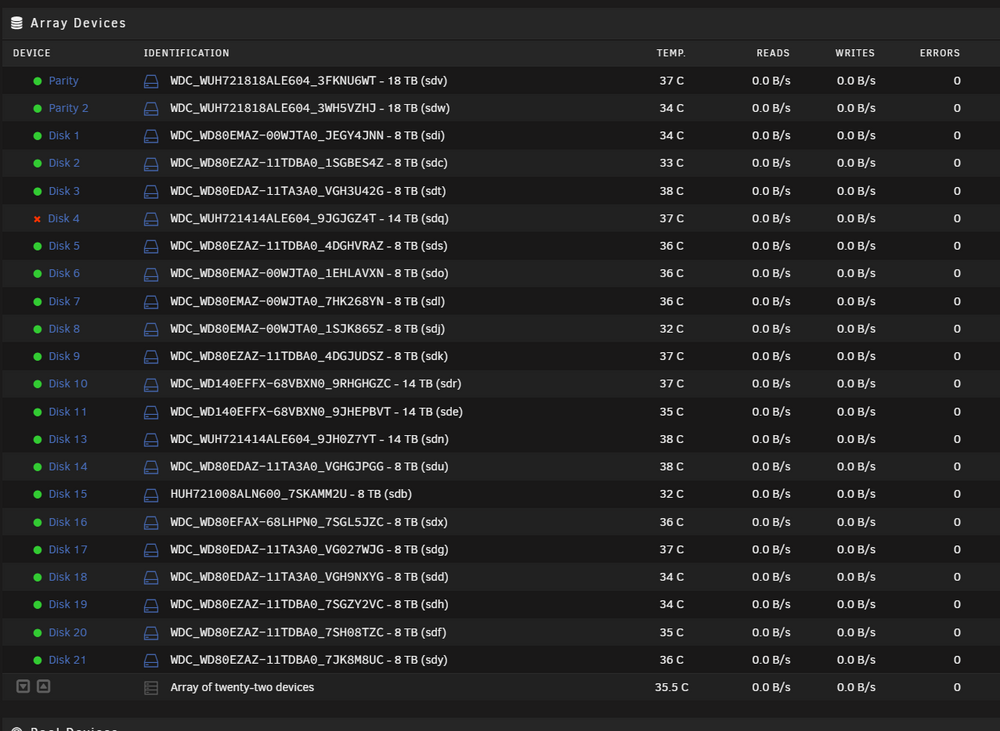
I'd like to be sure that I'm following this. The disk hasn't been reporting as "unmountable or unformatted" for a while. Disk 13 appears to be active in the array, and Disk 4 is emulated. The array is still in maintenance mode. What should I do next?
-
Attached... disc 13 looks pretty scary. Discs_4_13.txt
-
It took me a little while to figure out how to do this... I almost did it from a prompt, but when I saw the UI element in the Device Settings, I understood. Disk 4: Phase 1 - find and verify superblock... writing modified primary superblock Phase 2 - using internal log - zero log... ERROR: The filesystem has valuable metadata changes in a log which needs to be replayed. Mount the filesystem to replay the log, and unmount it before re-running xfs_repair. If you are unable to mount the filesystem, then use the -L option to destroy the log and attempt a repair. Note that destroying the log may cause corruption -- please attempt a mount of the filesystem before doing this. Disk 13: Phase 1 - find and verify superblock... writing modified primary superblock Phase 2 - using internal log - zero log... ERROR: The filesystem has valuable metadata changes in a log which needs to be replayed. Mount the filesystem to replay the log, and unmount it before re-running xfs_repair. If you are unable to mount the filesystem, then use the -L option to destroy the log and attempt a repair. Note that destroying the log may cause corruption -- please attempt a mount of the filesystem before doing this.
-
Thanks Again! I see that it needs to be started in "maintenance mode" to do that. Do you have any idea how long I can expect that to take with a 14tb drive?
-
The cable was delayed. New diagnostics are attached. I'm pretty sure I did this wrong, and rebuilt the parity instead of the drives. Thanks for looking! EDIT: I might actually be okay, data wise. It's showing that Drive 4 is emulated, but it's no longer showing the two drives as unformatted. Unfortunately, I need to head out for a couple of hours, but I'm more optimistic now. ood-diagnostics-20240825-1619.zip
-
Will do. I opened the machine up and realized that I don't have a spare. Hopefully I'll have a replacement "SFF-8643 to (4) SATA" tomorrow. Thank you!
-
Of course... thanks! I've got a really bad feeling that I did this the wrong way, but I swear the disc activity showed writing to the new drive(s). ood-diagnostics-20240822-1418.zip
-
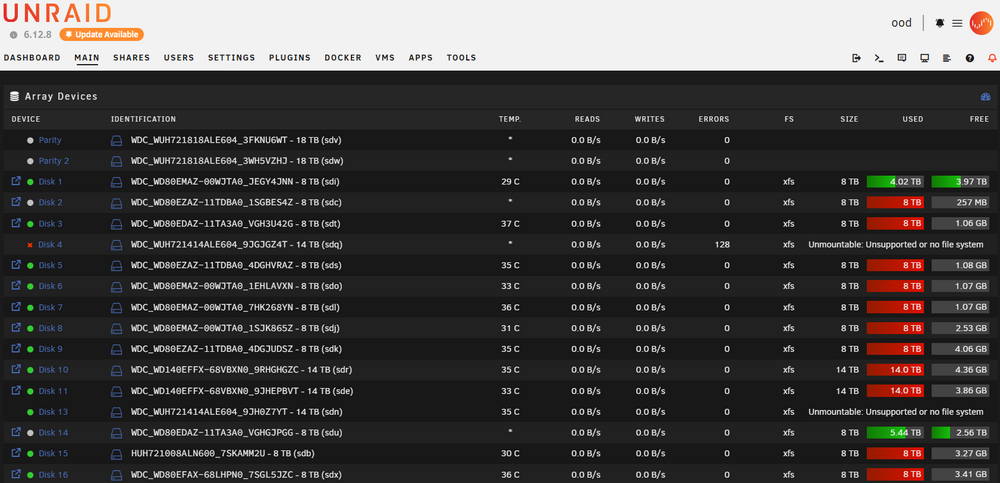
UnRAID removed two drives from my array because of performance problems. I replaced both with "refurbs". I restarted the array, and one of the drives dropped out again during the rebuild. I let the rebuild finish, expecting to restore one of the drives. Now, I'm seeing both of those drives listed as "Unmountable", even though all but one of the drives appears to be back in operation. Did I just rebuild my parity and lose the data on my drives? One of the drives was dumping so many "power on reset" errors that my log doesn't go back to start of the array rebuild.
-
Thanks for the input... I didn't get a notification, so I'm just seeing it now. My idea here was to have a second DC as "backup". One could run on a VM, and I'd turn on the second machine only when there was a problem. I'm still kicking ideas around... a low power computer running Windows might be the way to go.
-
Thanks... this is really what I was kind of expecting. I had hopes that maybe UnRAID had a credential caching mechanism to deal with this. I think it's strange that there seems to be so little overlap between UnRAID and AD - it's incredibly useful in a mutli-child, multi-computer family. It seems like there may only be two decent options: 1) Keep a domain controller offline, and boot it whenever I run into a problem. 2) Figure out the OpenLDAP thing. (the documentation I've found is really lacking, and it seems like I could run into the same sort of problem if Docker doesn't start.) If anyone has suggestions (or can point me to a good OpenLDAP resource), I'd be grateful.
-
I'm on the verge of getting down to a single (UnRAID) server. All that's left to solve/replace is Active Directory. I know it's possible to do with OpenLDAP, but it seems like a rare and scarcely documented use case - I'm nervous about going that route. Instead, I'm considering just building a new Domain on a Windows 2022 VM and retiring my current 2012R2 PDC. (I understand the headaches of moving to a new domain, but I'm prepared.) Can I expect trouble if UnRAID is joined to a Domain that's only available in a nested VM? I had some really bad behavior when I had a network issue - I couldn't even log into the console - I'm afraid that I could end up in a similar situation by doing this. Thanks in advance for your ideas and experience!
-
I worked around this by adding another NIC. I'm realizing now that my earlier problem was pinpointed, but not solved. It's still a problem, apparently... I may have to take this machine back out of the domain if this is how things are supposed to work. Ideally, I'd like for the UnRAID server to replace my Domain Controller, but I've had some false starts with the LDAP setup. Thanks!
-
Unfortunately, it does. Please see the last problem I had, here, for background. I can type as much as I want at the "login" prompt, and it appears on screen, but while "Enter" shows a carriage return, UnRAID will not accept the input. Once I added the UnRAID server to my Domain, I became unable to log in without it being connected to the network. I'm running on different hardware now, but that challenge has remained.
-
The issue I linked to in the OP prevents me from connecting locally. Without a network connection, I can't get past the "login" prompt - this seems to be a very unfortunate side effect of joining the server to a Windows domain.
-
I think that would require logging on? I'm not able to.
-
I'm running an ASRock X299 Taichi CLX motherboard on the current version of UnRAID. Last night, something happened, and my entire network was kaput. Eventually, I realized that the problem was coming from the UnRAID server - unplugging it restored my network. The machine was unresponsive, so I did a power-off reset. Since then, the 2.5gb LAN adapter on the motherboard seems non-functional. If I plug it in, there are no lights on either side of the connection. Related to the problem I reported here, I can't log into the console directly without a network connection. Thankfully, typing "shutdown" at the login prompt does give a clean shutdown. I have no idea how to proceed here. It seems apparent that trying to use UnRAID in a Active Directory Domain is a mistake. Any help would be appreciated.
-
This probably deserves its own thread. I'm definitely interested. I'm still working to move from a Windows infrastructure over to UnRAID... I'm hoping to be able to use my LTO-6 tape library without resorting to hacked copies of BackupExec, as I'd done in the past. I have a Dell PowerVault 24T. I don't think my drive has manufacturer support for LTFS. I tried to get that working under Windows, but wasn't able.
-
Those didn't work, but your suggestion got me thinking... I deleted "ident.cfg", and now I'm in. I'm guessing now that it would've been relevant to mention that I'd joined the server to a domain. Thank you, and itimpi, for helping me work through that! EDIT: I think there may have been another part of this: I'm not sure if my network adapter was connecting. It could have been the combination of AD settings and network problems.


