





FlunkyBob
Members
-
Joined
-
Last visited
-
I work ungodly hours. I have not forgotten this either. I will have time later today to hopefully get this sorted Thank you to you all for helping me so far
-
I have checked and tested this morning, and all seems fine apart from the cache disk error showing on the Main My shares are there, although with a warning that the parity is not fully finished, and my Docker apps all work fine

-
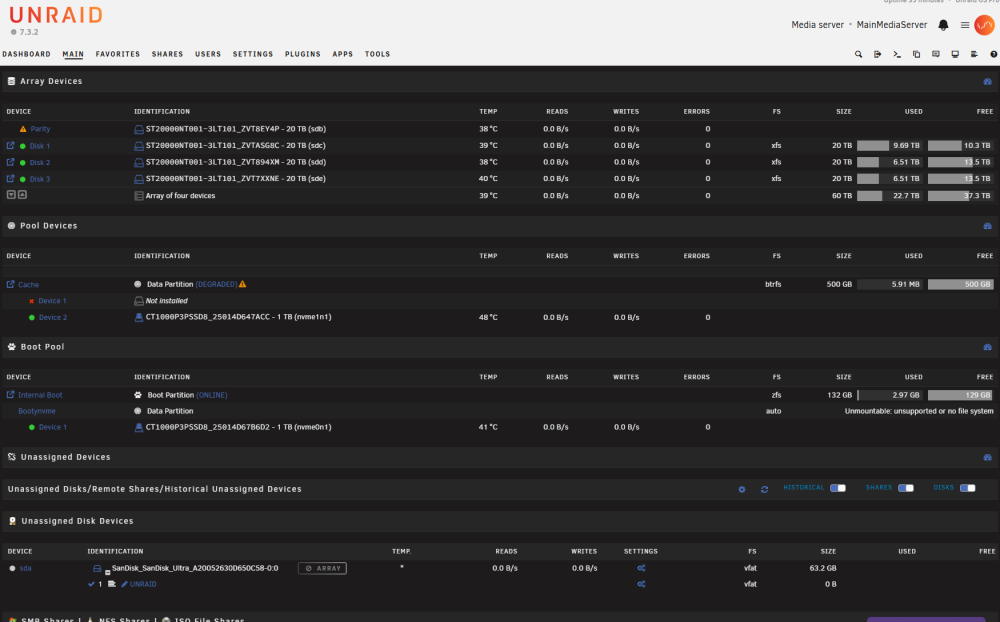
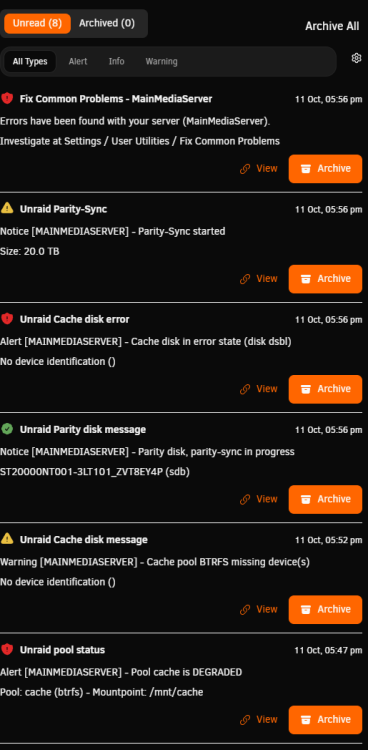
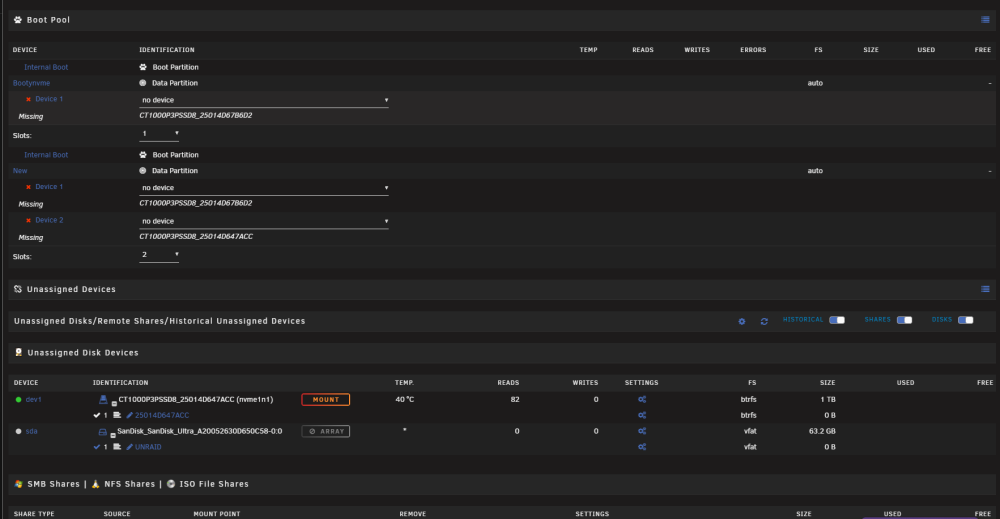
I have set Disk 4 back to the parity drive and started the new config I am however, getting errors coming up like those in the screenshots How should I proceed? I have paused parity sync for the moment
-
Here is what lsblk -o NAME,SIZE,FSTYPE,SERIAL gave me: NAME SIZE FSTYPE SERIAL loop0 736.1M squashfs loop1 308.3M squashfs sda 58.9G A20052630D650C58 └─sda1 58.9G vfat sdb 18.2T ZVT8EY4P └─sdb1 18.2T xfs sdc 18.2T ZVTASG8C └─sdc1 18.2T xfs sdd 18.2T ZVT894XM └─sdd1 18.2T xfs sde 18.2T ZVT7XXNE └─sde1 18.2T xfs sr0 1024M KLON5PA4401 zram0 0B nvme0n1 931.5G 25014D67B6D2 ├─nvme0n1p1 1M ├─nvme0n1p2 510M vfat ├─nvme0n1p3 127.5G zfs_member └─nvme0n1p4 803.5G nvme1n1 931.5G 25014D647ACC └─nvme1n1p1 931.5G btrfs The NVMe's were there to help with the system to run faster. I must admit the system is very slow and I think this is because of them not being in use, maybe? If this is ok, please let me know if I should continue with step 3. Thank you
-
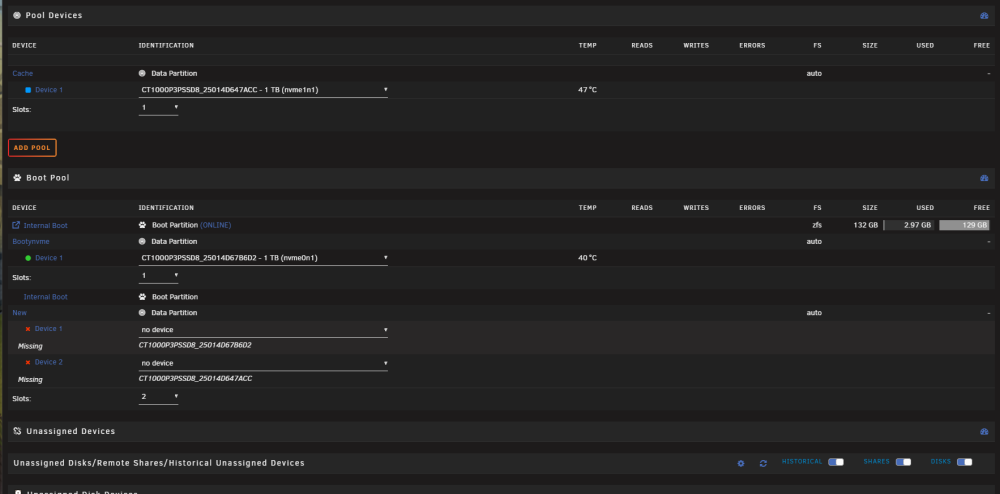
Thank you for the quick reply @UnraidSecretaryOffice - I have attached the diagnostics zip to this post. - I unfortunately do not remember the name of the pool. I think it was called 'cache', but I'm not too sure. - I did run it more than once. I feared I did it wrong the first time, and running again it would correct the issue. - I have an older backup of the USB stick, and appdata is backed up by Unraid on the server. As for the "All existing data on this device will be OVERWRITTEN" warning, I did do the tools -> newconfig, as it thought that might allow me to start again with the drives. It was foolish of me, as I should not mess with things I know nothing about. I have got the missing drive back up and showing in the cache pool, and the drive is in the boot pool now, where I originally put it Please see the screenshot: mainmediaserver-diagnostics-20261011-1452.zip
-
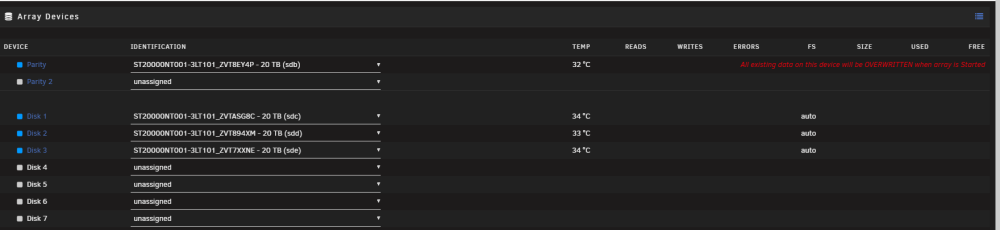
Hiya, I have a big problem I cannot seem to get around. I tried to move to internal boot using one of the NVMe's I have on the system that was in a cache pool. I rebooted the system, and now I have no boot device, no cache pool, and somehow I have a message saying: All existing data on this device will be OVERWRITTEN when the array is started. On my array, which I DO NOT want to happen lol. I am a BIG novice. I set this server up watching a YouTube video 3 years ago and have not touched it bar using it to add my blurays for media storage, so please bear with me as I am not clued up on the Linux and Unraid side of things. If anyone would be able to advise me on how to get around getting things back to normal, I would be forever grateful, as I have A LOT of media I would like to keep This is the message I have about overwriting data: Here are the errors I have with the internal boot: You can see in the unasigned there is an NVMe. I think this was supposed to be in the cache pool. My memory stick is there too but not used as the boot, as I can remove it and it still boots up to unraid. Thank you
-
I have attached my Diagnostics zip, sorry if I seem such a noob. I'm very new to linux and Nas servers Thank you for trying to help me mainmediaserver-diagnostics-20240519-1858.zip
-
Took a day or two to get a new cable but its not that causing it, i think its a setting on the server but im not sure what or where
-
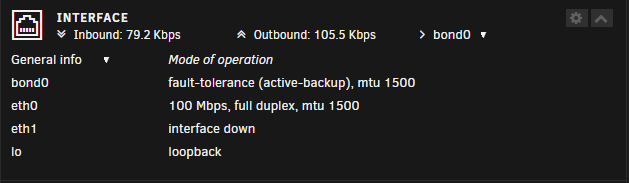
I am not sure how to set to auto, where would the setting be? Its connected to the router directly the same as a Mac in the other room, the mac seems to run at 1gbps just fine so i don't think its the router settings Its the router for the main internet of the house and i have just rebooted it to see if it sorted it but its still the same
-
Hiya, I have an issue with my server where it is limited to 100mb but the device should be 1gbs Is there any way to increase this output? Thank you
-
Thank you, i will have a look and give these a go, i will report back if it solves the issue or not
-
I have Attached the Diagnostics zip, thank you for willing to help me mainmediaserver-diagnostics-20240105-1439.zip
-
Hello guys I have been having an issue with a media server is built, it randomly becomes unresponsive and I have to restart it to get it to work again I have syslogs active and there are no errors as such only this as the last entries before it locks up: Jan 4 00:48:15 MainMediaServer kernel: IPv6: ADDRCONF(NETDEV_CHANGE): veth792272e: link becomes ready Jan 4 00:48:15 MainMediaServer kernel: docker0: port 4(veth792272e) entered blocking state Jan 4 00:48:15 MainMediaServer kernel: docker0: port 4(veth792272e) entered forwarding state Jan 4 00:48:22 MainMediaServer kernel: docker0: port 7(vethd6599df) entered disabled state Jan 4 00:48:22 MainMediaServer kernel: veth65da6ee: renamed from eth0 Jan 4 00:48:22 MainMediaServer kernel: docker0: port 7(vethd6599df) entered disabled state Jan 4 00:48:22 MainMediaServer kernel: device vethd6599df left promiscuous mode Jan 4 00:48:22 MainMediaServer kernel: docker0: port 7(vethd6599df) entered disabled state Jan 4 00:48:23 MainMediaServer kernel: docker0: port 7(veth5b63acc) entered blocking state Jan 4 00:48:23 MainMediaServer kernel: docker0: port 7(veth5b63acc) entered disabled state Jan 4 00:48:23 MainMediaServer kernel: device veth5b63acc entered promiscuous mode Jan 4 00:48:23 MainMediaServer kernel: docker0: port 7(veth5b63acc) entered blocking state Jan 4 00:48:23 MainMediaServer kernel: docker0: port 7(veth5b63acc) entered forwarding state Jan 4 00:48:23 MainMediaServer kernel: eth0: renamed from veth89cb382 Jan 4 00:48:23 MainMediaServer kernel: IPv6: ADDRCONF(NETDEV_CHANGE): veth5b63acc: link becomes ready Is this the cause of the locking up of the system? I'm about to buy all new parts like a motherboard, PSU, RAM and CPU as I'm not sure what the cause could be These are the only things that are from an old computer I had, so it could be those causing it... The Server is alive as in power is running and you can see the fans spinning but is not making any HDD reads and writes Thank you in advance Chris


