





tem_invictus
Members
-
Joined
-
Last visited
-
Sorry for the late reply, been pretty busy at work. Thank you for the input, I tried getting it to work, but not much luck. I will keep running Adguard Home on a VM with Tailscale installed, there I get the correct addresses for the Tailscale clients. That's fine for me, I just thought maybe I can get a VM of the system.
-
Ok, have to look again for the Tailscale Directory. Funny enough with that directory, it didn't complain. Yes I did set the DNS in Tailscale Admin to Adguards Tailscale address. But as mentioned, it the Adguard log, it logs those request as coming from localhost.
-
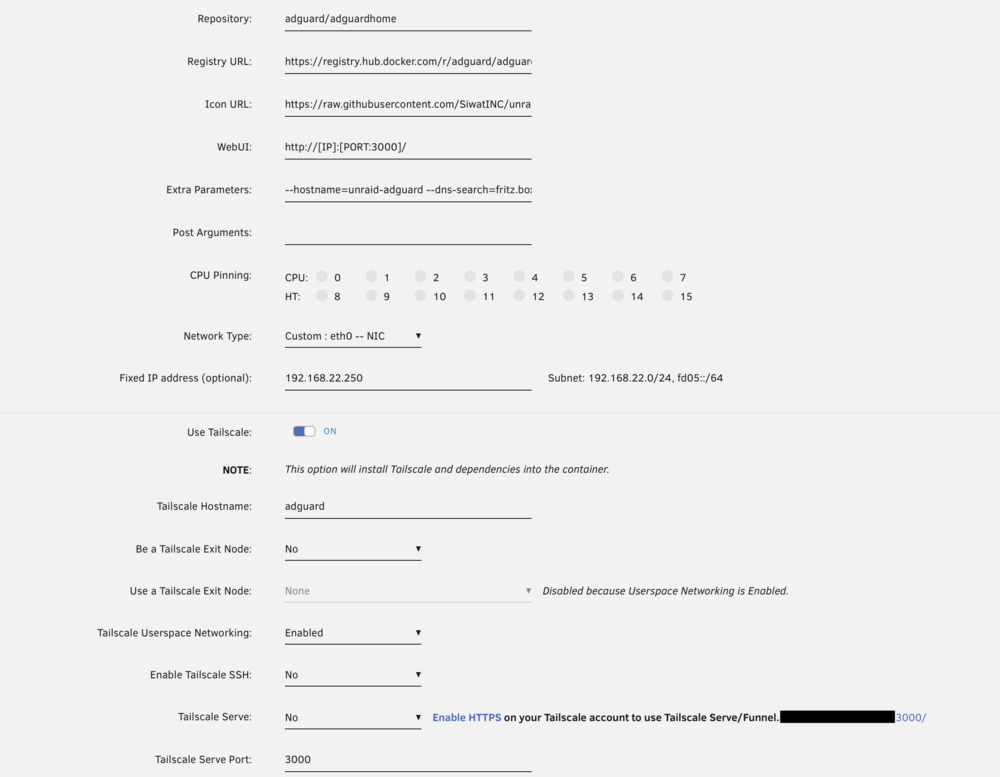
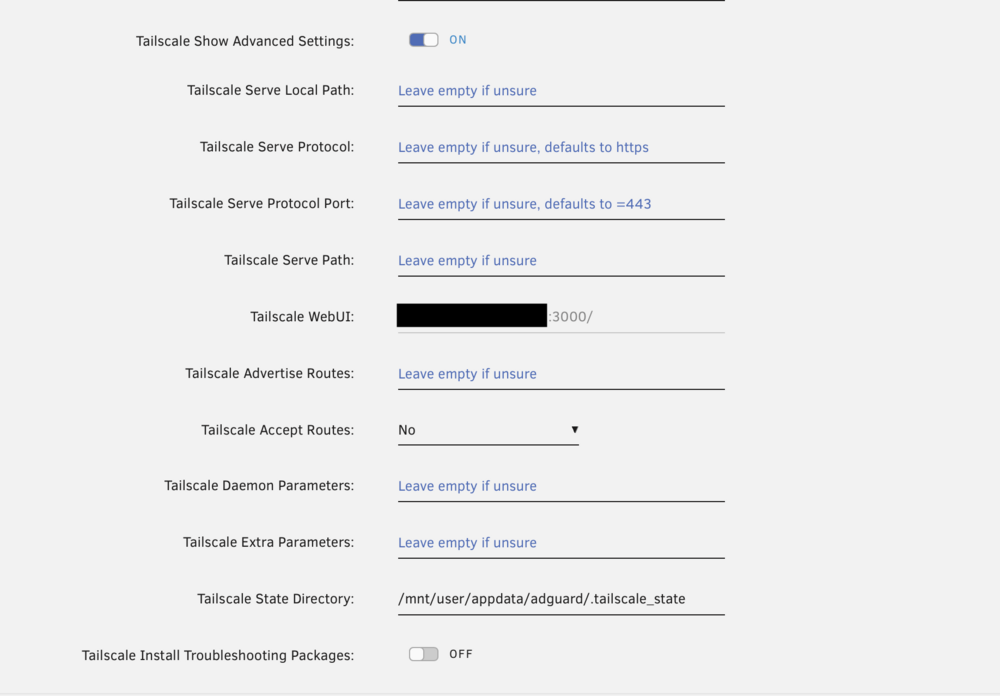
thanks, here is the configuration from the adguard container
-
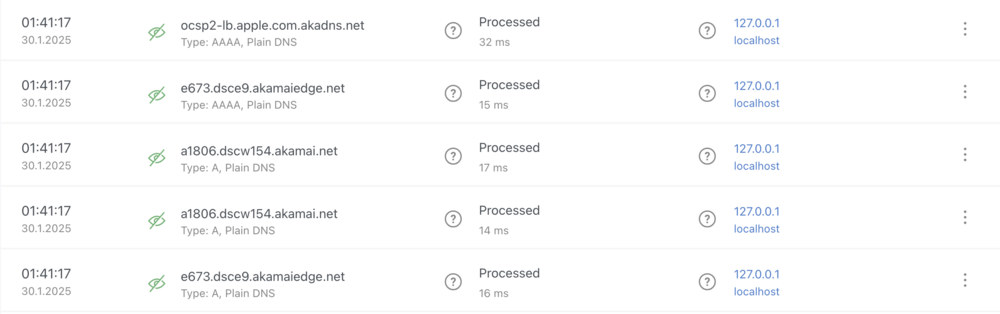
Been playing around with the Tailscale integration directly to Docker containers. That's working all fine so far. Adguard Home in Docker with Tailscale works too, DNS resolution is working as expected. The only thing is the logging of the Clients. Internal IPs are listed correctly in the Query Log from Adguard. When using Adguard as a DNS through Tailscale, the Query Log shows each request by localhost (127.0.0.1). So it's not getting/seeing the Tailscale IPs that are doing the requests. any idea how to fix that? thanks
-
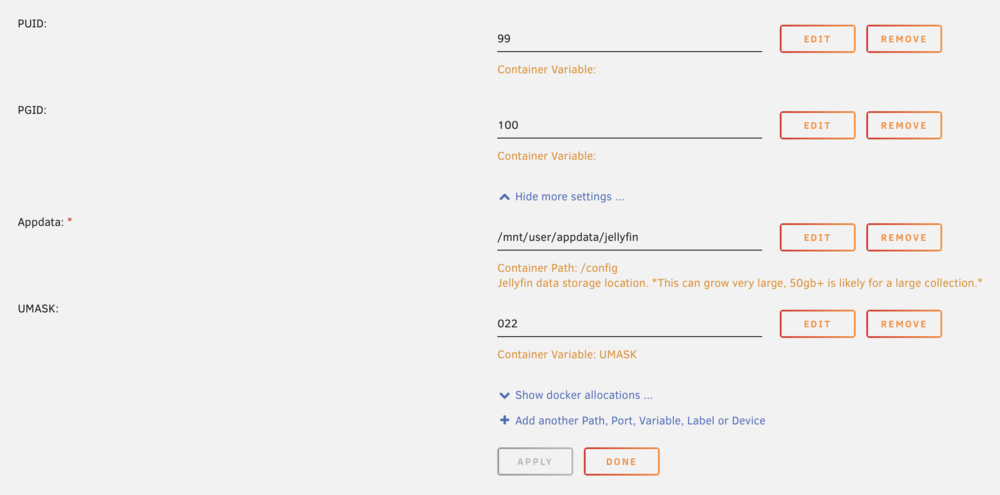
I got quite a lot of permission errors in the log. I don't know when it started, but my guess would be, since the upgrade to 10.9.x. Currently running 10.9.7. Here are two examples of my log file. [2024-07-28 03:35:12.132 +02:00] [ERR] [58] Jellyfin.Server.Implementations.Trickplay.TrickplayManager: Error creating trickplay images. System.UnauthorizedAccessException: Access to the path '/config/data/metadata/library/24/24fd5b5915f04733f1f69b84a6cdc46f/trickplay' is denied. [2024-07-28 09:23:47.633 +02:00] [ERR] [34] MediaBrowser.Providers.Genres.GenreMetadataService: Error in "Dynamic Image Provider" System.UnauthorizedAccessException: Access to the path '/config/data/metadata/library/3d/3d621c0b6dc1921bc93fa859f7512270/poster.png' is denied. any ideas or solutions I could try? thanks
-
Upps sorry, didn't see that. Will give it a try. Thanks
-
hello, so I recently switch to using macvlan instead of ipvlan as docker network type. I need some docker containers to have a fixed IP address and my Router (Fritzbox) is limited to handling clients by MAC addresses and not ClientIDs. So the way to go is macvlan. So I tried a few things and as far as I can tell, I get a CPU Warning whenever a container is using a USB device. Most of the times it just keeps working, but I also had docker containers freeze in that situation. Maybe there is a solution? Jan 16 17:58:08 MME-Unraid kernel: WARNING: CPU: 1 PID: 187 at net/netfilter/nf_nat_core.c:594 nf_nat_setup_info+0x8c/0x7d1 [nf_nat] Jan 16 17:58:08 MME-Unraid kernel: Modules linked in: nf_tables xt_nat xt_CHECKSUM ipt_REJECT nf_reject_ipv4 xt_tcpudp ip6table_mangle iptable_mangle vhost_net tun vhost vhost_iotlb xt_conntrack nf_conntrack_netlink nfnetlink xfrm_user xfrm_algo iptable_nat xt_addrtype br_netfilter nvidia_uvm(PO) dm_crypt dm_mod xt_MASQUERADE ip6table_nat nf_nat nf_conntrack nf_defrag_ipv6 nf_defrag_ipv4 md_mod zfs(PO) zunicode(PO) zzstd(O) zlua(O) zavl(PO) icp(PO) zcommon(PO) znvpair(PO) spl(O) tcp_diag inet_diag ip6table_filter ip6_tables iptable_filter ip_tables x_tables efivarfs macvtap macvlan tap bridge stp llc ax88179_178a usbnet igc intel_rapl_msr intel_rapl_common x86_pkg_temp_thermal intel_powerclamp coretemp kvm_intel nvidia_drm(PO) nvidia_modeset(PO) i915 kvm nvidia(PO) iosf_mbi drm_buddy i2c_algo_bit ttm crct10dif_pclmul crc32_pclmul crc32c_intel ghash_clmulni_intel drm_display_helper sha512_ssse3 sha256_ssse3 sha1_ssse3 aesni_intel drm_kms_helper crypto_simd cryptd mei_hdcp mei_pxp rapl intel_cstate drm wmi_bmof Jan 16 17:58:08 MME-Unraid kernel: ftdi_sio intel_gtt nvme i2c_i801 agpgart mei_me i2c_smbus intel_uncore thunderbolt mei joydev i2c_core usbserial nvme_core mii cdc_acm syscopyarea sysfillrect sysimgblt thermal fb_sys_fops fan tpm_crb tpm_tis tpm_tis_core video tpm wmi backlight intel_pmc_core acpi_tad acpi_pad button unix [last unloaded: usbnet] Jan 16 17:58:08 MME-Unraid kernel: CPU: 1 PID: 187 Comm: kworker/u32:6 Tainted: P W O 6.1.64-Unraid #1 Jan 16 17:58:08 MME-Unraid kernel: Hardware name: Intel(R) Client Systems NUC11BTMi7/NUC11DBBi7, BIOS DBTGL579.0063.2022.0803.1429 08/03/2022 Jan 16 17:58:08 MME-Unraid kernel: Workqueue: events_unbound macvlan_process_broadcast [macvlan] Jan 16 17:58:08 MME-Unraid kernel: RIP: 0010:nf_nat_setup_info+0x8c/0x7d1 [nf_nat] Jan 16 17:58:08 MME-Unraid kernel: Code: a8 80 75 26 48 8d 73 58 48 8d 7c 24 20 e8 18 cb 2c 00 48 8d 43 0c 4c 8b bb 88 00 00 00 48 89 44 24 18 eb 54 0f ba e0 08 73 07 <0f> 0b e9 75 06 00 00 48 8d 73 58 48 8d 7c 24 20 e8 eb ca 2c 00 48 Jan 16 17:58:08 MME-Unraid kernel: RSP: 0018:ffffc90000200c78 EFLAGS: 00010282 Jan 16 17:58:08 MME-Unraid kernel: RAX: 0000000000000180 RBX: ffff888295792600 RCX: ffff888178b59240 Jan 16 17:58:08 MME-Unraid kernel: RDX: 0000000000000000 RSI: ffffc90000200d5c RDI: ffff888295792600 Jan 16 17:58:08 MME-Unraid kernel: RBP: ffffc90000200d40 R08: 000000006d16a8c0 R09: 0000000000000000 Jan 16 17:58:08 MME-Unraid kernel: R10: 0000000000000098 R11: 0000000000000000 R12: ffffc90000200d5c Jan 16 17:58:08 MME-Unraid kernel: R13: 0000000000000000 R14: ffffc90000200e40 R15: 0000000000000001 Jan 16 17:58:08 MME-Unraid kernel: FS: 0000000000000000(0000) GS:ffff888890440000(0000) knlGS:0000000000000000 Jan 16 17:58:08 MME-Unraid kernel: CS: 0010 DS: 0000 ES: 0000 CR0: 0000000080050033 Jan 16 17:58:08 MME-Unraid kernel: CR2: 000000c0001291bb CR3: 000000000420a004 CR4: 0000000000772ee0 Jan 16 17:58:08 MME-Unraid kernel: PKRU: 55555554 Jan 16 17:58:08 MME-Unraid kernel: Call Trace: Jan 16 17:58:08 MME-Unraid kernel: <IRQ> Jan 16 17:58:08 MME-Unraid kernel: ? __warn+0xab/0x122 Jan 16 17:58:08 MME-Unraid kernel: ? report_bug+0x109/0x17e Jan 16 17:58:08 MME-Unraid kernel: ? nf_nat_setup_info+0x8c/0x7d1 [nf_nat] Jan 16 17:58:08 MME-Unraid kernel: ? handle_bug+0x41/0x6f Jan 16 17:58:08 MME-Unraid kernel: ? exc_invalid_op+0x13/0x60 Jan 16 17:58:08 MME-Unraid kernel: ? asm_exc_invalid_op+0x16/0x20 Jan 16 17:58:08 MME-Unraid kernel: ? nf_nat_setup_info+0x8c/0x7d1 [nf_nat] Jan 16 17:58:08 MME-Unraid kernel: ? nf_nat_setup_info+0x44/0x7d1 [nf_nat] Jan 16 17:58:08 MME-Unraid kernel: ? xt_write_recseq_end+0xf/0x1c [ip_tables] Jan 16 17:58:08 MME-Unraid kernel: ? __local_bh_enable_ip+0x56/0x6b Jan 16 17:58:08 MME-Unraid kernel: ? ipt_do_table+0x575/0x5ba [ip_tables] Jan 16 17:58:08 MME-Unraid kernel: ? __wake_up_common_lock+0x88/0xbb Jan 16 17:58:08 MME-Unraid kernel: ? xt_write_recseq_end+0xf/0x1c [ip_tables] Jan 16 17:58:08 MME-Unraid kernel: __nf_nat_alloc_null_binding+0x66/0x81 [nf_nat] Jan 16 17:58:08 MME-Unraid kernel: nf_nat_inet_fn+0xc0/0x1a8 [nf_nat] Jan 16 17:58:08 MME-Unraid kernel: nf_nat_ipv4_local_in+0x2a/0xaa [nf_nat] Jan 16 17:58:08 MME-Unraid kernel: nf_hook_slow+0x3a/0x96 Jan 16 17:58:08 MME-Unraid kernel: ? ip_protocol_deliver_rcu+0x164/0x164 Jan 16 17:58:08 MME-Unraid kernel: NF_HOOK.constprop.0+0x79/0xd9 Jan 16 17:58:08 MME-Unraid kernel: ? ip_protocol_deliver_rcu+0x164/0x164 Jan 16 17:58:08 MME-Unraid kernel: __netif_receive_skb_one_core+0x77/0x9c Jan 16 17:58:08 MME-Unraid kernel: process_backlog+0x8c/0x116 Jan 16 17:58:08 MME-Unraid kernel: __napi_poll.constprop.0+0x28/0x124 Jan 16 17:58:08 MME-Unraid kernel: net_rx_action+0x159/0x24f Jan 16 17:58:08 MME-Unraid kernel: __do_softirq+0x126/0x288 Jan 16 17:58:08 MME-Unraid kernel: do_softirq+0x7f/0xab Jan 16 17:58:08 MME-Unraid kernel: </IRQ> Jan 16 17:58:08 MME-Unraid kernel: <TASK> Jan 16 17:58:08 MME-Unraid kernel: __local_bh_enable_ip+0x4c/0x6b Jan 16 17:58:08 MME-Unraid kernel: netif_rx+0x52/0x5a Jan 16 17:58:08 MME-Unraid kernel: macvlan_broadcast+0x10a/0x150 [macvlan] Jan 16 17:58:08 MME-Unraid kernel: ? _raw_spin_unlock+0x14/0x29 Jan 16 17:58:08 MME-Unraid kernel: macvlan_process_broadcast+0xbc/0x12f [macvlan] Jan 16 17:58:08 MME-Unraid kernel: process_one_work+0x1a8/0x295 Jan 16 17:58:08 MME-Unraid kernel: worker_thread+0x18b/0x244 Jan 16 17:58:08 MME-Unraid kernel: ? rescuer_thread+0x281/0x281 Jan 16 17:58:08 MME-Unraid kernel: kthread+0xe4/0xef Jan 16 17:58:08 MME-Unraid kernel: ? kthread_complete_and_exit+0x1b/0x1b Jan 16 17:58:08 MME-Unraid kernel: ret_from_fork+0x1f/0x30 Jan 16 17:58:08 MME-Unraid kernel: </TASK> Jan 16 17:58:08 MME-Unraid kernel: ---[ end trace 0000000000000000 ]--- I also tried disabling the avahi services, as mentioned in this post. But didn't help. thanks mme-unraid-diagnostics-20240116-1800.zip



