





Pumuckl
Members
-
Joined
-
Last visited
-
Hello Unraid community, I'm facing a serious issue with my Unraid 7.0.1 installation. Everything was working fine yesterday, but today all my Docker containers show the error "Configuration not found. Was this container created using this plugin?" when I try to update them. Problem Details: All containers are missing the Edit button in the container menu "Apply update" button doesn't work and returns the "Configuration not found. Was this container created using this plugin?" The containers themselves are running fine, I can access all services I can still view logs, stop/start containers, but can't edit or update them through the UI What I've Already Tried: Restarting the Docker service Rebooting the entire server Creating a new plugin-registry.json file in /boot/config/plugins/dockerMan/ Updating the Community Applications plugin Reinstalling one container (Bazarr) through the App Store - this fixed the issues for that specific container only System Information: Unraid version: 7.0.1 Kernel: 6.6.78-Unraid Docker version: 27.0.3 Docker containers: 20+ (many from LinuxServer.io) Docker storage location: /var/lib/docker (14% used) My Questions: What could have caused this issue? I didn't make any system changes recently. How can I fix this without having to manually reinstall hundreds of containers? How can I prevent this from happening in the future? I've discovered that reinstalling containers through the App Store works, but this is impractical for the number of containers I have. I also thought about creating an update script to automatically pull new images and restart containers, but I'd prefer to have the UI functionality back. Any advice or suggestions would be greatly appreciated!
-
Jo war die Subnet option. Danke <3
-
Hallo, wenn mein Server neustartet fährt nginx nicht hoch und kann auch manuell nicht gestartet werden. "# /etc/rc.d/rc.nginx start" " nginx: 2024/02/07 17:49:20 [emerg] 15500#15500: still could not bind()" Erst nachdem ich über ssh tailscale down mache kann ich nginx starten und auch erst dann erhalte ich Zugriff auf mein WebUI. Tailscale habe ich als Plugin installiert. Wie verhindere ich das?
-
Hello, I'm just starting out with Unraid. I have created a Docker network as described here: https://www.youtube.com/watch?v=7fzBDCI8O2w Then I wanted to install a Docker app and got the error message: Download of appfeed failed. Community Applications requires your server to have internet access. The most common cause of this failure is a failure to resolve DNS addresses. You can try and reset your modem and router to fix this issue, or set static DNS addresses (Settings - Network Settings) of 208.67.222.222 and 208.67.220.220 and try again. root@Tower:~# docker network ls NETWORK ID NAME DRIVER SCOPE 62e28cf9143f br0 ipvlan local 7eb6af03175f bridge bridge local 40131bcb0729 docknet bridge local 9d7c59416ec7 host host local 189ccd791bb4 none null local Then I looked at the networks And deleted the DockNet with -rm DockNet I can ping 8.8.8.8 but I get no response from google.com I didnt changed my Gateway. My Dockers run in bridge mode and have access to the internet. tower-diagnostics-20240130-2043.zip
-
i started the array. i was able to mount and format both disks. so it looks good for now. still strange
-
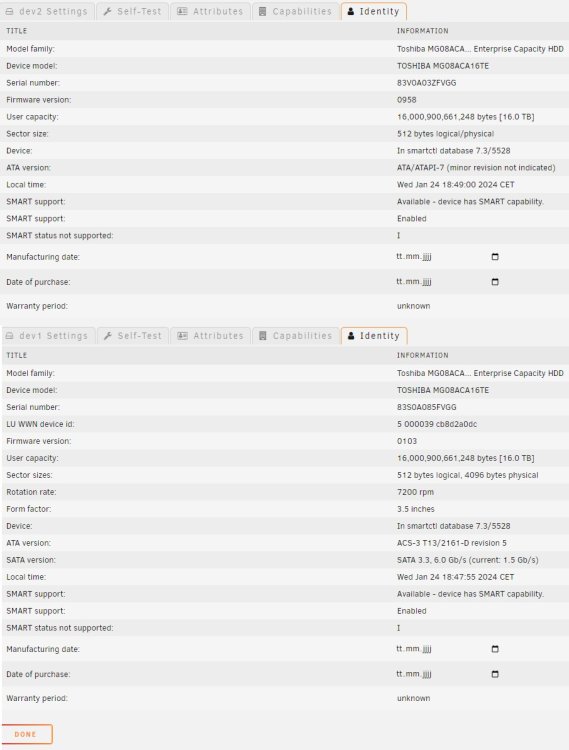
Hello, I have bought two new and identical hard disks from Toshiba. One is recognized correctly and works. The other one shows completely different metadata and the wrong firmware, which apparently does not exist. "dev2" shows no form factor and no rotation rate, in contrast to "dev1". I have already swapped the disk slots. Same result. I have not yet integrated them into the array.
-
I removed that Docker "Wireguard-Client" and still cant see the anything in settings-> VPN Manager
-
Hey, I was following a Guide "WireGuard with DuckDNS" I install the wireguard Docker and went to the "VPN Manager" but the Settings Tab i empty.



