Limeth
Members
-
Joined
-
Last visited
-
So I was advised to assign a separate IP to the docker container to run my DNS server on, but I ran into the issue with macvlan causing kernel panics. I've tried switching from macvlan to ipvlan, but that makes my DNS server inaccessible to the host and other containers, making it only accessible externally. Then I tried the "advanced" approach, but that caused my system to freeze up. So now I'm back trying to figure out ways in which this could be achieved.
-
Thanks for the guide, it helped me!
-
If I figure out how to patch the Unraid kernel, I might give this a try, as my newly built Unraid server is waiting for an HDD replacement to be usable.
-
Linux 6.6.x is a LTS release, so chances are Unraid could get updated to it. I'm not sure if it'd help, though.
-
What are you basing this on? I can't find any info on 13th gen being supported on Linux 6.1.x. Relevant issue on the powertop repository: https://github.com/fenrus75/powertop/issues/140
-
Actually, yes! I think I was mistaken about the i5-14500 using the codename "Meteor Lake", it seems to apply to mobile 14-series CPU's only. The i5-14500 is listed on the wiki page for "Raptor Lake", which covers both 13-series and some 14-series CPU's. Due to my misunderstanding I was only looking for resources related to this issue in 14-series CPU's, but I might have more luck finding results on the 13-series, as well. Note that support for "Raptor Lake" is neither in the current Unraid Linux kernel, nor the latest "master" Linux kernel. Strange, considering how long the 13-series has been around.
-
So I was building a brand new Unraid box and ended up getting a 14-series Intel processor. It turns out that C-states higher than C3 are currently unsupported in the Linux kernel. For details, see this support thread I made.
-
It looks like this commit is what added the functionality to the Linux kernel. It isn't currently in any released kernel versions. I wonder if there is a way to backport it to the current version of the kernel used by Unraid? I am not experienced in this matter.
-
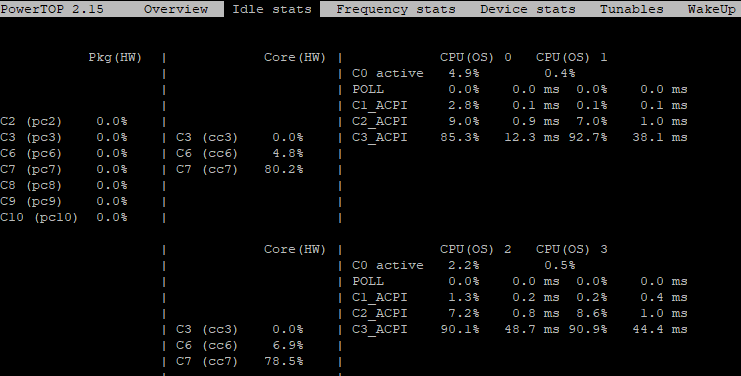
The intel_idle driver in the current Linux kernel (6.1.64) used by Unraid does not support Intel 14-series Meteor Lake processors. This makes it impossible to reach lower C-states than C3, as shown by powertop: The lack of support is indicated by the `_ACPI` suffix on the sleep state labels. For reference, I am using the recently released Intel i5-14500 processor. * intel_idle driver in Linux 6.1.64 showing missing support for Meteor Lake: https://git.kernel.org/pub/scm/linux/kernel/git/stable/linux.git/tree/drivers/idle/intel_idle.c?h=v6.1.64 * intel_idle driver in the latest stable kernel with Meteor Lake support: https://git.kernel.org/pub/scm/linux/kernel/git/stable/linux.git/tree/drivers/idle/intel_idle.c#n1532