





ansgaros
Members
-
Joined
-
Last visited
Everything posted by ansgaros
-
You're probably using network mode Host. Gluetun defaults to Bridge (like most containers seem to do). Not sure how using Host network changes things. Is there any particular reason you'd be using that? My uneducated suggestion is to use network mode Bridge for Gluetun. That seems to work for me, at least. I'd you're already using Bridge, then I have no idea.
-
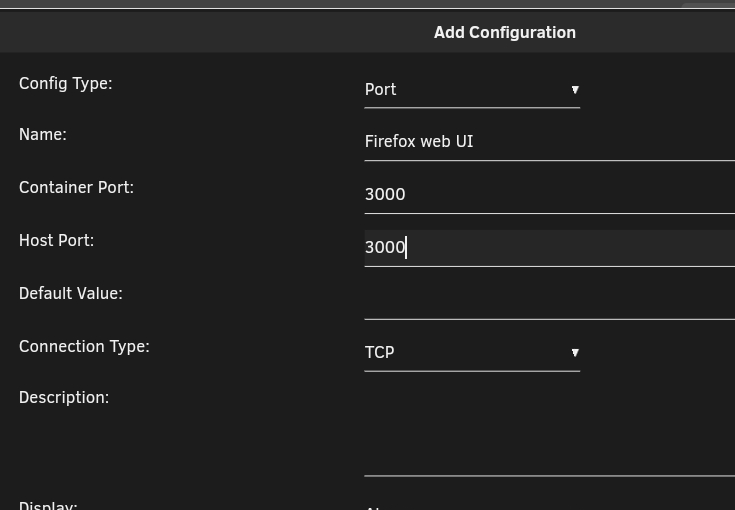
Apologies, my answer before was basically correct, but missing a crucial step if you need to interact with the container You will need to expose your Firefox container's web UI port via your Gluetun container (since network traffic now goes through that one). For example, if Firefox's web UI port is 3000, you would add that to Gluetun's configuration. You will need to remove that port mapping from the Firefox container first, or at least change it to something different. So you'd add something like this to your Gluetun container (change ports according to your configuration/preference):
-
Yes, you get no visible change. The VPN is transparent and always on for Firefox in this case, since all network traffic is routed via Gluetun. If you get no errors and internet works in your Firefox container, it should be working. You can verify for example via https://ip.me. If the IP it shows in your containered Firefox differs from what you get on another computer on your network (or your Unraid box, you can also do curl ip.me via Unraid console/ssh for the same effect), then your VPN is working. The IP your Firefox container shows via ip.me should also match your VPN configuration.
-
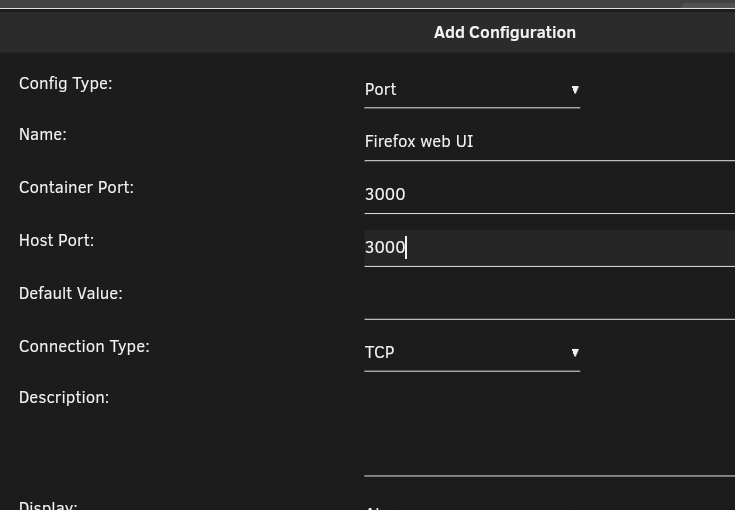
In your Firefox container settings: * Enable Advanced view in the top right (where it says Basic view) * In Extra Parameters, add: --network=container:GluetunVPN (or whatever the name of your Gluetun container is) * In the Network Type drop down select None That's it. EDIT: Well, not quite it. If you need to interact with the container via a web UI or similar, you will need to expose your Firefox container's web UI port via your Gluetun container (since network traffic now goes through that one). For example, if Firefox's web UI port is 3000, you would add that to Gluetun's configuration. You will need to remove that port mapping from the Firefox container first, or at least change it to something different. So you'd add something like this to your Gluetun container (change ports according to your configuration/prefer ence):
-
Did you try force updating your Gluetun container on Unraid's docker page? That could possibly help, if it didn't actually pull the latest image for some reason?
-
The above is now fixed in qmcgaw/gluetun:latest.
-
Same kind of error here. Temporarily solved by using tag v3.37 (assumed previous version). So my Repository line now reads: "qmcgaw/gluetun:v3.37". Same issue seems to be reported on GItHub as well. 2024-03-19T06:46:49+02:00 INFO [http server] http server listening on [::]:8000 2024-03-19T06:46:49+02:00 INFO [healthcheck] listening on 127.0.0.1:9999 2024-03-19T06:46:49+02:00 INFO [dns] using plaintext DNS at address 1.1.1.1 panic: runtime error: invalid memory address or nil pointer dereference [signal SIGSEGV: segmentation violation code=0x1 addr=0x0 pc=0x78e831] goroutine 119 [running]: github.com/qdm12/gluetun/internal/storage.filterServer({{0xc0027464c0, 0x9}, {0xc0027464c9, 0x7}, {0x0, 0x0}, {0xc0027465c0, 0x6}, {0xc0027465c6, 0x9}, ...}, ...) github.com/qdm12/gluetun/internal/storage/filter.go:77 +0x1b1 github.com/qdm12/gluetun/internal/storage.(*Storage).FilterServers(_, {_, _}, {{0xc0000281e9, 0x9}, {{0x0, 0xffff00000000}, 0xc000010018}, {0xc0002621b0, 0x9, ...}, ...}) github.com/qdm12/gluetun/internal/storage/filter.go:33 +0x2fb github.com/qdm12/gluetun/internal/provider/utils.GetConnection({_, _}, {_, _}, {{0xc0000281e9, 0x9}, {{0x0, 0xffff00000000}, 0xc000010018}, {0xc0002621b0, ...}, ...}, ...) github.com/qdm12/gluetun/internal/provider/utils/connection.go:39 +0xad github.com/qdm12/gluetun/internal/provider/mullvad.(*Provider).GetConnection(_, {{0xc0000281e9, 0x9}, {{0x0, 0xffff00000000}, 0xc000010018}, {0xc0002621b0, 0x9, 0x9}, {0x0, ...}, ...}, ...) github.com/qdm12/gluetun/internal/provider/mullvad/connection.go:12 +0x105 github.com/qdm12/gluetun/internal/vpn.setupWireguard({_, _}, {_, _}, {_, _}, {_, _}, {{0xc0000281e9, 0x9}, ...}, ...) github.com/qdm12/gluetun/internal/vpn/wireguard.go:20 +0xbe github.com/qdm12/gluetun/internal/vpn.(*Loop).Run(0xc000238420, {0x109d840, 0xc0002663c0}, 0xc0002567e0?) github.com/qdm12/gluetun/internal/vpn/run.go:40 +0x4f5 created by main._main in goroutine 14 ./main.go:427 +0x385a
-
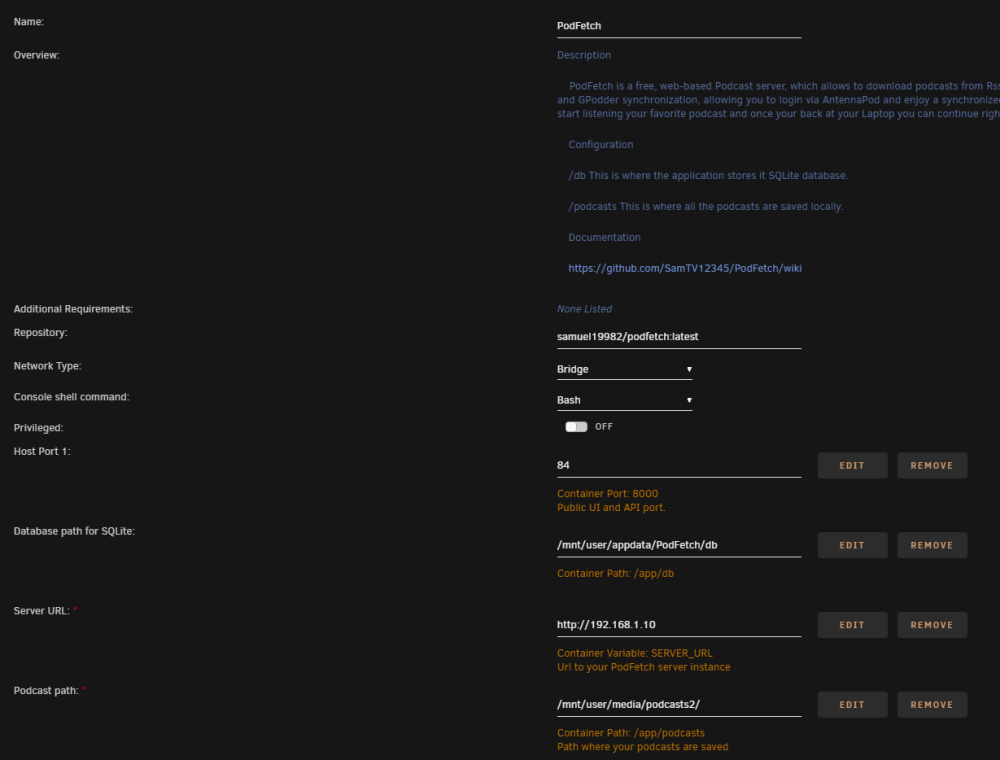
Yeah, it worked just fine with this configuration: As far as I can tell, everything under "More settings" is empty except for "OIDC scope", which doesn't matter since OIDC wasn't used in my configuration. But after trying it out, I realized that PodFetch wasn't the solution I was looking for.
-
I got a similar error and found this thread. Alas, the thread was of little help, but I managed to get it working anyway. Turns out that Server URL (SERVER_URL variable) has to begin with "http://" or "https://". No need for port here (it seemed to not care either way). Hope that helps.


