





stkraus70
Members
-
Joined
-
Last visited
-
anscheinend habe ich mich ungeschickt ausgedrückt 🙂 - ich mache es genau so wie Du es beschrieben hast .... ein Zertifikat für mehere Proxy Hosts auf einmal zu verwenden - auf die Idee bin ich bis jetzt noch gar nicht gekommen ... 😄
-
Ojeminee ... ich verstehe aktuelle leider nur teilweise von was genau Du das sprichst 😕 .. ich denke ich komme nicht darum herum mich mal mit IP V6 auseinandersetzen.. zu schauen wie genau das alles funktioniert: 1.) Du sagst das es extern sinnvoll ist IP V6 zu verwenden .. impliziert das in dem Fall, das man neben der üblichen IP V4 Portweiterleitung gleichzeitig eine IP V6 Weiterleitung zum jeweiligen Host / Service innerhalb vom Heimnetz einrichtet ? 2.) Ich habe bei dem Problem, dass das Erneuern von Letsencrypt Zertifikaten bei mir nicht funktioniert, (anscheinend) einen passenden Workaround gefunden zu haben - statt es zu Erneuern, erstelle ich stattdessen über die Einstellungen im zugehörigen Proxy Host einfach ein neues Zertifikat. Keine Ahnung weshalb, aber das funktioniert problemlos und das neue Zertifikat ist dann wieder entsprechend ausreichend lange gültig. Ich hatte diese Möglichkeit bis Dato ehrlicherweise nicht "auf dem Schirm" gehabt .. stattdessen bisher immer den kompletten Proxy Host und das dazugehörige Zertifikat gelöscht und dann noch einal "ganz von vorne" begonnen.... Noch eine kleine Zusatzfrage zum NPM: Wenn man den NPM einrichtet, wird die automatische Verlängerung von Zertifikaten dann eventuell von vorneherein mit konfiguriert oder ist das standardmäßig immer so dass sie nicht automatisch verlängern werden und man sich stets manuell darum kümmern muss ?? Vielen herzlichen Dank für Deine Unterstützung und die damit zwangsläufige Geduld mit mir und meiner offenkundigen Ahnungslosigkeit ... 🙂 !!!!!!!!!!!!!!!
-
Dann lieber IP V6 aus . nach meiner bisherigen Wahrnehmung ist der Betrieb von IP V6 für den Betrieb eines Proxy Host nicht zwingend erforderlich .. ich kenne mich damit bis Dato nicht wirkich aus, alleine aus dem Grund würde ich das Theme gerne "außenvor" lassen ...
-
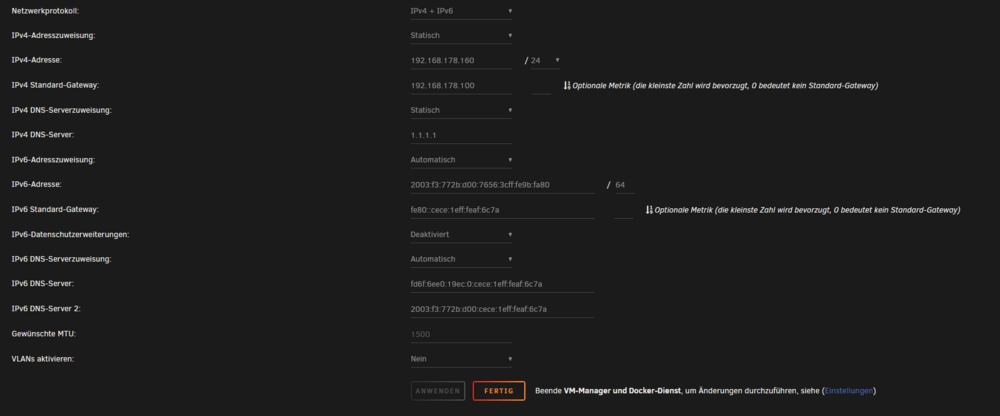
Verd.. bei meinem letzten Post bin ich versehentlich auf "Senden" gekommen ... was ich bei 1.) noch vor hatte zu schreien: 1.) Aktuell habe ich bei meinem UNRAID Server das IP V6 Protokoll de-aktiviert, eine IP V6 Weiterleitung ist ebenfalls nicht angelegt, weil ich davon ausgegangen bin, dass das für den Betrieb eines Proxy Hosts einschließlichlich eines Letsencyrpts nicht unbedingt notwendig ist. Du scheinst das anscheinend anders zu sehen 🙂 ?! Für den Fall das ich mit meiner Annahme richtig liege möchte würde ich Dich um Unterstützung bitten wie man eine IP V6 Weiterleitung ab der Fritz!Box anlegt. In meinem Unrauid habe ich das IP V6 in der Zwischenzeit (re-)aktiviert. Ich hoffe, dass das soweit passt:
-
Hallo und Guten Morgen, hab' vielen Dank für Dein ausführliches Feedback 🙂 !! ---- Aaaallsooo ...: 1.) Aktuell habe ich bei meinem UNRAID Server das IP V6 Protokoll de-aktiviert, eine IP V6 Weiterleitung ist ebenfalls nicht angelegt, weil ich davon ausgegangen bin, dass das für den Betrieb eines Proxy Hosts einschließlichlich eines Letsencyrpts nicht unbedingt notwendig ist. Du scheinst das anscheinend anders zu sehen 🙂 ?! Für den Fall das ich mit meiner Annahme richtig liege möchte würde ich Dich um Unterstützung bitten wie man eine IP V6 Weiterleitung ab der Fritz!Box anlegt. In meinem Unrauidf 2.) nc.famkraus03.duckdns.org konnte nicht funktionieren, tatsächlich war der Service dahiner nicht aktiviert, was ich ehrlicherweise vergessen hatte .. ist mittlerweile wieder am Laufen - IP V4 Ping sollte funktionieren 3.) Bei dem wd.famkraus03.duckdns.org handelt es sich um einen Webdav Server der über einen entsprechenden Client angesprochen werden kann und nicht per WebBrowser
-
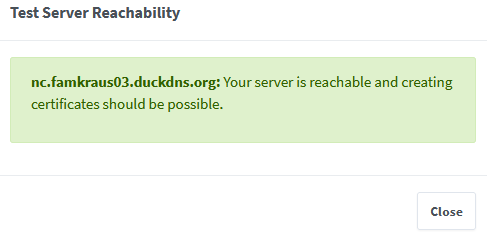
Es handelt eich konkret um die folgenden Adressen: nc.famkraus03.duckdns.org pl.famkraus03.duckdns.org vw.famkraus03.duckdns.org wd..famkraus03.duckdns.org Bei keinem dieser 4 Adressen funktioniert derzeit die Erneuerung der zugehörigen SSL Zertifikate- Nichtsdestotrotz sind die zugehörigen Tests zur Servererreichbarkeit allesamt erfolgreich. Zum Beispiel: In dem Zusammenhang noch der Hinweis das ich aktuell all diese 4 Dienste, welche sich hinter den Adressen befinden "von außen" verwende. Insofern passt alles mit der Portweiterleitung und dem DuckDNS. Ebenfalls noch einmal der kurze Hinweis das SSL Zertifikate die neu erstellt werden auch (testweise) direkt erneuter werden können. Nur bei diesen 4, die seit einigen Monaten in Betrieb sind, da funktioniert es auf einmal nicht mehr. Viele Grüße Stefan
-
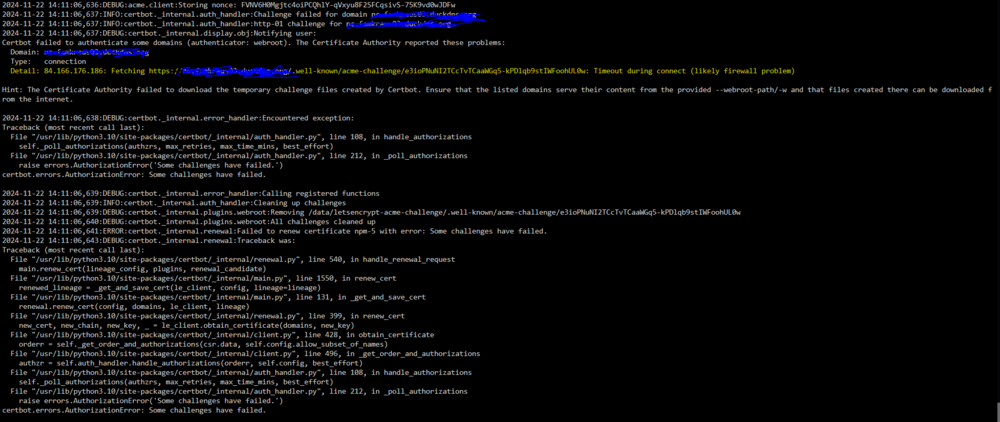
Hallo ihr Schlauen 🙂 , nachdem das Erneuern von Letsencrypt Zertifikaten eine ganze Weile nach dem Neuausetzten des Containers: wieder funktioniert hatte, ist dem nun (aus meiner Perspektive) auf einmal nicht mehr der Fall: Was ich (ebenfalls) nicht Verstehe: Das betrifft alle von mir derzeit (zu einem früheren Zeitpunkt) angelegten Proxy Hosts mit deren jeweiligen SSL Zertifikaten. Das Neuanlegen eine Proxy Host einschließlich SSL Zertifikat und das anschließende (testweise) sofortige Erneuern eines solchen frischen Zertifikates klappt einwandfrei. Insonfern wäre es vermutlich ein Workaraound alle aktuell angelegten Proxy Hosts und deren Zertifikate zu Löschen und dafür entsprechend neue Proxy Hosts samt Letsencrypt Zertifikaten zu erstellen. Auch das komplette Neuanlegen des Nginx Containers wird vermutlich helfen. Nichtsdestotrotz versuche ich das aktuelle Verhalten zu verstehen und meine Lehren für die Zunkunft zu ziehen. Aber zu sagen dass das alles unfassbar nevt ist eine Untertreibung ..... Für eure Unterstützung habt vielen Dank ! Viele Grüße Stefan
-
Hallo zusammen, bei meiner aktuellen Nextcloud Installation unter UNRAID ist nach einigen Bemühungen von mir noch eine einzige Warnung übrig geblieben, die ich super gerne loswerden würde: Unterhalb von: habe ich die Datei .htaccess wie folgt erweitert: Das ganze habe ich der Nextcloud Dokumentation entnommen: Wer von euch kann "Licht in mein aktuelles Dunkel" bekommen 🙂 Vielen herzlichen Dank an alle !! Stefan
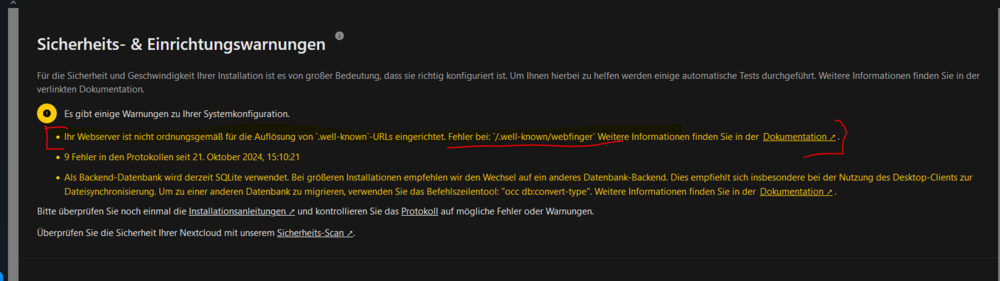
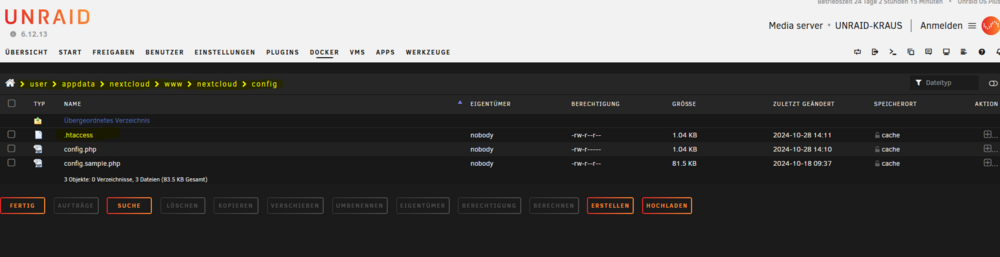
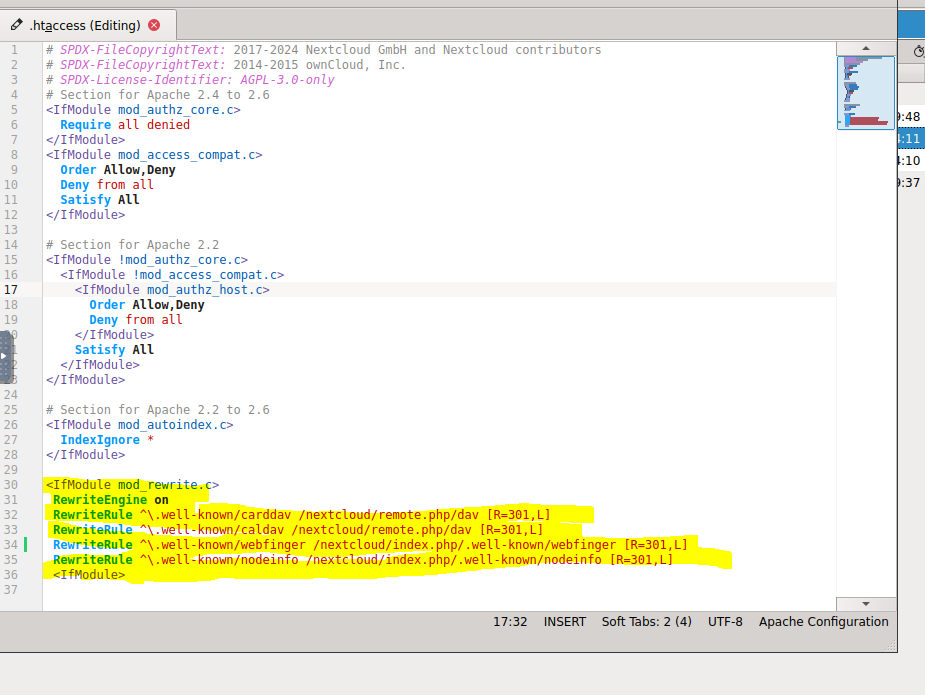
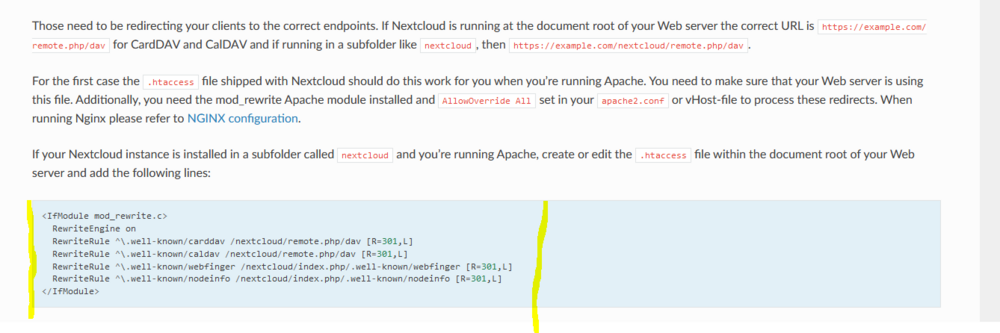 Noch zur Ergänzung:
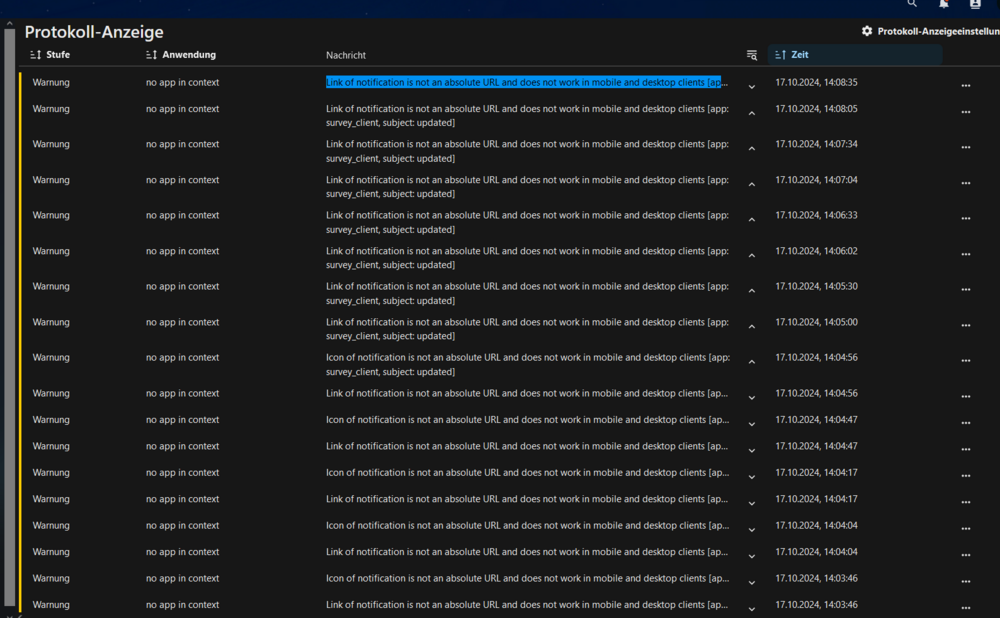
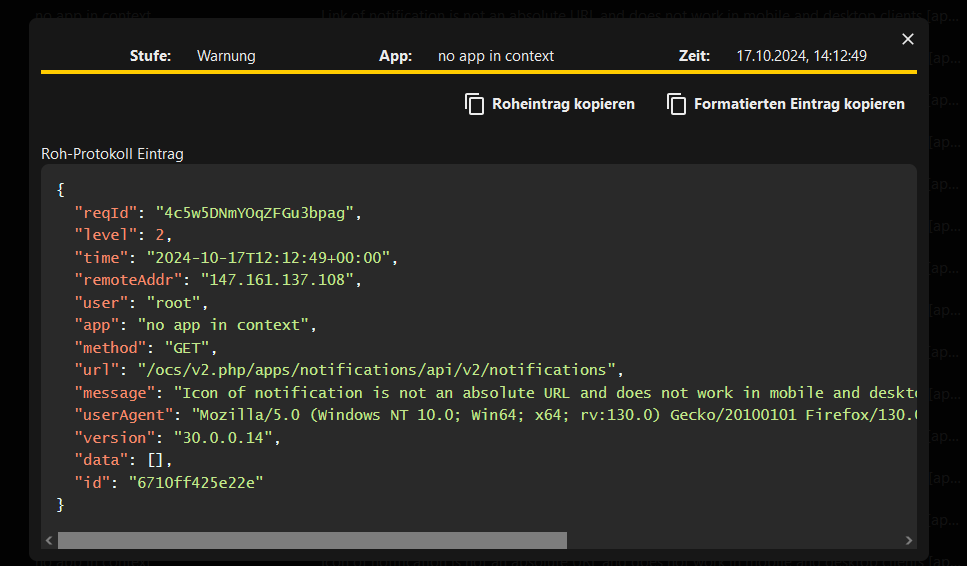 Hallo zusammen, ich bekomme die folgenden Fehlermeldung in meiner Nextclould Installation bei der Protokollierung quasi alle paar Sekunden neu angezeigt: Kann mir jemand sagen a) woher die kommt und b) wie man sie weg bekommt. Vielen Dank für eure Unterstützung !! Stefan
 Vielen Dank für Deine Nachricht 🙂 !! Ich möchte nicht neu installieren - ich mache mir aber Gedanken darüber wie ich den aktuellen Stand wieder herstellen kann, würde meine aktuelle Installation oder auch der gesamte Unraid Server - warum auch immer - nicht mehr funktioniert, bzw. futsch sein.... das ist alles .... Verstehe ich das richtig - wenn ich nach erfolgter Neuinstallation den bisherigen Datenordner mit allem was dazu gehört (Anm.: den sichere ich aktuell auch komplett - nicht nur das was in \Export liegt) - wieder entsprechend wieder an der bisherigen "Stelle" zur Verfügung stelle - ich die Neuinstallation genau so konfiguriere wie bisher - das Paperless-ngx direkt wieder so läuft wie bisher ?! - Ich frage weil nach meinem (aktuellen) Verständnis ja nicht nur die bisherigen Daten wieder an Ort und Stelle sein müssen, sondern die bisherigen Redis DB Einträge wieder hergestellt werden müssten - die Installation müsste ja auch neu erfolgen .... daher bin ich davon ausgegangen das man diesen "Import Befehl" benötigt, damit diese Einträge in diesem Zusammenhang wieder hergestellt werden... Vielen Dank !!Hallo zusammen, aktuell erstelle ich bei Paperless-ngx nach jeder Veränderung der vorhandenen Datenn, manuell einen Export, also wenn man so will ein Backup mittels des Befehles: /usr/src/paperless/src/manage.py document_exporter /usr/src/paperless/export Die Frage, die ich mir nun stelle ist, wie das Vorgehen denn wäre, müssten die im Ordner /export vorhandenen Daten nun in eine neue Paperless-ngx Installation wieder importiert weden - ich vermute mal an der Stelle, 1.) Das es einen passenden "Import" Befehl zu dem obigen Befehl gibt ?! und 2.) bevor dieser ausgeführt wird, die aktuell im Ordner /export befindlichen Daten zuvor in den /consume Ordner der neuen Installation kopiert werden müssen Für sachdienliche Hinweise in diesem Zusammenhang wäre ich sehr dankbar 🙂 !! Vielen herzlichen Dank und viele Grüße !! StefanVielen Dank für Deine Nachricht ! - Ich konnte das Problem in der Zwischenzeit lösen. Und tatsächlich ist das was am Ende geholfen hat auch in Deinem Screenshot "vorhanden": Nachden ich bei "Secure SMTP" von "force_tls" auf "starttls" den Port von 465 auf 587 und bei "SMTP Auth Mechanism" von " " auf "Plain" umgestellt funktioniert alles wie es soll, sprich ohne "Sendmail" .. huurrraaa 🙂 ... Vielen Dank für Deine Support !! - Viele Grüße ....Hallo zusammen ! - Vielen Dank für eure Unterstützung !!! 🙂 - Nachdem ich den Nginx Container komplett gelöscht und anschließend wieder neu installiert und eingerichtet habe, funktionert sowohl das Erstellen, als auch das Erneuern von Zertifikaten problemlos. Ich habe (natürlich) keine Ahnung weshalb das so ist ... ... aber was sollS - ich bin sehr erleichtert dass das nun geklärt ist. Ich habe mir eure Lösungsvorschläge dennoch mal aufgeschrieben, sollte ich mal wieder in das Problem laufen ...


