





Sptz87
Members
-
Joined
-
Last visited
Everything posted by Sptz87
-
Little bit late reply. Life got in the way. Everytime I reboot it happens. Just yesterday I updated from 7.1.4 to 7.2.4 and it doesn't boot. Have to turn off the server, grab the usb drive, replace the BZ* files and it then boots fine
-
So what just happened right now. Upgraded to 7.1.4 = no boot Changed USB port = no boot Downloaded a copy of 7.1.4 and replaced manually on my laptop every single file and folder except for config and syslinux Plugged to the original usb port = booted
-
That's interesting and a possibility! But this never happened before though, only after going to 7.1.2. Even going from 6 to 7 which was a big jump was absolutely fine. I could reliably reboot the server remotely etc all the time. No issues!
-
So I forgot to update this thread. Basically it fails to boot all the time. I have to change USB ports for it to work. I just tried to upgrade now to 7.1.4 and lo and behold. Not booting. :[
-
Think I spoke to soon. To test I just restarted the server and same thing happened again. Copied the files yet again, and now it just doesn't boot with the same issue...
-
Yep, that worked. Wow lol. That simple. Just replaced the bz* files and instantly booted perfectly.
-
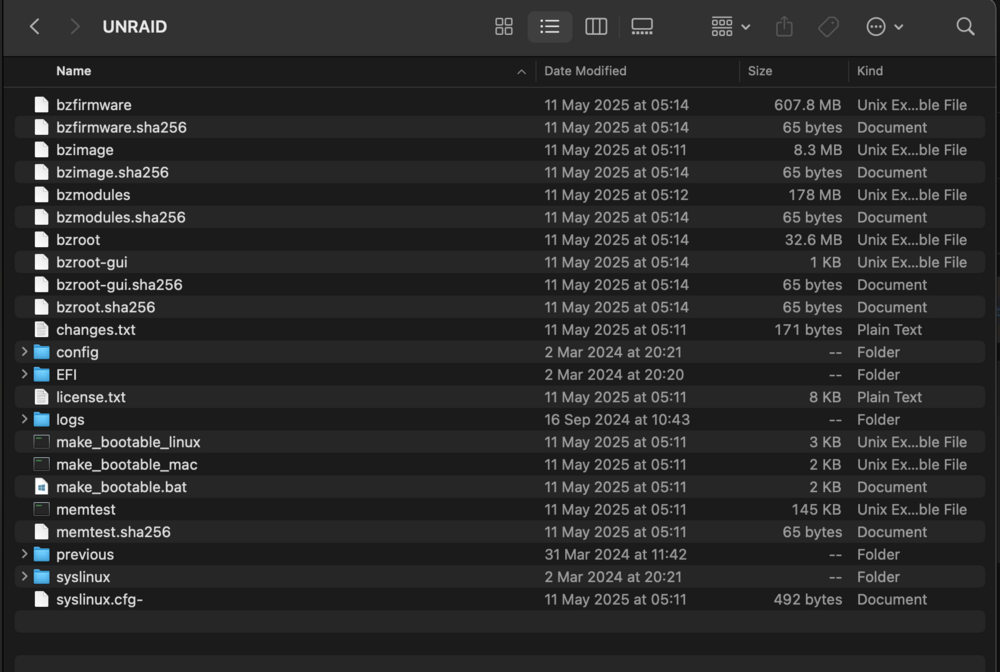
I just plugged it on my mac and everything seems to be there. Don't know what to do now lol, it's been rock solid until this update today
-
Samsung Flash Drive FIT 1100 is the flash drive I use. Cache SSDs are both a Sabrent and a Crucial. As can be seen in my signature. How would it die with an update though? When it's been rock solid oO I just plugged the flash drive on my mac and it looks fine.
-
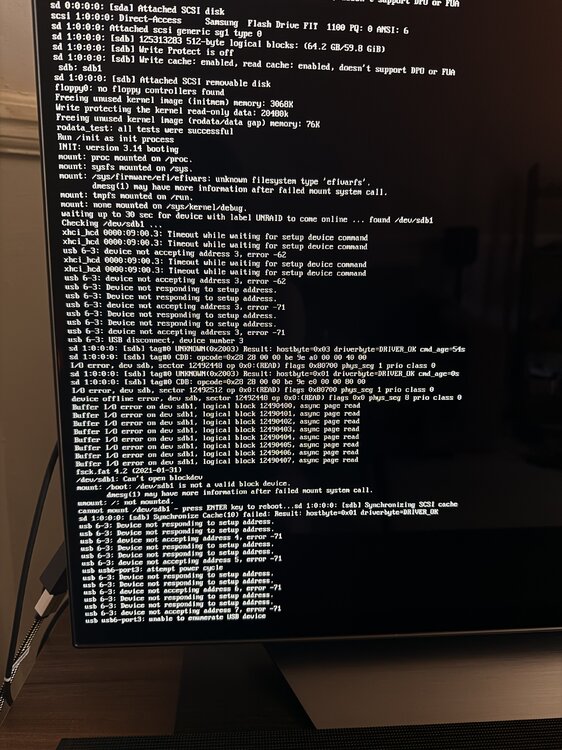
I've been running unraid for over a year, decided to update today from 7.0.1 to 7.1.2, surprised it didn't come back online. So I plugged an HDMI cable to check what was up and noticed it was booting straight into the bios, I changed the USB drive to another port, force reboot and it started booting but to this error. Apologies for being a photo, as I have the server in my living room, never plugged to a monitor. Any idea on what to do here? Never encountered this before and all updates prior were a breeze. Until today...
-
I've been running unraid for over a year, decided to update today from 7.0.1 to 7.1.2, surprised it didn't come back online. So I plugged an HDMI cable to check what was up and noticed it was booting straight into the bios, I changed the USB drive to another port, force reboot and it started booting but to this error. Apologies for being a photo, as I have the server in my living room, never plugged to a monitor. Any idea on what to do here? Never encountered this before and all updates were a breeze. Until today
-
What CPU are you using? And not using amd-pstate actually worked out to better power savings to you? :o
-
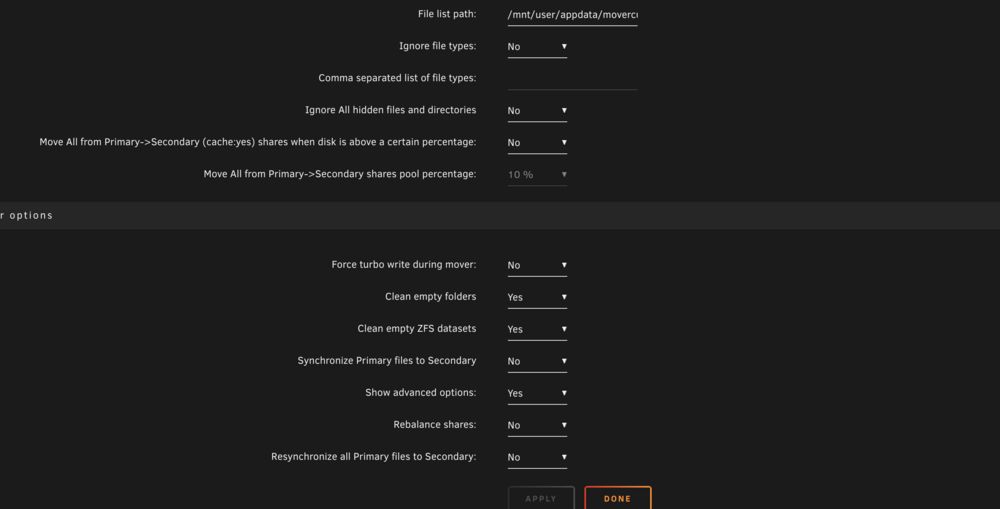
I just ran into this as well. My cache pool is ZFS (always has been) and with all those options ticked still leaves empty folders behind.
-
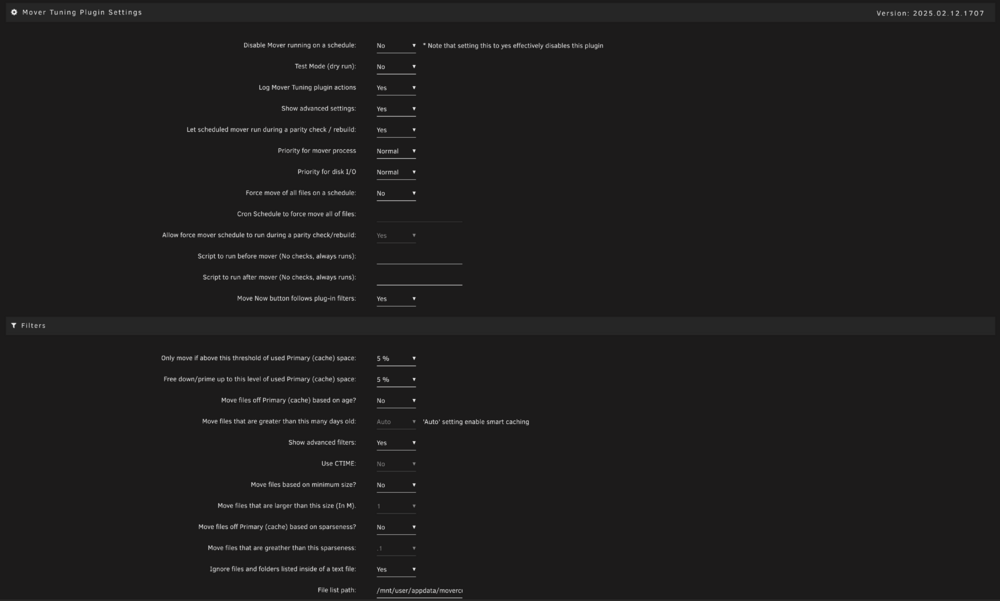
Yes, with your version. I was using 2023 which didnt work at all in unraid 7 so I installed yours
-
I have an external HDD as well, which I could very well use. As I used that as an in-house backup on top of offsite backup. So I can just dump what's in the cache pool onto that and then copy it back onto the new pool? Makes sense! Thank you!
-
Attached diagnostics as well! awe-diagnostics-20250213-1515.zip
-
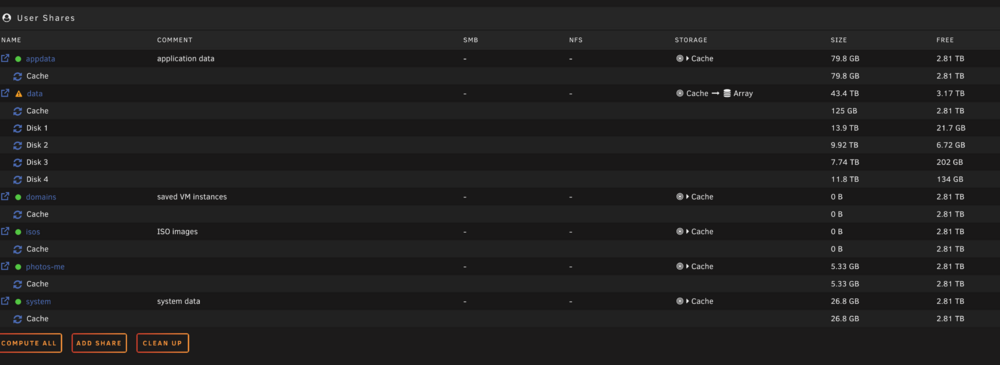
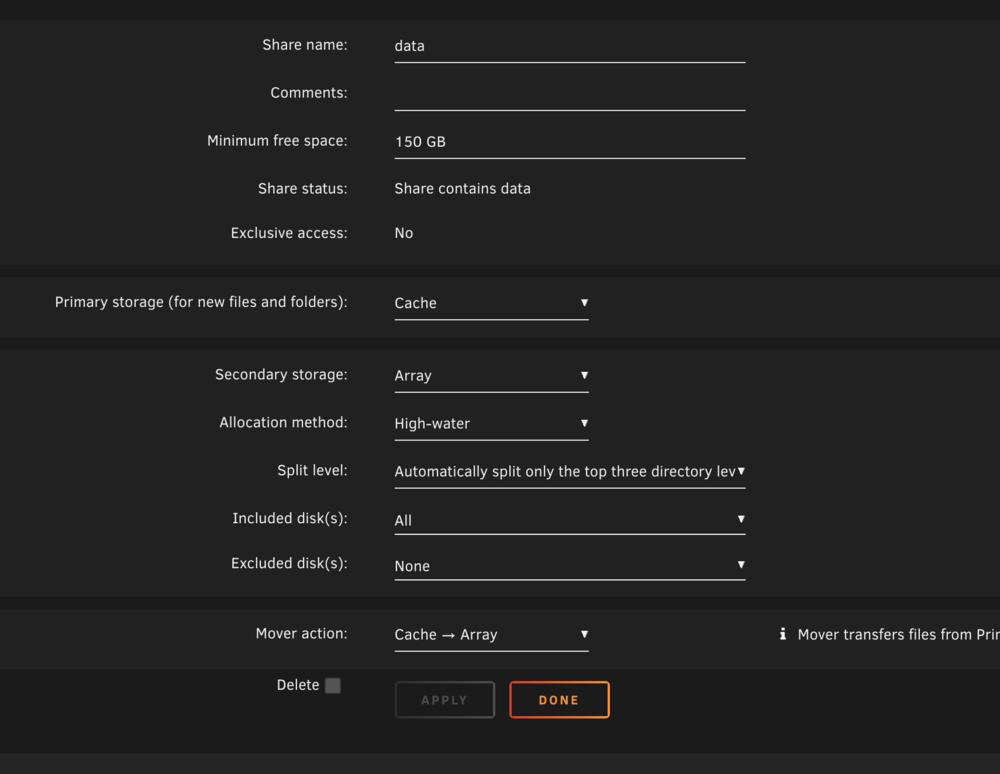
I currently have a big issue that I've never had before. Basically it looks like Mover, right now moving about 600GB of media into the array and it's exhausting just a single disk to below the minimum free space set (150GB). This has never happened before... I have 2 other disks with 300 GB each available and it's just not moving to those for some reason? these are my share settings

-
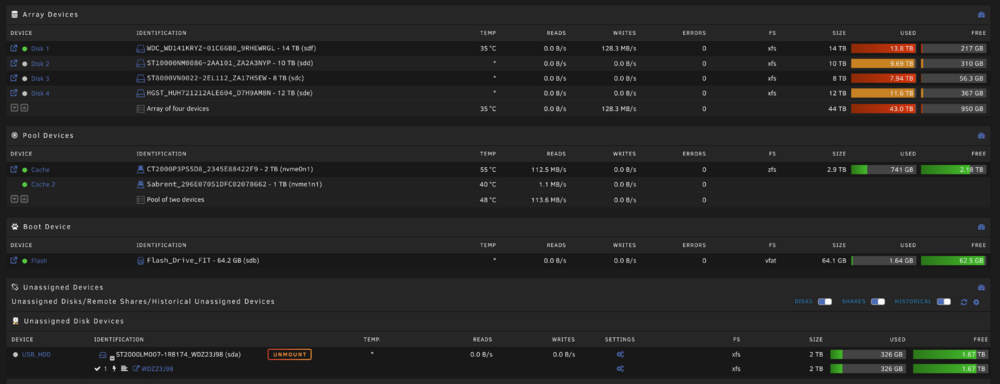
Thank you for the recommendation thread! Regarding what I have in the pool I showed a screenshot. appdata, data (media files that usually all go into the array), system
-
Hi all, I've been putting it off but I'm in need of upgrading my server's storage. My current setup is in my sig and as seen in the below screenshot. I've run out of SATA ports for more disks, so my plan was to use the secondary M2 connector with a controller to add more SATA drives from there. The issue here is that I'm currently using, as you can see, 2 NVME drives for the cache in a ZFS Raid0 pool (in unRAID 7 is shows Stripe now). This is the main thing I'm scared about. Basically I'm gonna purchase a new NVME drive (larger capacity) for the cache pool. The problem is how do I back this up? Can I literally just drag and drop the folder structure? So back it up to an external drive and then after adding the new NVME drive, create a new ZFS cache pool and just drop them back in? Below are my shares. Not using domains or isos. Also, what is the best recommended controller to use for the additional SATA drives? Many thanks!


-
Awesome, thank you!! The "original" 2024 version now shows it's got an update as well for me?
-
Thanks mate! What exactly isn't working at the moment though?
-
Yeah, that's the one I had installed (2023 one). All I'm using mover tuning for is to run a pre-script and whitelist files from a .txt that's it. Would this 2024 version work for that? Don't really use any other options
-
Hi all, Just upgraded to 7 and noticed mover tuning isn't working. Just doesn't seem to move anything at all. I used a script at runtime to only move stuff that's older and keep the rest at a specific disk size. Is there anything at the moment that can be replaced with? Or is there an update in the works?
-
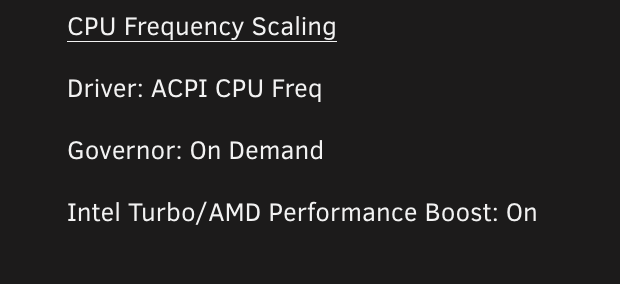
I just upgraded to 7.0 and if I remove amd_pstate=passive from syslinux boot it defaults to ACPI driver. On my system it should now default to amd_pstate right? Anyway, if I add it back it now loads that driver. But can we actually use p_state=active now? Regarding this plugin, this shouldn't be paired with tips and tweaks right? Since it's an "auto" plugin I'm a bit wary of installing it
-
Removed the line, rebooted and it defaulted to ACPI unfortunately So I guess it's still needed, but shouldn't in theory as the kernel is now fully capable of pstate guided even right?
-
All seems to have gone fine. No problems whatsoever. Except as you said, mover tuning isn't working. So I can't use the script I've been using right? And just use mover at its "default" state? Also, do you have any idea if there's any further compatibility with amd pstate since we moved up in kernel's version? I used to have amd_pstate=passive in syslinux under "Unraid OS" after "append initrd=/bzroot". Which worked, this is still necessary? And/or can we use active or guided now?


