





zkkzkk32312
Members
-
Joined
-
Last visited
-
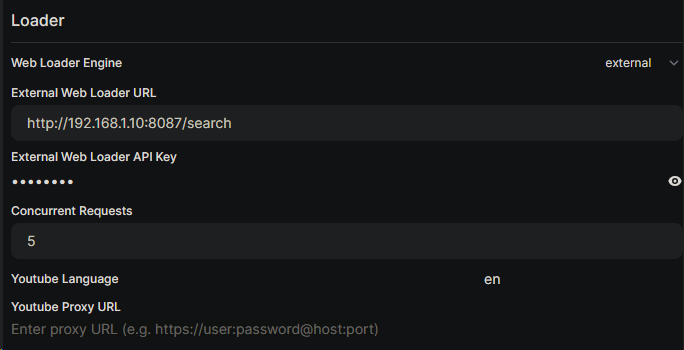
Crawl4AI Proxy is a lightweight Docker container that bridges Open WebUI's external web loader to Crawl4AI, enabling high-quality page content fetching for web-search-enhanced AI responses. What it does: Fetches clean markdown from any URL using Crawl4AI's headless browser Strips navigation noise, ads, and sign-in prompts via filter=fit Returns rich page content to Open WebUI instead of broken or empty snippets Prerequisites: Crawl4AI running (Docker or standalone) — Crawl4AI on GitHub Open WebUI — Open WebUI on GitHub SearXNG (optional, for search integration) Installation: Via Community Apps (once approved): Go to Apps tab → search "Crawl4AI Proxy" → Install Manual: docker run -d --name crawl4ai-proxy -p 8087:8087 -e CRAWL4AI_URL=http://<your-crawl4ai-ip>:11235/md zkkzkk32312/crawl4ai-proxy Open WebUI Configuration: Go to Admin Panel → Search Set Web Loader Engine to external Set External Web Loader URL to http://<unraid-ip>:8087/search Set SearXNG Query URL to http://<searxng-ip>:8084/search?q=<query>&format=json (note: angle brackets <query>, not curly braces) Ensure Bypass Web Loader is OFF Settings: Proxy Port — host port (default 8087) Crawl4AI URL — your Crawl4AI /md endpoint (default http://192.168.1.10:11235/md) Proxy API Key — optional, leave empty to disable Project: https://github.com/zkkzkk32312/crawl4ai-proxy Docker Hub: https://hub.docker.com/r/zkkzkk32312/crawl4ai-proxy Feel free to ask questions or report issues here or on GitHub.
-
I currently have Postgres v17 installed as I was using it for other purpose, should I downgrade it to v14 or v15 before I install immich?
-
for first time installing, should I downgrade Postgres from v17 to v15 or v14?
-
for everyone having issues with not being able to create no-ip2.generated.conf, check your group settings in NO-IP. I had a group set in NO-IP that I forgot, and in the config file I only put in my hostnames, and the script actually tells me to go delete the group on NO-IP, after that no-ip2.generated.conf gets created successfully.
