



Skip to content
View in the app

A better way to browse. Learn more.

Unraid

A full-screen app on your home screen with push notifications, badges and more.

To install this app on iOS and iPadOS
  1. Tap the Share icon in Safari
  2. Scroll the menu and tap Add to Home Screen.
  3. Tap Add in the top-right corner.
To install this app on Android
  1. Tap the 3-dot menu (⋮) in the top-right corner of the browser.
  2. Tap Add to Home screen or Install app.
  3. Confirm by tapping Install.

lunz

Members
  • Joined

  • Last visited

  1. I'm currently running an 8th gen i5-8400 (6 core, 6 thread) on an ITX motherboard. It's good for running 1-2 VM's (Home Assistant and AzuraCast) and ~15 containers. It's fine for now but I'm already looking to upgrade to this minisforum BD790i (16 core, 32 thread) in the future because adding more VM's uses too many resources.
  2. @Nodiaque that was it! I created the folder at this location and it's working! /mnt/disk1/backup/appdata_backup thank you
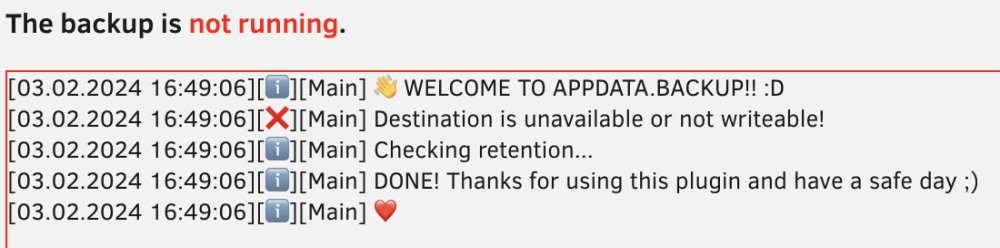
  3. Hey I'm trying to setup appdata backup and when I run the manual backup to test out my config I'm getting an issue that the destination is unavailable or not writable [see attached picture]. I've tried setting the destination to another share that I know I can write to and I get the same error. Any help would be appreciated! Thanks
Account

Navigation

Search

Search

Configure browser push notifications

Chrome (Android)
  1. Tap the lock icon next to the address bar.
  2. Tap Permissions → Notifications.
  3. Adjust your preference.
Chrome (Desktop)
  1. Click the padlock icon in the address bar.
  2. Select Site settings.
  3. Find Notifications and adjust your preference.