





sharpling
Members
-
Joined
-
Last visited
-
Not checked previous answers so maybe I am stating the obvious but... Going from 4xsata to SFF8087 requires a “reverse” cable. Cannot use a breakout cable. (They look exactly the same). Going from miniSAS to SFF8087 I think should be a “miniSAS host to SFF8087 target” cable. I never got MiniSAS to SSF-8643 working, tried a few cables but ended up adding a HBA-card instead. Now using the minisas with a breakout cable to run some internal ssds instead.
-
Tested slimsas breakout cable with 4 sata devices + 4 devices on sata ports. All m.2 slots still working, so no port sharing.
-
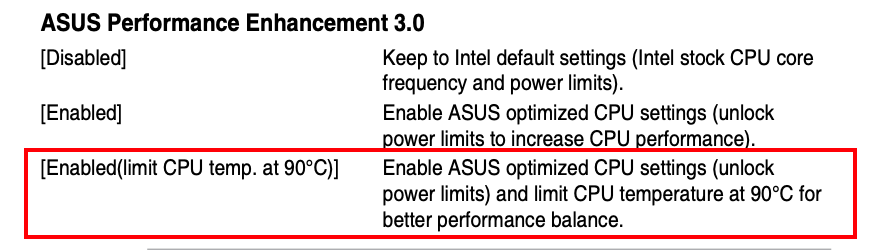
Is there a big diffrence between the max 90 degree setting and manually limiting?
-
I've tested all filesystems now. Even installed windows, crystal speed test aprox 7000MB/s. Windows explorer file copy jumping between 3000-4000. Upgraded firmware on nvme's, reset mb bios, took out everything else from computer only left nvme's, reset unraid config. Messed around a bit copying without assigning them to a pool, not a big diffrence. Made some new pools for the 11 time, changed to zfs (for 3rd time). Then just suddenly stable 5GB/s between m2_2/m2_3 and 6GB/s if copying from m2_1. I have absolutly no idea why. Update: speed was due to beeing in cache. After a lot of trying i can get max 2GB/s copying from nvme to nvme so still suspecting something is off.
-
Thank you, that is roughy what i was expecting to see. I will play around a bit more, probably i've set something wrong somewhere.
-
Has anyone tested any nvme to nvme transfer speeds? Since I am new to unraid I'm not sure how to proper test things but played around copying large files in 'mc' between two Corsair mp600 pro xt. Seems to max out at around 1.7GB/s, was expecting a bit more. i7-13700, 64GB
-
Yeah, I also planned for a smaller 8 x sata array and have no room left for another HBA card. Now also tried to disable the slimsas sata ports in bios individually and in groups. Thinking that maybe disabling 1-2 or 3-4 would open at least one m.2 but no diffrence. Hopefully it's backplane or cable related but i kinda doubt it. Anyways I opened a support case and asked for clarification related possible port sharing between PCH slimsas and PCH m.2 slots. Update: after putting back hba’s I now noticed that connecting slimsas also disables the x4 pcie slots so the problem points more towards bad cable or hardware.
-
Thank you, Think I found the problem, The mobo seems to use port sharing between slimsas and pch nvme slots. I have slimsas connected to a sas backplane - disconnect it and the nvme drives are detected / working. I will test if breakout cable allows any sata drives at all but i think it's the whole port - so no slimsas ports in case you want use pch m.2_2 or m.2_3. Update: after putting back hba’s I now noticed that connecting slimsas also disables the x4 pcie slots so the problem points more towards bad cable or hardware.
-
Hi! First post here, Just got this board and maybe this is a stupid question but i cannot figure it out.. I have 3 corsair mp600 pro xt nvme drives, putting one in the m.2_1 works out of the box and directly detected by unraid but cannot get 2_2 / 2_3 working no matter what i do. Is there some shared pcie/lanes setting to enable m.2_2 / m.2_3? In that case where?


