





halfmoon
Members
-
Joined
-
Last visited
-
Thanks
-
Is there a way of uninstalling the Disk Location plugin? Had a problem allocating hard drives - would like to reinstall the plugin and try to reallocated the hard drives. Thanks for your help
-
Thanks for your response. You were right it was spun down - but was not able to spin-up the drive using the icon on the Main screen. As I shutdown Unraid I noticed the power light on one of the the Icy Box IB-565SSK 5-Bay storage unit was not on. I switched it on and attempted to restart Unraid. It took considerably longer to get to the 192.168.1.23 and the log in prompt on the Unraid monitor. I was unable to connect to Unraid from another port on the network using 192.168.1.23 in the browser address bar - gave the message - cannot connect. After trying to reboot several times i eventually was able to login to Unraid - did not change anything just performed several reboots. After logging in all the drives were accessible and the preclear problem disappeared. Looks like a hardware problem? Could one of the drives be faulty?
-
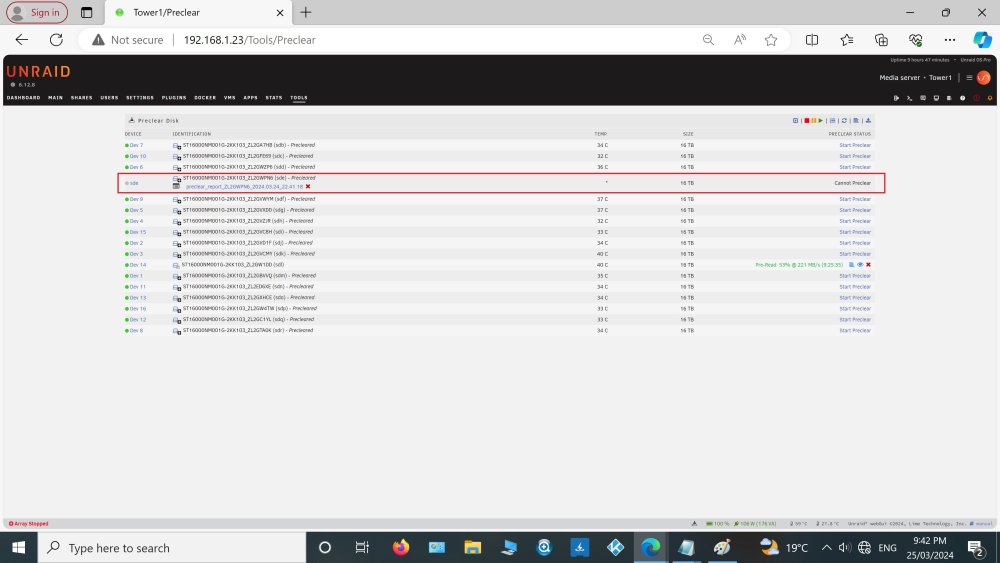
Preclear almost complete. Have noticed on of the drives in the Tools-> Preclear screen shows one of the drives cannot be precleared (attachment Tools-Preclear.jpg), however the preclear report (attachment preclear_report_ZL2GWPN6.txt) stated the preclear operation was successful. Can I use this drive? Do I need to do another preclear? Thanks for your help preclear_report_ZL2GWPN6.txt
-
Disregard the last post . Used two different sata cables and plugged them into 2 onboard sata connectors. No initial errors - will let the preclear cycle complete and report the outcome. Thanks
-
Thanks, for the reply I've shutdown Unraid and unplugged 2 of the onboard Sata connectors, and then plugged in 2 of the sata connectors from the 2nd M.2 Sata 3.0 riser card which are giving udma crc errors. Restarted Unraid and only 14 of the 18 hard drives appeared in the unassigned disk list - the 2 problematic drives did not appear on the list - going to unassigned plugin did not located them. 4 Drives appeared in the Historical Devices list of the main Unraid Tab - corresponding to the 2 disconnected drives and the 2 newly connected problematic drives. Removed the problematic drives from the Historical Devices list , rebooted and executed the unassigned plugin. The 2 problematic drives do not appear on the unassigned devices. Do i need to remove all the historical devices in order for the problematic drives to appear on the unassigned devices list?
-
Hi, i'm new to unraid and am having problems preclearing some hard drives. The server has 18x 16tb exos drives - on the 6 Sata connectors on the mother board and 12 Sata connectors using using 2x M.2 To SATA 3.0 Riser Cards. I have precleared 15 of the hard drives with no problems. The last 3 are on the 2nd M.2 To SATA 3.0 Riser Card. Two of the six Sata hard drived on the riser card successfully preceared without problems. I replaced the sata power and data cables - this appeared to make a difference. This server was unintentionally shutdown during the preclear operation. After this 3 of the drives have udma errors in excess of 15000-20000 with read rates <50MB/s. I have tried to restart the preclear operation but the more errors occur. Does anyone have a suggestion to how i can preclear the 3 hard drives?
