





kiwipaul
Members
-
Joined
-
Last visited
Everything posted by kiwipaul
-
I have my movies on UnRraid with Jellyfin running on another Linux server. I have a single directory share - movies. Jellyfin media is mapped to subdirectories in the UnRaid share . This worked well until recently. After much digging around I found that the Jellyfin server could not see the subdirectories. I have gotten around this by using symbolic links. Looks like a change to SMB in UnRaid 7
-
Nice to see my favourite streamer back. Note that Moode Audio is fabulous raspberry pi client with all the bells and whistles and very active development. https://moodeaudio.org/
-
Will give that a go with a different controller.
-
root@HomeNas:~# sdparm -C sense /dev/sdc /dev/sdc: ATA ST4000VN000-1H41 SC46 root@HomeNas:~# sdparm -C sense /dev/sdd /dev/sdd: SEAGATE ST4000NM0043 0006
-
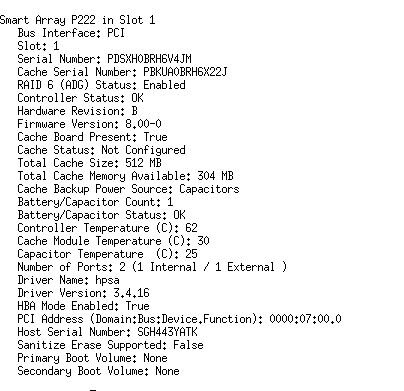
I booted into the HP gui programme for managing this server / controller (HPSSA) which confirms that the controller is in HBA mode, but there is no sign of the 2 SAS drives in any of the menus. I got into the command line equivalent (ssacli) hoping to see more but no joy. The drives are not listed. I am starting to think that the drives (second hand) are faulty but why then does UnRaid see them? Puzzled and open to suggestions
-
Thanks. I went through the steps of putting into IT mode but I will check again. Where in the diagnostics did you see this?
-
OK === START OF INFORMATION SECTION === Vendor: SEAGATE Product: ST4000NM0043 Revision: 0006 Compliance: SPC-4 LU is fully provisioned Rotation Rate: 7200 rpm Form Factor: 3.5 inches Logical Unit id: 0x5000c50085831dbb Serial number: Z1ZADZTS0000R642JST3 Device type: disk Transport protocol: SAS (SPL-4) Local Time is: Sun May 19 07:30:39 2024 NZST device is NOT READY (e.g. spun down, busy) A mandatory SMART command failed: exiting. To continue, add one or more '-T permissive' options. homenas-diagnostics-20240519-0734.zip
-
Greetings running latest version of UnRaid (6.12.10) on a HP Gen8 MicroServer with a HP HAB card. The Gen8 has a SAS compatible backplane. The system runs well. I have added two SAS Seagate drives but they are not recognised. See as follows. Not recognised during boot either. System hangs for a while with errors - below. Any thoughts? Thanks in advance. IOMMU group 1: [8086:0151] 00:01.0 PCI bridge: Intel Corporation Xeon E3-1200 v2/3rd Gen Core processor PCI Express Root Port (rev 09) [103c:323b] 07:00.0 RAID bus controller: Hewlett-Packard Company Smart Array Gen8 Controllers (rev 01) [1:0:1:0] disk ATA ST4000VN008-2DR1 CV11 /dev/sdb 4.00TB [1:0:2:0] disk ATA ST4000VN000-1H41 SC46 /dev/sdc 4.00TB [1:0:3:0] disk SEAGATE ST4000NM0043 0006 /dev/sdd - [1:0:4:0] disk SEAGATE ST4000NM0023 E007 /dev/sde - [1:0:5:0] disk ATA ST2000DL003-9VT1 CC3C /dev/sdf 2.00TB [1:0:6:0] disk ATA WDC WD30EFRX-68E 0A80 /dev/sdg 3.00TB May 15 21:49:58 HomeNas emhttpd: device /dev/sdd has size zero May 15 21:49:58 HomeNas emhttpd: device /dev/sde has size zero May 15 21:50:00 HomeNas emhttpd: device /dev/sdd has size zero May 15 21:50:00 HomeNas emhttpd: device /dev/sde has size zero
-
Greetings. I cant get ssacli to recognise my P222 raid card. I installed a Debian VM and installed the latest version of ssacli (echo "deb http://downloads.linux.hpe.com/SDR/repo/mcp bookworm/current non-free" > /etc/apt/sources.list.d/hp-mcp.list) but ssacli is not recognising the HP P222 card. The error suggests no driver installed, I tried googling and tried starting the driver as follows but no success. modprobe sg I see that the HP driver installed is actually hpsa On the basis of other internet guidance I tried this. modprobe hpsa hpsa_allow_any=1 No joy. Anyone? Guidance from the web I have relied upon https://gist.github.com/mrpeardotnet/a9ce41da99936c0175600f484fa20d03

