





Mbeaver5555
Members
-
Joined
-
Last visited
Everything posted by Mbeaver5555
-
Ok thanks I will try that when I have some spare time to mess about in a few weeks - thank you
-
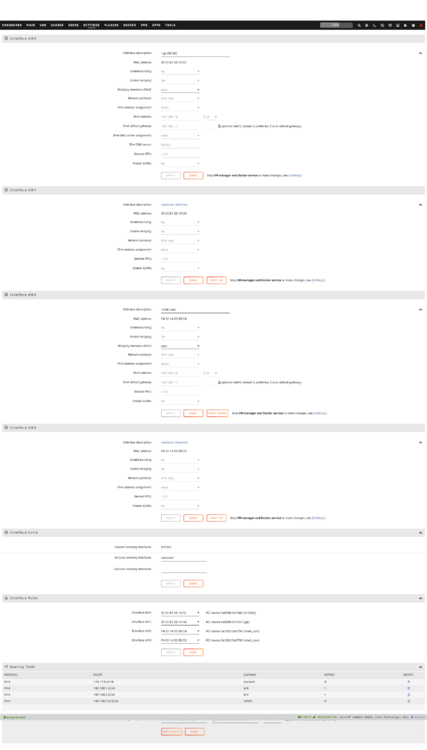
I've installed a IBM 98Y2404 Mellanox MNPH29D-XTR ConnectX-2, 10Gbps SFP+ +2 x10GBs SFP included. Goal was to have a 10gb networks, so I can then deploy a second server and move data between them faster. I cannot get the 10gb card to move to ETH0 in Interphase rules. Every time I move the order around my choice is lost upon restart. I've tried deleting the network.cfg and network-rules.cfg from the flash also. I have also tried to use an active failover bonding with the 10gb in ETH2, however this seems to prioritise the 10gb card. I've tried doing this which I found on the forums: Create a file on the flash: config/modprobe.d/bonding.conf which contains the single line: options bonding primary=eth0 I've attached my log files, and a screenshot of my current network settings. I've currently got the 10gb NIC on a different IP range to see if that helped. I would like the 10gb card to be in ETH0, so that I can set the nic with 192.168.1.9, then bridge for the docker network, and then also have a failover bond with one of my 2 x 1gb Nics on my motherboard I must have restarted my server 35 times trying to get this to work so far. Any suggestions would be great! tower-diagnostics-20250401-1954.zip
-
I'm running unraid 7. I'm close to running out of space on my unraid server (16 disks with 168tb usable). I have a few more bays to use however then I will be full. I don't want to delete stuff. Server 1 has a "data" folder in it. Which is mostly for plex. I'm planning a second server built on a Supermicro CSE 847. I don't want a das as I like the parity protection of having a second server. I would like to be able to mount the pool of disks, in server 2, into the data folder in server 1, so that I can continue to download ISOs, and that my aar stack, plus seperate Plex PC will continue to work. The seperate Plex PC has this data folder mounted into it. They will be connected via 10gb rj45 How could I achieve this? Or do I need to do something different?
-
How do I access that folder? It's not visible in my shares GUI?
-
Hi Itimpi - I've now added my diagnostics as requested
-
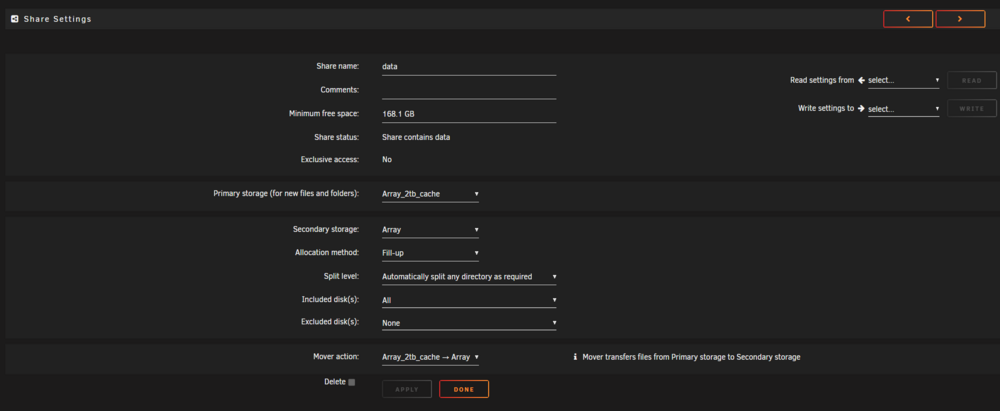
*edit: updated to include my log files as requested File are stuck on my cache and won't move to the array. I'm setup correctly as per the screen shot, i've shared below. App data is on a separate cache and is working fine. This share is my content, and the new files are new downloads from usenet. I'm using usenet, so not active seeding running on the files. The file download but then do not move to the array. The cache is 99% full. When I start mover manually and have enabled logging I get the following (with no files moving). Jan 24 12:00:13 Tower move: mover: started Jan 24 12:00:13 Tower move: mover: finished I've tried turning off docker and VMs and running mover, however this doesn't work either. i had a mover plugin which I have installed and I read this can stop mover working. Having the plugin installed and then removed hasn't made any difference. Any help would be appreciated! tower-diagnostics-20250124-1228.zip
-
Hi Frank, I'm moving the files from one folder on the the share location to another, I'm not changing anything on the disk - I'm leaving that to unraid. Thanks for the info. The files I'm Syncronising only need to move up one folder.
-
True yes, however the data is already on the disk. I don't see it would need to be moved, just that the path to the file is updated
-
Help with Transfer/Sync Krusader I'm migrating from Windows to Unraid, moving my plex data. I've got about 100tb to copy, I'm about half way through after 2 weeks! I'm using Krusader. My windows used Drivepool, which means each disk has many folders with some files in. For this reason I have been using Syncronise not copy in Krusader. The data is split across multiple folders, all named the same, across multiple disks. Sync runs at 5x slower than copy. So I tried to copy the data over to the share, in a new folder "copiedmovies" and thought I could quickly sync to the main "movies folder" since all was needed is a minor folder location update, as it was in the same directory,. However its still really slow, I thought it would be nearly instant. Destination Share to Sync into (50tb) Data/movies Location of data to sync into share (6tb) Data/movies/copiedmovies Does anyone have any ideas how I can speed this up? M

