






Kristopher
Members
-
Joined
-
Last visited
-
Like, should I do a New Config and put the correct drives back in their slots?
-
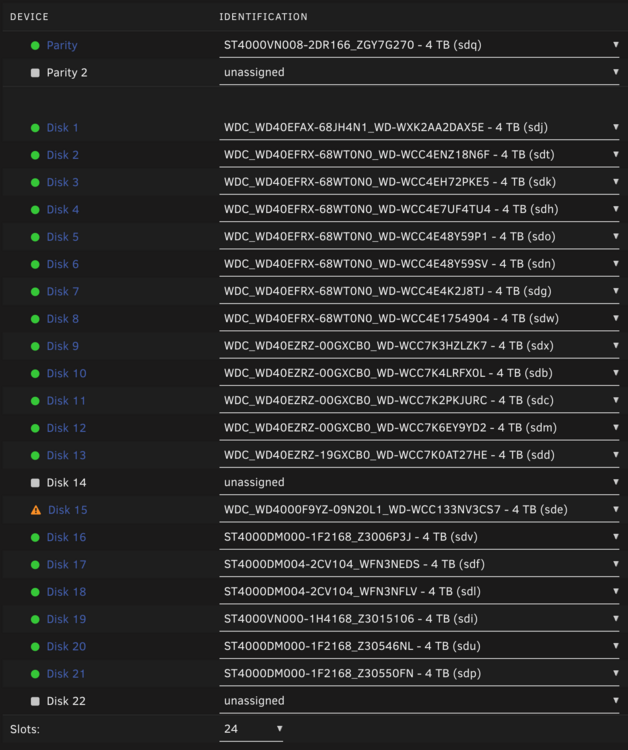
I am having an issue where I have a failing drive, syslog spammed with: I also had a drive that was doing a parity rebuild when this one decided to poop the bed. Now my configuration looks like this: ... and I can't start the array. I don't know why Disk 14 and 22 show "unassigned". HELP?!?!

-
I'm not running any scripts or editing the nginx directly. Bug report filed, I'll take a look at your script, thanks!
-
Log filled with these - then crashes nginx and locks up server: unRAID 7.1.4 Aug 28 15:20:41 Angband nginx: 2025/08/28 15:20:41 [crit] 18252#18252: ngx_slab_alloc() failed: no memory Aug 28 15:20:41 Angband nginx: 2025/08/28 15:20:41 [error] 18252#18252: shpool alloc failed Aug 28 15:20:41 Angband nginx: 2025/08/28 15:20:41 [error] 18252#18252: nchan: Out of shared memory while allocating message of size 26053. Increase nchan_max_reserved_memory. Aug 28 15:20:41 Angband nginx: 2025/08/28 15:20:41 [error] 18252#18252: *173999 nchan: error publishing message (HTTP status code 500), client: unix:, server: , request: "POST /pub/devices?buffer_length=1 HTTP/1.1", host: "localhost" Aug 28 15:20:41 Angband nginx: 2025/08/28 15:20:41 [error] 18252#18252: MEMSTORE:01: can't create shared message for channel /devices Aug 28 15:20:41 Angband webgui: Nchan out of shared memory. Reloading nginx Aug 28 15:20:41 Angband rc.nginx: Restarting Nginx server daemon... Aug 28 15:20:41 Angband rc.nginx: Checking configuration for correct syntax and then trying to open files referenced in configuration... Aug 28 15:20:41 Angband rc.nginx: /usr/sbin/nginx -t -c /etc/nginx/nginx.conf Aug 28 15:20:41 Angband rc.nginx: Stopping Nginx server daemon gracefully... Aug 28 15:20:53 Angband nginx: 2025/08/28 15:20:53 [error] 18252#18252: MEMSTORE:01: force-reaping msg with refcount 1 Aug 28 15:20:53 Angband nginx: 2025/08/28 15:20:53 [error] 18252#18252: MEMSTORE:01: force-reaping msg with refcount 1 Aug 28 15:20:53 Angband nginx: 2025/08/28 15:20:53 [error] 18252#18252: MEMSTORE:01: force-reaping msg with refcount 1 Aug 28 15:20:53 Angband nginx: 2025/08/28 15:20:53 [error] 18252#18252: MEMSTORE:01: force-reaping msg with refcount 1 Aug 28 15:20:53 Angband nginx: 2025/08/28 15:20:53 [error] 18252#18252: MEMSTORE:01: force-reaping msg with refcount 1 Aug 28 15:20:53 Angband nginx: 2025/08/28 15:20:53 [error] 18252#18252: MEMSTORE:01: force-reaping msg with refcount 1 Aug 28 15:20:53 Angband nginx: 2025/08/28 15:20:53 [error] 18252#18252: MEMSTORE:01: force-reaping msg with refcount 1 Aug 28 15:20:53 Angband nginx: 2025/08/28 15:20:53 [error] 18252#18252: MEMSTORE:01: force-reaping msg with refcount 1 Aug 28 15:20:53 Angband nginx: 2025/08/28 15:20:53 [error] 18252#18252: MEMSTORE:01: force-reaping msg with refcount 1 Aug 28 15:20:53 Angband nginx: 2025/08/28 15:20:53 [error] 18252#18252: MEMSTORE:01: force-reaping msg with refcount 1 Aug 28 15:20:53 Angband nginx: 2025/08/28 15:20:53 [error] 18252#18252: MEMSTORE:01: force-reaping msg with refcount 1 Aug 28 15:20:53 Angband nginx: 2025/08/28 15:20:53 [error] 18252#18252: MEMSTORE:01: force-reaping msg with refcount 1 Aug 28 15:20:53 Angband nginx: 2025/08/28 15:20:53 [error] 18252#18252: MEMSTORE:01: force-reaping msg with refcount 1 Aug 28 15:20:53 Angband nginx: 2025/08/28 15:20:53 [error] 18252#18252: MEMSTORE:01: force-reaping msg with refcount 1 Aug 28 15:20:53 Angband nginx: 2025/08/28 15:20:53 [error] 18252#18252: MEMSTORE:01: force-reaping msg with refcount 1 Aug 28 15:20:53 Angband nginx: 2025/08/28 15:20:53 [error] 18252#18252: MEMSTORE:01: force-reaping msg with refcount 1 Aug 28 15:20:53 Angband nginx: 2025/08/28 15:20:53 [error] 18252#18252: MEMSTORE:01: force-reaping msg with refcount 1 Aug 28 15:20:53 Angband nginx: 2025/08/28 15:20:53 [error] 18252#18252: MEMSTORE:01: force-reaping msg with refcount 1 angband-diagnostics-20250828-2210.zip
-
Server locking with the following - diagnostics attached: Aug 28 15:20:41 Angband nginx: 2025/08/28 15:20:41 [crit] 18252#18252: ngx_slab_alloc() failed: no memory Aug 28 15:20:41 Angband nginx: 2025/08/28 15:20:41 [error] 18252#18252: shpool alloc failed Aug 28 15:20:41 Angband nginx: 2025/08/28 15:20:41 [error] 18252#18252: nchan: Out of shared memory while allocating message of size 26053. Increase nchan_max_reserved_memory. Aug 28 15:20:41 Angband nginx: 2025/08/28 15:20:41 [error] 18252#18252: *173999 nchan: error publishing message (HTTP status code 500), client: unix:, server: , request: "POST /pub/devices?buffer_length=1 HTTP/1.1", host: "localhost" Aug 28 15:20:41 Angband nginx: 2025/08/28 15:20:41 [error] 18252#18252: MEMSTORE:01: can't create shared message for channel /devices Aug 28 15:20:41 Angband webgui: Nchan out of shared memory. Reloading nginx Aug 28 15:20:41 Angband rc.nginx: Restarting Nginx server daemon... Aug 28 15:20:41 Angband rc.nginx: Checking configuration for correct syntax and then trying to open files referenced in configuration... Aug 28 15:20:41 Angband rc.nginx: /usr/sbin/nginx -t -c /etc/nginx/nginx.conf Aug 28 15:20:41 Angband rc.nginx: Stopping Nginx server daemon gracefully... Aug 28 15:20:53 Angband nginx: 2025/08/28 15:20:53 [error] 18252#18252: MEMSTORE:01: force-reaping msg with refcount 1 Aug 28 15:20:53 Angband nginx: 2025/08/28 15:20:53 [error] 18252#18252: MEMSTORE:01: force-reaping msg with refcount 1 Aug 28 15:20:53 Angband nginx: 2025/08/28 15:20:53 [error] 18252#18252: MEMSTORE:01: force-reaping msg with refcount 1 Aug 28 15:20:53 Angband nginx: 2025/08/28 15:20:53 [error] 18252#18252: MEMSTORE:01: force-reaping msg with refcount 1 Aug 28 15:20:53 Angband nginx: 2025/08/28 15:20:53 [error] 18252#18252: MEMSTORE:01: force-reaping msg with refcount 1 Aug 28 15:20:53 Angband nginx: 2025/08/28 15:20:53 [error] 18252#18252: MEMSTORE:01: force-reaping msg with refcount 1 Aug 28 15:20:53 Angband nginx: 2025/08/28 15:20:53 [error] 18252#18252: MEMSTORE:01: force-reaping msg with refcount 1 Aug 28 15:20:53 Angband nginx: 2025/08/28 15:20:53 [error] 18252#18252: MEMSTORE:01: force-reaping msg with refcount 1 Aug 28 15:20:53 Angband nginx: 2025/08/28 15:20:53 [error] 18252#18252: MEMSTORE:01: force-reaping msg with refcount 1 Aug 28 15:20:53 Angband nginx: 2025/08/28 15:20:53 [error] 18252#18252: MEMSTORE:01: force-reaping msg with refcount 1 Aug 28 15:20:53 Angband nginx: 2025/08/28 15:20:53 [error] 18252#18252: MEMSTORE:01: force-reaping msg with refcount 1 Aug 28 15:20:53 Angband nginx: 2025/08/28 15:20:53 [error] 18252#18252: MEMSTORE:01: force-reaping msg with refcount 1 Aug 28 15:20:53 Angband nginx: 2025/08/28 15:20:53 [error] 18252#18252: MEMSTORE:01: force-reaping msg with refcount 1 Aug 28 15:20:53 Angband nginx: 2025/08/28 15:20:53 [error] 18252#18252: MEMSTORE:01: force-reaping msg with refcount 1 Aug 28 15:20:53 Angband nginx: 2025/08/28 15:20:53 [error] 18252#18252: MEMSTORE:01: force-reaping msg with refcount 1 Aug 28 15:20:53 Angband nginx: 2025/08/28 15:20:53 [error] 18252#18252: MEMSTORE:01: force-reaping msg with refcount 1 Aug 28 15:20:53 Angband nginx: 2025/08/28 15:20:53 [error] 18252#18252: MEMSTORE:01: force-reaping msg with refcount 1 Aug 28 15:20:53 Angband nginx: 2025/08/28 15:20:53 [error] 18252#18252: MEMSTORE:01: force-reaping msg with refcount 1 angband-diagnostics-20250828-2210.zip
-
Can also confirm -- updates docker to cleao/guacamole and it upgraded fine, retained all settings and is running perfectly.
-
No, they're not 10Gb -- VMware think they are as VMXNET adapters. They're regular, old, 1Gb Realteks in the unRAID.
-
No things seem to be working fine. I can see media traffic on eth0 and docker traffic on eth1 now. I am just concerned about saturating the eth0 now, lol. Perhaps I'll add another NIC at some point - or try to get some of the media servers onto eth1 too (just to offload a bit). It's definitely made a difference during heavy download periods -- however, there was a point where eth0 was registering 1.2Gbps lol.
-
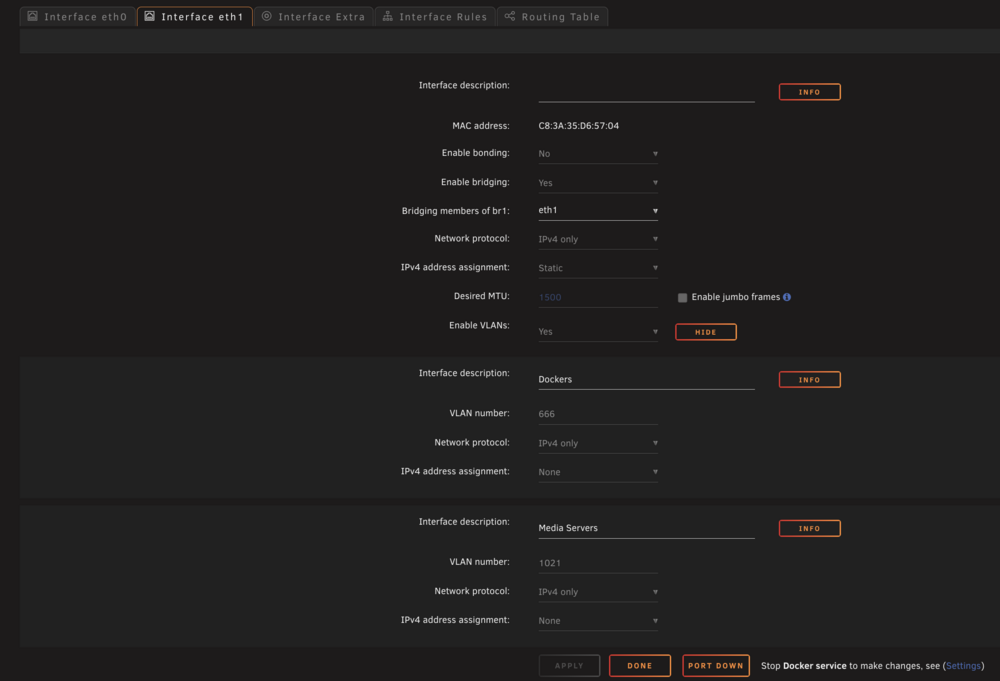
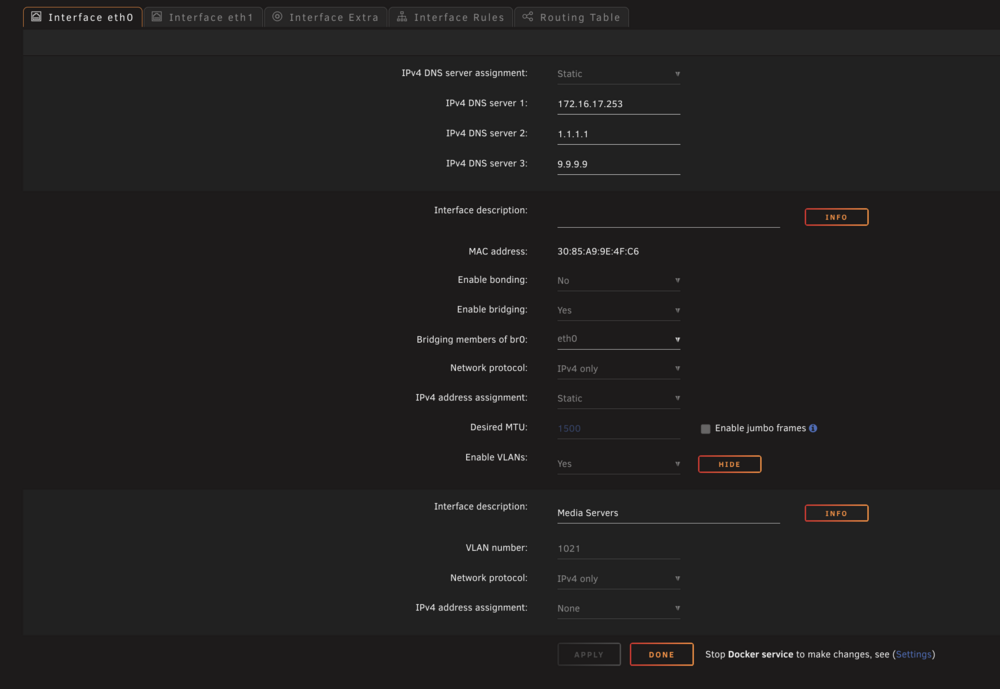
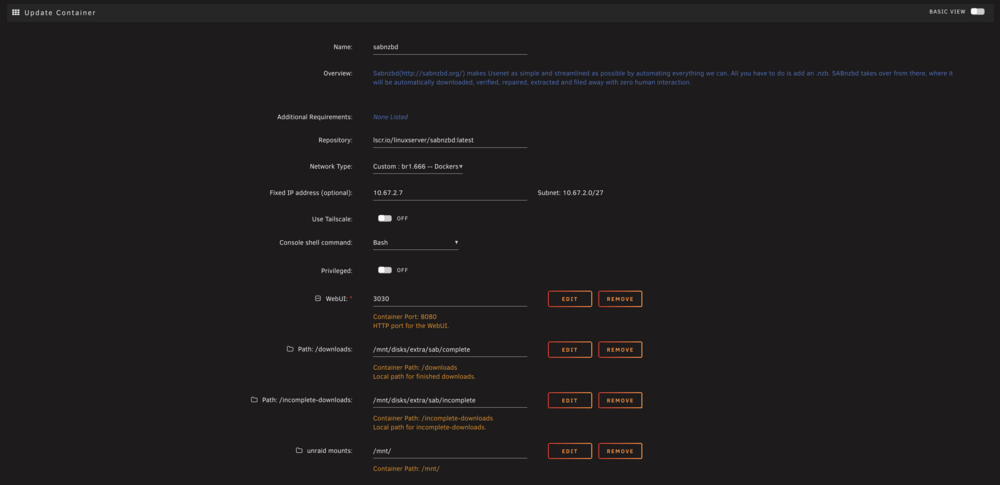
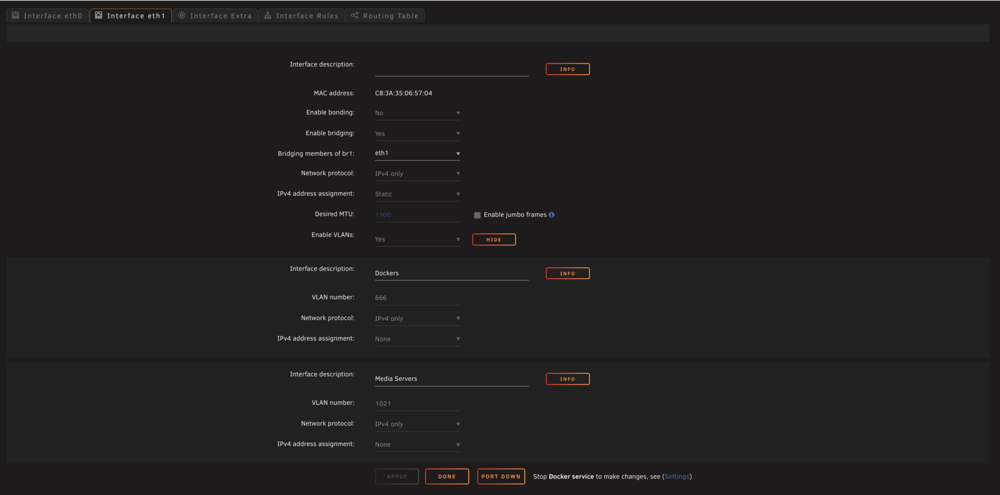
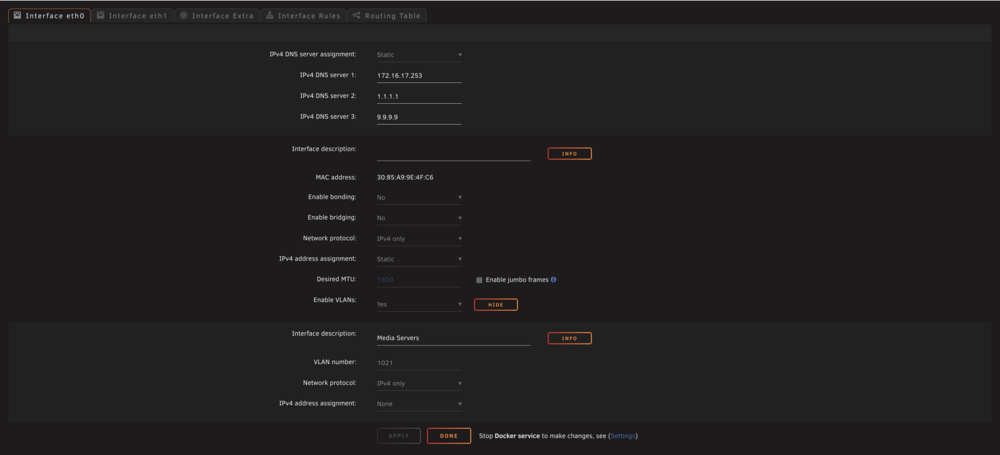
Thanks for clarifying, and I totally get being frustrated -- I am actually in IT and I know dealing with constant newb questions can get tired fast. I'm not very strong in networking (trying to get better) and it's things like vlans etc where my brain starts to hurt. To clarify I'm not using unraid for the streaming, only the NFS storage that the media servers pull from. I have both NICs bound to the MEDIA SERVERS vlan (in case I want to move one server onto that physical NIC. I attached screenshots so they make better explain what I'm not great at :)

-
Thank you for your thoughtful and quick reply, remember when I said "there's a huge chance I'm just dumb" ? It, of course, makes sense about the two NICs on the same subnet, I can see that now, thank you. I wasn't trying to imply anywhere that unraid was networking equipment My end goal was to see if I could segregate traffic between media servers - one going to NIC 1 and the other to NIC 2. I had tried LACP and RR bonding (yes, my switch supports LACP) but I didn't really see much of a difference. I also wanted to visualize how much traffic was flowing over either interface. So, in the interim now, I set my eth1 to be 10.67.2.30 (the outside of my /27 range for the Dockers network on my router). ETH0 - 172.16.17.252, VLANS (1021 for media servers) ETH1 - 10.67.2.30, VLANS (666 for Dockers) When I tested by downloading something, I can now see traffic flowing on the eth1 interface. I'm aiming to isolate the heavy traffic of downloading away from the media serving, hence the two physical adapters on two separate switch ports.
-
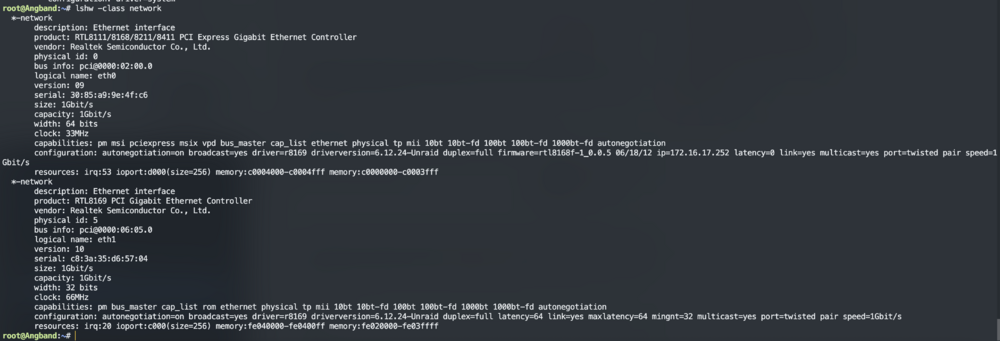
I have some confusion about now unRAID is handling network adapters. I have two, physical adapters configured as follows: eth0 - plugged into port 15 on my switch, configured with 172.16.17.252 eth1 - plugged into port 16 on my switch, configured with 172.16.17.251 Now, when I disable either of those ports on the switch, BOTH addresses will still answer. It's confusing to me, as I would expect one link to be down (unRAID says it is) but yet both IPs answer to pings. Why I'm confused is that I want to setup a VLAN for my Dockers and also segregate network traffic coming in on either interface from media servers (eg, some map NFS via .252 and some via .251 for primitive "load balancing"). I have the Dockers VLAN (666) setup as br.1 on eth1 and it's working... but I just don't know if it's sending over BOTH interfaces somehow as all traffic seems to traverse even if the port that .251 is plugged into it disabled. If I disable BOTH ports then all traffic stops, as expected. Here's the hardware output and unRAID screens... I will attached logs / diags as well in case those help. I am just confused, and it's HIGHLY likely I'm just dumb :) There is something interesting, the switch shows a third MAC address attached to port 15 ... not sure what this is or how it's being used.... image attached. *** I think this is solved, I enabled bridging on eth0 and that mac went away, it was being added as vhost0, after enabling bridging on eth0 this went away *** angband-diagnostics-20250622-0420.zip



-
So far so good after downgrading to 7.1.2 I've got some replacement RAM on order as well, just in case. Amazing that 32GB of DDR3 is now $40 ... lol.
-
I got the server back on, went to Tools -> Downgrade and the only option it gave me was to 7.1.2 After the downgrade to 7.1.2 it would not let me downgrade further.
-
I think I may try that ... Can I go back to 7.1.1 if I'm at 7.1.3, or just 7.1.2?
-
I'd agree, except this behaviour started with 7.1.2 and continues with 7.1.3. It ran stably for years. I agree that hardware can "expire/go bad" but it just seems super coincidental.





