





aysonohbata
Members
-
Joined
-
Last visited
Everything posted by aysonohbata
-
I thought my graphic card didn't require the extra power cable but it did. I think it worked once I plugged it. Thank you for your help!
-
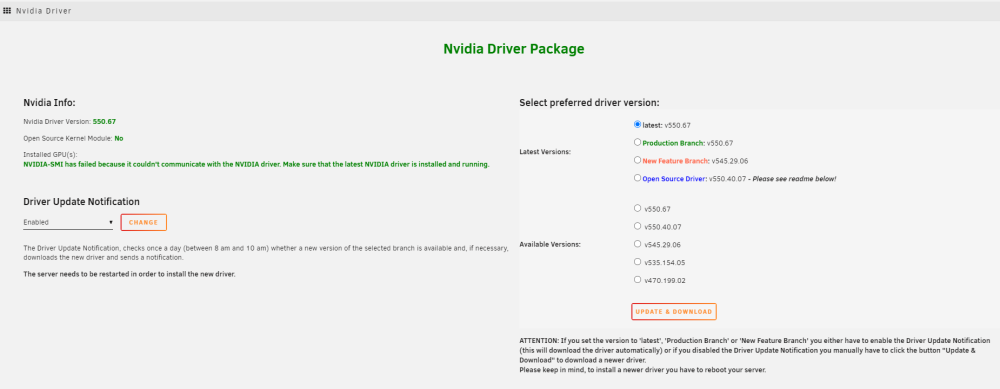
Hello, I just got an Gigabyte GeForce RTX 4060 OC Low Profile. The "Supported products" shows RTX 4060 so I hope the Low Profile is not a problem. The error that I am getting is NVIDIA-SMI has failed because it couldn't communicate with the NVIDIA driver. Make sure that the latest NVIDIA driver is installed and running. I have followed the instruction and it did not work so I gave the server a reboot but that didn't work either. So I tried uninstalling, reboot, install, then finally another reboot. I found this in the syslog but I am still new to unraid so I am not sure where to go next. Apr 5 08:28:58 AYSON-UNRAID root: plugin: community.applications.plg installed ### [PREVIOUS LINE REPEATED 1 TIMES] ### Apr 5 08:28:58 AYSON-UNRAID root: Executing hook script: post_plugin_checks Apr 5 08:28:58 AYSON-UNRAID root: plugin: installing: nvidia-driver.plg Apr 5 08:28:58 AYSON-UNRAID root: Executing hook script: pre_plugin_checks Apr 5 08:28:58 AYSON-UNRAID root: plugin: running: anonymous Apr 5 08:28:58 AYSON-UNRAID root: plugin: checking: /boot/config/plugins/nvidia-driver/nvidia-driver-2024.01.19.txz - MD5 Apr 5 08:28:58 AYSON-UNRAID root: plugin: skipping: /boot/config/plugins/nvidia-driver/nvidia-driver-2024.01.19.txz already exists Apr 5 08:28:58 AYSON-UNRAID root: plugin: running: upgradepkg --install-new /boot/config/plugins/nvidia-driver/nvidia-driver-2024.01.19.txz Apr 5 08:28:58 AYSON-UNRAID root: Apr 5 08:28:58 AYSON-UNRAID root: +============================================================================== Apr 5 08:28:58 AYSON-UNRAID root: | Installing new package /boot/config/plugins/nvidia-driver/nvidia-driver-2024.01.19.txz Apr 5 08:28:58 AYSON-UNRAID root: +============================================================================== Apr 5 08:28:58 AYSON-UNRAID root: Apr 5 08:28:58 AYSON-UNRAID root: Verifying package nvidia-driver-2024.01.19.txz. Apr 5 08:28:58 AYSON-UNRAID root: Installing package nvidia-driver-2024.01.19.txz: Apr 5 08:28:58 AYSON-UNRAID root: PACKAGE DESCRIPTION: Apr 5 08:28:58 AYSON-UNRAID root: Package nvidia-driver-2024.01.19.txz installed. Apr 5 08:28:58 AYSON-UNRAID root: plugin: creating: /usr/local/emhttp/plugins/nvidia-driver/README.md - from INLINE content Apr 5 08:28:58 AYSON-UNRAID root: plugin: running: anonymous Apr 5 08:28:58 AYSON-UNRAID root: Apr 5 08:28:58 AYSON-UNRAID root: --------------------Nvidia driver v550.67 found locally--------------------- Apr 5 08:28:58 AYSON-UNRAID root: Apr 5 08:28:58 AYSON-UNRAID root: --------------Installation of Nvidia driver v550.67 successful-------------- Apr 5 08:28:58 AYSON-UNRAID root: plugin: nvidia-driver.plg installed ayson-unraid-diagnostics-20240405-1529.zip
-
Recreating the docker image file worked. Is there anything I can do prevent this from happening? I don't think it is a space problem.
-
Hello I am very new to server management FYI. I have had this server for only a couple months. I added new drives to my UNRAID after using the plugins Unassigned Devices Unassigned Devices Plus Unassigned Devices Preclear I had received new drives and had successfully swapped my two parity drives with the new drives. I ran these plugins to preclear my drives and I just added new drives to the array this morning however when I stared the array, the docker service will not come up. I tried to remove the plugins and reboot the server numerous times but it would not take. Please help me get docker back online. ayson-unraid-diagnostics-20240329-1828.zip


