





late4473
Members
-
Joined
-
Last visited
-
Yep - solid as a rock - like you I haven't seen that for months! I'm pretty sure it was due to taking FUSE out of the equation rather than the upgrade (my conclusion being it couldn't handle the throughput)....glad you're in the same boat. I was ready to chuck unRAID into the bin!

-
No - never seen the CIFS line. I only see drives spinning up and down in my syslog. Good luck!
-
I too came from Synology. I suggest using simple rsync to transfer your data over. And do set aside hundred, if not thousands, of hours to fiddle with unRAID!
-
Set SSL to YES (Settings/Management Access )- and http will get redirected. I've also changed my port to accommodate a reverse proxy.


-
late4473 changed their profile photo
-
One more follow up - previous solution was not permanent - server continued to die. I'm putting this down to the unRaid FUSE bug (shfs). Resolution which has a 7 day up-time so far... 1) Upgrade to 7.2.0-beta.2 (Can't be any worse that what I've got!) 2) Change all drive references (docker container persistent drives, docker.img, libvirt.img and all VM storage paths) from /mnt/user/... to /mnt/cache/... These are all cache only drives anyway and this takes FUSE out of the equation. I hope this helps someone! Will I make 2 weeks of up-time??
-
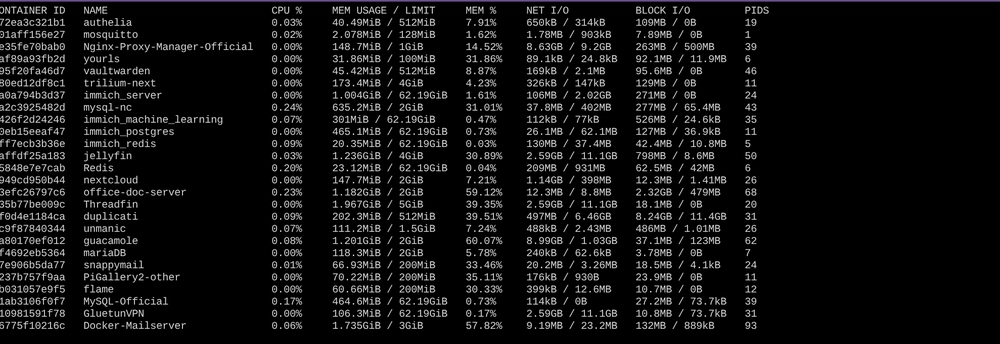
I'm going to mark this as solved - my uptime is now 5 days (!) and server seems rock solid (40 docker containers, 4 VMs all happily running). Last key actions: Uninstalled the Connect Plug-in (had some impact ) Increased Settings/Docker/PID limit to 8000 (Even though my Docker Stats PID column only sums to c1300) from the default setting. Could they have been spikes perhaps? pids.sh
-
My server survived for 4 days or so - and the unresponsive behaviour at the death was slightly different. I could access GUI (all looked normal) - no reported stuck CPUs but all docker containers unresponsive. Any attempt to stop them resulting in 'server error'. I did notice my Docker PID limit was on the default (2048) and a quick docker stats showed I was in the high 1000s so have now bumped up substantially and restarted. Watch this space.
-
Thank you for the feedback. I'm not convinced by the version being the root cause because I was actually reporting the same issue on this forum about a year ago! My server dies at RANDOM times also. I've actually today just gone over 2 days uptime (!) - unprecedented for months. I'd noticed that a 'flash backup' seemed to be running at random times during the day, so my last change was to completely remove the CONNECT plug-in. Let me monitor over the next few days. It's so good not having to hard boot every other day! #fingerscrossed @JDGJr Do you have Connect installed and do you have auto backups switched on?
-
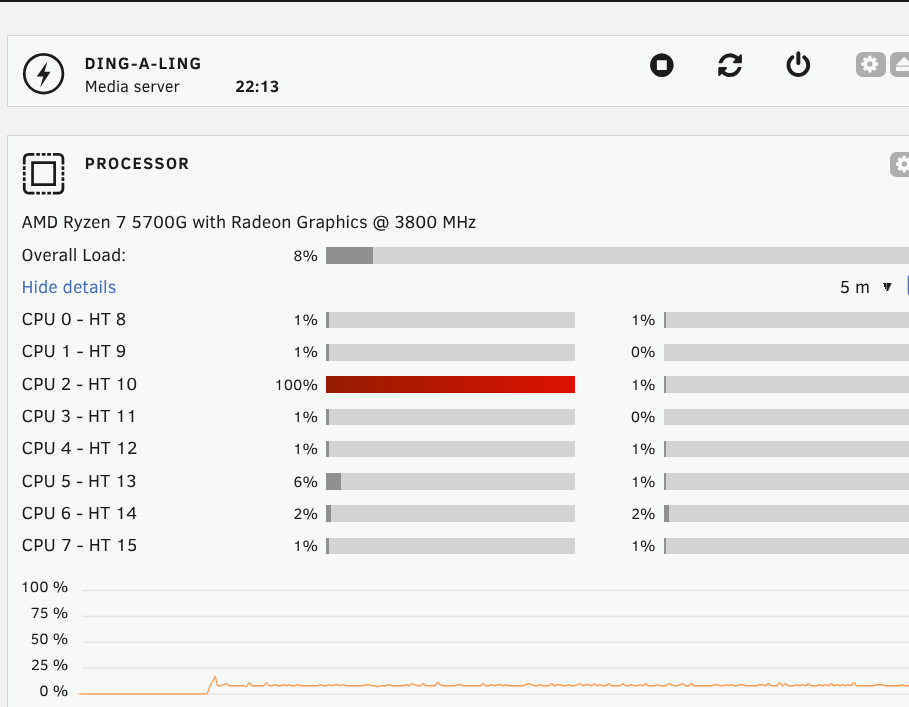
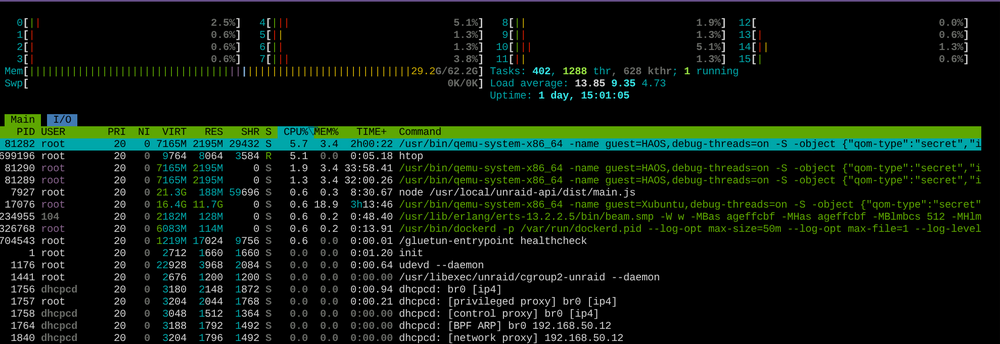
@JorgeB Here is the syslog and some other screenshots. Died 6-Aug @ 22:10ish i.e. All dockers stopped responding. Hard reboot and all is well again....cycle continues I could access unraid GUI - note a CPU thread locked at 100% HTOP doesn't report the same locked CPU but is reporting the load average endlessly climbing There is an recurring error about a missing css file. I have tried both 'light' and 'dark' settings but this file is always missing I hope you can spot something Thanks syslog-192.168.50.12.log
-
Enabled, will post. But should add I've inspected before during the 'hangup' via ssh. Last entries always seem to be just the normal 'spin down' of the hard drives.
-
Yes 7.1.4 I guess you haven't solved it? Did you try a rollback?
-
For months now my server goes unresponsive about every 2 days and I've had to hard power down to get it back. When it's back it runs like a dream Unresponsive means: I can't access GUI dashboard I can ssh. 'Reboot' with force or otherwise gives me a beep but not a shutdown. Docker Stop commands fail. HTOP suggests 3 CPU threads are stuck on 100% Docker stats suggest all my docker containers are running, but I can't access access them either locally or through reverse proxy There is nothing of any importance (error/warnings) that I see in the syslogs or via dmesg. Failure times are random (middle of the night, middle of the day, idle times, busy times) - I can't pin-point to anyone container or script In troubleshooting I've changed/upgraded all of PCI cards, memory and processor Uninstalled many plugins Tried switching off the dockers (but not all yet) Rebuilt docker vdisk (twice) Switched off all VMs completely Prevented drives from spinning down Ensured BIOS Idle settings are as everyone suggests (C-states disabled, idle control typical, cool'n'quiet disabled) Removed all USB devices Changed UPS Use Docker ipvlan networks Temperatures are all ok Hammered the box with 90% cpu processing for 7 hours - no problem All disks have plenty of capacity / SMARTs are good The server cannot survive for more than 48 hours.... Can anyone spot anything in my diags? Do I need to reinstall the UNRAID OS perhaps? It all suggests to me that something is 'building up' or hamming the system - but what is it? ANY suggestion is welcome. I'm almost ready to give up. ding-a-ling-diagnostics-20250805-1130.zip
-
To close on this - it WAS to do with an immutable flag...it was just hidden I ended up copying all the data out of my media share and I was left with 2 shares that still had 'operation not permitted' when I tried to destroy them: media/Movie media/photo-other 'media' was an encrypted datashare whereas the nested 'media/photo-other' was not (just saying) I 'unlocked' media via the GUI and this gave a failure message and still showed the open padlock...but magically this enabled me to see the files in photo-other and: So the 'masked' files were immutable preventing actions noted in the OP. So I cleared the flags, deleted the files, then destroyed the datasets. The take away message: take care with encrypted dataset where you (accidentally or otherwise) create files and folders whilst it is locked! I just glad this wasn't a bug where ZFS had let me down. I'd written my files whilst the dataset was locked, so after my weekly reboot and the dataset was unlocked (via a script on array startup) all my files appeared to disappear - and because I had made them immutable (ransomware protection) the dataset couldn't be destroyed! Confusing but explainable. Cheers all.

-
Thanks for your help. I'm convinced I've set something 'immutable' - I just cannot find what. I hope no more datasets go this way!
-
NP Yes it does:




