






stephondoestech
Members
-
Joined
-
Last visited
Everything posted by stephondoestech
-
Apologies for being so quiet everyone. Life was doing it's thing. I just move release notes to Github exclusively as folks are more likely to look there. Release v1.5.0 is live. I'm also now using codex in this project to assist me with feature development and troubleshooting. https://github.com/stephondoestech/unraid-config-guardian/releases/tag/v1.5.0 @MichaelD Let me look into that. I haven't seen that issue yet, but that doesn't mean it's not there. Before you stopped the container were there any errors you could see?
-
I just pushed a brute force fix because I'm losing it on this issue lol. It's not a perfect fix, but it's still better than running the container as root.
-
Hey folks! Back again with another update mostly focused on bug fixes. Unraid Config Guardian - Change LogVersion 1.3.0 - Available 09/28/2025 Summary Fixed Docker health check hardcoded socket path issue causing repeated container restarts Resolved permission errors preventing subsequent backups after first run Integrated change log functionality into web GUI to track configuration differences Fixed git pre-push hook syntax error Issues Fixed Health Check: Container was failing health checks due to hardcoded /var/run/docker.sock path Permission Errors: Subsequent backups failed with "Permission denied: '/boot/config/plugins/dockerMan/templates-user'" after first successful run Change Log Integration: create_change_log function was called but not properly integrated into web GUI Made Docker socket path configurable via DOCKER_SOCK_PATH environment variable Added fallback Docker client creation for custom socket paths Improved error messages with troubleshooting tips Added graceful handling of Docker connection failures during startup
-
WHELP...that was short lived. Thanks to user reporting and testing I was able to find a fix that revealed another issue with the cached data. Docker pipeline is building now to roll that out. Unraid Config Guardian - Change LogVersion 1.2.1 - Available 09/19/2025 Bug Fixes - Boot Info Caching: Boot drive information is now cached at container startup, eliminating repeated file system reads during backup operations - Template Refresh Optimization: Docker templates are automatically refreshed before each backup to ensure the most current container configurations are captured - Resource Management: Cached template files are now properly cleaned up after zip creation, preventing disk space - Timing Issue: Fixed entry file timing when users switch configurations prior to container loading
-
Hey everyone! Quick heads up I'm aware that the hostname and version are still not appearing correctly in addition to the templates zip not being generated. This is due to Unraid requiring root access to the boot drive to get this information. I'm in the middle of fix now that I should be able to roll out today, but please know I'm working hard to resolve this. The biggest challenge is balancing security vs functionality. I really don't want this running as root.
-
Hey folks! Sorry I've been quiet. Pesky real job was keeping me busy. So after reviewing a lot of the valuable feedback I received I wanted to focus on bringing forward the features that were most important to myself and others. I also realize that my vision for the service vs what it was providing varied so I took some time to refocus it to provide what I feel is significant value. I realize one can write a script, or use Unraid Connect, etc this is meant to just be another option that targets more of a disaster recovery scenario. This isn't meant to solve every backup issue, but it's just another tool in the toolbox. That said below you can find the change log for version 1.1.0. Thank you all for your support and I'll continue to improve this and learn as I go. Unraid Config Guardian - Change LogVersion 1.1.0 - Available 09/19/2025 Permission Issues - FIXED - PUID/PGID support now working correctly - Container properly switches to your specified user/group - No more "permission denied" errors when writing backups - Standard Unraid compatibility - Use PUID=99/PGID=100 for seamless integration Change Tracking - NEW FEATURE - See what changed between backups - New changes.log file shows exactly what was added, removed, or modified - Container monitoring - Track image updates, port changes, volume modifications - System change detection - Monitor Unraid version updates, disk additions, share changes - Web dashboard integration - Change summaries displayed in the interface Health Check Fixes - Netdata alerts resolved - Container no longer reports as "unhealthy" - Improved startup reliability - Better timing and error handling - Enhanced diagnostics - Clear health status reporting Documentation Improvements - Simplified README - Now focused on flash drive disaster recovery use case System Detection - Improved hostname/version detection - Better error handling and logging - Clear feedback - Shows exactly why detection succeeded or failed - Proper boot mount support - Works correctly when /boot is mounted What You Get Now Every backup now includes: - changes.log - NEW! Shows what changed since last backup - container-templates.zip - Native Unraid XML templates - docker-compose.yml - Emergency fallback containers - unraid-config.json - Complete system configuration - restore.sh - Automated restoration script For Existing Users No action needed! These are all improvements and new features. Your existing setup will continue working and gain the new features automatically. Want to see changes? Check /mnt/user/backups/unraid-docs/latest/changes.log after your next backup. Flash Drive Recovery Focus This tool is now clearly positioned as your disaster recovery solution for when your Unraid flash drive dies. Perfect for the community's most common emergency scenario. --- Need help? Check the docs/troubleshooting.md or open an issue on GitHub.
-
tcp should only be there once
-
It means the container port needs to be updated to 7842. Click the remove button. At the bottom of the page there should be an option to add a path, port, etc. Click it and update the dropdown to port. You can name it whatever. The container and host port should be set to 7842. Unfortunately updating the template for things like this doesn't over ride existing installations so this has to be done manually to resolve the UI not loading.
-
Release 1.0.5 Summary Hey everyone! I'm going to start dropping release notes in the the forum thread to reduce the chance of a missed update. The latest version rolled out on 9/10/25 contains the following fixes: Directory PermissionsProblem: No permissions were being set on directory creation leading to access issues when updating. Solution: Set a check to ensure permissions are set to 755 so service user doesn't lose access on update. Version Synchronization Problem: src/version.py (1.0.4) was out of sync with git tags (up to v1.0.7), causing inconsistent releases. Solution: Updated Makefile release commands to automatically sync versions: make tag VERSION=v1.0.8 now updates src/version.py to 1.0.8 before creating the tag Added make release-minor and make release-major for semantic versioning All release commands now commit version changes, create tags, and push automatically Automated Code FormattingProblem: Manual formatting commits cluttering git history. Solution: Created pre-push git hook (.githooks/pre-push) that: Runs make format-fix automatically before any push Commits formatting changes with standardized message if needed Prevents linting failures in CI/CD Fixed Pre-commit HooksProblem: Pre-commit hooks weren't running due to conflicting hook path configuration. Solution: Removed custom core.hooksPath setting that was breaking pre-commit Fixed installation process in make install-dev and make install-hooks Resolved line length violation in src/unraid_config_guardian.py:44 All pre-commit hooks now pass successfully
-
I made a change in 1.0.4 to update the internal port to match the webUI port so the Unraid template wouldn’t error on their side. That’s why your UI isn’t loading. I posted an update earlier in the forum, but if you were jumping from 1.0.3 to 1.0.5 it's possible it was missed.
-
I was able to find the issue and opened a ticket for it here. https://github.com/stephondoestech/unraid-config-guardian/issues/14 I'm wrapping up testing the fix now. If someone would be willing to set their permissions to 755 report the results to me that would speed things up since I can only reproduce it artificially.
-
Good catch! Just updated this in the templates now.
-
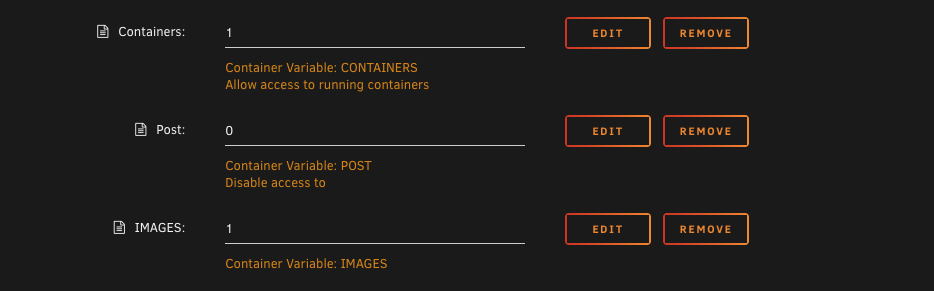
Hey @ExXxtr3me did you add the IMGAES variable to the dockersocket container with a value of 1? If you didn't that's why you're getting that error.
-
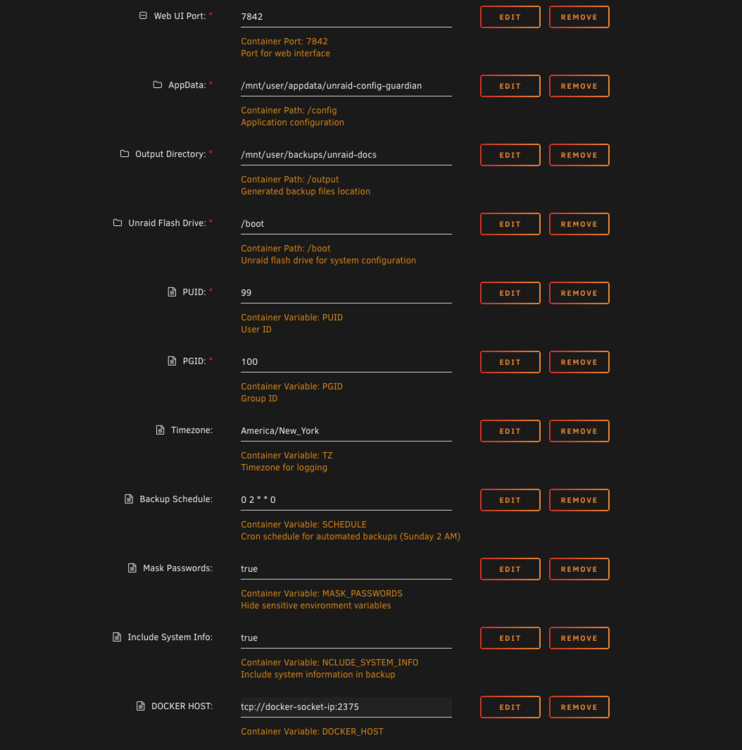
Quick update everyone! I'm still working through all the feedback (damn my pesky day job) and am actively working on making the implementation better. I just pushed version 1.0.4 out to production which does require a manual template update. In hindsight this should've been a minor version bump so I do apologize for that. In order to have the container not run as root I've implemented the use of docker socket proxy. For this to work you MUST install the dockersocket container from the Apps page. You will need to add a variable to it called IMAGES and set the value to 1. In the UnraidConfigGuardian container you'll want to remove the docker host path and instead add a variable called DOCKER_HOST and set it to the address of your dockersocket container. This will allow the service to run as a non privileged user while still getting the information it needs for the system. You will also want to update the PUID and PGID to 99 and 100 respectively. Lastly the container port needs to be updated to 7842as the previous value was causing an issue in the template validator. Thank you again everyone for the continued feedback. I'm excited to keep working on this project and making it more useful with each update.
-
Hey everyone! Sorry I’ve been quiet, it’s been busy with the holiday weekend here in the US. So quick update, I’ve received A TON of feedback on this service and I’m working through all of it. I’m in the process the creating issues for all of the things I plan to implement. I’ll be up front that I do not plan to implement every suggestion submitted, but there are a great many that I will. For version 1.1.0 which I’m in the process of testing now I’ve added the following: configuration generation focuses on templates first then fallback to docker compose If templates can’t be restored then docker compose will be installed before being run Adding a flag to enable/disable docker compose restore Adding a GitHub action to create a PR in the Ibracorp repo each time the XML template is updated in the service repo to keep changes in sync Initial implementation of enacting with the Unraid API to better detect configuration changes Updating the readme to better reflect the services purpose (receiving feedback that this is unclear) If your feedback isn’t listed here check the repo to see if an issue exists for it. I’m focusing on this for the next version as it addresses the most obvious pain points for users. Thank you all so much for your feedback and I’m looking forward to getting the next version out to y’all soon!
-
It might not be showing in the UI yet but there is a new release out with a couple of fixes and small GUI updates. They were pretty quick to implement. You might have to force update until Unraid picks up the new image SHA.
-
This is an absolutely valid callout and a missed use case on my part. Since XML templates for all user added containers are stored in /boot/config/plugins/dockerMan/templates-user I could do the following: add those as a zip to the backup called container-templates.zip as a backup file add an option to restore the templates to the boot location Update the restore script to restore the templates first then update the readme to instruct the user on how to add their containers back based on that Leave the docker-compose as a fallback with a warning that these won't be managed by the Unraid CA system This seems like the most reasonable approach. Give me a few days to a week to put in this update as I really want to test this well. I'll likely bump this as a minor version update since it's somewhat new functionality.
-
@JudasD thank you for catching that! It’s a bug I introduced solving another issue. I plan to have a fix in the next day or two for that. @kfonda absolutely! I’m thinking of throwing it in the header. It’ll match the latest available tag. @dhstsw technically all your docker containers are compose under the hood. It’s just made easier to interact with in Unraid by using the GUI. When you do the restore Unraid Config Guardian simply leverages compose to rebuild your containers, but once completed is no different then going to the CA page and installing from there. Would it be helpful if I added some language explaining that to the readme?
-
Okay @bristopher and @Korosys I think I found the issue. The way I'm doing the docker image data lookup didn't have error handing for when the images were deleted or unavailable. I've cleaned up the lookup code a bit and added better error handing so that should solve the issue you're both having. It now has better code to do the image data lookup and a fallback to parse the container config if that fails. @Inch I updated the readme with your request too.
-
Do you mind sharing your XML template or a screenshot of your setup? I’m looking now and I think /output expects it to be in that location but that’s an easy code fix. A screenshot of the GUI error when you try to load the page would be helpful too.
-
Can you do me a favor and open an issue in the repo? Love this idea and happy to implement it.
-
Hey Unraid Community! 👋 I've been running my Unraid server for a few years now, and like many of you, I've built up a pretty complex setup with dozens of containers, custom configurations, and specific network setups. Everything was great until my hardware died and I realized I had no good way to quickly rebuild everything. After spending an entire weekend manually recreating my setup from memory and scattered notes, I decided to build something better. What is Unraid Config Guardian?It's a simple Python tool that automatically documents your entire Unraid setup for disaster recovery. Think of it as "Infrastructure as Code" for your homelab. What it does: Scans all your running Docker containers Generates ready-to-deploy docker-compose.yml files Creates automated restoration scripts Documents your system configuration Masks sensitive data (passwords, API keys) for security Runs on a schedule to keep documentation current The Problem It SolvesHow many of you have ever thought: "If my server died tomorrow, how long would it take me to rebuild everything?" Docker Hub: https://hub.docker.com/repository/docker/stephondoestech/unraid-config-guardian/ GitHub: https://github.com/stephondoestech/unraid-config-guardian Documentation: https://github.com/stephondoestech/unraid-config-guardian/blob/main/README.md
-
@latino_sky on the repository line you have to update it to: filerun/filerun:8.1 There isn't a latest tag in the docker repo anymore, that's why it's failing for you. Edit: I happened to find this while looking in their documents and it helped me get running.
-
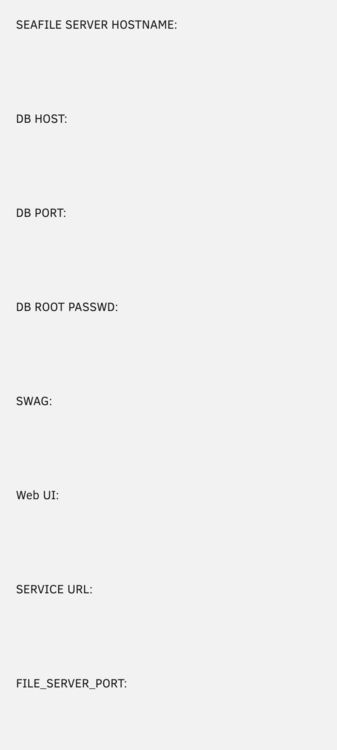
After 6 days and over 30+ hours I was about ready to give up when I FINALLY was able to get Seafile (specifically uploads/downloads) working with SWAG. Huge shout out to user tubezleb for providing this solution on GitHub. I did using the official image and following some of the context in this guide. I created a file called seafile.subdomain.conf and the only change I needed to make in this was to update the server name to match my domain. I also had to update the port from 8000 to my port number since 8000 is already in use on my server in the proxy config. I also had to add several variables to the container that I attached in the screenshot. Last thing, in the /seafile/conf directory created after you hit apply I needed to update the web ui port in the following files (this only matters if you don't use port 8000): gunicorn.conf seafdav.conf seahub_settings.py Total sidenote, email notifications started working after I got the file server working. Follow this guide here. Hope this helps someone.
-
Thank you do much for creating this. Is it normal to have to create the `logs` folder in the `appdata/eedisinsight` on first start?




