





Kulis
Members
-
Joined
-
Last visited
Everything posted by Kulis
-
Unfortunately, when I try to revert to the previous version, it throws errors left and right.
-
@sdchoni When I do that, I get a message in the log saying that the migration failed.
-
@Djoss The problem is described here: I have Cloudflare set up, and the certificate is configured in Nginx via Cloudflare. Logi: │ │ │ Application: Nginx Proxy Manager │ │ Application Version: 2.14.0 │ │ Docker Image Version: 26.03.1 │ │ Docker Image Platform: linux/amd64 │ │ │ ╰――――――――――――――――――――――――――――――――――――――――――――――――――――――――――――――――――――――╯ [cont-init ] 89-info.sh: terminated successfully. [cont-init ] all container initialization scripts executed. [init ] giving control to process supervisor. [supervisor ] loading services... [supervisor ] loading service 'default'... [supervisor ] loading service 'app'... [supervisor ] loading service 'nginx'... [supervisor ] loading service 'logmonitor'... [supervisor ] service 'logmonitor' is disabled. [supervisor ] loading service 'logrotate'... [supervisor ] service 'logrotate' is disabled. [supervisor ] loading service 'cert_cleanup'... [supervisor ] all services loaded. [supervisor ] starting services... [supervisor ] starting service 'nginx'... [supervisor ] starting service 'app'... [supervisor ] all services started. [cert_cleanup] ---------------------------------------------------------- [cert_cleanup] Let's Encrypt certificates cleanup - 2026/03/16 12:56:50 [cert_cleanup] ---------------------------------------------------------- [cert_cleanup] Keeping /etc/letsencrypt/archive/npm-9/fullchain2.pem. [cert_cleanup] Keeping /etc/letsencrypt/archive/npm-9/privkey2.pem. [cert_cleanup] Keeping /etc/letsencrypt/archive/npm-9/chain2.pem. [cert_cleanup] Keeping /etc/letsencrypt/archive/npm-9/cert2.pem. [cert_cleanup] Keeping /etc/letsencrypt/archive/npm-2/fullchain9.pem. [cert_cleanup] Keeping /etc/letsencrypt/archive/npm-2/chain9.pem. [cert_cleanup] Keeping /etc/letsencrypt/archive/npm-2/cert9.pem. [cert_cleanup] Keeping /etc/letsencrypt/archive/npm-2/privkey9.pem. [cert_cleanup] 8 file(s) kept. [cert_cleanup] 0 file(s) deleted. [app ] [3/16/2026] [12:56:50 PM] [Global ] › ℹ info Using configuration from file: ./config/production.json [app ] [3/16/2026] [12:56:50 PM] [Migrate ] › ℹ info Current database version: none [app ] [3/16/2026] [12:56:50 PM] [Setup ] › ℹ info Logrotate Timer initialized [app ] [3/16/2026] [12:56:50 PM] [Setup ] › ℹ info Logrotate completed. [app ] [3/16/2026] [12:56:50 PM] [Global ] › ℹ info IP Ranges fetch is enabled [app ] [3/16/2026] [12:56:50 PM] [IP Ranges] › ℹ info Fetching IP Ranges from online services... [app ] [3/16/2026] [12:56:50 PM] [IP Ranges] › ℹ info Fetching https://ip-ranges.amazonaws.com/ip-ranges.json [app ] [3/16/2026] [12:56:50 PM] [IP Ranges] › ℹ info Fetching https://www.cloudflare.com/ips-v4 [app ] [3/16/2026] [12:56:51 PM] [IP Ranges] › ℹ info Fetching https://www.cloudflare.com/ips-v6 [app ] [3/16/2026] [12:56:51 PM] [SSL ] › ℹ info Let's Encrypt Renewal Timer initialized [app ] [3/16/2026] [12:56:51 PM] [SSL ] › ℹ info Renewing SSL certs expiring within 30 days ... [app ] [3/16/2026] [12:56:51 PM] [IP Ranges] › ℹ info IP Ranges Renewal Timer initialized [app ] [3/16/2026] [12:56:51 PM] [Global ] › ℹ info Backend PID 560 listening on port 3000 ... [app ] [3/16/2026] [12:56:51 PM] [SSL ] › ℹ info Completed SSL cert renew process My settings router: My docker parametrs: docker run -d --name='NginxProxyManager' --net='dockernet' --pids-limit 2048 -e TZ="Europe/Warsaw" -e HOST_OS="Unraid" -e HOST_HOSTNAME="KulisUnRaid" -e HOST_CONTAINERNAME="NginxProxyManager" -e 'USER_ID'='99' -e 'GROUP_ID'='100' -e 'UMASK'='0000' -e 'APP_NICENESS'='0' -e 'DISABLE_IPV6'='0' -l net.unraid.docker.managed=dockerman -l net.unraid.docker.webui='http://[IP]:[PORT:8181]' -l net.unraid.docker.icon='' -p '7818:8181/tcp' -p '1880:8080/tcp' -p '18443:4443/tcp' -v '/mnt/user/appdata/NginxProxyManager':'/config':'rw' 'jlesage/nginx-proxy-manager'
-
I installed the latest version and am getting an SSL handshake failed error Error code 525 Even the website is having the same problem: Application Site: https://nginxproxymanager.jc21.com Is there any way to fix this?
-
I don't understand. Can you tell me exactly what I need to change to make this work? Everything was fine until today. My redirects on the router look like this: In Unraid, my settings are as follows: I see that Nginx had some kind of update, so I generated new certificates, but it still isn't working.


-
For now, I see that whatever you set at the start is what you get. So I don't see any possibility of synchronizing both Plex and Jellyfin.
-
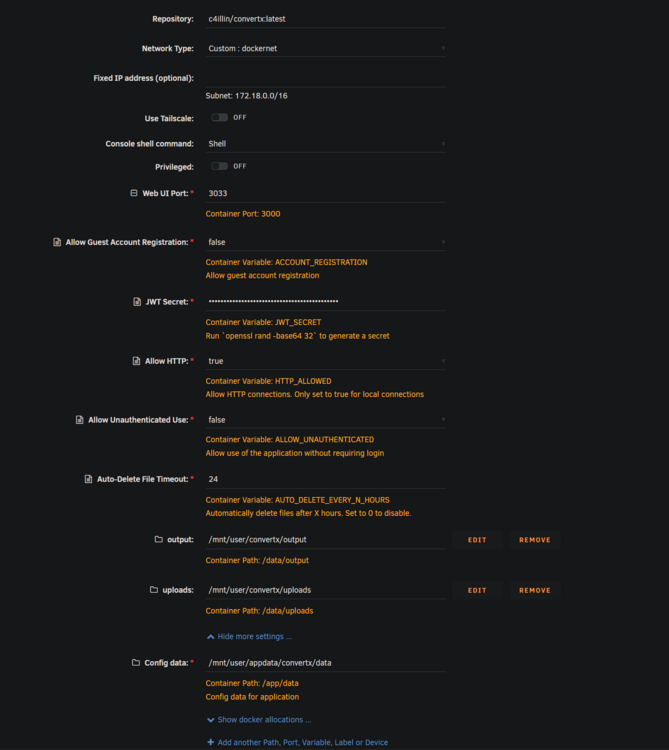
@Woodpusherghd Thank you for your reply. I couldn't map it by adding -v in Docker in any way. Ultimately, I did the mapping on the Unraid side: mount --bind /mnt/user/convertx/uploads /mnt/user/appdata/convertx/data/uploads mount --bind /mnt/user/convertx/output /mnt/user/appdata/convertx/data/output
-
Please tell me what parameters I need to set in Unraid to change the output location: /mnt/user/appdata/convertx/data/output to /mnt/user/convertx ?
-
@manrw I would like to thank you very much. Everything works. I had to add 99:100 in the Extra parameter, and now it saves files correctly as nobody.
-
Thank you, but that doesn't solve the problem. You can actually go down a version and use "SLSKD_VOLATILE:". I read GitHub, and in my opinion, there are questions everywhere about file access rights, chmod 777, and unmask 000, and in Unraid there is a problem with the file owner. In Unraid, it is saved as root and not as nobody. I checked the docker from binhex-slskd and it seems to not have this problem, but I have a problem setting where the shared media is located. And the weight of the docker is very large compared to the light and official slskd docker.
-
@jademonkeeit doesn't work for me anymore after adding it SLSKD_VOLATILE: receives a message SQLite Error 1: 'no such table: Transfers'.
-
What do I need to do to save files with user rights instead of root rights? My Docker settings are below. All the files I download have root permissions, but I need nobody permissions. -d --name='slskd' --net='dockernet' --pids-limit 2048 -e TZ="Europe/Warsaw" -e HOST_OS="Unraid" -e HOST_HOSTNAME="*****" -e HOST_CONTAINERNAME="slskd" -e 'SLSKD_REMOTE_CONFIGURATION'='true' -e 'PORT'='5030' -e 'SLSKD_UPLOAD_SLOTS'='10' -e 'SLSKD_UPLOAD_SPEED_LIMIT'='1000' -e 'SLSKD_SLSK_USERNAME'='****' -e 'SLSKD_SLSK_PASSWORD'='****' -e 'SLSKD_SLSK_DESCRIPTION'='****' -e 'SLSKD_SLSK_DIAG_LEVEL'='None' -e 'SLSKD_USERNAME'='****' -e 'SLSKD_PASSWORD'='****' -e 'SLSKD_SHARED_DIR'='/data/music/' -e 'SLSKD_DOWNLOADS_DIR'='/data/downloads' -e 'SLSKD_INCOMPLETE_DIR'='/data/incomplete' -e 'SLSKD_FILE_PERMISSION_MODE'='777' -e 'SLSKD_REMOTE_FILE_MANAGEMENT'='true' -e 'PUID'='99' -e 'PGID'='100' -e 'UMASK'='0000' -e 'SLSKD_UMASK'='0000' -e 'CA_TS_FALLBACK_DIR'='/app' -l net.unraid.docker.managed=dockerman -l net.unraid.docker.webui='http://[IP]:[PORT:5030]/' -l net.unraid.docker.icon='' -p '5030:5030/tcp' -p '5031:5031/tcp' -p '50300:50300/tcp' -v '/mnt/user/appdata/slskd/':'/app':'rw' -v '/mnt/user/media/music/':'/data/music':'rw' -v '/mnt/user/downloads/complete/music/':'/data/downloads':'rw' -v '/mnt/user/downloads/incomplete/music/':'/data/incomplete':'rw' 'slskd/slskd:latest'
-
I have the same problem as you, my documents in Nextcloud stopped working. It turns out that in version 3, Nextcloud changed the way it communicates with applications. Does anyone know how to enable them in Unraid?
-
Good morning, did you manage to solve this problem? In Docker on a Linux server, it is very easy to change: https://github.com/linuxserver-archive/docker-letsencrypt/blob/535dcee33a866b6921a03b13bd7b50350c76b072/root/defaults/ssl.conf#L20 Unfortunately, the official docker does not have an ssl.conf file. Does anyone know how to add: add_header Strict-Transport-Security "max-age=63072000; includeSubDomains; preload" always; to this docker using Cloudflare and Nginx?
-
Does anyone have instructions on how to install Rocket.chat in 2025?
-
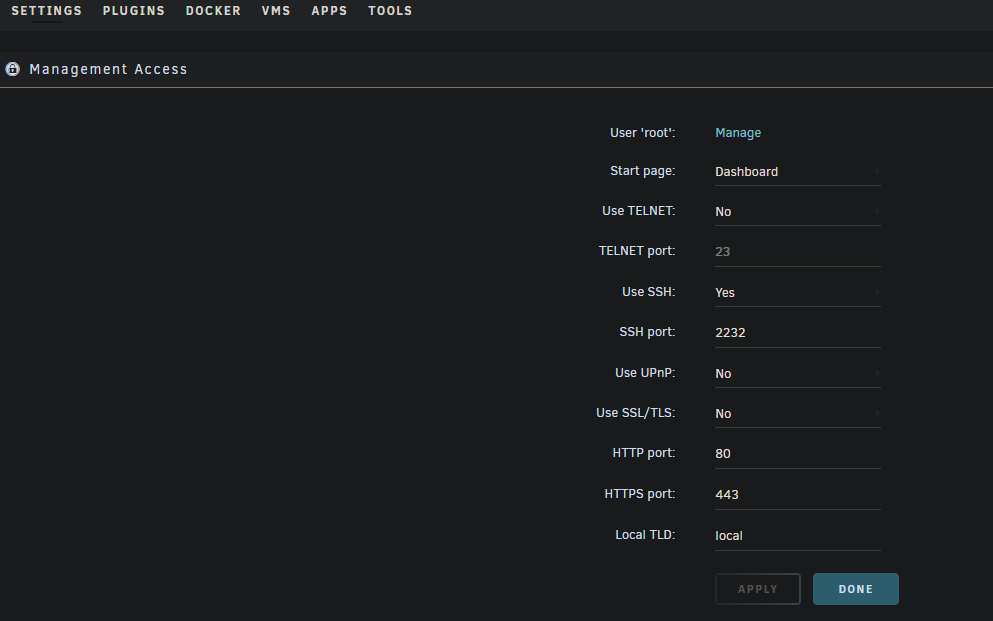
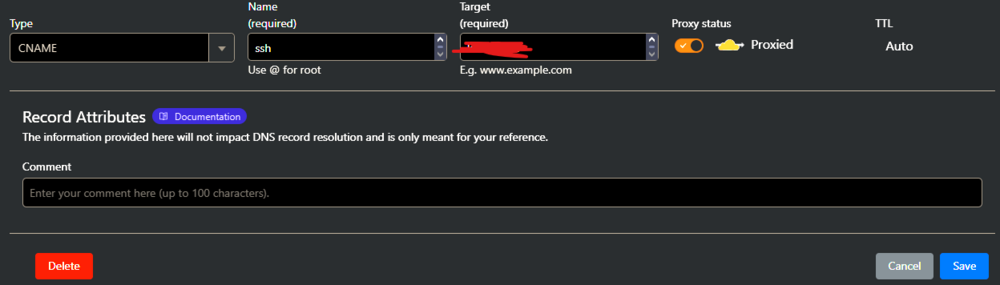
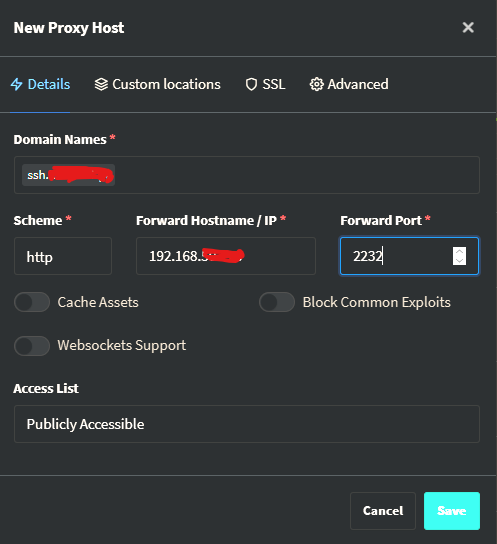
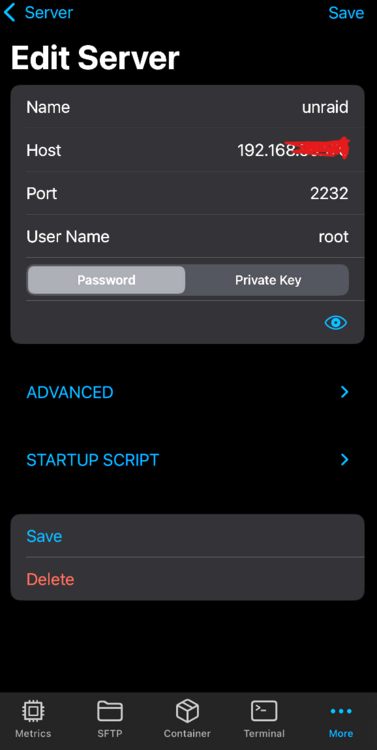
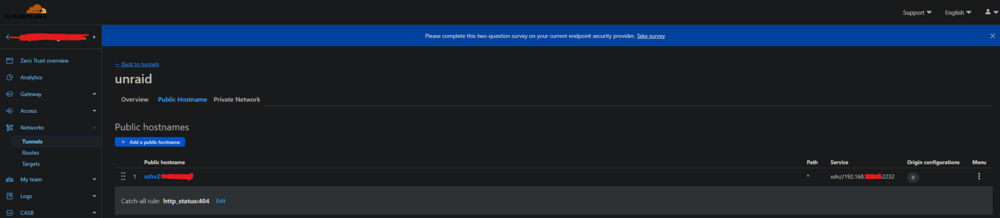
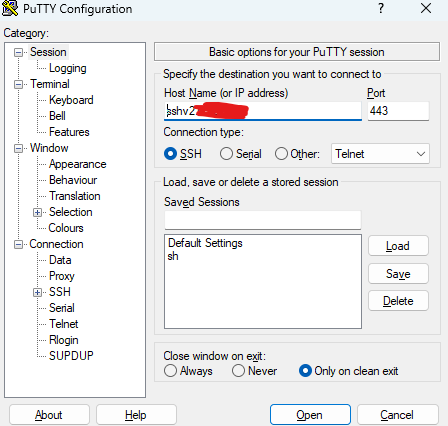
Does anyone of you know if it is possible to share SSH port 2232 via Cloudflare? My ssh settings in unraid look like this: I would like to be able to connect to this port via cloudflare 443. I added DNS: in proxy manager redirection: And I would like to connect to the IOS application: I also tried through the tunnel I JUST tried to do something like this. But connecting via putty doesn't work:
-
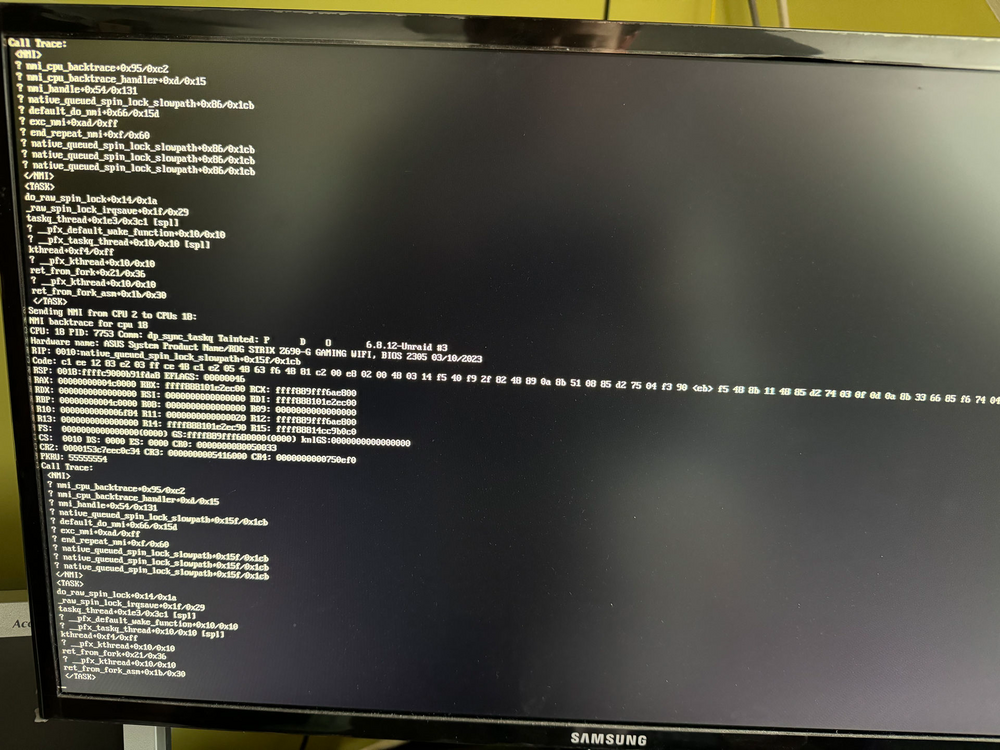
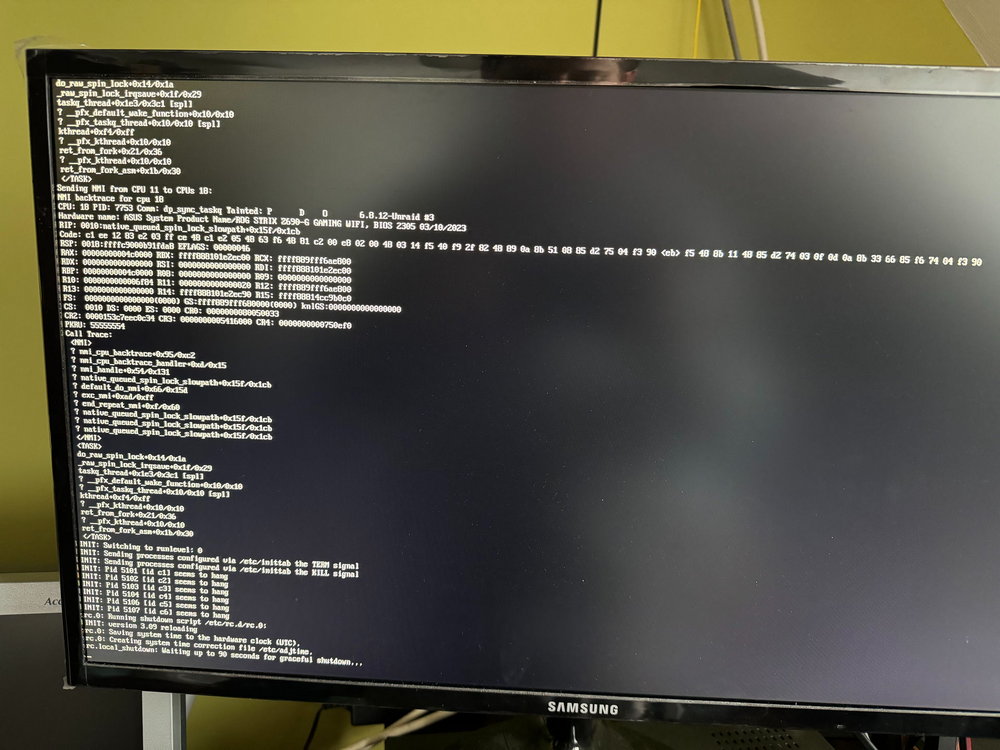
The server works properly until it receives the following messages: I installed it again and transferred the config to USB. The server does not turn off despite pressing the button. Syslog is not generating. I wonder if it's not the processor's fault.
-
Today, when I shut down the system, I received the following message: Could you look at it? kulisunraid-diagnostics-20240914-1358.zip

-
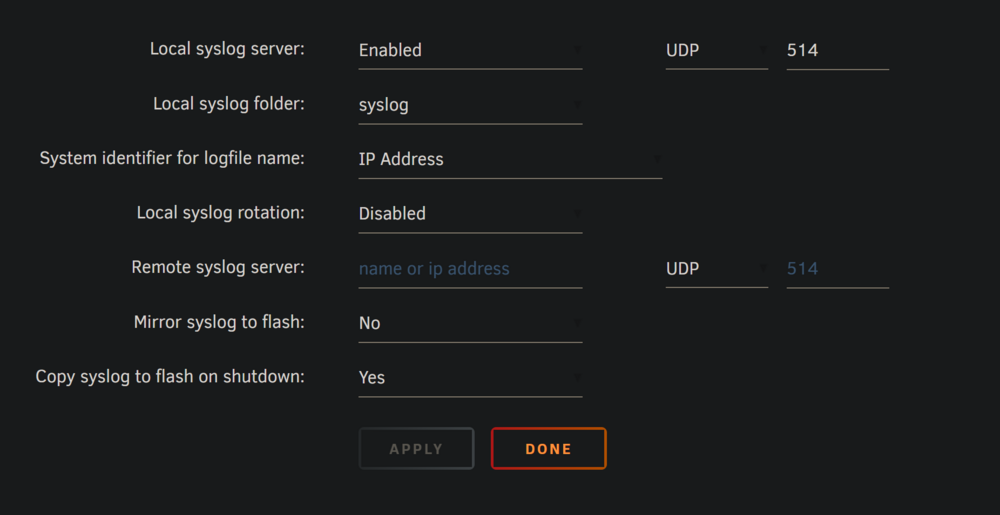
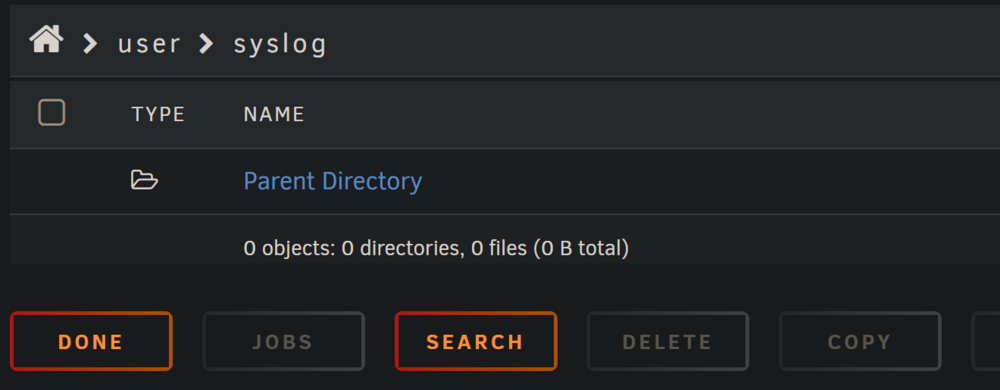
@JorgeB I turned on syslog but after the unraid error I do not see the file in the syslog directory. Can you tell me what I'm doing wrong? The only thing I can send are messages from trying to disable unRaid after freezing.
-
I have exactly the same problem. Unraid runs for some indefinite period of time and then suddenly dies. I switched to Unraid 7 to take advantage of ZFS. Can you look at my logs? syslog.txt
-
ruTorrent Problem. When trying to download a torrent file by Radarr, I receive the following message: HTTP request failed: [413:RequestEntityTooLarge] [POST] at [http://192.168.50.176:8000/RPC2] Adding a torrent directly via rutorrent works without any problems. Does anyone know any solution? Can anyone tell me where I can add file limit parameters for rpc? Log from ruTorrent: 846#846: *1832 client intended to send too large body: 1969355 bytes, client: 172.18.0.13, server: , request: "POST /RPC2 HTTP/1.1", host: "rutorrent:8000
-
I would like to allocate more RAM for ZFS from the UnraidOS GUID entry.
-
@itimpiSo the only solution is to move important data somewhere else and do a "new installation"?
-
Can anyone tell me if I use the method described in the video: I will be moving data until all my drives are ZFS, will I then be able to create a zPool from all the drives and stop using parity?
-
Can I increase RAM allocation from unraid OS? Do Is this the only solution I have to do this by changing the file to USB?


