





Praetoriate
Members
-
Joined
-
Last visited
Everything posted by Praetoriate
-
Hello all! I am once again stumped by this and cannot seem to find anything specific enough to get over this last (service preventing) issue. This is my third attempt at getting this to work and I keep running into the same issue(s). I have installed seafile-mariadb, seafile-redis, and seafile-13 from the CA. Logs show that they all startup happy enough. The only differences between the defaults are that I am using a custom network named 'dockernet' (since I already have a Newt tunnel for Pangolin using that custom network) and I am using port 8585 instead of 8080 for Seafile. Everything seems to work fine, except: I cannot get to the seafile webUI from it public interface. It works with ServerIP:8585 I cannot do a file upload (Network Error) I have a feeling they are directly related and I see these issues when searching for help, but not specific to Pangolin or Unraid. Further details: I have Overseerr configured the exact same way, and it is working. HTTPS is used for all the protocol variables. And the ingress I can create a file in the Seafile webUI, so I assume the seafile > mariadb connection is working? Sources followed: https://github.com/chirmstream/unraid-templates/blob/main/seafile-13/seafile-13_guide.md https://www.reddit.com/r/unRAID/comments/1f4ebke/guide_for_installing_the_latest_version_of/ Any help/insight would be much appreciated.
-
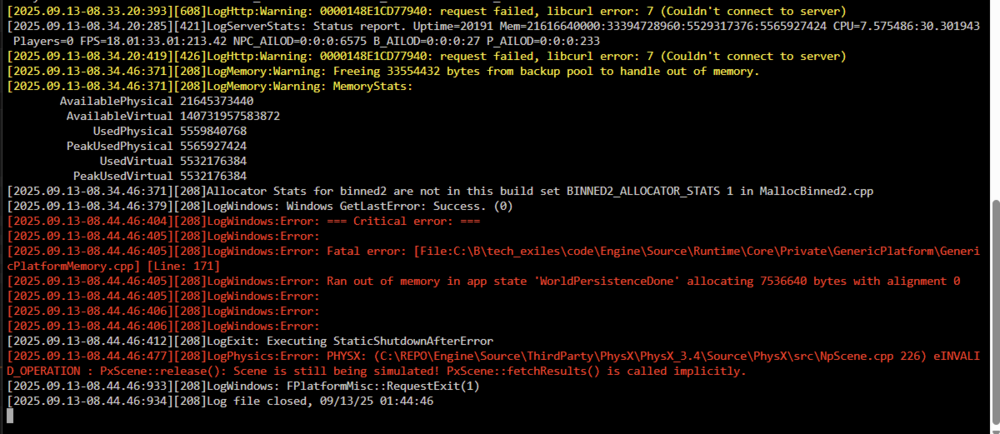
Gotcha, thank you. That helped a lot to know where the issue lies. In looking up the Wine stuff I came across this variable/key that is mentioned that seems to help: https://www.reddit.com/r/ConanExiles/comments/1dbuiqd/dedicated_server_on_linux_hangs_and_players/ Is this something I can hit with adding a variable/game_params to the container in 'edit'? I tried using the commands in the container console, but its saying I don't have permission.
-
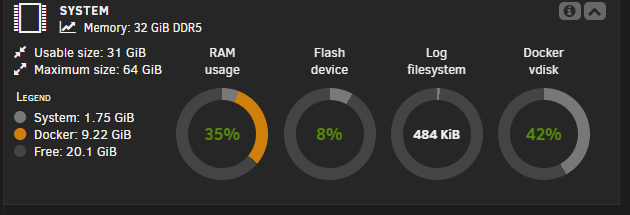
I'm running the Conan Exiles server (works great other than this), and we are getting a frequent crash for the pictured issue. It appears to be running out of memory and I cannot seem to find a way to allocate/free up the memory inside the container. There is plenty of RAM and storage for it in the docker settings, but I'm not sure what to do next with it otherwise. When rebooted, it works fine for a while and then this happens again hours/days later (with or without players logged in)
-
Thank you, it seems it has been moved there. Still hoping to see if anyone has any experience setting up anything similar.
-
Exit node: Tailscale Plugin on my server has been using a mullvad exit node since I set it up. While troubleshooting some issues tonight with containers and Tailscale, I disabled the plugin exit node and now it's unable to be set back? https://github.com/tailscale/tailscale/issues/14372 Containers: When enabling Tailscale in a container and setting an exit node it is not accessible over LAN even when 'enable LAN access' is set? (Example: sabnzb container set to use exit node and allow LAN access, radarr cant see dl client, I can't access web gui, etc. all over LAN) Sharing: Friend group is really into Icarus. I've been playing solo remotely from a dedicated server container on my server. I access it remotely from a laptop when I'm not at home using Tailscale. It shows up as a LAN connection. I added Tailscale to the container and shared it to a friends Tailnet. They can ping the ipv4 address from their windows but nothing we tried could get it to show up in his game client. Direct connect using any address/port combo didn't work either. Is there something I'm just not getting with how this works? TIA, and I love you guys.
-
Sorry, just updated my prev comment. I was able to get it to pull by deleting just the steamapps folder and starting the container.
-
I am also experiencing this same issue with Icarus. There's been 2 updates in the last week and a half and the only way I am able to pull the update is to uninstall and reinstall the container, deleting everything in-between... Connecting anonymously to Steam Public...OK Waiting for client config...OK Waiting for user info...OK Update state (0x3) reconfiguring, progress: 0.00 (0 / 0) Error! App '2089300' state is 0x6 after update job. Edit: I was able to get it to pull by deleting just the steamapps folder and starting the container.
-
Dude, absolutely no worries! I am so new here, only heard about unRAID 2 weeks ago. I am impressed that a user is devving this, kudos to you man.
-
Also here for the 1.66 update info. Following. The 1.64.0 update was available here 4 days after initial Tailscale release, fyi.

