





purplehexagon
Members
-
Joined
-
I have checked my log over the last 20 hours, and no errors have occurred. So replacing the cable with a new one seems to have fixed the problem. Thanks @JorgeB for your help!
-
I've swapped the cable for Main 4 (sdf) bc following logs leads me that sdf is responsible, isn' it? Even though today's log is dated 2026-05-16, it was also "ata8.00" yesterday and the day before. May 16 13:38:16 PurpleGravity kernel: scsi 7:0:0:0: Direct-Access ATA Samsung SSD 870 3B6Q PQ: 0 ANSI: 5 May 16 13:38:16 PurpleGravity kernel: sd 7:0:0:0: Attached scsi generic sg5 type 0 May 16 13:38:16 PurpleGravity kernel: ata8.00: Enabling discard_zeroes_data May 16 13:38:16 PurpleGravity kernel: sd 7:0:0:0: [sdf] 7814037168 512-byte logical blocks: (4.00 TB/3.64 TiB) May 16 13:38:16 PurpleGravity kernel: sd 7:0:0:0: [sdf] Write Protect is off May 16 13:38:16 PurpleGravity kernel: sd 7:0:0:0: [sdf] Mode Sense: 00 3a 00 00 May 16 13:38:16 PurpleGravity kernel: sd 7:0:0:0: [sdf] Write cache: enabled, read cache: enabled, doesn't support DPO or FUA May 16 13:38:16 PurpleGravity kernel: sd 7:0:0:0: [sdf] Preferred minimum I/O size 512 bytesI'll monitor the log today, and if the same errors occur again, I'll check the cables on the ASM1166 controller.
-
Since the day before yesterday (first 7.2.6 as of today 7.3.0), I’ve been seeing the error below more and more frequently. At first, it happened every few hours. Now, it’s happening every few minutes. I have a total of 6 SATA SSDs in my setup. However, since I only have 4 SATA ports on the motherboard, I had to install an ASM1166 expansion card in an NVMe slot, to which two of the SSDs are connected. Unfortunately, the error doesn’t specify exactly which drive is causing the issue. I’d like to ask for some help with this. May 15 14:15:11 PurpleGravity kernel: ata8.00: exception Emask 0x10 SAct 0x400000 SErr 0x400100 action 0x6 frozen May 15 14:15:11 PurpleGravity kernel: ata8.00: irq_stat 0x08000000, interface fatal error May 15 14:15:11 PurpleGravity kernel: ata8: SError: { UnrecovData Handshk } May 15 14:15:11 PurpleGravity kernel: ata8.00: failed command: WRITE FPDMA QUEUED May 15 14:15:11 PurpleGravity kernel: ata8.00: cmd 61/18:b0:68:4b:9a/00:00:89:01:00/40 tag 22 ncq dma 12288 out May 15 14:15:11 PurpleGravity kernel: res 40/00:01:00:00:00/00:00:00:00:00/00 Emask 0x10 (ATA bus error) May 15 14:15:11 PurpleGravity kernel: ata8.00: status: { DRDY } May 15 14:15:11 PurpleGravity kernel: ata8: hard resetting link May 15 14:15:11 PurpleGravity kernel: ata8: SATA link up 6.0 Gbps (SStatus 133 SControl 300) May 15 14:15:11 PurpleGravity kernel: ata8.00: supports DRM functions and may not be fully accessible May 15 14:15:11 PurpleGravity kernel: ata8.00: supports DRM functions and may not be fully accessible May 15 14:15:11 PurpleGravity kernel: ata8.00: configured for UDMA/133 May 15 14:15:11 PurpleGravity kernel: ahci 0000:00:17.0: port does not support device sleep May 15 14:15:11 PurpleGravity kernel: ata8: EH complete May 15 14:15:11 PurpleGravity kernel: ata8.00: Enabling discard_zeroes_datapurplegravity-diagnostics-20260515-1435.zip
-
Correct. Anything but the message is working! Thanks for the amazing work done here.
-
I waited for the official release of 7.2.0 so that I could continue testing. Now that 7.2.0 has been released, I tried again to create a Wireguard tunnel with IPv6 only and a tunnel with IPv6+IPv4 combined. And indeed: a connection is possible, everything seems to be working again. The only thing that still appears in the logs is the following line: Nov 4 09:25:32 PurpleGravity http_get_contents: Curl error 28: Connection timed out after 15002 milliseconds. Requested url: 'https://wanip6.unraid.net' Before 7.2.0 i was able to curl -v --interface br0 https://wanip6.unraid.net/ and get a corret response. Now with 7.2.0 i can't get a response with any interface. The exact answer of my above command is: Host wanip6.unraid.net:443 was resolved. * IPv6: 2600:1f14:b8f:3b02:2f81:a0d1:f4d9:9e12 * IPv4: (none) * Trying [2600:1f14:b8f:3b02:2f81:a0d1:f4d9:9e12]:443... * socket successfully bound to interface 'br0' * connect to 2600:1f14:b8f:3b02:2f81:a0d1:f4d9:9e12 port 443 from <redacted> port 43296 failed: Connection timed out * Failed to connect to wanip6.unraid.net port 443 after 133307 ms: Could not connect to server * closing connection #0 curl: (28) Failed to connect to wanip6.unraid.net port 443 after 133307 ms: Could not connect to server
-
I've read the plugins code and if I'm reading it correctly the problem is not the plugin it self, it is how the docker caching works. The page is build on a foreach loop with the contents from the "getAllInfo();" function which is included by /usr/local/emhttp/plugins/dynamix.docker.manager/include/DockerClient.php The Function "getAllInfo" uses "getDockerContainers" which lastly returns the docker cache with this line: if (is_array($this::$containersCache)) return $this::$containersCache; To fix the wrong display on previously deleted containers you can just reboot your system to clear the cache an untested alternative might be the the usage of following command:docker builder prune
-
Leider nein. Mir sind die Ideen leider auch ausgegangen.
-
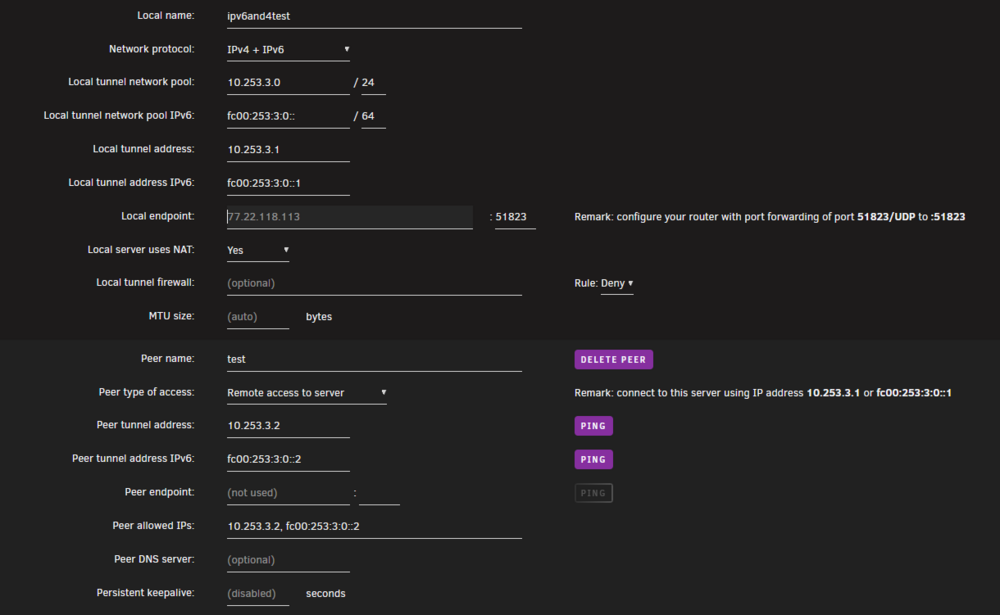
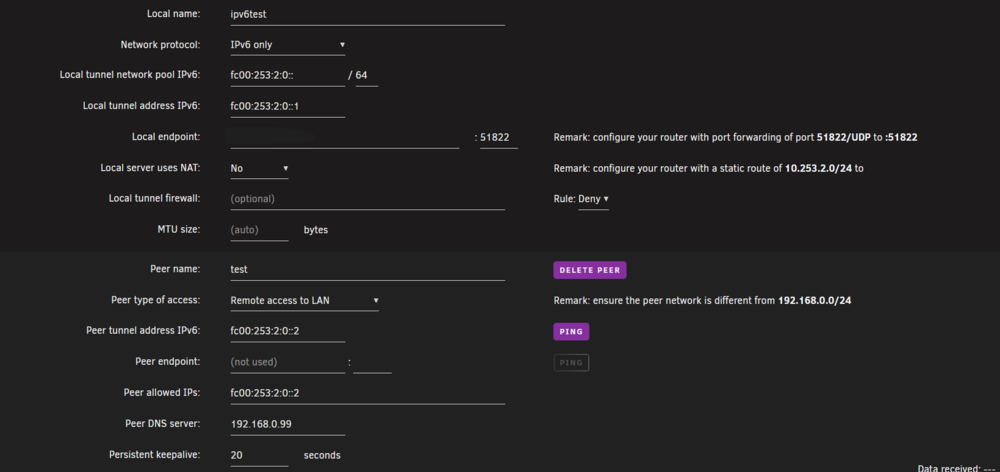
Yes, I see it as part of your report too, but I suspect it's not the final cause. In the end though, I'm no expert. Yes, I think it is something else. If I set up a tunnel where both ipv4 and ipv6 are used (screenshots attached), the tunnel can be activated, but the WAN IPv6 request to https://wanip6.unraid.net/ is still not answered. As I described at the beginning, the request can be resolved on the DNS side, but it ends in a timeout. To me it looks like the IPv6 traffic can leave Unraid, but receiving is impossible if the traffic comes from outside my local network. I have now tested again and made both my smartphone and my Raspi reachable via an ipv6 address, and I was able to ping both devices from outside my local network. So it must be my Unraid server blocking incoming IPv6 traffic, or am I on the wrong track here? That means even if the WireGuard tunnel could be switched on, it would be of no use as Unraid remains unreachable via IPv6. However, I have no idea what the problem is either. Sceenshots for wg3 where using IPv4 and IPv6: wg-quick of wg3 after enabling the tunnel: Timeout error:


-
Thank you. Yes, it seems like Unraid is trying to create an ipv4 route, but this can't work because there is no ipv4 address for an ipv6-only tunnel. However, this is only one half of the errors mentioned. I still don't understand why I can't ping my server from outside my internal network via ipv6 and that Unraid keeps throwing timeouts in the logs when trying to resolve the WAN IPv6 address. Inside my network everything seems normal my global unique address ist reachable from inside but from the outside it isn't and infact for unraid only. I run the connectivity checks via a smartphone hotspot paired to my laptop without connecting to my internal network, if that matters
-
Thanks in advance. If you need something else f.e. my routing table or network settings don't hesitate to ask.Okay, dass das Docker Image schon mal nicht voll ist, ist gut. bzw eigentlich nicht weil die Lösung einfach gewesen wäre. Schau mal im Share wo deine Nextcloud Daten liegen was unter "Minimum Free Space" eingetragen ist, eventuell ist eine Platte schon zu voll und der Wert verhindert weiteres Beschreiben. Welches Docker-Image wird für Nextcloud benutzt, AIO oder Stand-Alone?Sorry for the missunderstanding.
 Hier sieht es aber tatsächlich so aus als wäre deine Platte voll. Kannst du einmal bitte die komplette erste Zeile posten, insbesondere der Pfad ist interessant /app/www/public ... bitte da einmal komplettieren. Ansonsten mal prüfen wie voll das Docker Image ist. Dazu vllt mal unter Settings -> Docker -> Enable Docker auf off, oben rechts die Erweiterte Ansicht an danach n Screenshot von den Settings machen und mal posten. Ggf. ist das Docker Image voll gelaufen und muss vergrößtert werden. Ist aber nur eine Vermutung.




