Fozzuk
Members
-
Joined
-
Last visited
-
Hi all, I've written before on here about how incredible this container is so massive thanks to the developer. Just wanted some perspective from the community: most of my Steam games work perfectly, but others that have a 'Platinum' rating on ProtonDB and I've personally run fine on Linux (Bazzite) on bare metal don't work on Steam-Headless. None of the 'tweaks' on ProtonDB seem to have the slightest effect either. Snowrunner is my personal nemesis in this respect. Is this just the nature of running 0.2.0 software, or should I be doing more to debug? I've seen some comments above about Unraid 7.1 helping with DRM software, so if the advice is to try updating the host then more than happy to go with that. Thanks,
-
Thanks for clarifying! That’s a shame, but I completely understand and very much appreciate all the work you do on the many other apps you maintain.
-
Hi, does anyone know why MagicMirror² doesn't show up when I search in the Unraid App Store? Appreciate I can probably install from DockerHub but would prefer to go the Unraid way. Thanks
-
Hi all, I've also started facing the same error today having had Steam-headless work brilliantly for the past 6 months. . Perhaps because I've just upgraded to 6.12.13, but Steam-headless was working fine this morning with that version of Unraid. I now get the below error repeated in logs and "Failed to connect to server" in the VNC interface: 2024-08-29 10:39:24,695 WARN exited: xorg (exit status 11; not expected) 2024-08-29 10:39:24,755 INFO spawned: 'xorg' with pid 1470 2024-08-29 10:39:25,758 INFO success: xorg entered RUNNING state, process has stayed up for > than 1 seconds (startsecs) 2024-08-29 10:39:34,787 WARN exited: xorg (exit status 11; not expected) 2024-08-29 10:39:35,790 INFO spawned: 'xorg' with pid 1616 2024-08-29 10:39:36,792 INFO success: xorg entered RUNNING state, process has stayed up for > than 1 seconds (startsecs) 2024-08-29 10:39:45,819 WARN exited: xorg (exit status 11; not expected) 2024-08-29 10:39:46,823 INFO spawned: 'xorg' with pid 1755 2024-08-29 10:39:47,826 INFO success: xorg entered RUNNING state, process has stayed up for > than 1 seconds (startsecs) 2024-08-29 10:39:48,387 WARN exited: x11vnc (exit status 11; not expected) 2024-08-29 10:39:48,387 WARN exited: desktop (exit status 11; not expected) 2024-08-29 10:39:48,387 WARN exited: sunshine (exit status 11; not expected) 2024-08-29 10:39:48,389 INFO spawned: 'x11vnc' with pid 1778 2024-08-29 10:39:48,391 INFO spawned: 'desktop' with pid 1779 2024-08-29 10:39:48,392 INFO spawned: 'sunshine' with pid 1780 2024-08-29 10:39:49,400 INFO success: x11vnc entered RUNNING state, process has stayed up for > than 1 seconds (startsecs) 2024-08-29 10:39:49,401 INFO success: desktop entered RUNNING state, process has stayed up for > than 1 seconds (startsecs) 2024-08-29 10:39:49,401 INFO success: sunshine entered RUNNING state, process has stayed up for > than 1 seconds (startsecs) 2024-08-29 10:39:49,401 INFO reaped unknown pid 1792 (exit status 0) 2024-08-29 10:39:56,859 WARN exited: xorg (exit status 11; not expected) 2024-08-29 10:39:57,863 INFO spawned: 'xorg' with pid 1913 2024-08-29 10:39:58,865 INFO success: xorg entered RUNNING state, process has stayed up for > than 1 seconds (startsecs) 2024-08-29 10:40:07,897 WARN exited: xorg (exit status 11; not expected) I've tried: – rolling back to Nvidia driver v550 – Deleting and recreating the docker container (keeping the folder in Appdata) – Deleting the folder in Appdata – Updating parameters per this post - https://github.com/Steam-Headless/docker-steam-headless/issues/111#issuecomment-1939700742 EDIT: Have also tried a full roll-back to a backup of Unraid 6.12.11 that was running fine a few days ago. Still no dice. EDIT 2: Fixed! Changed "Display ID:" in the extra Docker settings from the previous value (55) to another number (50). Per this - https://www.reddit.com/r/unRAID/comments/18q355u/comment/kew2j9f/?utm_source=share&utm_medium=web3x&utm_name=web3xcss&utm_term=1&utm_content=share_button
-
Hi, apologies but I didn't share my Config file in the end as I was concerned about confidentiality. I would just do the "clean install" – it took me about 60mins and I wished I'd done it sooner given all the time I'd wasted troubleshooting inoperative logs. Just use a fresh USB stick so you always have any prior data or the option to go back to the old config.
-
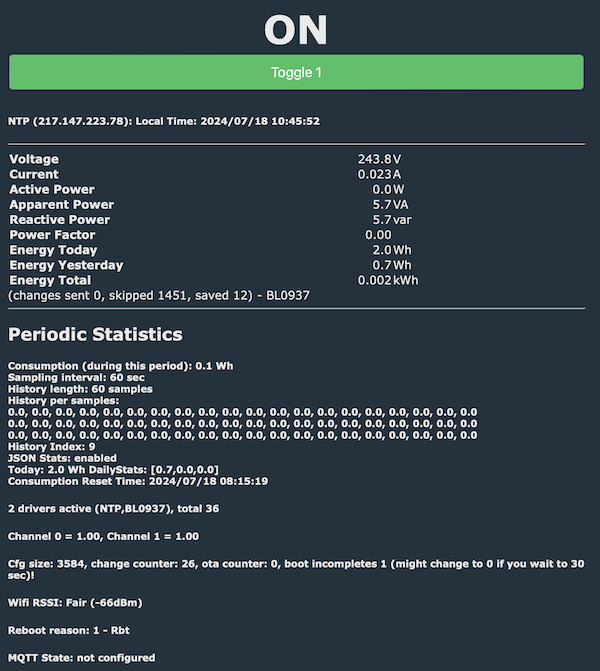
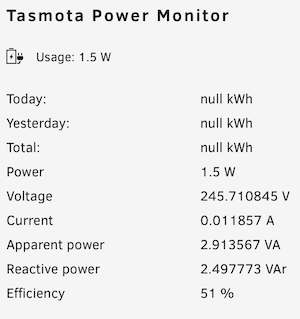
Has anyone had any luck using this plugin with a plug flashed with OpenBK? After a bit of tweaking I've managed to pull live power usage from the plug, but I can't get Unraid to pull energy history even though it's reported via the plug GUI: (the 1.5W is probably accurate - the plug is currently not supplying my server, there's just a USB thingy plugged into it) Just to clarify: I have no idea what I'm doing here. Tasmota and its forks seem to be a massive and technical black hole.
-
Thanks everyone for input. So it feels like Eypc is the solution here – I do hear the comments on Threadripper, but apart from somewhat higher clock speeds I don't see the advantage over Epyc that warrants the massive cost of entry. Aliexpress is nicely flooded with cheap, used Epyc CPUs. On the motherboard side, I think a SuperMicro H12SSL-i is where I'll go (7003 support, Gen.4 PCIe, lots of x16, etc). The Gigabyte MZ32-AR0 (Rev.3) seems slightly superior in specs but it's a bigger board and the CPU fan won't fit in my case. Edit: Forgot to mention: I wasn't aware of the new 4004 Epyc processors, but these just bring server-grade functionality that I don't care about (ECC, RAID, security, etc) and none of the stuff I do want i.e. PCIE lanes.
-
Hoping for some advice. My AM4 / X570 build is rapidly running out of PCIe slots. From looking at other consumer-level mobos, I don't think I have much scope for significant improvement on my MSI X570 Tomahawk – even AM4 boards with multiple x16 slots typically run those at x1. Do I have any options to stay with consumer-level boards (preferably AM4)? Otherwise my upgrade path seems to be a low-spec Epyc 7002 from Aliexpress (~£60) and an expensive (~£400) mobo. And probably some upgrades to ECC memory and a new power supply. I've currently got: – A PCIe 4.0 x8 GPU – A PCIe 3.0 x8 HBA – A PCIe 3.0 x8 10GbE (currently in an x1 PCIe slot) Any thoughts welcome. Thanks.
-
I still have a full backup of the old Config folder if anyone from Limetech wants to get in touch on that.
-
Update for anyone interested: Created a fresh Unraid USB stick, booted from that and logs were running nicely. Given that worked (after fixing some network settings) I didn't really transfer much from the old install – just a few folders from config/plugins (especially dockerMan). Corrected settings (inc. share settings) manually. So basically: there was no 'fix' to my missing logs but the 'clean install' was incredibly easy and took me about an hour. There's a lot of comments on this forum and reddit about every reboot being effectively a fresh install but that's demonstrably not the case here.
-
Good plan, thanks. I will try that over the weekend.
-
So I feel we're kinda out of ideas here. Since I have some free time this weekend, can anyone recommend whether a "clean install" might help? I was thinking to set up an Unraid trial on a fresh USB stick, and transfer over the bare minimum from my old config – drive assignments and docker configs. Is that possible? Thanks.
-
Thanks for the suggestion. I've just rebooted in safe mode and ls -l /var/log still shows 0 size for the syslog file. And I don't have any user scrips that trigger on boot - only a weekly rclone backup. I do have this vague memory of many years ago having a log file that got big it clogged up the USB stick and I couldn't boot, so I guess I might have broken something in the course of fixing that. But unfortunately no idea what. Edit: And I remember tinkering around with Nerdtools and not having a clue what I was doing, in case I've potentially broken something through that route.
-
root@UnraidRack:~# ls -l /var/log total 96 -rw------- 1 root root 0 Apr 3 22:35 btmp -rw-r--r-- 1 root root 0 Apr 28 2021 cron -rw-r--r-- 1 root root 0 Apr 28 2021 debug -rw-r--r-- 1 root root 500 May 22 09:44 dhcplog -rw-r--r-- 1 root root 70757 May 22 09:43 dmesg -rw-r--r-- 1 root root 8944 May 22 09:44 docker.log -rw-r--r-- 1 root root 0 Feb 13 2021 faillog -rw-r--r-- 1 root root 0 Apr 8 2000 lastlog drwxr-xr-x 4 root root 140 May 22 09:44 libvirt/ -rw-r--r-- 1 root root 0 Apr 28 2021 maillog -rw-r--r-- 1 root root 0 Apr 28 2021 messages drwxr-xr-x 2 root root 40 Aug 10 2022 nfsd/ drwxr-x--- 2 nobody root 60 May 22 09:44 nginx/ lrwxrwxrwx 1 root root 24 Apr 3 22:34 packages -> ../lib/pkgtools/packages/ drwxr-xr-x 4 root root 80 Jan 19 2023 pkgtools/ drwxr-xr-x 2 root root 340 May 22 09:44 plugins/ drwxr-xr-x 2 root root 40 May 22 10:04 pwfail/ lrwxrwxrwx 1 root root 25 Apr 3 22:36 removed_packages -> pkgtools/removed_packages/ lrwxrwxrwx 1 root root 24 Apr 3 22:36 removed_scripts -> pkgtools/removed_scripts/ drwxr-xr-x 2 root root 40 Jan 30 2023 sa/ drwxr-xr-x 3 root root 320 May 22 09:44 samba/ lrwxrwxrwx 1 root root 23 Apr 3 22:34 scripts -> ../lib/pkgtools/scripts/ -rw-r--r-- 1 root root 0 Apr 28 2021 secure lrwxrwxrwx 1 root root 21 Apr 3 22:34 setup -> ../lib/pkgtools/setup/ -rw-r--r-- 1 root root 0 Apr 28 2021 spooler drwxr-xr-x 3 root root 60 Sep 27 2022 swtpm/ -rw-r--r-- 1 root root 0 Apr 28 2021 syslog -rw-r--r-- 1 root root 0 May 22 09:43 vfio-pci -rw-r--r-- 1 root root 0 May 22 09:43 vfio-pci-errors -rw-rw-r-- 1 root utmp 6912 May 22 09:44 wtmp root@UnraidRack:~# Thanks
-
Hi, I've had a long term issue where my system logs are always blank / empty. i.e – Tools > System Log shows nothing – /boot/logs contains only diagnostic files I did enable the Unraid syslog server this morning, and pointed Unraid to log to its own IP, but no log files have been created in the share. I haven't sought to fix this in the past because Unraid has been very stable, and always assumed a future update would fix it. But I'm now having few random lock-ups and would like to understand why. Thanks. unraidrack-diagnostics-20240522-1005.zip