ChristophD
Members
-
Joined
-
Last visited
Everything posted by ChristophD
-
Hallo Helmi, bist du bei den Thema weitergekommen?
-
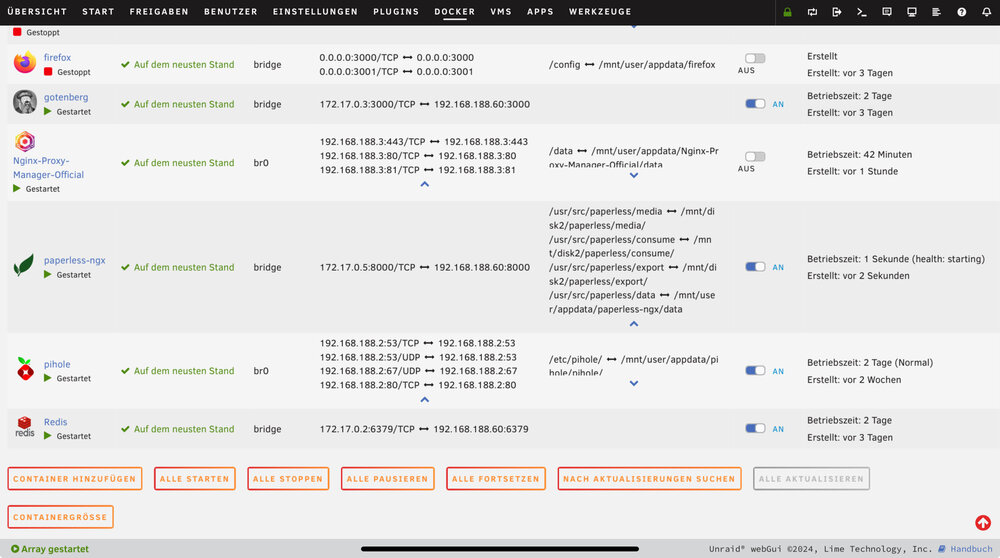
Enable bridging ist auf yes. Paperless ist bei mir nicht auf br0 sondern auf Bridge. Hier die genau konfigurieron
-
Hallo Archonw, Das habe ich schon probiert leider kann ich paperless nach wie vor nicht erreichen über die Domain.
-
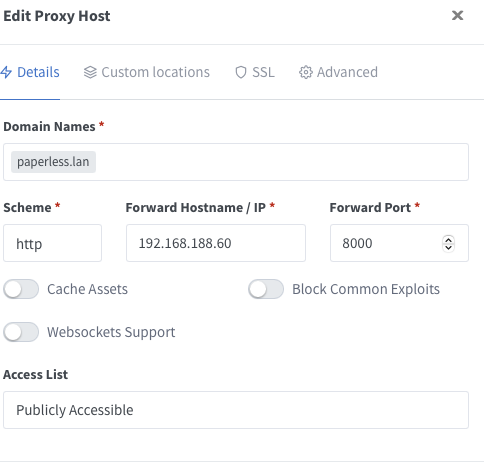
Hallo zusammen, ich bin neu im Thema Unraid und experimentiere gerade etwas, jetzt habe ich gerade ein Herausforderung. Ich würde gerne Paperless nicht über die IP aufrufen sondern über eine lokale Domain. Ich habe mir Nginx und Pihole installiert und konfiguriert. Wenn ich jetzt paperless.lan im Browser auf rufe komme ich nicht zu Paperless wie gewollt sondern es öffnet sich die google suche. Nginx Konfiguration Das ist der DNS-Eintrag in Pihole: Die Domain konfiguriert in Nginx zur Paperless Mir fehlt gerade die Fantasie warum es nicht läuft. Schon mal vielen Dank für die Hilfe