





ChristianL
Members
-
Joined
-
Last visited
Everything posted by ChristianL
-
Habt ihr die weitere Unterhaltung geschoben ? Im Titel stand: kleines Linux. Das wuerde (sorry, keine Umlaute auf meinem Keyboard) mein Weg sein: kleines Linux aufsetzen, gerne ueber WOL oder Smartsteckdose zum Einschalten. rsync um die Daten vom unRAID zu ziehen. Dann 3x"sync" um den Schreibbuffer zu leeren und einmal "shutdown -h now". HA dann kann mit viel Sicherheit die Smartdose ausschalten z.B. weil die MAC Adresse vom Mini-Linux system nicht mehr online ist. Ist dann nicht abhaengig von der Zeit fuer das Backup und das Risko den Strom vorschnell zu sperren.
-
I read that I can only ask once a year for a recover of a license key in case needed. I just started my unRAID career and have not yet experience on the lifespan of the USB stick I use (KIOXA, a.k.a. Toshiba, USB 2.0). But wonder what happen if I had very bad luck hit me and I would have multiple times need for refresh ? Since the license is bound to the S/N of the USB stick a simple backup is not really helping. If only one refresh will be given how could I access my data without USB-stick based license ? (please move is this not the appropriate section of the forum)
-
I'm happy I bought the Pro license proactive before the change; but activated later. As I was not sure which way I would go took that little risk. Eventually I know that software development/maintenance cost money and pay a bit is ok for me. Even after the change I would consider the license as not too expensive for a one-time-payment. Burned by the free ESXi debacle or CentOS death by RH. I understood that I didn't bought Lime with my license but hope it keep them motivated to continue working on their product for years to come.
-
yeah, ESXi is dead, RIP. Had my ZFS under ESXi/freeBSD running on it with a passthrough LSI HBA. Worked well over the years. I moved for my virtualization stuff to xcp-ng but decided to have a dedicate NAS box running unRAID; same as for my router. Moved from ESXi/pfSense to Ubiquiti. Somehow router and NAS are more "critical" for the infrastructure and downtimes of one should not impact other services. Ok; we are talking homelab-style of setup; nothing business-critical. But family is unhappy if Youtube or Discord is not working while I play with VMs. And for my NAS I wanted to remove one layer of complexity/dependency; hence dedicated physical box.
-
I don't mind having ZFS as option in unRAID. Was running ZFS for years under ESXi / freeBSD without issues. Like earlier mentioned I will also use ZFS in unRAID e.g. for easier to be compressed files or when snapshots give me additional security for important files beyond regular backup.
-
But a (un)RAID is not a backup ? Isn't it ? You could still delete a file and it's gone from parity too. If you really mean an independent backup I would, in an easy case, use rsync to transfer files over to the other disc. This way you might even have a different filesystem which then could be read on Windows (as you mentioned). I used rsync actually to copy my files from my old ESXi/freeBSD ZFS NAS over to my new unRAID server. Worked very well. Now I'm looking for how to make a little DVD/BD burner system for a more long-term archival. Not yet 100% sure how but likely a xcp-ng based linux VM connected via the 10GbE to pull data from unRAID and burn. But that might not work for your 12TB discs
-
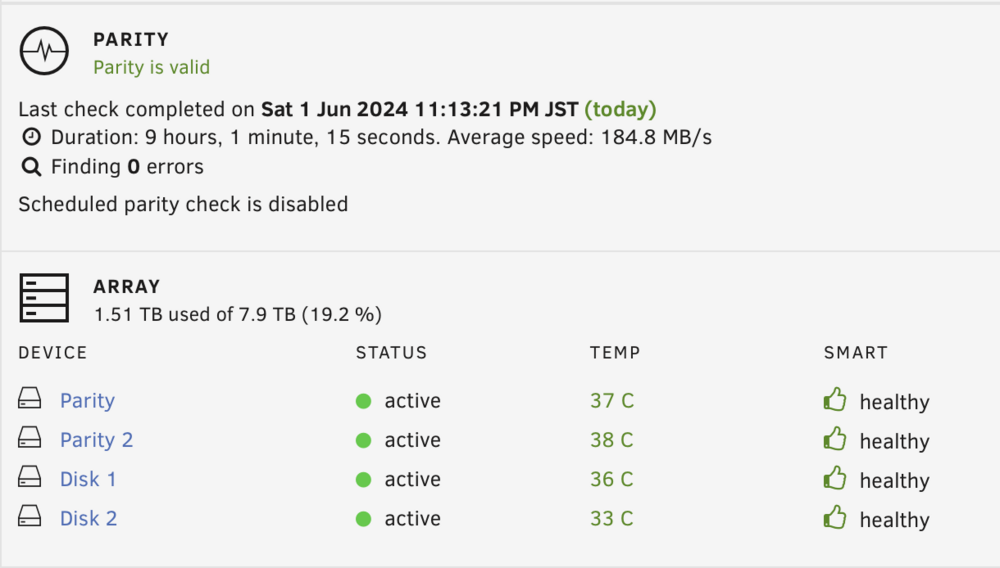
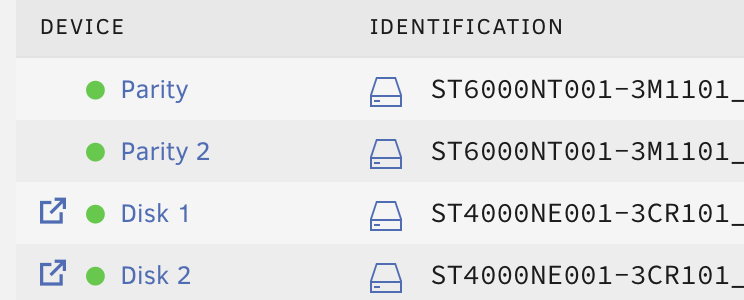
Just to close the loop: Parity rebuild on both devices finished in the expected 9 hours; temps of the HBA remain at 53C as per storcli64. There is a 12cm fan above pushing quite some air over the cooling fins. Devices in the sequence as desired in the assignment list. Rebooted twice to see and array is up. I guess now I can add few more spinner.
-
Thanks @itimpi and @Kilrah, and yes, I moved the drive assignment of one data drive inside the unRAID list. Understood that the physical connection is not relevant for unRAID as the S/N of the drive is more important (I like that concept quite a bit). When I freshly build the server I first inserted only one data disk and placed it in slot 11. My beginner mind thought that this disk would not be added to the array and remain a single drive for initial data transfer. Until I understood unRAID is not a RAID and I just added the parity drives and other data drive and build the current array. Parity 1 and 2, and data disk 1 remained in their slots at the begin of the list. Now I had that huge list in the drive list which looked ugly and long-term confusing. And since I',m still learning I thought: heck, move the drive and see what happen (after reading some postings pointing to the "New config" tool and special situation with parity 2 drive setups. And the fact that parity 2 is position-sensitve of drives in the list. (My next mistake was that the first data disk I entered I formatted in ZFS while the second drive is XFS; but I guess I will not touch this for now as it technically not much matter).
-
Hello all, newbee here with unRAID. I have an AMD NAS setup. Right now only fours discs; 2x4T and 2x6T for parity. I'm not counting the system yet a production and have my important data still off that system. Today I put a HBA 9311 8i in and changed the cables from motherboard SATA to the HBA. Worked smooth; array started with valid parity. Then I had a cosmetic thing to fix as one of the 4T discs was positioned in a slot far away from the other tree discs so I decided I want to move the disk to reflect the position in the cage same as slots in unRAID. I used the "New Config" tool but for whatever reason the Parity 1 and Parity 2 now get rebuild at the same time. Is that a problem or will the parity overall still be consistent after those 7 hours even when P1 and P2 are written at same time.



